
Neowin first highlighted the unusually long feature list, while Microsoft’s Release Preview notes confirm the build numbers, KB identifier, and channel scope. This is a pre-release update for Windows Insiders, not an update that ordinary Windows 11 24H2 or 25H2 installations should expect through the normal August security patch.
The taskbar change will draw the headlines, but the most consequential item for IT departments may be elsewhere: Windows Management Instrumentation Command-line, or WMIC, is now unavailable as an optional Windows feature and absent from new Windows 11 24H2 and 25H2 installations. Organizations with legacy scripts that still call wmic.exe need to find them before a clean deployment turns a neglected dependency into an avoidable support incident.
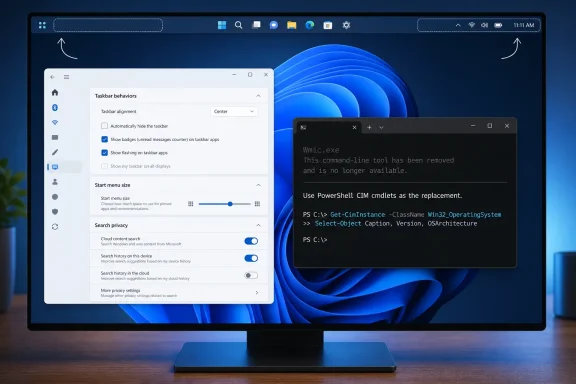 Taskbar relocation returns, with two important limits
Microsoft’s new Taskbar position setting is under Settings > Personalization > Taskbar > Taskbar behaviors. It allows the bar to move to the bottom, top, left, or right. Tooltips, flyouts, animations, and most existing customization choices—including the option to never combine taskbar buttons—are intended to work in every location.
There are limits that matter on multi-monitor workstations and compact devices. Microsoft says the Search box and the new Small taskbar mode work only when the bar is positioned at the top or bottom. A user moving the taskbar vertically to the left or right should therefore expect a different Search presentation and cannot combine the vertical arrangement with the smaller taskbar option.
The Small taskbar setting reduces both icon size and taskbar height. It is plainly aimed at small screens, but it may also interest administrators supporting shared or space-constrained devices where the usable vertical area is at a premium. Microsoft has not published any policy setting for centrally enforcing taskbar position or taskbar size in KB5120998’s notes, so enterprises should not assume these new personalisation controls are manageable through Intune or Group Policy simply because they now appear in Settings.
This is also a reversal worth stating clearly. Windows 11 launched without the Windows 10-era option to move the taskbar to screen edges other than the bottom, and third-party workarounds filled that gap for years. Microsoft is bringing the function back as a supported shell feature rather than asking users to modify unsupported registry values or replace shell components. Yet it returns in a narrower form: taskbar behavior is expected to follow the new placement, but the two most visible density controls still favor horizontal layouts.
Start and Search receive controls Microsoft previously scattered or omitted
KB5120998 adds three Start menu size choices: Small, Large, and Automatic, with Automatic remaining the default. It also gives users separate switches to show or hide Pinned, Recent, and All in the Start menu. The existing Recommended label becomes Recent, a small wording change that more accurately describes the area’s mix of recently used apps and files without changing its basic role.
Users can also hide their account name and profile picture in Start. That is primarily a privacy and presentation setting, useful on classroom devices, shared workstations, or screens used for demonstrations. It does not remove the signed-in account from Windows, and it should not be confused with an account-security control.
The Search changes offer a more substantive choice. Microsoft says results will identify their origin more clearly—whether the target is an installed app, a Settings page, a local file, a web result, or a Microsoft Store suggestion. A new setting under Privacy & security > Search determines whether web and Store suggestions appear alongside local results.
For users who want the Windows Search interface to prioritize the PC in front of them, that setting is more meaningful than the visual cleanup Microsoft also describes. It should reduce the ambiguity between a local match and a result that hands the query to Microsoft’s web services or Store. The update additionally adds automatic indexing for folders Windows identifies as frequently used, controlled by a separate “Automatically find additional relevant locations” setting.
That automatic indexing deserves a measured deployment approach in managed environments. Faster discovery of active folders can help users, especially on workstations where documents are stored outside conventional libraries. But it also expands the locations Windows considers for indexing, which can affect storage activity, search expectations, and support troubleshooting. Microsoft’s notes do not specify the criteria Windows uses to designate a folder as “most used,” nor do they describe any enterprise policy governing that decision.
The Release Preview label is more important than the feature count
Microsoft divides KB5120998 into gradual rollout and normal rollout. The long list of interface changes, performance improvements, administrator protection, ML-KEM support, and WMIC removal appears under the gradual category. That means installing build 26100.9267 or 26200.9267 does not guarantee that every feature switch is enabled on that PC on day one.
This distinction is easy to miss because the KB number and build number are concrete while the feature delivery is conditional. Release Preview is often the last Insider stop before broader distribution, but it is still an Insider channel. Microsoft says availability varies by device and market, and the notes do not provide a percentage rollout, a timetable for completing it, or a commitment that all elements will ship unchanged in a future public cumulative update.
There is evidence that Microsoft is continuing to use the same servicing approach across the two Windows releases. Microsoft’s earlier 25H2 Release Preview announcement established that Windows 11 24H2 and 25H2 share a servicing branch and receive the same continuous-innovation features. KB5120998 bears that out: the paired builds end in the same .9267 revision and carry the same feature list.
For administrators, that makes this release more useful as a validation target than as a reason to split test plans by version. Test the application estate and management policies against both build trains if both are deployed, but expect the underlying feature payload to be closely aligned. The more immediate lifecycle issue is that Windows 11 24H2 Home and Pro reaches the end of updates on October 13, 2026, while 24H2 Enterprise and Education remain supported through October 12, 2027. A shared feature branch does not equal shared support dates.
Windows Central’s coverage of the August 11 security update underscores another point: Microsoft is already delivering a separate set of August changes through the mainstream servicing track. Readers should not conflate that public security release with KB5120998. The new taskbar positioning, Start sizing, and Search-source controls are documented in the August 14 Release Preview build, where Microsoft has explicitly marked them as gradually rolling out.
WMIC is gone; WMI is not
The clearest deployment action in KB5120998 is the retirement of the Windows Management Instrumentation Command-line utility. Microsoft says that, starting this month, Windows 11 24H2 and 25H2 no longer include WMIC, that it was already absent by default on new installations, and that it can no longer be installed as a Feature on Demand.
The company is careful to distinguish WMIC from Windows Management Instrumentation itself. WMI remains supported. What disappears is the old command-line wrapper, so scripts, runbooks, installers, inventory tools, and help-desk procedures built around commands such as wmic bios, wmic diskdrive, or wmic product are the exposure point.
The practical replacement is generally PowerShell’s CIM cmdlets, such as Get-CimInstance, rather than an attempt to restore WMIC through an optional component that no longer exists. This is not merely housekeeping: a clean Windows deployment is where the failure will occur, while an in-place-upgraded device may obscure the dependency until it is rebuilt or replaced.
Microsoft had signaled WMIC’s removal when it introduced Windows 11 25H2 to Release Preview in August 2025, so this is not a surprise policy change. KB5120998 turns the long-running deprecation into a deployment reality for the current Windows 11 servicing pair. Administrators should search endpoint-management scripts, login scripts, packaging logic, and vendor-provided diagnostics now—not wait for a new device image to reveal the problem during rollout.
Security and reliability changes are real, but still incomplete as a change record
The update says the post-quantum cryptography algorithm ML-KEM can now operate as a standalone TLS key-exchange algorithm, alongside hybrid groups previously added by Microsoft. That expands the cryptographic capability available to software and services that are built to negotiate it; it does not mean existing applications automatically become post-quantum protected merely by installing the build.
Administrator protection is also beginning to roll out. Microsoft describes it as a mechanism for just-in-time administrative tasks using profile separation, intended to harden systems against elevation-of-privilege attacks. The company expressly says it is not a formal security boundary, and it is off by default. It can be enabled through an Intune OMA-URI or Group Policy, making it a feature security teams should evaluate in a lab rather than silently treat as an enabled mitigation.
The remainder of the list is mostly reliability work: better recovery from VPN-related background processes that stop responding, improved Japanese IME stability, preserved brightness settings after Energy Saver turns off, a sleep-state fix after Windows Update restarts, and a more responsive File Explorer Home page. Microsoft’s normal-rollout section provides no specific bug identifiers or known-issue list, only a statement that additional quality improvements are included.
That lack of detail is not evidence of trouble, but it limits the value of treating KB5120998 as a production-ready fix bundle. For Release Preview participants, the sensible test is focused: taskbar placement on multiple displays, Start policies and layout expectations, Search behavior in indexed folders, VPN resilience, and any management or software package that invokes WMIC. The first broad consequence of this build is likely to be visible not in the redesigned taskbar, but on the next clean Windows 11 deployment that still depends on a command Microsoft has now removed for good.
