
For administrators, the immediate task is to decide which package belongs in a representative Release Preview validation ring. These are non-security preview updates, not the August security releases, and Microsoft says their new capabilities arrive through a gradual rollout. Installing either KB verifies the underlying update, but it does not guarantee that every listed user-facing feature will appear on every test machine at once.
The most operationally important change in the 24H2/25H2 release is not a taskbar option or a Start menu refresh. Microsoft says the Windows Management Instrumentation Command-line utility, wmic.exe, is no longer included in those versions from August 2026 and is no longer available as a Feature on Demand. WMIC is gone; WMI itself is not. That distinction will matter to organizations whose deployment scripts, inventory jobs, break-glass procedures, or third-party management tools still launch wmic.
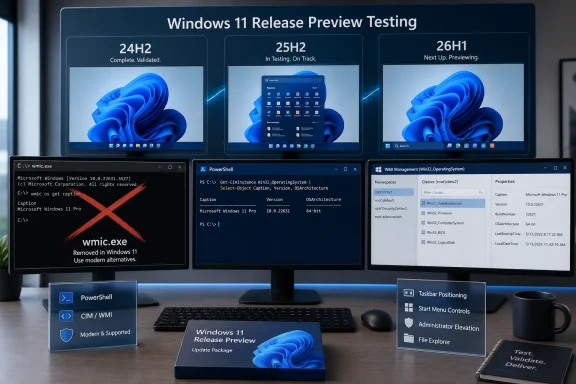 KB5120998 puts 24H2 and 25H2 on the same feature test
Microsoft is distributing KB5120998 to both supported mainstream Windows 11 branches: 24H2 receives build 26100.9267 and 25H2 receives build 26200.9267. The shared package and matching revision number show that Microsoft is validating the same servicing payload across the two releases rather than reserving these changes for 25H2 alone.
The visible changes are extensive. Testers may get taskbar placement controls that allow the bar at the top, left, or right of the display as well as at the conventional bottom; Microsoft notes that the search box and smaller taskbar option remain limited to top and bottom placement. Start gains small, large, and automatic sizing, calls its Recommended area “Recent,” and adds controls to hide the account name and photo or independently show and hide Pinned, Recent, and All content.
Windows Search receives a new switch for web and Microsoft Store suggestions, clearer result-source labels, a simpler search home, and automatic indexing for frequently used folders. File Explorer Home is intended to launch faster, its Recommended carousel gains touch scrolling, and Windows is replacing older-looking activity spinners with updated progress indicators during startup, sign-in, restarts, shutdowns, and update installation.
These are features worth testing, but Microsoft’s own release notes caution that availability varies by device and market. The notes separately categorize feature delivery as gradual and “normal rollout,” which is Microsoft’s broad distribution phase. In practical terms, a successful installation validates compatibility with KB5120998; it does not prove that every controlled feature has reached the device or that an organization’s entire fleet will receive it on the same day.
That is especially relevant for policy testing. A 24H2 or 25H2 pilot should cover taskbar positioning with multi-monitor configurations, Start layout policies, Search privacy settings, and File Explorer’s handling of recently used content. Those areas can be affected by existing configuration profiles, shell customizations, profile-management products, and endpoint security tooling even where the update itself installs cleanly.
WMIC removal turns a preview build into a compatibility deadline
Microsoft’s KB5120998 notes state that Windows 11 24H2 and 25H2 no longer include the WMIC utility as of August 2026. The company is explicit that the underlying Windows Management Instrumentation platform remains supported. The break comes at the command-line executable layer: commands such as wmic bios get serialnumber, wmic product get name, and legacy wmic process calls will fail if a script expects the retired binary to exist.
This removal deserves attention because WMIC often survives long after an organization has adopted PowerShell elsewhere. It appears in old logon scripts, packaging detection rules, manufacturing checks, asset-collection jobs, vendor support runbooks, and software that invokes it indirectly. A clean Windows image can expose a dependency that a long-lived device did not, especially now that Microsoft says administrators cannot simply re-add WMIC through Features on Demand.
Microsoft has previously described administrator protection as a defense against free-floating administrator rights, and that feature also begins rolling out in KB5120998. The two items do not depend on one another, but together they make this a meaningful test release for operational scripts: one removes a legacy command-line interface, while the other changes how administrative work can be elevated on devices where the feature is deliberately enabled.
Administrators should use the Release Preview ring to find WMIC dependencies before this build moves further through servicing:
- Search endpoint-management packages, repositories, scheduled tasks, logon scripts, and monitoring rules for
wmic,wmic.exe, and command strings that call it indirectly. - Test the supported PowerShell CIM cmdlets or other maintained management interfaces as replacements in the precise remote-management and permissions contexts where WMIC was used.
- Keep WMI queries and the retired WMIC executable separate in incident documentation, because a WMI service issue and a missing
wmic.exebinary are different failures. - Validate security-agent, inventory-agent, and OEM support tooling on a clean 24H2 or 25H2 Release Preview installation, not only on machines upgraded across several Windows versions.
Microsoft’s release note gives no compatibility exception, migration tool, or reinstallation path for the command-line utility. That makes an inventory exercise more useful than waiting for an end-user helpdesk incident.
Administrator protection is arriving, but it remains an opt-in test
KB5120998 also starts the rollout of Administrator protection, a Windows 11 security feature Microsoft first disclosed in an October 2025 update. Microsoft says it is off by default and can be enabled through Group Policy or Microsoft Intune using OMA-URI policy. Its purpose is to keep administrators in a deprivileged state until a task requires elevation, with a separate protected context for the administrative action.
Microsoft’s documentation is careful not to call Administrator protection a formal security boundary. That is an important limitation for security teams: it is a hardening mechanism, not a substitute for patching, least-privilege account design, credential safeguards, application control, or separation of privileged workstations.
Still, this Release Preview flight gives IT teams a practical chance to test the real friction point: elevation workflows. Microsoft’s configuration guidance identifies policies for the administrator approval mode and the behavior of elevation prompts, and it says the feature can use Windows Hello-integrated verification. Before enabling it broadly, validate software installers, remote support tools, developer workflows, local administrator procedures, and emergency recovery processes. An elevation control that works in a lab but blocks a standard repair path at 2 a.m. will not be regarded as a security improvement by the person handling the outage.
The same 24H2/25H2 package also enables standalone ML-KEM use for TLS key exchange, following earlier hybrid-group support. That is a forward-looking cryptography change, but Microsoft’s notes do not identify which Windows applications, TLS stacks, or enterprise products will select the new option automatically. It belongs in interoperability testing rather than in a change-control claim that a fleet has suddenly become post-quantum-ready.
Build 28000.2796 is for 26H1 hardware, not existing PCs
The other Release Preview package, KB5120996, takes Windows 11 26H1 to build 28000.2796. Its feature list is different: File Explorer gets correctly scaled file-size units in Details view, middle-click folder opening in new tabs, thumbnail improvements, and Home-page fixes. Search receives better handling for misspelled or partial app names, while Voice access gains Korean support and noise-filtering modes, including Voice Isolation.
Windows Hello Enhanced Sign-in Security gains support for compatible external fingerprint readers, which Microsoft says extends the option beyond devices with built-in fingerprint sensors. The update also includes new precision-touchpad controls, accent-colored Widgets notification badges, power-setting reliability fixes, IPPS printing performance work, DHCP renewal improvements, and better clipboard reliability in some Remote Desktop and Azure Virtual Desktop scenarios.
The critical constraint is that 26H1 is not an upgrade path for existing 24H2 or 25H2 PCs. Microsoft’s Windows release-information documentation says 26H1 is a hardware-optimized release for new devices that entered the market in early 2026. It is not offered as an in-place feature update from 24H2 or 25H2. Microsoft’s release-health guidance likewise continues to identify 24H2 and 25H2 as the recommended enterprise deployments for established Windows 11 estates.
So an IT department should not read the 26H1 notes as a menu of features it can obtain by moving its current fleet to a newer Windows version. The correct pilot population is newly acquired 26H1 hardware, particularly devices with external biometric peripherals, touchpads, IPPS printers, Remote Desktop or AVD usage, and Voice access requirements.
The missing bug list limits what can be certified
Both Microsoft Learn release notes say that the updates include additional quality improvements, but neither supplies a granular list of fixed defects under the normal-rollout section. Neither note publishes a known-issues section for these specific Release Preview builds. That leaves administrators without the usual one-to-one mapping between a reported production problem and a documented fix in the preview candidate.
Release Preview remains Microsoft’s recommended channel for organizations validating upcoming Windows releases and quality updates, with the company suggesting a diverse one-percent device pilot. That recommendation fits these packages: use the ring to test actual line-of-business software, hardware models, policy baselines, and management paths rather than treating the builds as a general desktop personalization preview.
Windows 11 24H2 Home and Pro editions reach end of servicing on October 13, 2026, according to Microsoft’s release information. With less than two months before that date, KB5120998 is a useful final-stage test for organizations remaining on 24H2 while preparing 25H2 deployment. The deadline is no longer the taskbar’s new location controls; it is whether old automation still assumes wmic.exe exists when this servicing work reaches production.
