
The feature is planned for Plasma 6.8, currently scheduled for public release on October 14, 2026. The release plan includes two beta builds, with the first expected on September 10 and the second on September 24. As with any pre-release schedule, dates and feature scope can move before the final package reaches distributions, but the direction is clear: KDE is treating remote access as a first-class desktop workflow rather than an afterthought.
Automatic RDP session locking is only one element of the coming update. Plasma 6.8 is also set to improve multi-monitor task shortcuts, remember each user’s preferred login session, introduce a more capable display-management command-line tool, accelerate Flatpak icon loading in Discover, and make language selection in Plasma Setup easier to search. Meanwhile, maintenance releases for Plasma 6.7 and Plasma 6.6 are addressing crashes and regressions involving KWin, NVIDIA hardware, login-screen monitor handling, browser video, peripherals, and widgets.
For Windows users who regularly connect to Linux systems over RDP, the headline change is particularly notable. It brings Plasma closer to the expectations set by mainstream enterprise remote-access environments: when the remote user leaves, the desktop should not remain openly exposed.
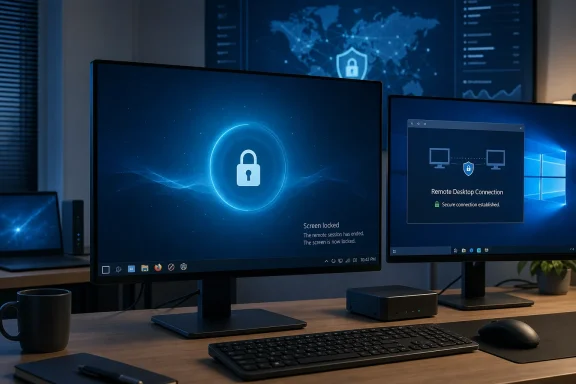 Why Automatic RDP Locking Matters
Remote desktop convenience can easily create local security problems. A user may connect from a different room, from home, or while traveling; complete their work; and close the RDP client without considering what the machine at the other end is doing. If the host desktop remains unlocked, anyone with physical access can potentially use that active session.
That is the situation Plasma 6.8 is designed to address. The new behavior is presented as a configurable option in Plasma’s built-in remote desktop server rather than an unavoidable policy. When enabled, Plasma will lock the session after the last connected RDP client disconnects.
The “last connected” detail is important. Modern remote workflows are not always a one-client, one-session arrangement. A user might connect to the same desktop from a primary PC and a tablet, or an administrator could be monitoring a session while another user is still actively connected. Locking immediately when any single connection closes would be disruptive; locking only when no RDP clients remain is the more sensible approach.
A Small Change With Real Security Value
The practical benefit is straightforward:
- A remote user disconnects intentionally and the desktop locks.
- A laptop loses network connectivity and the RDP connection drops; the desktop locks.
- A user closes the RDP application instead of manually locking first; the desktop locks.
- Someone returns to the physical PC after the remote session ends and must authenticate before using it.
This does not replace a comprehensive endpoint-security strategy. It cannot protect against every scenario involving a compromised account, an already authenticated local user, insecure network exposure, weak credentials, or flawed remote-access policies. But it reduces the likelihood of one common and avoidable mistake: leaving the host session unlocked because the remote client has gone away.
For organizations that permit remote administration, shared office systems, lab machines, home servers with a monitor attached, and hybrid workers who access a Linux desktop from Windows, the feature adds a valuable layer of session hygiene. It makes the safe behavior automatic instead of depending entirely on memory and discipline.
Particularly Relevant to Windows RDP Users
RDP remains one of the most familiar remote-access technologies in Windows environments. It is deeply embedded in Windows administration, used widely by businesses, and supported by a large ecosystem of clients. KDE’s work on a built-in RDP server makes Plasma more approachable for users moving between Windows and Linux systems because it supports a workflow that already feels natural on a Windows PC.
That familiarity should not be confused with identical behavior or full interoperability in every possible enterprise scenario. RDP implementations differ in authentication integration, policy controls, session handling, smart-card support, gateway compatibility, and security configuration. Still, Plasma’s focus on better RDP session lifecycle management is significant because it addresses a basic expectation of professional remote desktop use.
The important shift is philosophical as much as technical: a remote session is not merely a screen-sharing event. It is an authenticated desktop session with real local consequences.
How the New Plasma RDP Locking Option Should Be Understood
The feature will apply specifically to Plasma’s built-in remote desktop server. It should not be assumed to automatically affect every third-party remote access tool, every VNC configuration, or a separately installed RDP server running outside Plasma’s own remote desktop stack.
That distinction matters for Linux users because remote access can be assembled in many different ways. A system may use Plasma’s native tools, a standalone service, a VNC server, SSH with graphical forwarding, a commercial remote-support application, or a custom setup. Automatic lock-on-disconnect is valuable, but administrators will need to confirm which component is actually accepting incoming connections.
Configurable Security Is Better Than a Blind Default
Making the behavior optional is a sensible design choice. In most personal and professional scenarios, automatically locking after the final RDP client disconnects is the safer setting. However, some specialized workflows may rely on an active local session remaining visible after remote administration ends.
Examples could include:
- A technician remotely starting a local demonstration.
- A home media or kiosk system with an intentionally accessible desktop.
- A supervised workstation where a local user is expected to take over immediately.
- A testing environment where repeated unlock operations would interrupt automation.
Even in those cases, leaving a session unlocked should be a deliberate risk decision—not the accidental consequence of closing an RDP window. Plasma 6.8 appears to strike a workable balance by exposing the control to the person administering the machine.
Locking Is Not the Same as Logging Out
The new behavior locks the desktop session; it does not imply that applications are closed or that the user is logged out. This is generally the right outcome. Running applications, files, development environments, long-lived tasks, and background processes can continue while the screen is protected by the lock screen.
That distinction is especially useful for remote workers. A user can disconnect from an RDP client, preserve the state of their work, and return later without reopening every application. At the same time, an in-person user cannot simply sit down at the host PC and resume the session without authentication.
In a well-designed desktop environment, that is the expected compromise between usability and protection.
Plasma Login Manager Will Remember Per-User Sessions
Another planned Plasma 6.8 improvement targets a different but familiar source of friction: systems that offer more than one desktop environment or session type. Plasma Login Manager will remember the last session selected by each individual account.
For users with a single operating system and one desktop environment, this may sound minor. On multi-user Linux PCs, developer workstations, test systems, or devices that expose options such as Plasma on Wayland, Plasma on X11, a fallback session, or an alternate desktop shell, it can eliminate needless repetition at every login.
Why Per-User Memory Is the Correct Model
A shared computer should not assume all users prefer the same session. One user may rely on a particular desktop for accessibility tooling or workflow consistency, while another may use a different session type for compatibility or testing. A globally remembered option can create confusion, especially when the selection changes based on whichever person logged in last.
Per-account session memory is a cleaner model because it recognizes that the desktop is personal. Each user gets their preferred starting point without having to repeatedly open the session menu at the login screen.
It also reduces avoidable support issues. On a Linux machine that presents multiple options, users sometimes select the wrong environment, then assume their files, settings, or applications have disappeared. Remembering the previous session does not eliminate all confusion, but it makes the ordinary login path more predictable.
Wayland, X11, and Transitional Complexity
The feature is also useful during the industry’s ongoing shift from X11 toward Wayland. Different users may have different reasons for choosing a session type. Wayland is the modern display-server direction and is central to current Linux desktop development, while X11 may remain relevant for certain software, graphics drivers, workflows, or legacy behavior.
Plasma 6.8 will not end that transition. What it can do is reduce the friction of managing it on systems where users still need a choice. Remembering the previous selection means the login manager becomes less of a recurring decision point and more of a stable handoff into the user’s normal workspace.
Kscreenctl Signals a More Serious Approach to Display Management
Plasma 6.8 is also expected to introduce kscreenctl, a new command-line utility intended as the future replacement for kscreen-doctor. KDE describes the new tool as offering more functionality, greater robustness, and a more conventional command syntax.
That may sound like an obscure addition, but display configuration is one of the Linux desktop’s most persistently complicated areas. Multi-monitor setups frequently involve different resolutions, refresh rates, scaling levels, docking states, display rotations, virtual outputs, GPUs, and connection types. When the graphical interface is unavailable—or when an administrator needs repeatable automation—a reliable command-line tool becomes essential.
Why Command-Line Display Tools Still Matter
A graphical monitor settings panel is the right place for most users to arrange screens. It is visual, discoverable, and easy to adjust. But advanced use cases need scripting and remote management.
A command-line display tool can help administrators and technically experienced users:
- Query connected display outputs.
- Inspect monitor state and available modes.
- Apply a known layout after docking.
- Automate changes in login scripts or deployment tools.
- Troubleshoot displays when the graphical session is unreliable.
- Prepare configurations for remote or virtual display environments.
The planned move away from kscreen-doctor should not be viewed as a sudden disruption for normal desktop users. It is primarily an investment in the underlying manageability of Plasma display configuration. The key question will be how KDE handles compatibility, documentation, packaging, and migration for scripts that depend on existing command behavior.
The Risk of Tool Transitions
Replacing a command-line tool always introduces some risk. Existing scripts can break if commands, output formats, or assumptions change. Documentation written for the older tool may become outdated, and administrators may need to maintain separate logic while distributions transition between Plasma versions.
KDE’s stated goals—more features, stronger reliability, and more conventional syntax—are encouraging. However, the ultimate value of kscreenctl will depend on clear help output, stable interfaces, predictable error handling, and a careful migration path. Those details matter more than the tool’s name.
Multi-Monitor Shortcuts Become More Logical
Plasma’s existing Meta + number shortcuts are also getting a practical refinement in multi-display setups. These shortcuts can be used to activate tasks from a panel, but the current behavior may direct commands toward the panel on the primary monitor even when the user is working on another display.
Plasma 6.8 is set to change that. The shortcuts will target the panel on the actively used screen, aligning their behavior with the user’s current focus rather than a static primary-monitor rule.
A Better Match for Real Desktop Layouts
For a single-display PC, the change will be invisible. For users with two, three, or more monitors, it is a welcome correction. The primary monitor is often not the screen where active work is happening.
Consider a desktop where communication tools live on one side display, a browser and documents sit on a center monitor, and development tools occupy a third screen. If the pointer or active window is on the right-hand screen, a task shortcut should logically act on that screen’s panel. Having it jump to an application from the primary display breaks the user’s spatial model.
This is a quality-of-life improvement rather than a headline feature, but such refinements accumulate. A desktop feels polished when shortcuts honor context instead of forcing users to remember hidden exceptions.
Discover and Plasma Setup Receive Focused Usability Work
KDE’s Discover software center is also scheduled for a series of refinements. Its transaction-progress view will organize entries into clearer groups, placing actively running work at the top while completed operations are separated below.
That should make updates and installations easier to read at a glance. Software-management interfaces often become cluttered when several packages are downloading, installing, waiting, or finished. Grouping active and completed operations can reduce visual noise and make it obvious whether a user needs to wait, intervene, or simply close the window.
Faster Flatpak Icon Loading
Discover is also expected to load icons for Flatpak applications more quickly. Icons are not the most technically consequential part of an application store, but they significantly influence perceived responsiveness. A software center that opens quickly but displays empty placeholders for too long can still feel slow or incomplete.
This kind of improvement demonstrates an important point about desktop performance: users judge speed by feedback. Responsive buttons, visible progress, timely icons, and clear states often make a system feel more dependable even when the underlying workload is unchanged.
Better Language Search in Plasma Setup
Plasma Setup will gain expanded language-search behavior, allowing languages to be found by locale code, localized name, or English name. This is a modest but thoughtful accessibility and internationalization improvement.
Language names are not always recognized in the same form by every user. Someone may know a locale identifier, a native-language name, or an English-language label. Supporting all three makes the setup experience more forgiving, especially on devices prepared by one person for another user.
Stability Work Matters as Much as New Features
While Plasma 6.8 features are attracting attention, KDE is also preparing fixes for supported releases. These are not merely housekeeping updates. They address problems that can prevent users from logging in, operating displays normally, using particular hardware, or enjoying media playback.
Plasma 6.7.4: Login, Display, and Peripheral Fixes
Plasma 6.7.4, expected on August 4, 2026, is scheduled to resolve a KWin crash that can occur at login on some laptops. A login crash is one of the most disruptive desktop failures because it can block access before users reach their applications or settings.
The update is also expected to fix a Plasma Login Manager problem that can occur after a monitor is disconnected and reconnected while the system is sitting at the login screen. That scenario may sound narrow, but it is common with docking stations, shared displays, KVM switches, laptops moving between rooms, and systems that wake after monitor power changes.
Additional work is planned to restore the ability to change the login-screen wallpaper and apply Plasma settings to the login manager on systems upgraded from Plasma 6.6. A separate fix addresses a potential System Settings crash when certain Fanatec racing pedals are connected, a reminder that desktop hardware compatibility extends well beyond keyboards and mice.
Plasma 6.6.7: NVIDIA, Chromium, and Widget Reliability
For the older supported Plasma 6.6 series, version 6.6.7 is expected to fix a KWin login crash involving newer NVIDIA GPUs, recent proprietary NVIDIA drivers, and particular color-management features. Graphics-related login failures are especially serious because they can be difficult for ordinary users to diagnose and may lead to mistaken assumptions that a system installation is fundamentally broken.
Plasma 6.6.7 is also set to restore full-screen video playback in Chromium-based browsers when using virtual displays, such as those involved in screen-recording workflows. Virtual display behavior is increasingly relevant as remote work, streaming, capture tools, and privacy-conscious screen-sharing techniques become more common.
Other planned corrections include:
- Preventing Plasma freezes when switching activities under unusual configuration values.
- Fixing layout and font inconsistencies in the Digital Clock widget.
- Ensuring Media Frame slideshow images do not become blank after source files are modified.
These fixes may not be glamorous, but they reinforce the credibility of the broader Plasma platform. A modern desktop is judged not only by its new features, but also by how well it handles the awkward edges of real hardware, real configurations, and real user habits.
What Windows and Linux Users Should Watch For
Plasma 6.8’s automatic RDP session locking is a positive step, but it should be evaluated in context. Its effectiveness depends on users enabling the option where appropriate, using a supported Plasma remote desktop setup, and maintaining sound account-security practices.
For users connecting from Windows, a sensible remote-access posture still includes:
- Use strong account passwords and avoid shared credentials.
- Lock manually before disconnecting until the Plasma 6.8 option is available and verified.
- Limit RDP exposure to trusted networks, VPN connections, or tightly controlled access paths.
- Keep the host updated, including the desktop environment, graphics stack, and remote-access components.
- Test the disconnect behavior after upgrading, particularly on shared or multi-client systems.
- Review local physical access, since automatic locking is useful precisely because the host computer may remain in an accessible location.
Administrators should also consider whether their environment needs a stronger policy than lock-on-disconnect. Some systems may require forced logouts after inactivity, full-disk encryption, managed authentication, centralized access logging, or network-level restrictions. Plasma’s new option is an improvement to desktop behavior, not a substitute for enterprise security architecture.
A More Mature Remote Desktop Experience
The planned Plasma 6.8 update is notable because it focuses on the kind of detail that separates feature availability from a mature user experience. KDE already has the ingredients of a capable modern desktop: Wayland development, remote desktop support, flexible display handling, rich customization, multi-monitor awareness, and a growing emphasis on reliability.
Automatic RDP session locking strengthens that foundation by addressing a predictable real-world failure mode. It makes the secure outcome easier, protects the local machine after remote access ends, and better aligns Plasma with the expectations of users who move between Windows and Linux desktops.
At the same time, the surrounding Plasma 6.8 work shows a consistent theme. Remembering per-user sessions reduces login friction. Making task shortcuts screen-aware improves multi-monitor logic. Reworking display-management tooling benefits advanced deployment and troubleshooting. Refining Discover and Plasma Setup improves the everyday experience. Ongoing fixes for KWin, NVIDIA systems, login screens, virtual displays, and connected hardware show that stability remains an active priority.
Plasma 6.8 will not transform remote desktop security overnight, nor will one setting resolve every challenge involved in managing Linux systems remotely. But by making session locking a deliberate, built-in option, KDE is delivering a practical safeguard that users can understand immediately—and one that may prevent a surprisingly common mistake from becoming a genuine security incident.
