
The Mac was designed for direct software distribution long before the Mac App Store opened in 2011. Browsers, developer tools, backup utilities, virtualization software, security products, open-source projects, and many enterprise applications still arrive as downloads from a vendor’s website, GitHub release page, package manager, or corporate software portal. Treating every non-App-Store app as suspicious would rule out a large part of normal Mac computing.
The more useful rule is stricter: download directly from the publisher, preserve macOS’s security warnings, and treat unexpected permissions as a stop sign. The Mac App Store reduces some risks, but its absence is not itself evidence of danger.
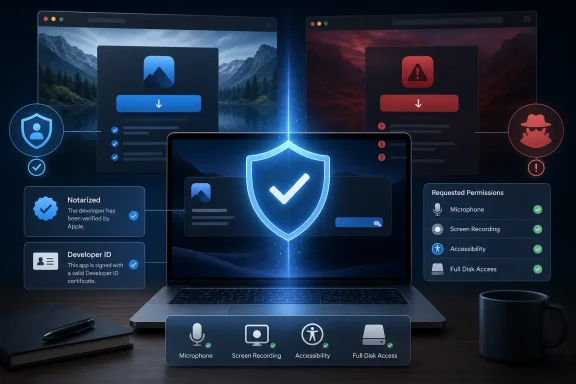 What the Mac App Store adds — and what it does not
Apple describes the Mac App Store as the safest place to obtain Mac software because Apple hosts the download, reviews submissions, signs the apps it distributes, and can remove an app if it later identifies a problem. Store-distributed macOS apps are also required to use App Sandbox, Apple’s access-control system that limits an app’s reach into files, hardware, network services, and other protected resources unless the developer declares a legitimate need.
That matters because sandboxing changes the blast radius of a compromised application. An App Store note-taking tool, for example, cannot simply roam through every folder on a Mac by default. It must work within its container and obtain user-approved access to specific documents or locations. Apple’s App Review rules also restrict background behavior, root-privilege requests, outside update mechanisms, and downloading executable code that would materially change the application after review.
But “in the App Store” does not mean an app is automatically trustworthy in every sense. Store review is a meaningful layer, not a lifetime guarantee against privacy-invasive behavior, a future server-side change, a compromised developer account, or a feature a user should not have granted access to. A screen-recording app may legitimately need to see a screen; a remote-support app may legitimately need Accessibility control. The security question remains whether the request matches the product and whether the publisher has earned the user’s trust.
The reverse is also true: a direct-download app may be perfectly legitimate precisely because it needs capabilities the Mac App Store model makes awkward or unavailable. Apple’s own developer documentation says App Sandbox is required for App Store distribution but merely recommended for direct distribution. That distinction helps explain why utilities that manage disks, install device drivers, run virtual machines, provide endpoint security, hook into developer workflows, or update independently are often sold outside the store.
The tradeoff is clear. The App Store provides a more constrained distribution channel and a stronger default containment model. Direct distribution gives developers and customers more latitude, which can be necessary for professional software — and gives a malicious or careless publisher more room if the user installs the wrong thing.
Gatekeeper and notarization are checks, not a blanket approval
Modern macOS does not leave direct downloads unguarded. Apple’s Gatekeeper evaluates apps, plug-ins, and installer packages obtained from outside the App Store. Under the default security settings, macOS checks whether the code is signed with an Apple-issued Developer ID certificate, whether it has been altered since signing, and — on macOS Catalina and later — whether it was notarized by Apple.
Notarization is often misunderstood. It does not mean Apple performed the same full App Review used for a Mac App Store listing, nor does it certify that a program is good, private, or appropriate for a particular business. Apple’s security documentation describes notarization as a malware-scanning service: developers submit their software to Apple, which checks it for known malicious content and issues a ticket if none is detected. Gatekeeper can then validate that ticket before launch.
That makes notarization a useful integrity and known-malware signal. It proves that the app Apple saw was associated with an identified developer and did not trigger Apple’s checks at the time it was processed. It does not prove that the developer is reputable, that an app will never contain a vulnerability, or that a newly created threat has already been detected.
Apple also maintains XProtect, its built-in malware detection and remediation technology, and says it updates XProtect signatures automatically outside normal macOS feature updates. Apple can revoke developer certificates and issue revocation tickets for known malicious apps, including software that was previously notarized. These are important backstops, but they operate after Apple has information about a threat. They are not a substitute for deciding whether a download page, publisher, and permission prompt are credible before handing a program access to a Mac.
Recent malware reporting illustrates the limitation. Malwarebytes reported in July that a macOS infostealer dubbed CrashStealer used an Apple-notarized installer while impersonating an Apple crash-reporting component. The important lesson is not that notarization is useless; it is that attackers can abuse legitimate-looking packaging and social engineering long enough to reach users. No Mac owner should download a supposed Apple system tool from a random website merely because Gatekeeper does not immediately block it.
The download source is usually the first real test
A legitimate app can be copied, repackaged, bundled with adware, or impersonated on a lookalike site. The safest route is the developer’s official website, a publisher-controlled release page, or an organization’s managed software catalog. Search ads, download portals, “free full version” pages, file-hosting links, cracked-app forums, and pop-ups claiming a browser or macOS component needs an urgent update are poor substitutes.
This is where many users make the wrong comparison. They ask whether a
.dmgfile is less safe than the Mac App Store. A disk image is just a delivery container; it says little about the software inside. The important questions are who published it, whether the developer’s identity is visible in macOS, whether Gatekeeper recognizes it, and whether the app behaves as advertised after installation.
Before opening a direct download, a sensible Mac user should apply a short, repeatable test:
- Obtain the installer from the software maker’s own domain or verified project page, rather than from a mirror that inserts its own download manager.
- Keep System Settings set to allow apps from the App Store and identified developers, rather than weakening Gatekeeper globally.
- Read the first-launch dialog instead of reflexively clicking through it. A warning that macOS cannot identify the developer or check the app for malicious software is a reason to investigate, not a routine inconvenience.
- Compare the publisher name in the Gatekeeper prompt with the developer users expected to install. A mismatch is a hard stop.
- Decline administrator-password prompts, Full Disk Access, Accessibility, screen recording, automation, login-item, or browser-extension permissions unless they are clearly required for the product’s stated function.
- Install updates through the app’s own verified updater or the vendor’s site, not through ads, browser notifications, or unsolicited “your software is out of date” messages.
For IT administrators, this is also a policy issue rather than an individual-user preference. Managed Macs can limit app sources, deploy approved titles through MDM, and restrict privacy controls such as Full Disk Access, Accessibility, screen recording, and system extensions. Apple notes that some Gatekeeper settings may be unavailable when a Mac is managed by an administrator. That is intentional: centrally governed endpoints should not rely on each employee making an informed call on every unsigned installer.
Permissions can outweigh the App Store distinction
A direct-download app that stays within its expected role may be less concerning than a store app that persuades a user to grant broad access. macOS requires user consent for many sensitive resources, including Desktop, Documents, Downloads, iCloud Drive, removable volumes, Full Disk Access, Accessibility, Automation, camera, microphone, and screen or system-audio recording.
The highest-risk requests deserve a pause because they can turn an ordinary application into something with sweeping visibility or control. Accessibility permission can allow an app to observe and interact with interface elements. Screen and system-audio recording can expose passwords, messages, meetings, financial data, and work material. Full Disk Access can reach far beyond the files a user selected in an Open dialog. An app may have a valid reason to request one of these permissions, but the explanation should be specific and consistent with what the software does.
A password manager requesting Accessibility privileges to fill credentials is understandable, though it still warrants trust in the vendor. A basic image converter asking for the same privilege is not. A video-conferencing app requesting camera, microphone, and screen recording access is expected; a menu-bar weather widget asking for those permissions is a reason to uninstall it.
Users should periodically review System Settings > Privacy & Security and remove access from applications they no longer use. Uninstalling an app does not always make its previously granted permissions irrelevant, especially if it installed helpers, login items, browser extensions, or system components. Checking the Login Items and Extensions areas after removing unfamiliar software is prudent.
The practical answer: yes, with a narrower definition of “safe”
It is reasonable to install a Mac app outside the Mac App Store when it comes from the real developer, is signed and notarized, has a clear reputation and update path, and does not demand unexplained access. Direct distribution is a normal part of the Mac platform, not an exceptional workaround.
What is unsafe is training yourself to bypass warnings because an app is free, unavailable in the store, or recommended by a search result. Do not disable Gatekeeper globally to install one questionable tool. Do not use “Open Anyway” as a routine installation step. Do not equate a notarization result with a security audit.
For most users, the Mac App Store remains the lower-friction choice for common consumer software. For professional, open-source, specialist, and enterprise tools, direct download is often the only practical channel. The concrete safeguard is not loyalty to one storefront; it is refusing to grant execution and privileges to software whose publisher, provenance, or purpose cannot be verified.
References
- Primary source: bgr.com
Published: August 7, 2026 at 11:17 AM UTC
Is It Safe To Download Apps Outside Of The Mac App Store?
Downloading apps from the Mac's App Store is easy, but is it safe to use apps you've downloaded from another source or will it do harm to your computer?www.bgr.com - Related coverage: support.apple.com
Safely open apps on your Mac - Apple Support (CA)
macOS includes a technology called Gatekeeper, that's designed to ensure that only trusted software runs on your Mac.support.apple.com - Related coverage: support.apple.com
Security Verification
Security verification page to protect against malicious bots.support.apple.com
- Related coverage: help.apple.com
Distribute outside the Mac App Store (macOS)
If you distribute your macOS app outside the Mac App Store, notarize the app or sign it with a Developer ID certificate.help.apple.com - Related coverage: developer.apple.com
Notarizing macOS software before distribution | Apple Developer Documentation
Give users even more confidence in your macOS software by submitting it to Apple for notarization.developer.apple.com
- Related coverage: developer.apple.com
Notarizing macOS software before distribution | Apple Developer Documentation
Give users even more confidence in your macOS software by submitting it to Apple for notarization. - Related coverage: research-it.manchester.ac.uk
MacOS blocking you from installing your own apps?
research-it.manchester.ac.uk
- Related coverage: apple.com
- Related coverage: asbis.com
- Related coverage: tomsguide.com
100 million Mac users at risk: Hackers are hijacking ‘verified’ apps to sneak past your Mac’s security | Tom's Guide
A new wave of malware is stealing developer keys to impersonate trusted apps, leaving your MacBook wide open to data theft.www.tomsguide.com
