
The central promise is straightforward but important. Administrators will be able to identify oversharing risks, move into remediation workflows, understand what portion of sensitive Microsoft 365 Copilot interactions are protected, and enable Microsoft Purview Data Loss Prevention (DLP) for Microsoft 365 Copilot from the admin center. In practical terms, Microsoft is attempting to make secure Copilot adoption a more visible, day-to-day administrative responsibility rather than a task isolated inside a specialist compliance portal.
That shift matters because Microsoft 365 Copilot does not invent a new permission system. It can surface organizational content that the requesting user already has permission to access, which means existing excess access, anonymous links, unlabeled documents, and legacy SharePoint sprawl can become more consequential once AI makes that content easier to discover and summarize. Microsoft’s Copilot overview describes Copilot responses as potentially incorporating work content that users are permitted to access, making access hygiene and data classification foundational controls rather than optional compliance enhancements.
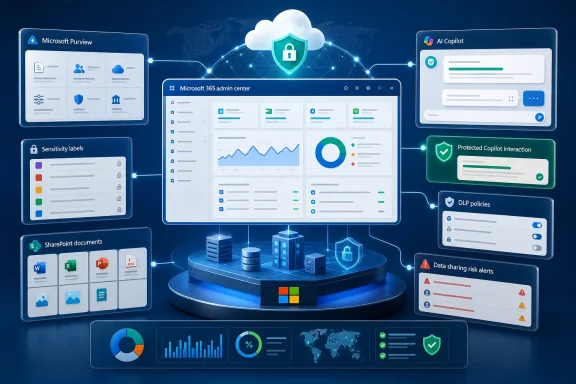 Overview: Purview Comes Closer to the Daily Admin Workflow
The Microsoft 365 admin center has traditionally been the place where organizations manage users, licenses, services, and broad tenant settings. Microsoft Purview, meanwhile, has been the deeper environment for data loss prevention, information protection, eDiscovery, auditing, retention, insider risk, and compliance operations.
Roadmap ID 559617 narrows that divide. Its planned experience is aimed at AI and IT administrators who need a practical route from awareness to action: identify a data-sharing issue, assess its relevance to Copilot, and enable an appropriate protection control without having to navigate a fragmented set of security and compliance tools. Microsoft’s roadmap entry explicitly positions the feature around visibility into oversharing risks, remediation, insight into protection of sensitive Copilot interactions, and direct activation of Purview DLP for Microsoft 365 Copilot.
This direction aligns with Microsoft’s existing Copilot security dashboard design. Microsoft documentation already describes the Copilot security dashboard in the Microsoft 365 admin center as a focused workspace for Microsoft 365 Copilot data protection, oversharing, and compliance insights. The documented access path is Copilot > Overview > Security; viewing requires the Global Reader role, while modifying protections requires the AI Administrator role. Microsoft’s security guidance distinguishes this day-to-day governance dashboard from the broader Security Dashboard for AI, which brings together signals from Microsoft Defender, Microsoft Entra, and Microsoft Purview.
The October 2026 roadmap item should therefore be understood as a meaningful extension of that operating model, not merely another reporting widget. Its value lies in reducing the distance between a signal—such as a potentially overshared SharePoint location—and a response, such as applying DLP, adjusting content discovery, applying labels, or initiating an ownership review.
Why Oversharing Is the Copilot Security Problem That Won’t Go Away
“Copilot security” can sound abstract until it is translated into ordinary Microsoft 365 conditions. A project site may have broad “Everyone except external users” access. A folder could include links available to anyone with the link. A former team’s archive may be readable by far more people than its current business purpose justifies. A document containing financial, legal, HR, or customer data may simply be unlabeled.
Those conditions are not necessarily new. What changes with generative AI is the speed and ease with which a person can locate, synthesize, and reuse material that has always been technically accessible. Microsoft’s Data Security Posture Management documentation directly describes generative AI as amplifying the oversharing problem because it can proactively surface content that is obsolete, over-permissioned, or lacking governance controls.
That is why a secure Copilot rollout cannot be reduced to asking whether the model is private, whether prompts are encrypted, or whether an employee has completed AI-awareness training. Those controls matter, but the harder question is often whether the organization’s information estate is in a condition where legitimate existing access produces an inappropriate business outcome.
Oversharing is not always a permissions bug
A key distinction is that oversharing can be policy-valid yet business-inappropriate. A person may have access because they belong to a broadly scoped Microsoft 365 group, inherited permissions from a SharePoint site, retained membership after changing roles, or received a link intended for a short-term collaboration event.
The security issue is therefore often contextual:
- Is the material sensitive?
- Is the recipient’s access still necessary?
- Is the sharing method too broad for the content’s classification?
- Should Copilot be permitted to summarize or reason over this class of content?
- Does the organization have an owner accountable for reviewing access?
Purview’s role is to turn those questions into detectable signals and available remediation actions. The planned admin center experience could make the answers more accessible to teams that manage Copilot service adoption but do not spend every day in the Purview portal.
From passive inventory to visible risk
Microsoft Purview’s current Data Security Posture Management (DSPM) model is designed around discovering, protecting, and investigating sensitive-data risks. Its objectives include preventing exposure in Microsoft 365 Copilot and Microsoft Copilot interactions, preventing oversharing of sensitive data, preventing exfiltration to risky destinations, and discovering sensitive data throughout the organization. Microsoft’s DSPM overview describes these objectives as end-to-end workflows that group information protection, DLP, Insider Risk Management, and eDiscovery capabilities around specific outcomes.
The practical insight is that oversharing should be treated less like a one-time cleanup project and more like a measurable data-security posture. Content changes, people join and leave teams, sharing links proliferate, sites are repurposed, and new agents can be built on top of business data. A fixed audit is useful, but it eventually becomes stale.
Microsoft’s default data risk assessment model reflects that reality. For SharePoint and OneDrive, Purview can run a weekly default assessment across the top 100 SharePoint sites based on usage, presenting totals for discovered items, detected sensitive data, and content exposed through “anyone” links. Microsoft’s oversharing assessment documentation also notes a four-day delay before the first default-assessment results appear and explains that custom assessments do not continuously update after completion.
That timing matters. A dashboard can make risk visible, but administrators should not mistake it for a live entitlement system that instantly reflects every permission or sharing change. Governance teams need to account for the collection and assessment cadence when setting internal expectations.
What the Planned Admin Center Experience Should Change
The proposed Purview capability has two complementary components: oversharing-risk visibility with remediation and coverage insight for sensitive Copilot interactions with an option to activate Purview DLP.
A more usable path from insight to remediation
The strongest aspect of the announcement is its focus on remediation. Security dashboards are easy to create; actionable dashboards are much harder. If the admin center merely reports that a SharePoint estate contains broad sharing or unprotected sensitive files, it risks becoming another source of security fatigue.
Microsoft’s existing Purview workflows show what the remediation path can involve. In a data risk assessment, administrators can identify content that has or has not been scanned for sensitive information, then take actions that include:
- Restricting access by sensitivity label through DLP so Copilot and agents cannot summarize selected labeled content.
- Restricting all items from specified SharePoint sites through Restricted Content Discovery.
- Creating an auto-labeling policy for sensitive but unlabeled files.
- Creating a retention policy for stale content.
- Reviewing sharing patterns such as access granted through anyone links, organization-wide access, named access, and external sharing. Microsoft’s data risk assessment guidance details these options.
That is a valuable design pattern because it recognizes that there is no universal “fix oversharing” button. Different conditions call for different interventions. A public project workspace may need access review. A sensitive document set may need a label. An obsolete site may require a records decision. A specific subset of highly sensitive material may need to be excluded from Copilot processing altogether.
Seeing protection coverage, not merely policy existence
The second important capability is the ability to understand how much of sensitive Copilot interaction is protected. This is more mature than simply asking whether a DLP policy exists.
A tenant can have a DLP policy configured while still leaving major gaps:
- The policy may be scoped to only a pilot group.
- Sensitive information types may not reflect the organization’s actual risk profile.
- Sensitivity labels may be inconsistently applied.
- Important SharePoint sites may be excluded from scanning or governance.
- The policy could be running in a test configuration rather than an enforcing state.
- Users may work through unmanaged endpoints, browsers, or adjacent AI tools outside the policy’s effective coverage.
An interaction-protection metric creates a more useful operational question: What sensitive activity is currently governed by an applicable control, and what is not? It encourages administrators to measure actual control coverage rather than celebrate the presence of a configuration object.
Microsoft’s broader DSPM approach already uses outcome cards and metrics such as the percentage of data covered by policies, the number of risky sharing incidents, and trend improvements over time. Microsoft’s DSPM documentation explains that these outcome-focused workflows can surface prioritized actions, support one-click policy configuration, and track posture changes as remediation proceeds.
Purview DLP for Microsoft 365 Copilot: The Control That Matters
Microsoft Purview DLP is the primary enforcement mechanism referenced in the roadmap item. In this scenario, its job is not just to detect sensitive data after the fact; it can prevent Microsoft 365 Copilot and agents from processing content with sensitivity labels selected in a DLP policy.
Microsoft documents a policy named “DSPM for AI - Protect sensitive data from Copilot processing” that blocks Microsoft 365 Copilot and agents from processing items carrying the sensitivity labels selected by the administrator. Microsoft’s Purview DLP and DSPM guidance describes that policy as a response to the recommendation to protect labeled items from Microsoft 365 Copilot and agent processing.
This is a critical but easily misunderstood capability.
What it does well
When a document has the right sensitivity label and the DLP policy is correctly configured, the organization can establish a firm boundary: the file may remain available for authorized human access in its intended workflow, but Copilot and agents cannot summarize or process it.
That is a sophisticated control because it avoids a blunt, all-or-nothing response. Rather than disabling Copilot for an entire business unit, an organization can create carefully defined content classes that should not participate in AI processing.
Examples may include:
- Board and executive briefing materials.
- Mergers-and-acquisitions content.
- Privileged legal work product.
- Highly restricted HR investigations.
- Sensitive customer datasets.
- Trade secrets, source-code materials, or regulated engineering designs.
- Documents subject to particularly stringent contractual handling conditions.
This approach supports secure Copilot adoption because it allows an organization to preserve broad productivity use cases while reserving strong restrictions for content that warrants it.
What it does not solve by itself
DLP cannot protect a file that has not been accurately identified. If the organization relies on sensitivity labels as a major control point but files remain unlabeled, misclassified, or inconsistently labeled, the effective protection boundary will be incomplete.
This makes data classification the quiet dependency behind the roadmap feature. Purview can assist through sensitive information types, auto-labeling, policy recommendations, and assessment workflows, but the organization still needs a defensible taxonomy and stewardship process. A label called “Confidential” means little if users apply it inconsistently, nobody understands its Copilot implications, or thousands of legacy files never receive it.
Microsoft’s remediation guidance explicitly connects oversharing assessments to auto-labeling: where sensitive information is found in unlabeled files, administrators can create an auto-labeling policy to apply an appropriate sensitivity label. Microsoft’s Purview assessment documentation also supports removing links, notifying site owners, and applying labels to potentially overshared items discovered through more detailed custom assessments.
The Benefits for IT, Security, and Compliance Teams
The roadmap item has clear appeal because it addresses the organizational friction common to large Microsoft 365 deployments. Copilot strategy often involves service owners, IT administrators, security teams, compliance leads, data owners, and business sponsors—each with a different portal and operational vocabulary.
Better operational ownership
Embedding Purview-facing insight in the Microsoft 365 admin center can make it easier for Copilot administrators to take responsibility for risk outcomes without pretending that they are suddenly compliance specialists. It creates a handoff point: the service owner can see that an exposure issue is relevant to Copilot, while Purview teams can define the required policies, labels, and governance standards.
That is especially useful where a central security team has limited capacity. The more a dashboard can prioritize issues and send the administrator toward the appropriate corrective workflow, the less likely sensitive findings are to remain buried in a specialist console.
Faster, more defensible Copilot enablement
Organizations frequently delay Copilot expansion because they feel trapped between two undesirable options: roll out rapidly with uncertain data exposure, or wait for an exhaustive enterprise-wide data cleanup that may never fully conclude.
A posture-driven model offers a more realistic middle path:
- Establish an initial data-security baseline.
- Identify the highest-risk oversharing locations.
- Protect the most sensitive labeled content from Copilot processing.
- Expand deployment in controlled stages.
- Reassess, remediate, and improve coverage continuously.
This does not eliminate risk. It makes risk visible, prioritized, and governable, which is a more achievable operational standard.
A clearer executive narrative
Security leaders need to explain Copilot risk in business terms. “We have created fourteen policies” is a poor executive metric. “We have increased protection coverage for sensitive Copilot interactions, remediated the highest-risk sharing locations, and reduced broad anonymous-link exposure” is much more useful.
Microsoft’s DSPM outcome model is built around this style of reporting, including policy-coverage percentages, risky-sharing counts, and posture trends. Microsoft’s DSPM overview indicates that reporting and analytics are organized around outcomes to make compliance and risk-reduction progress easier to track.
Risks, Limitations, and Operational Traps
The rollout should not be treated as a turnkey answer to every AI governance challenge. The roadmap item makes secure adoption easier to operationalize, but only if organizations avoid several predictable mistakes.
Dashboards can create false confidence
A green dashboard is not proof that sensitive data is fully protected. It may reflect the scope of configured scanning, recognized sensitive-information types, available labels, or current policies—not every risk that exists in the tenant.
For example, Microsoft’s default SharePoint assessment prioritizes the top 100 sites by usage. That is a practical starting point, but it is not equivalent to a full review of every dormant, legacy, or low-usage site. Microsoft’s Purview documentation also specifies limits for item-level assessment scenarios, including a maximum of 10 SharePoint sites for item-level scanning and no current OneDrive support for that item-level scanning capability.
The right response is not to dismiss the dashboard. It is to treat it as an intelligence layer with known coverage boundaries and to supplement it with a broader governance plan.
Broad restrictions can harm legitimate work
DLP policies that prevent Copilot from processing labeled content can be highly effective. They can also be disruptive if labels are too broad, policy scope is poorly designed, or business users have no clear alternative workflow.
Blocking Copilot access to a category of data is often preferable to an accidental disclosure, but it can undermine adoption if it affects content that users reasonably expected Copilot to help summarize or analyze. Administrators should use staged deployment, test groups, impact assessment, and clear user messaging before moving from audit-oriented visibility to wide enforcement.
Microsoft’s guidance notes that some policies can be reviewed and edited after creation, including scoping them to particular users for testing and changing the classifiers used to detect sensitive information. Microsoft’s Purview DSPM guidance supports that iterative approach rather than treating default policies as permanent, untouchable configurations.
Sensitive interaction visibility has prerequisites
Visibility into Copilot interactions depends on foundational controls. Microsoft states that monitoring Copilot and agent interactions requires Microsoft Purview auditing to be enabled, and Microsoft 365 Copilot users must be licensed appropriately. Microsoft’s DSPM considerations also describe separate prerequisites for broader AI scenarios, including endpoint onboarding, browser-extension deployment, Edge policy configuration, and integrations for certain third-party AI use cases.
That is an important distinction: the planned admin center surface may simplify the experience, but it cannot eliminate technical dependencies underneath it. Organizations should review auditing, role assignments, labeling, endpoint coverage, and policy scope before assuming every relevant interaction will appear in a protection-coverage figure.
Permission boundaries still require discipline
The admin center documentation provides a useful access model: Global Reader can view the security section, while AI Administrator is required to make changes. Microsoft’s Microsoft 365 Copilot security guidance makes clear that visibility and modification are distinct responsibilities.
That separation is good governance. However, it also means enterprises should define who owns the decisions behind a remediation action. Removing a sharing link, excluding a site from Copilot discovery, or applying a restrictive label can change how people work. IT should not automatically become the unilateral owner of every data-access judgment.
A Practical Preparation Plan Before October 2026
The general-availability target is October 2026, so organizations have time to prepare their foundations before the planned experience becomes available. The best preparation is not waiting for a new dashboard; it is ensuring that the dashboard will have meaningful information and actionable controls when it arrives.
1. Establish ownership across service, security, and data teams
Create a clear operating model involving:
- Microsoft 365 and Copilot administrators for service configuration.
- Purview and compliance administrators for DLP, labels, retention, auditing, and investigations.
- SharePoint and Teams owners for site-level access and content accountability.
- Security operations teams for incident response and risk escalation.
- Legal, privacy, and records stakeholders for content categories that require special handling.
The goal is not a large committee. It is a documented decision path for when a risk signal leads to a potentially disruptive action.
2. Inventory the riskiest sharing patterns
Start with the highest-value signals:
- Anyone and anonymous sharing links.
- External sharing on sensitive project sites.
- Large legacy SharePoint sites with broad group memberships.
- Material without sensitivity labels.
- Sites with unclear ownership.
- Former project or acquisition workspaces that remain broadly readable.
Purview assessments can expose sharing categories and sensitive-data findings, while item-level assessment workflows can support remediation actions such as applying labels, notifying site owners, or removing a sharing link when appropriate. Microsoft’s assessment guidance cautions that removing a link should be used sparingly because it can interrupt legitimate access.
3. Rationalize sensitivity labels before relying on DLP
A small number of well-understood labels is generally more valuable than a complex taxonomy nobody uses. Ensure each sensitive label has a defined business meaning, a consistent publication policy, and a decision on whether Copilot and agents should be allowed to process it.
Then validate that labels are actually being applied. Use auto-labeling where suitable, but include quality checks; automated classification can accelerate coverage, yet it should be monitored for false positives and false negatives.
4. Pilot Copilot DLP using a measured enforcement path
Begin with a focused policy scope and clearly documented objectives. Validate the user experience, help-desk impact, affected content categories, and exceptions process before expanding coverage.
A pilot should answer operational questions such as:
- Which labels should prevent Copilot processing?
- Are business owners comfortable with that boundary?
- Are users receiving understandable guidance when protection applies?
- Is the policy detecting the intended content?
- Does the remediation workflow create an auditable record of decisions?
5. Use coverage metrics as governance metrics
Once the planned admin center experience arrives, the most useful metric will not be the number of policies enabled. It will be the trend in protected sensitive Copilot interactions, correlated with reductions in high-risk sharing and improvements in classification coverage.
That framing keeps the organization focused on outcomes. It also helps prevent a common governance failure: measuring activity rather than risk reduction.
The Bigger Meaning of Purview in the Admin Center
Microsoft’s roadmap item is significant because it acknowledges the operational reality of enterprise AI. Copilot adoption is not a simple software rollout and cannot be governed solely through a security architecture diagram. It is an ongoing collision between AI capability and the accumulated complexity of years of file sharing, permissions, group membership, unmanaged content, and inconsistent classification.
Bringing Purview insights and DLP activation into the Microsoft 365 admin center is a pragmatic move toward making that collision manageable. It gives Copilot and IT administrators a clearer line of sight into the risks created when AI meets real-world content estates, while keeping Purview’s policy and compliance machinery close enough to support meaningful remediation.
The feature will not erase oversharing, automatically classify every sensitive file, or make difficult access decisions on an organization’s behalf. What it can do is shorten the path between seeing a Copilot-related data risk and taking a proportionate, auditable action. For organizations pursuing secure Microsoft 365 Copilot adoption, that operational bridge may prove more valuable than another standalone AI dashboard.
