

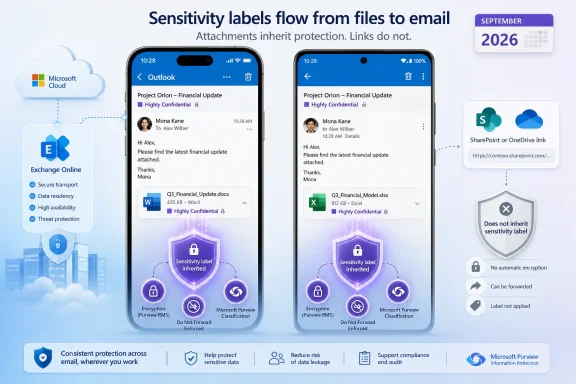
The practical change is straightforward but consequential: if a mobile user attaches a labeled file to an otherwise unlabeled email, Outlook can automatically apply the attachment’s highest-priority published sensitivity label to the email, or recommend that label to the sender. For organizations using labels to trigger encryption, Do Not Forward restrictions, headers, footers, or downstream DLP handling, the email body will no longer be a separate, potentially lower-classified object merely because it was composed from an iPhone or Android device.
Microsoft’s roadmap wording calls this “label inheritance from email attachment,” but the direction of inheritance matters. The email inherits the attachment’s label; this is not the separate Outlook behavior in which an unencrypted Office attachment can inherit encryption applied to a labeled email. Administrators planning policy tests should treat those as two different mechanisms with different triggers and outcomes.
The mobile gap is real today
Microsoft Learn’s sensitivity-label capability table, last updated June 30, 2026, still lists “Label inheritance from email attachments” as unavailable in Outlook for iOS and Outlook for Android. The same table shows the capability is already supported in classic Outlook for Windows, Outlook on the web, and new Outlook for Windows, while Outlook for Mac is also marked unavailable.
That makes Roadmap ID 569021 a genuine platform-expansion item rather than a policy change affecting every Outlook client at once. Mobile users can already manually apply labels in Outlook, and Microsoft rolled out support for recommended and automatically applied sensitivity labels during mobile email composition earlier in 2026. But that earlier rollout evaluates email content against Purview policy conditions; the new September feature responds to the classification already attached to a file.
The distinction is important in real workflows. A user might send a short message saying “Please review the attached draft” with no sensitive terms in the mail body. Content-based auto-labeling may find nothing to classify in that text. Attachment-based inheritance can still elevate the email if the attached Word, Excel, PowerPoint, or other supported physical file already carries a higher-priority label.
Microsoft has not published app-version minimums for iOS or Android in the roadmap entry, nor has it provided a staged rollout schedule within September. The company also has not said whether the mobile capability will arrive simultaneously for iOS and Android. No other outlet has reported more detailed timing, so IT teams should treat September as a general-availability target rather than a date for deployment commitments.
The highest-priority label wins, but manual choices still take precedence
Microsoft’s Purview documentation sets out the inheritance rules already used by supported Outlook clients. Outlook dynamically selects the highest-priority label among labeled attachments, provided that label is published to the sender. In Purview, label priority follows the order configured by the administrator: a label placed higher in the policy hierarchy is less sensitive, while labels farther down have higher priority.
A manually applied email label will not be replaced by attachment inheritance. This protects deliberate user choices from being silently changed, including where a sender selected a lower label intentionally under an approved business process. It also means organizations cannot assume attachment inheritance will correct every mislabeled mobile message; a user-selected email label remains authoritative in the client.
The feature can, however, replace a lower-priority label that was automatically applied or set as the default. That is the useful compliance correction: an email that begins as “General” or “Internal” can be raised to “Confidential” or “Highly Confidential” when the sender adds a correspondingly labeled attachment.
Administrators can choose between two modes in the sensitivity-label publishing policy:
- Outlook can apply the inherited label automatically, though the sender can still remove it or select another label before sending.
- Outlook can recommend the attachment’s label and require the sender to accept or dismiss the suggestion.
The automatic setting reduces dependence on user judgment, but it can produce surprises where labels carry encryption. Microsoft documents that when the inherited label includes encryption, its protection is also applied to the email by default. An attachment labeled with Do Not Forward, for example, can result in the message itself being labeled and encrypted with Do Not Forward.
That is a meaningful operational change for help desks. A sender who merely attaches a protected file from mobile can see a message become inaccessible to recipients outside the configured audience, unable to be forwarded, or governed by internal access rights. The behavior may be correct under the organization’s classification policy, but it will look like a sending failure to users who were never trained on the inheritance rule.
SharePoint and OneDrive links do not trigger it
The most significant limitation is easy to miss: the attachment must be a physical file. Microsoft’s Purview documentation explicitly excludes file links, including links to documents stored in SharePoint or OneDrive.
That means a user attaching Budget.xlsx directly from a mobile device can trigger label inheritance, while a user pasting or sharing a OneDrive link to the same labeled Budget.xlsx will not trigger this particular feature. The file itself may remain protected by its own sensitivity label and SharePoint or OneDrive access controls, but the email carrying the link will not be elevated through attachment inheritance.
For organizations that have standardized on cloud links instead of traditional attachments, the immediate benefit may therefore be much narrower than the roadmap title suggests. This is especially relevant in tenants that discourage attachments to reduce duplicate files and improve collaboration. Purview controls such as Exchange auto-labeling, DLP, and SharePoint sensitivity labels may still apply in those environments, but they are separate policy paths and should not be counted on as a substitute without testing.
The label also has to be configured for both Files & other data assets and Emails. A label scoped only to documents cannot be inherited by an email, and an email-only label cannot serve as the source label on a file. Microsoft warns that changing label scopes can affect existing default-label, auto-labeling, and document-library configurations, so this rollout is not a reason to casually retrofit every label in production.
Mobile protection is applied by Exchange Online, not on the device
Outlook for iOS and Android supports Purview sensitivity labels through Microsoft’s native sync architecture, but the apps do not encrypt messages locally. Microsoft’s Exchange Online documentation says that, for mobile Outlook, encryption occurs in Exchange Online transport after the user sends the message and before delivery to recipients.
That architecture has a visible side effect: sent copies stored in Outlook mobile are not encrypted locally in the same way the delivered message is protected. Microsoft advises users who want to forward or Reply All from a Sent Items copy to remove and reapply the encryption label first. The new inheritance feature will not change that platform behavior.
IT teams should also remember that a sensitivity label and its encryption are related but not identical. Email clients that do not preserve Outlook’s label metadata can cause the original label to stop appearing in later replies or forwards, particularly across organizational boundaries. Encryption applied by the label continues to protect content, but the classification signal may not survive every external mail-client hop.
This creates a practical testing requirement for regulated organizations: validate not only that Outlook mobile selects the expected label, but also that the recipient experience, forwarding behavior, external-recipient access, and audit records match the organization’s intended policy. A successful label badge in the compose window is not enough evidence that the transport and access-control result is correct.
September rollout should start with policy review, not a broad switch-on
Organizations already using attachment inheritance in Outlook on the web or Windows have a useful advantage: their Purview policy design can likely extend to mobile without creating a new label taxonomy. The immediate work is to review the labels published to mobile users, their priority order, whether both file and email scopes are enabled, and whether automatic inheritance or recommendation is appropriate.
The more difficult cases are organizations that use broad default labels and labels with aggressive encryption settings. If a common attachment label maps to an internal-only rights-management group, automatic inheritance can protect an otherwise routine email more strongly than the sender expects. Recommendation mode may be a better initial choice where policy maturity or user training is incomplete.
Microsoft has committed this rollout to commercial and U.S. government cloud instances, including GCC High and DoD, rather than limiting it to worldwide tenants. But the roadmap remains an in-development promise, and the current Microsoft Learn capability matrix correctly shows that no Outlook mobile version supports it yet. Until that table changes and the relevant Outlook builds arrive, attachment-driven label inheritance remains available on the web and Windows—not on the phones where users are most likely to send a quick message with a sensitive file attached.