
According to Microsoft’s roadmap entry, survey audiences will update automatically from Viva Insights data and retain the dashboard’s existing organization and job-function filters. That should remove a manual step for IT teams that currently have to translate a dashboard segment—such as a department with low Copilot usage—into a separately targeted feedback campaign.
The practical appeal is the ability to compare behavioral telemetry with employee sentiment in the same workflow. A team with frequent Copilot use but poor survey results may need better enablement or more relevant use cases; a low-usage group with positive feedback may instead be constrained by licensing, access, or rollout timing.
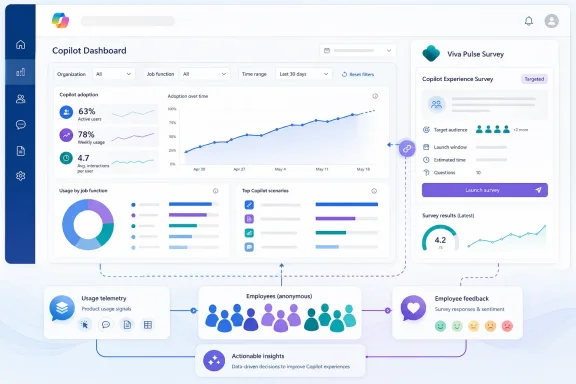 Dashboard filters become survey targeting
Microsoft already documents Viva Pulse survey integration in the Copilot Dashboard, including a dashboard entry point for starting a new Pulse survey and sentiment reporting for survey results. The planned change is more specific: it uses the active dashboard audience rather than asking change leaders to rebuild that audience in Pulse.
Microsoft says the results will remain population-level, an important limitation for organizations concerned that Copilot adoption reporting could become individual performance monitoring. Administrators should still validate their Viva Insights privacy settings and minimum-group thresholds before using sentiment data to direct training or adoption interventions.
A rollout tool, not proof of business value
For Copilot program owners, the feature may make it easier to run a tighter improvement loop:
- Use dashboard filters to identify a cohort with unusual adoption or usage patterns.
- Send a Copilot Pulse survey to that same cohort without reconstructing membership.
- Compare responses with the adoption signals that prompted the survey, then adjust communications, training, or support.
The feature is still a roadmap commitment rather than a released capability, so tenants should treat the August preview and September general-availability dates as targets that may change. Its value will depend less on the new launch button than on whether organizations ask focused questions and avoid treating aggregated sentiment as a substitute for deeper rollout analysis.
