
For users, the practical value is straightforward: it should cut down on the broad, context-heavy follow-up answers that occur when Copilot treats its entire prior response as the subject of a question. For IT teams, however, the more important finding is that this roadmap update appears to describe a capability Microsoft had already said was rolling out months earlier — and it does not explain what, specifically, is now targeted for August.
Microsoft’s Roadmap lists the item as worldwide, standard multi-tenant, web-only, and in development as of August 4. It provides no supported-build details, no tenant controls, no licensing statement, no rollout stages, and no explanation of whether organizations that saw the feature earlier will receive a changed implementation.
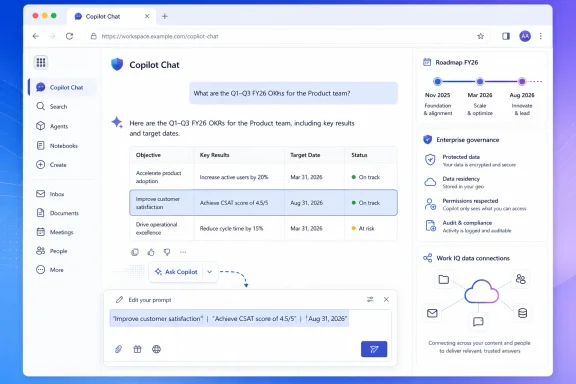 A roadmap item with an earlier rollout history
Microsoft’s own February 2026 What’s New in Microsoft 365 Copilot post described “Text selection and expanded grounding for Copilot Chat” in nearly identical terms. That announcement said users could select text from a Copilot response, use an “Ask Copilot” button for focused follow-up questions, and target explanations, summaries, translations, and next steps at the chosen passage. Microsoft said that capability was rolling out in March.
An archived listing of Roadmap ID 522616 published by M365 Admin also captured the same feature description and identified a November 2025 release target. That does not establish that the feature reached every tenant at that time, but it shows the item has carried shifting delivery expectations: November 2025 in the archived roadmap record, a March 2026 rollout statement in Microsoft’s Copilot update, and now an in development general-availability target of August 2026.
The visible feature description has changed little through those dates. Microsoft has not publicly identified a new platform, new administration model, or materially expanded function that would distinguish the August milestone from the selection feature it discussed in February. The evidence therefore supports a narrower conclusion than the roadmap wording might suggest: this looks like a delayed, resumed, or reclassified rollout of an existing Copilot Chat interaction, not evidence of a newly invented Copilot capability.
That distinction matters for deployment planning. A roadmap entry marked “General Availability” is a target, not confirmation that the feature is presently available in a tenant. Administrators should not treat the August date as a reason to update internal support documentation until the option is actually visible in their production Copilot Chat web experience.
The selection is prompt context, not a hard privacy boundary
Microsoft’s description says Copilot will work “only” on the highlighted selection. Read literally, that sounds like a source restriction: select two sentences, and Copilot should reason from only those two sentences. But Microsoft’s broader Copilot documentation describes a more complicated grounding model.
Copilot Chat can draw on attached content, public web information, and — when Work IQ is enabled for a licensed Microsoft 365 Copilot user — the user’s accessible Microsoft 365 work data. Microsoft says Work IQ can use emails, files, chats, meetings, people, projects, and other work signals, while still enforcing the organization’s existing permissions and governance policies. It also says users can turn Work IQ off when they want Copilot to answer without referencing work data.
That means the highlighted response should be understood as the immediate material inserted into the next prompt, rather than proof that the model is technically prohibited from using every other authorized source. Microsoft’s current roadmap language does not say the selection creates an isolated, selection-only grounding mode. Nor does it say that Work IQ is disabled automatically when someone invokes the action.
For an individual user, this may be exactly the desired behavior. A person reviewing an AI-generated project update may want to highlight one questionable claim and ask, “Explain this in plain English,” while still allowing Copilot to consider related work context. For compliance-sensitive review, the same behavior could be undesirable: the reviewer may expect a selection-only explanation but receive an answer influenced by accessible company data, web sources, or conversation context.
The operational guidance should therefore be simple: if a task genuinely requires narrow source handling, users should verify the visible prompt, explicitly instruct Copilot to use the selected text only, and consider turning Work IQ off where that fits the task. Selection is a useful interaction control; it is not, on the published record, a new data-governance control.
Previewing the selection is the most consequential design detail
The apparently minor detail in the roadmap entry is that Copilot previews the selected text inside the prompt before the user sends it. This makes the feature less like a one-click contextual command and more like a prompt-composition shortcut.
That design has two benefits. First, it lets the user see exactly what is being passed into the next turn. Anyone who has used a browser or document assistant that loses a highlighted excerpt when a side panel opens will recognize why that matters. Second, it allows the user to edit the excerpt, remove sensitive lines, add framing, or correct a bad selection before Copilot processes it.
It also creates a limitation Microsoft has not called out. After editing, the prompt may no longer contain precisely what the user highlighted. The workflow gives the user more control, but the final request is no longer necessarily an analysis of the original output verbatim. In audit-heavy work, reviewers should distinguish between asking Copilot to interpret an AI-generated passage and asking it to interpret a manually altered version of that passage.
The prompt preview is also important because Copilot can produce plausible but incomplete or incorrect answers. Microsoft’s own support documentation advises users to review sources and confirm critical details before sharing or acting on responses. Highlighting a specific sentence may make it easier to interrogate a claim, but it does not validate the claim or provide an automatic source check.
A useful pattern for staff is to ask Copilot to identify the assertion in the selected text, state what evidence would verify it, and flag assumptions or missing data. “Explain this” is convenient; “identify the factual claim, the source needed to verify it, and the decision risk if it is wrong” is more appropriate for operational or technical material.
What is missing for administrators
Roadmap ID 522616 gives administrators almost no implementation detail beyond platform and cloud scope. Microsoft has not stated whether the action is available to Microsoft 365 Copilot add-on license holders only, to users of Copilot Chat without the add-on, or to both groups under different grounding conditions.
The entry also does not name a Microsoft 365 admin center policy, a PowerShell control, a feature flag, an audit event, or a reporting category for highlighted-response prompts. Microsoft’s Copilot usage-report documentation tracks prompt submission and several app-level Copilot activities, but the published material does not identify selection-based follow-up as a separately reportable action.
There is no stated support for Windows desktop, macOS, iOS, Android, Teams, Outlook, Word, or Edge. This is particularly important because Microsoft already offers several similarly named “Ask Copilot” experiences: Edge can send selected contextual web information to Copilot; Outlook can insert selected email text into a Copilot Chat prompt; and Office applications offer their own document- and selection-aware Copilot interactions. Roadmap item 522616 is specifically a web feature for text inside a Copilot response. Help desk teams should not assume that a missing button in Edge, Outlook, or Word is evidence that this particular rollout failed.
Microsoft’s release documentation also makes clear that availability can vary by subscription, license, account type, organization settings, and whether web access is disabled by an administrator. The roadmap’s “worldwide” designation does not override those conditions.
August is a verification point, not a deployment deadline
The immediate takeaway is not that organizations need to configure a new Copilot control before August ends. Microsoft has not announced one. The sensible action is to add a focused test case to Copilot acceptance testing: generate a response containing several distinct claims, highlight one sentence or a table cell, choose “Ask Copilot,” inspect the prefilled prompt, and test the answer with Work IQ on and off where the license permits it.
That will answer the questions the roadmap entry leaves unanswered: whether the selection survives correctly, whether the action is present for the organization’s license mix, whether the prompt preview can be edited, and whether the result behaves as a truly narrow follow-up in the tenant’s configured grounding mode.
Until Microsoft reconciles the March rollout statement with the August 2026 general-availability target, Roadmap ID 522616 should be treated as a status signal — not proof that a new selection-only Copilot mode is arriving for every user this month.
