
For Windows users who already manage projects in the Planner web experience, Microsoft Teams, and Microsoft 365, this is another step away from static task boards and manually assembled weekly updates. Instead of treating progress reporting as separate administrative work, Microsoft is positioning the plan itself as the reporting source—and Planner Agent as the layer that interprets the data.
The promise is not merely a shorter route to a polished paragraph. Done well, AI-powered status reporting could force teams to keep task status, due dates, owners, and priorities accurate because those fields will directly shape the update leaders see. Done poorly, it could automate the appearance of clarity while preserving the stale or incomplete project data underneath.
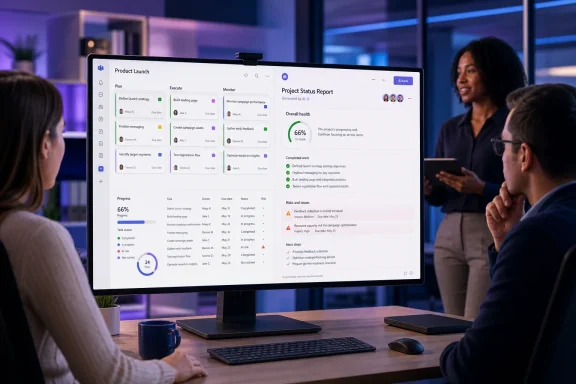 Overview: What AI-Generated Status Reports in Planner Agent Will Do
The roadmap item describes a capability that converts Planner task data into a narrative status update. Users will be able to ask Planner Agent for a report and tailor it by specifying the intended audience, preferred tone, desired length, and sections to include. Microsoft lists the feature for Planner and Microsoft Copilot for Microsoft 365, across desktop and web, with preview availability targeted for August and general availability targeted for September. Microsoft’s roadmap listing identifies the deployment as worldwide for standard multi-tenant tenants.
That description closely aligns with Microsoft’s existing Planner Agent reporting model. Microsoft says the agent can create a customized status report from the current state of a plan and user instructions, including a selected date range, report sections, report length, and other guidance. The agent uses plan structure, task progress, deadlines, assignments, and recent activity to summarize completed work, work in progress, upcoming tasks, overdue items, and notable changes. Microsoft’s Planner Agent FAQ describes the output as a concise view of progress, risks, and next steps.
In other words, this is not intended to be a generic writing assistant that produces a project update from a blank prompt. It is designed as a grounded reporting feature, drawing from a specific Planner plan and the signals embedded in that plan.
That distinction matters. A normal generative AI prompt can make an update sound credible without knowing whether milestones slipped or a critical dependency remains unassigned. A Planner-connected reporting agent has the potential to surface facts that are already represented in the project system—provided that system is being maintained.
A Reporting Problem That Has Long Outlived the Spreadsheet
Status reports are deceptively expensive. In many organizations, a project manager spends the end of each week reviewing task boards, exporting lists, checking comments, asking owners for clarifications, translating technical updates into executive language, and formatting an email or slide. The final artifact may take an hour or more, even when the underlying facts already live in a shared planning tool.
The process also introduces an awkward lag. By the time a manager turns a Friday afternoon task snapshot into a Monday leadership update, the project may have changed. A blocker may have cleared, a deadline may have moved, or a supposedly finished deliverable may have returned for revision.
Planner Agent’s approach is attractive because it collapses this reporting gap. Rather than creating a report manually after interpreting a plan, the user can instruct the AI to synthesize the plan directly. Microsoft says Planner Agent can generate professional summaries based on progress, milestones, and upcoming work, positioning the feature as a way to improve stakeholder visibility while reducing the time spent on reporting administration. Microsoft’s status-report guidance frames the capability around transparency and alignment as well as time savings.
The key word is synthesize. Most project teams do not need another screen full of task counts. They need a narrative that answers practical questions:
- Is the project on track, at risk, or blocked?
- What meaningful work was completed during the reporting period?
- Which deliverables are late or approaching their deadlines?
- Where are risks concentrated?
- What decisions, resources, or stakeholder actions are needed next?
- What will the team focus on before the next update?
Task boards can contain much of that information, but readers often lack the time or access required to derive it themselves. A concise report bridges the gap between operational detail and executive oversight.
How the Planner Agent Reporting Workflow Works
Microsoft’s documentation offers a useful indication of the workflow that will underpin the roadmap feature. Reporting is built into the Reports tab of an eligible Planner plan, rather than being treated as a separate document-generation product.
Selecting the reporting window
A good status report needs a boundary. Without one, the narrative may blur old history with the work that actually changed this week.
Microsoft’s Planner guidance lists predefined reporting periods including:
- Last week
- Last two weeks
- Last month
- Last quarter
Users can also choose which report sections should be included before generating the result. Microsoft’s Planner Agent access documentation says the report interface supports reporting-period selection and section controls from the Reports tab.
That is a practical design choice. An engineering leadership group may need a two-week delivery and risk summary, while a steering committee may prefer a quarterly view emphasizing outcomes, budget concerns, dependencies, and decision requests. One plan can therefore support several reporting styles without requiring the manager to reconstruct the story every time.
Adding context and defining the output
The more important control is the natural-language instruction field. Microsoft gives the example of asking for a comprehensive update on high-priority items for the leadership team. It also offers report length choices: Concise, Standard, and Detailed. Microsoft’s support article confirms these controls as part of report generation.
This is where the forthcoming AI-generated status reports feature could become genuinely useful. “Status report” is not a single artifact. The right version depends on who will read it.
A team lead may want a practical, technical update with task-level blockers. A department head may want a short risk-oriented briefing. A client-facing project manager may need neutral, polished language that does not expose internal uncertainty or raw implementation details. The ability to set tone, length, audience, and sections can make one underlying plan useful across all of those scenarios.
Useful prompt patterns could include:
- Leadership update
“Create a concise executive update for senior leadership. Lead with overall status, then summarize completed milestones, top three risks, decisions needed, and next-week priorities.” - Delivery review
“Write a detailed operational report for the project team covering overdue tasks, unassigned work, blocked deliverables, upcoming deadlines, and owners who need follow-up.” - Customer-facing summary
“Draft a professional client update in a confident but transparent tone. Include delivered work, active workstreams, key dependencies, and the next reporting-period objectives. Exclude internal staffing details.” - Risk escalation
“Create a short escalation report focused only on tasks that are overdue, blocked, or due within seven days. Explain the likely impact and identify the action required from leadership.”
The AI is doing the drafting, but the human requester still defines what matters. That is the appropriate division of labor.
Reviewing and sharing the result
Microsoft says a generated report appears in a Loop canvas, where it can be reviewed and edited. The report can then be kept or discarded, and it may be shared as a SharePoint newsletter. Microsoft’s Planner Agent documentation also notes that agent-created Loop files, including reports, are stored in the SharePoint site associated with the plan’s Microsoft 365 group.
That Loop integration is more consequential than it initially sounds. A status report no longer needs to be a dead-end email attachment or a copy-and-paste block trapped in a Teams chat. A Loop component can be placed in other Microsoft 365 surfaces and remain collaboratively editable.
Microsoft further states that the report can be copied into Teams, Outlook, OneNote, Word, and other Microsoft 365 applications, with changes synchronized in real time. Microsoft’s reporting guide says users can also inspect access permissions and locate historical reports through the SharePoint folder where they are stored.
For teams using Windows PCs as their primary workstations, that interoperability is the practical payoff. A report can begin inside Planner in Teams, receive edits in Outlook or Loop, and end up incorporated into a Word-based project pack without repeatedly exporting data between disconnected tools.
The Real Value: Converting Task Metadata Into a Narrative
A Planner plan is normally optimized for doing work. Tasks have names, owners, due dates, progress markers, priorities, buckets, notes, attachments, and sometimes dependencies or goal relationships. None of those fields alone qualifies as a status report.
The reporting agent’s job is to interpret the pattern.
For example, the plan may show that 80 percent of tasks are marked complete. A simple dashboard could represent that as a positive completion metric. But a useful AI-generated status report should recognize whether the remaining 20 percent contains a late launch approval, an unassigned security review, or a critical vendor dependency. It should distinguish between broad task completion and delivery readiness.
Microsoft says Planner Agent uses signals including task progress, due dates, assignments, plan structure, and recent activity when building its reporting output. Microsoft’s Planner Agent FAQ That does not guarantee perfect judgment, but it is the right starting point for an agent meant to summarize live project work rather than merely count task states.
Overall status should not be a cosmetic label
One of the most difficult parts of a manual status update is the headline: green, amber, or red. Teams are often reluctant to mark a project at risk until there is an undeniable failure, at which point the label becomes less useful.
An AI-generated report could make the conversation more evidence-driven if it consistently connects overall status to observable plan conditions:
- A large cluster of overdue tasks
- A critical task with no assignee
- Several deliverables due before their dependencies are complete
- A growing number of tasks marked blocked
- A milestone nearing its deadline with low completion progress
- A concentration of work assigned to one individual
The agent should not be trusted to make the final strategic call alone. Still, surfacing those conditions in a coherent report can make it harder for teams to hide risk behind vague wording such as “monitoring closely” or “minor schedule pressure.”
Progress becomes more useful when it is grouped
Raw progress data is often too granular for stakeholders. “Task 38 changed from Not Started to In Progress” is useful to a workstream owner, but it rarely belongs in a leadership update.
Narrative synthesis can group individual updates into meaningful themes:
- Completed foundation work
- Active integration work
- Delayed approvals
- Readiness for a release milestone
- Work that requires external action
- Changes to scope or sequencing
This is where tone and audience controls become central. The same facts can be expressed as a technical delivery summary, a customer communication, or a decision memo. The underlying data should remain unchanged; the presentation should change.
Requirements, Licensing, and Availability Considerations
The feature sits within the broader Planner Agent experience, and access is not universal merely because someone can open a Planner plan. Microsoft says Planner Agent requires an active Microsoft 365 Copilot license, while users without that license can collaborate on plans but cannot directly interact with the agent. Microsoft’s access requirements also state that additional Planner licensing can unlock premium functionality.
Microsoft’s documentation currently describes Planner Agent as available in shared basic and premium plans, although some functions are plan-specific. For example, task generation from high-level goals is limited to premium plans. Microsoft’s Planner Agent FAQ distinguishes reporting and chat capabilities from premium-only goal-driven task generation.
The reporting workflow also has plan eligibility requirements. Microsoft says status reports work with Project Manager-enabled plans and shared premium plans, and its instructions repeatedly point to a plan shared with a Microsoft 365 group. Microsoft’s automatic status-report documentation states that users without a Microsoft 365 Copilot license may view and edit existing reports but cannot generate new ones.
Microsoft additionally recommends having at least 10 tasks in the plan before generating a report. The company presents this as both a product threshold in its Planner Agent guidance and a practical quality consideration: plans that have been tracked over time and contain enough task data are better inputs for a meaningful report. Microsoft’s Planner Agent setup instructions and report-generation guide make that expectation clear.
That threshold is sensible. A plan with five loosely defined tasks cannot support a credible project narrative, no matter how polished the generated prose becomes.
The Major Strengths of AI Status Reports in Microsoft Planner
Faster reporting without abandoning the source of truth
The strongest benefit is speed. The reporting agent should reduce the mechanical work of turning task-level updates into written communication.
This is especially valuable for teams that already use Planner as the operational source of truth but still duplicate status reporting in PowerPoint decks, email threads, Word templates, or separate project-management systems. The less copying required, the less chance the narrative will diverge from the plan.
Better consistency across reporting cycles
Manual reports often vary wildly based on who writes them. One project manager might list risks and decisions explicitly; another might omit them. One might state overdue items plainly; another might bury them under optimistic language.
A report generator that consistently looks at deadlines, progress, assignments, and activity can provide a repeatable structure. Human reviewers can still apply judgment, but the starting point becomes more standardized.
A natural fit for Microsoft 365 collaboration
Planner, Teams, Loop, SharePoint, and Copilot are already part of a tightly connected Microsoft 365 environment. The ability to generate a report in Planner, refine it as a Loop component, and distribute it through familiar collaboration surfaces makes the workflow more coherent than a separate AI reporting tool that requires exports and imports.
Microsoft says Planner Agent reports can be shared as Loop components and may be published as SharePoint newsletters. Microsoft’s reporting documentation That broad distribution model could be particularly useful for organizations that need a recurring project update to reach audiences with different working habits.
More visibility into neglected project hygiene
AI reporting can also expose an uncomfortable truth: project visibility is only as good as task hygiene. If due dates are blank, owners are missing, tasks remain in progress indefinitely, and milestones are not represented in the plan, the generated report will reveal the gaps—directly or indirectly.
That may be healthy. A reporting feature that encourages clearer ownership and more reliable task updates can improve the plan even before anyone reads the finished narrative.
Risks: AI Can Summarize Bad Data Very Efficiently
The biggest risk is false confidence.
A well-written update can appear authoritative even when the underlying plan is stale. If task owners are not updating progress, if deadlines have not been revised after scope changes, or if critical work is managed in email rather than Planner, the agent may generate an articulate but incomplete report.
That is not a unique flaw in Planner Agent. It is a general limitation of AI systems grounded in enterprise data: the output inherits the quality, completeness, and timeliness of the inputs.
A human review step remains mandatory
Microsoft’s implementation wisely places the result in a Loop component that can be edited after generation. Microsoft’s status-report guidance confirms that users can make direct edits before finalizing the report.
Organizations should treat that editing step as a control, not a convenience. A project owner should verify:
- Whether the overall status accurately reflects reality
- Whether any risk has been understated or overstated
- Whether confidential internal details are suitable for the target audience
- Whether the report identifies the correct next action and accountable party
- Whether task changes made outside Planner have been reflected
- Whether the report’s tone matches the sensitivity of the situation
The agent should accelerate analysis and drafting. It should not become an unreviewed executive reporting channel.
“Risk” needs interpretation, not just detection
An overdue task is not automatically a project risk. It might be an optional cleanup item, a duplicate task, or a deliberately deferred activity. Conversely, a task can be marked on schedule while its vague description conceals a major issue.
The agent can identify warning signals, but the project manager understands business impact, contractual commitments, stakeholder relationships, and informal dependencies. Those are often absent from a task board.
The best reports will combine the agent’s structured scan of the plan with the human owner’s contextual judgment.
Data access and distribution need governance
Because reports are stored as Loop files in the associated group’s SharePoint site, sharing behavior and permissions deserve attention. Microsoft’s Planner Agent documentation ties report storage to the plan’s group SharePoint site, while Microsoft’s sharing guidance notes that users can inspect who has access to a report. Microsoft’s report-sharing documentation
That means IT administrators and project leads should review:
- Membership of the Microsoft 365 group tied to the plan
- Whether reports may include sensitive delivery, personnel, financial, or customer information
- External sharing policies for SharePoint and Loop
- Retention and lifecycle policies for generated report content
- Appropriate use of SharePoint newsletters for broad distribution
- Internal expectations about editing, approving, and publishing AI-generated updates
The convenience of one-click dissemination is also the reason that reporting governance cannot be an afterthought.
A Practical Operating Model for Teams
The best way to adopt AI-generated status reports in Planner Agent is not to start with the prompt. Start with the plan.
Build a reportable plan
Before relying on AI summaries, teams should establish minimum operational discipline:
- Assign every meaningful task to an owner.
- Use realistic start and due dates.
- Update task progress at an agreed cadence.
- Represent important milestones as visible work items or goals.
- Use task descriptions to record acceptance criteria and key context.
- Identify blockers clearly instead of leaving work permanently “in progress.”
- Avoid turning Planner into a dumping ground for unmanaged wish-list items.
The report becomes much more useful when the plan distinguishes committed delivery work from optional ideas, routine maintenance, and future backlog items.
Standardize report templates through prompts
Organizations should create a small library of approved prompt patterns rather than leave every manager to invent their own. That avoids inconsistent reporting and makes expectations clear.
A simple internal standard could include three templates:
- Weekly team update — detailed, operational, action-oriented
- Monthly leadership report — concise, strategic, risk and decision focused
- External stakeholder update — professional, controlled, customer-ready
Each template should define the required sections, the reporting window, the expected tone, and any information that should never be included.
Separate fact extraction from executive judgment
A useful working practice is to ask Planner Agent for the factual draft first, then add the manager’s assessment second.
For example:
- First prompt: “Summarize progress, overdue items, upcoming deadlines, and changes from the past two weeks.”
- Second prompt: “Reformat this as an executive update with a concise overall status and top risks.”
- Human review: Confirm status, clarify impact, add decisions needed, remove sensitive details.
This sequence reduces the temptation to let the AI invent an executive judgment before the team has agreed on it.
What the Roadmap Signals for Microsoft Planner
The roadmap entry is notable because it frames reporting as a core Planner Agent capability rather than an adjacent Copilot experiment. Microsoft’s feature listing ties the status-report experience directly to Planner and Microsoft Copilot for Microsoft 365, spanning desktop and web.
That matters for the evolving identity of Microsoft Planner. Planner has moved beyond its early role as a lightweight Kanban-style task board. In Microsoft’s broader vision, it is becoming an entry point for planning, task execution, AI-assisted work management, goal tracking, and project communication.
Microsoft’s own Planner Agent materials describe the agent as a collaborator that can execute assigned tasks, act on feedback, generate work from goals in supported plans, answer questions, and write reports from plan updates. Microsoft’s Planner Agent FAQ AI-generated status reports fit naturally into that progression: they are not a separate project-management feature, but an output of the plan’s ongoing work.
For Windows-centric organizations invested in Teams and Microsoft 365, this reduces the pressure to assemble a fragmented toolchain for work tracking and reporting. It will not eliminate specialized project-management platforms for complex portfolios, resource management, cost controls, or advanced scheduling. But it can make Planner more capable for the large middle ground of departmental projects, launches, operational programs, and cross-functional initiatives.
The Bottom Line
AI-generated Status Reports in Planner Agent have the potential to remove one of the least loved but most necessary parts of project work: repeatedly translating task-board activity into a clear explanation of where the project stands.
Microsoft’s planned experience is compelling because it focuses on the details that determine whether a report is useful—audience, tone, length, time period, and included sections—while grounding the draft in Planner’s task-level information. The ability to review and edit the output in Loop, retain it in SharePoint, and distribute it through Microsoft 365 makes the feature more than a simple text-generation button.
Yet the feature will reward disciplined teams and expose undisciplined ones. No AI-generated narrative can compensate for missing assignments, outdated deadlines, ambiguous task descriptions, or risks that never make it into the plan. The strongest implementation will treat Planner Agent as an assistant that extracts, structures, and drafts—not as an authority that replaces project ownership.
If Microsoft delivers the roadmap capability as described, Planner status reporting could become faster, more consistent, and more tightly connected to the work being done. The real benefit will not be that project updates take minutes instead of hours. It will be that teams can spend the recovered time resolving the risks those updates reveal.
