

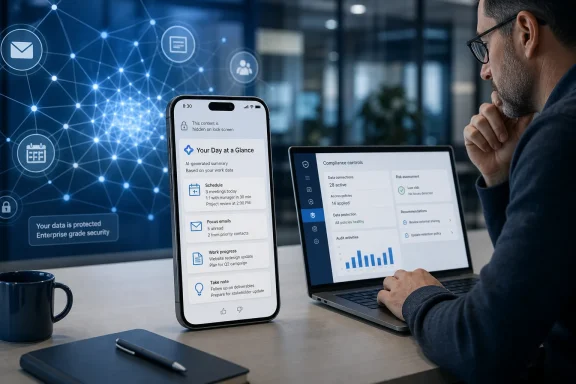
The roadmap entry, updated August 10, lists Current Channel, Targeted Release, and General Availability, with GCC, GCC High, and DoD included among the cloud instances. Microsoft has set September 2026 as the estimated general-availability month. Its roadmap also explicitly warns that dates and feature details are subject to change, so this is a deployment target rather than a promise that every tenant will receive the feature on September 1.
For licensed Microsoft 365 Copilot users, this turns the mobile app from a place to ask for a work catch-up into a service that can choose the moment to put one on the lock screen. That may be useful for a manager walking into a morning meeting or an employee returning from leave. It also creates a new delivery channel for AI-generated interpretations of a user’s work context, on a device that is commonly visible outside the office.
Roadmap item 560339 moves Copilot from pull to push
Microsoft’s description is narrow but consequential. Opening a notification will take the recipient to the associated Copilot response inside the Microsoft 365 Copilot app. The company has named two starter workflows: a daily overview and a prompt about items awaiting the user’s attention.
The language matters. “Items waiting for you” is not a defined Microsoft 365 object in the way an Outlook message, Planner task, Teams mention, or SharePoint document is. It suggests Copilot will select and summarize material it believes merits action, then package that judgment into a notification. Microsoft has not published the ranking rules, the data sources used for each notification type, the maximum number of alerts per day, quiet-hour behavior, or examples of the actual responses users will receive.
That leaves IT departments unable to answer several practical questions before rollout: whether a notification can name a sensitive project or sender in the preview text; whether users can disable only these Copilot prompts without disabling all app notifications; whether administrators can set tenant-wide limits; and whether an alert can be governed separately from Copilot Memory itself. The roadmap entry does not say.
Microsoft’s existing mobile-app documentation establishes that the Microsoft 365 Copilot app can search for organizational files and information, continue desktop conversations, and offer work-based chat to users with the appropriate Copilot license. The new capability uses that app as an outbound channel. In practical terms, it extends Copilot’s reach beyond the desktop and browser into the surface users check reflexively throughout the day.
Copilot Memory is the material change behind the alerts
Microsoft Support describes Copilot Memory as a personalization layer built from saved memories, inferences from chat history, and user-provided custom instructions. It can retain details such as communication preferences, recurring work, goals, and topics a user has discussed with Copilot. Microsoft’s stated purpose is to make future answers more relevant.
With roadmap item 560339, that personalization no longer affects only an answer after a user initiates a chat. It will help determine which response Microsoft sends proactively to the user’s phone. A user who has told Copilot about a recurring project, preferred work style, or important deadline could therefore receive an alert shaped by information that was originally provided in earlier chats.
That is a meaningful distinction for administrators evaluating Copilot’s risk profile. The push notification itself may be brief, but it acts as an invitation into a response generated from workplace context. A lock-screen message such as “Your Day at a Glance is ready” may be harmless; a more descriptive preview could reveal that a particular project, meeting, or request exists. Microsoft has not said what content will appear in notification previews or whether its app will deliberately suppress sensitive details there.
The feature is limited, according to the roadmap, to users with Microsoft 365 Copilot licenses. That excludes the broader set of Microsoft 365 subscribers who can access portions of the app with web-grounded chat, but it aligns with the feature’s apparent reliance on work-aware, personalized Copilot experiences. Microsoft Learn’s licensing documentation says licensed users receive work-based and web-grounded chat, while ordinary Microsoft 365 subscribers get web-grounded chat only.
The licensing boundary will matter in shared-device and mixed-license organizations. A company can have the Microsoft 365 Copilot app deployed broadly through Intune while only some users are licensed for work-grounded Copilot. The app’s presence alone should not be mistaken for eligibility for these alerts.
Turning Memory off does not necessarily erase it
The sharpest caveat is in Microsoft’s administrator documentation for Copilot personalization and memory. Microsoft says tenant administrators can use the Enhanced Personalization control to turn off Copilot Memory for users or across an organization. But disabling the control stops Copilot from applying saved memories; it does not remove the saved memories already stored for users.
Microsoft’s documentation goes further: saved memories remain until an end user explicitly deletes them in Copilot’s personalization settings. Deleting the original chat does not automatically delete a memory generated from it. Chat-history inferences have a different lifecycle, but users and admins should not treat “disable” as synonymous with “purge.”
That creates an implementation gap for organizations that decide these proactive alerts are undesirable. If alerts depend on Copilot Memory, disabling Enhanced Personalization should stop the underlying memory from being used for notifications. But the organization may still have stored memory data to address separately. The correct operational response is not simply to toggle a setting and assume the historical data is gone.
Microsoft’s current documentation also says Copilot Memory and personalization are in preview and subject to change. The roadmap feature has a September 2026 target, while the underlying memory controls remain described that way in the administration guidance. Enterprises should therefore verify the final control behavior in their own tenant before treating any current setting as a complete notification-governance solution.
Compliance teams need to distinguish chat records from memory records
Microsoft 365 Copilot interactions are stored as individual items in a user’s Exchange Online mailbox and can be found through Microsoft Purview eDiscovery. Microsoft says prompts and responses can be searched, retained, exported, and, where policies permit, deleted. Its eDiscovery guidance specifically covers commercial and U.S. Government clouds.
Copilot Memory is also stored in the user’s Exchange mailbox, according to Microsoft Learn, but in a hidden folder. It is searchable through Purview eDiscovery or Content Search, and Microsoft says administrators can delete memory data using eDiscovery in combination with Microsoft Graph. For GCC, GCC High, and DoD, Microsoft notes that Graph Explorer is unavailable for this deletion workflow and PowerShell must be used instead.
There are two limits worth underlining. First, Microsoft says Purview retention policies and retention labels configured by administrators do not apply to Copilot Memory itself. A policy that deletes Copilot chat interactions after a set period does not automatically clear saved memories. Second, Microsoft says Memory and personalization actions do not generate Purview audit-log entries. An organization may be able to discover the resulting memory data, but it does not receive a conventional audit trail showing every memory-related action.
Those details complicate the otherwise straightforward narrative that the feature is merely a productivity alert. Once a Copilot response is proactively selected and delivered to a mobile device, the organization needs controls for the device notification, the work data behind the response, the chat record, and the long-lived memory used to personalize it. Microsoft has documented pieces of that chain, but roadmap item 560339 does not describe how those controls intersect.
What administrators should do before September
The immediate task is to decide whether Copilot’s mobile app should be permitted to notify employees proactively at all. That decision belongs alongside mobile-device notification policy, not only the broader Copilot rollout plan.
Administrators should inventory who holds a Microsoft 365 Copilot license and which of those users have the Microsoft 365 Copilot app installed on managed or unmanaged iOS and Android devices. They should also inspect the tenant’s Enhanced Personalization setting and test the user-level Copilot Memory controls, including whether turning off memory changes any forthcoming notification behavior in a preview or release-ring tenant.
A short pre-rollout test should cover:
- Verify what text appears in lock-screen and notification-center previews on both iOS and Android, including when the device is locked.
- Test whether users can disable proactive Copilot notifications independently from other Microsoft 365 Copilot app alerts.
- Confirm whether a tenant-level setting exists to disable or scope the capability before it reaches the production ring.
- Review Purview eDiscovery procedures for Copilot interactions and stored memories, particularly in GCC High and DoD environments where PowerShell is required for deletion workflows.
- Update user guidance to explain that deleting a Copilot chat does not necessarily delete a saved memory created from that conversation.
Microsoft has announced a feature with a clear productivity pitch but has not supplied the implementation detail that determines whether it is a useful daily briefing or an unnecessary new exposure point for work context on personal lock screens. By the time the September rollout begins, the most important test will be simple: whether organizations can meaningfully govern the alerts before Copilot begins choosing what deserves employees’ attention.