

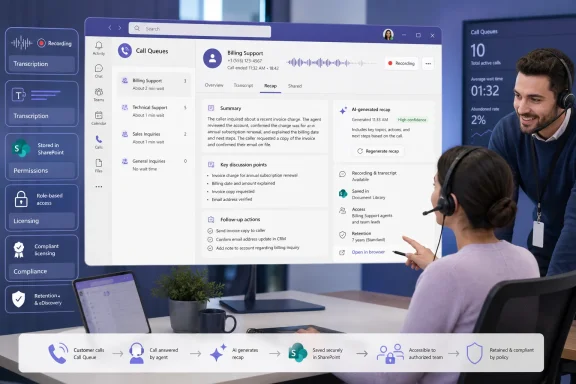
The immediate benefit is obvious for service desks, reception teams, sales queues, and internal IT support: a second agent can see what happened on a customer call without playing back an entire recording. But the more consequential detail is what Microsoft’s roadmap entry leaves implicit: this recap capability depends on an organization having already enabled Teams’ new per-queue recording and transcription plumbing, controlled the right access path, and assigned the licenses Microsoft requires for the Queues app and intelligent recap features.
For organizations that have treated Call Queues as a routing feature rather than a durable customer-interaction record, the feature changes the operational and compliance posture. A queue call that was previously handled, summarized manually, and forgotten can now become a recording, a transcript, an AI-produced summary, and a set of suggested actions retained in Microsoft 365 storage.
The Recap tab arrives after Teams builds the recording foundation
Microsoft’s roadmap says users will navigate to a call record in the Queues app and select Recap to view AI-generated notes, discussion points, and follow-up actions. The listed scope is Teams and Microsoft Copilot on Windows desktop and macOS, with worldwide standard multi-tenant availability targeted for September 2026. There is no mobile platform in the roadmap entry, no GCC or sovereign-cloud date, and no promise of a specific September rollout week.
The timing closely follows a separate Teams Phone change that is much more important than the short roadmap description suggests. Microsoft’s Teams documentation says automatic Call Queue recording can be configured per queue; once enabled, every inbound queue call answered by an agent is recorded and transcribed automatically. Recordings are stored in SharePoint, rather than left only in a user’s personal calling history.
The Microsoft 365 Message Center archive reports that automatic recording and transcription for Teams Call Queues is scheduled to reach worldwide general availability, including GCC, from mid-August through late August 2026. That puts the underlying capture feature on track to land shortly before the September recap target.
In other words, Microsoft is not adding AI to an existing archive of every queue call. The intended deployment path is more constrained:
- Administrators must turn on automatic recording and transcription for each Call Queue where recaps are wanted.
- Calls must be answered by an agent before the automatic Call Queue recording workflow applies.
- Shared Call History must be enabled so authorized users and representatives can reach the recording and transcript in the Queues app.
- The recap is derived from the captured conversation, so queues that remain unrecorded or untranscribed will have nothing for the new Recap tab to summarize.
That dependency is the central operational fact. A help desk may see the Recap tab arrive in Teams in September but find no usable content until it has configured queue-level recording, announcements, permissions, and Shared Call History.
This is a handoff tool, but only for the people allowed into the queue record
Teams Call Queues are often staffed across shifts, departments, or groups of rotating agents. The feature is designed for that reality: one person takes a call, another investigates the case, and a supervisor reviews how it was handled. Instead of relying on an agent’s post-call notes, staff can review the recording, transcript, and AI-produced recap from the same queue call record.
Microsoft’s documentation states that authorized users can view recordings and transcriptions, while representatives can be separately granted access. That is a meaningful distinction for IT administrators. A queue can be configured to record all answered calls without automatically making every call available to every agent assigned to answer it.
The Queues app therefore becomes a controlled shared work surface rather than a personal call log. That has a practical upside for customer callbacks and incident handoffs, but it also means admins need to decide who has the right to review a customer’s full conversation—not simply who has the right to answer the phone.
Microsoft has been moving in this direction since it introduced automatic recording and transcription for queues. The new recap layer makes the stored conversation easier to consume, but it does not replace the source record. Teams’ broader intelligent-recap documentation warns that AI-generated content can be inaccurate, incomplete, or inappropriate because it is based on transcripts and generated with GPT-based and other AI models.
For support and customer-service teams, that warning should be taken literally. AI notes can help an agent triage a callback, identify a promised follow-up, or locate the relevant segment of a long conversation. They should not become the only record used to decide whether a customer consented, whether an agent gave a particular commitment, or whether a regulated disclosure was delivered. The recording and transcript remain the evidence; the recap is an accelerator.
Licensing is the key unanswered deployment detail
Microsoft’s roadmap classifies the feature under Microsoft Teams and Microsoft Copilot, but it does not state which specific license grants intelligent Queue call recaps. That omission matters because Teams’ current licensing is split across Teams Phone, Teams Premium, and Microsoft 365 Copilot.
Microsoft’s April 2026 Teams licensing FAQ says intelligent call recap for PSTN calls is a Teams Premium capability and requires Teams Phone for PSTN calling. The same FAQ describes the Queues app as an advanced-call-functionality experience for Teams Phone Call Queues and Auto Attendants, again requiring Teams Phone. Separately, Microsoft’s general Teams recap support documentation says intelligent recap is available through either Teams Premium or a Microsoft 365 Copilot license.
Those statements establish the likely baseline, but they do not explicitly settle the entitlement for Roadmap ID 569017. Microsoft has not yet said whether Queue recaps will be enabled by Teams Premium, Microsoft 365 Copilot, both, or a more specific combination of Teams Phone and one of those add-ons.
Administrators should avoid assuming that assigning Microsoft 365 Copilot to a manager will automatically expose queue recordings and AI recaps for every agent. Access to the underlying queue call record still depends on the queue configuration and permissions. Conversely, organizations that already license Teams Premium for Queues app users may be positioned for the feature, but Microsoft has not published a final eligibility matrix for this specific workload.
The safest reading is that a deployment will require, at minimum, the Teams Phone and Queues app prerequisites already documented by Microsoft, plus whichever intelligent-recap entitlement Microsoft confirms before general availability. That ambiguity should be resolved before organizations budget the feature as a Copilot-only rollout.
Recording policy now determines whether AI has customer data to analyze
The September feature also raises a governance issue that can be missed if the project is framed as a simple productivity update. Microsoft’s Call Queue recording documentation says queue recordings are stored in SharePoint. The Message Center notice further notes that the recordings and transcripts can fall under eDiscovery, audit, and retention policies depending on the tenant’s configuration.
That changes the nature of a queue call. A customer-service conversation may contain account details, troubleshooting information, contact data, financial context, or internal operational notes. Once automatic transcription is activated, that information becomes searchable text as well as audio. Once intelligent recap is added, the same conversation produces a condensed representation that makes details easier to scan and act on.
Microsoft provides controls that matter here: recording and transcription can be enabled or disabled per queue; caller announcements can use the standard message, text-to-speech, or custom audio; and agent access can be restricted. But the technical controls do not answer the policy questions for the organization.
Before enabling recaps, Teams administrators should work with the owners of the affected queues to determine whether calls are appropriate for automatic recording, whether existing retention labels cover the new SharePoint content, and whether the recording announcement meets local legal and contractual requirements. A queue used for ordinary internal IT requests may have a different risk profile from one handling benefits, payments, patient scheduling, or legal intake.
Microsoft has also not said in the roadmap entry whether Queue recaps can be exported, shared outside the organization, copied into CRM systems, or governed differently from the call transcript. Those gaps are not evidence that such capabilities will exist; they are details administrators will need before treating the recap as a formal case-management record.
September will be a configuration milestone, not a switch-on moment
The feature’s practical value will vary sharply between tenants. Organizations already using the Queues app, Shared Call History, Teams Phone, and per-queue recording may receive a useful AI layer over a call archive they have already designed and governed. For them, the September release could reduce time spent replaying routine calls and improve shift-to-shift continuity.
For everyone else, the Recap tab will expose work that needs to be completed first: recording policy decisions, caller notification text, SharePoint retention, authorized-user assignments, agent permissions, and license validation. Microsoft’s September 2026 target is therefore best understood as the final visible piece of a Call Queue recording stack that begins rolling out in August—not as a standalone Copilot feature that can be enabled without changing how customer calls are captured and retained.