
That is a meaningful result for Windows-centric organizations already living in Microsoft 365, Power BI, CRM platforms, and line-of-business reporting systems. NLG is no longer a niche tool for automated sports stories or quarterly financial commentary; it is becoming the text-generation layer that turns dashboard data, spreadsheets, support records, and campaign metrics into readable summaries. But G2’s review data, reinforced by NIST’s warnings about unreliable generative output, points to a practical limit: speed is real, while finished quality remains conditional.
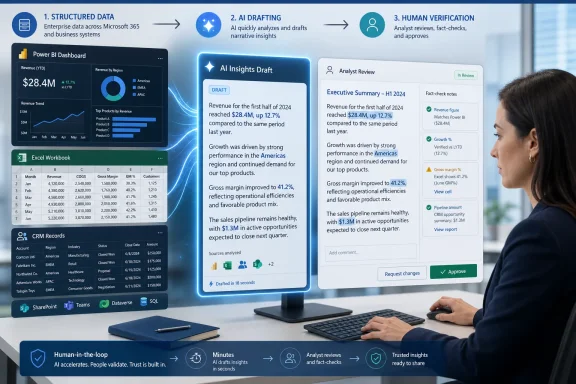 The category has become a drafting engine
Natural Language Generation, or NLG, converts data or instructions into human-readable prose. A classic deployment takes structured information—sales performance, inventory levels, service tickets, web traffic, or accounting data—and produces a narrative explaining what happened and, sometimes, why it matters.
That distinction is important. Business intelligence software can show a declining sales chart; NLG can write that revenue fell 8% from the previous quarter, identify the region or product family associated with the decline, and package the result into a manager-ready report. The underlying system may draw from data warehouses, Power BI dashboards, CRM records, or a spreadsheet uploaded into a broader AI assistant.
G2’s NLG category continues to include Microsoft Copilot alongside specialist products such as Quill, Anyword, Arria, Wordsmith, and Phrazor. The category has therefore widened considerably. It now covers both traditional data-to-text systems designed around repeatable reports and large-language-model tools used for content drafting, summaries, rewrites, and analysis inside everyday productivity applications.
That shift is why NLG adoption has moved beyond technical teams. G2 says end users authored 1,353 of the reviews in its analysis, compared with 142 from administrators. In practice, that means adoption often starts with a marketing manager trying to produce campaign variants, an analyst trying to write weekly reporting faster, or an operations lead trying to turn recurring data into plain-English updates.
IT may not make the initial purchase decision, but it often inherits the consequences. Once an NLG tool needs access to SharePoint libraries, Teams conversations, customer records, Power BI workspaces, or sensitive financial data, it becomes an identity, governance, retention, and data-protection project—not merely another writing app.
Deployment has shrunk from quarters to weeks
The strongest finding in G2’s data may be the change in time to value. Average time to go live reportedly dropped from roughly 3.4 months in 2022 and 2023 to approximately 1.3 months in 2026. That is more than a 60% reduction in the time between purchase and usable output.
The technical explanation is straightforward. Older NLG projects often relied on templates, grammar rules, carefully modeled data fields, and custom decision trees. These systems could produce controlled, repeatable narratives, but they took substantial work to configure. Modern tools increasingly arrive with pretrained models capable of drafting text from prompts, documents, tables, and connectors with much less upfront language engineering.
For small businesses and individual departments, that is transformative. A team can test a use case quickly: summarize a workbook, draft a report from a Power BI export, produce campaign copy, or generate a briefing from a set of structured notes. The work moves from building a language system to defining a reliable workflow around one.
Enterprise deployment still takes longer. G2 places enterprise go-live time at about 3.1 months, compared with 2.3 months for small businesses. That gap is not necessarily a measure of software difficulty. Large organizations have more data connections to review, more permissions to validate, more security stakeholders, and more approval gates before an AI tool can reach production.
The U.S. Census Bureau’s Business Trends and Outlook Survey provides useful context. Its more recent AI data shows that business use is spreading, especially among large employers, but adoption varies sharply by sector and company size. NLG’s faster onboarding does not erase the enterprise reality: the model may be ready immediately, while the organization is not.
For Windows administrators, the deployment lesson is simple. Do not treat “time to first output” as the same metric as “time to safe production use.” A user can generate a polished narrative in minutes. Establishing who can access the underlying data, where prompts are retained, whether outputs inherit sensitivity labels, and how mistakes are detected takes longer.
Reviewers love the productivity gain—and flag its cost
G2’s theme analysis captures the central contradiction in the market. “Productivity enhancement” was one of the most frequently praised themes, appearing in 68 verified reviews, but also among the most criticized, with 47 negative mentions. “Artificial intelligence” followed a similar pattern: users value the speed, but complain about the limitations of the same mechanism.
This is not a paradox once the workflow is examined. NLG removes the blank-page problem. It can turn a database extract into a report outline, a dashboard into an executive update, or a vague campaign brief into several usable versions in seconds. That is valuable even when the output needs editing.
The trouble begins when organizations mistake a strong opening draft for a finished document. Reviewers cited repetitive wording and tone in longer output, generic copy, and weak handling of specialized terminology. In analytical or regulated work, those are not cosmetic defects. An inaccurate financial narrative, a poorly qualified customer communication, or an oversimplified compliance summary can create a real operational problem.
NIST’s Generative AI Profile uses the term confabulation for outputs that are false or erroneous but presented convincingly. The agency’s risk framework makes clear that fluent language is not proof of validity, reliability, or factual grounding. That is especially relevant to NLG because its outputs often look authoritative: reports, summaries, executive briefs, and explanatory prose carry more implied confidence than a rough brainstorming note.
The best use case, then, is not “write and publish.” It is “generate, verify, refine, and approve.” Human review should be proportional to the consequence of an error. A social media caption may need a brand check. A quarterly revenue explanation should be reconciled against the source data. A customer-facing or regulated document may require subject-matter review, auditability, and a defined approval path.
That human layer also changes how teams should measure ROI. The relevant question is not whether NLG produces text faster than an employee. It is whether it reduces total time to a correct, usable, approved result. If a tool saves 45 minutes of drafting but creates 40 minutes of correction, the benefit is narrower than its demo suggests. If it saves an analyst three hours of repetitive narrative work and leaves 20 minutes of focused validation, the value is substantial.
Microsoft environments make governance the differentiator
For WindowsForum readers, Microsoft Copilot is the most visible example of NLG entering the existing work stack rather than arriving as a standalone platform. G2 lists Copilot among prominent NLG offerings, and Microsoft positions its commercial Copilot services around integration with Word, Excel, PowerPoint, Outlook, Teams, and Microsoft Graph-connected organizational data.
That integration is the upside and the risk. Copilot can be genuinely useful when it helps a user turn an Excel model into a written summary, draft a presentation narrative from source documents, or condense a Teams discussion into action items. But the quality of what it produces depends on the quality and accessibility of the data it can reach.
Microsoft says prompts, responses, and data accessed through Microsoft Graph in Microsoft 365 Copilot are not used to train foundation models. That is an important enterprise assurance, but it is not a substitute for permissions hygiene. If a user already has broad access to stale, overshared, or poorly classified content, an AI assistant can make that information easier to discover and summarize.
Before expanding NLG use, administrators should ensure that:
- Data access follows least-privilege principles, particularly across SharePoint, OneDrive, Teams, and Power BI.
- Sensitivity labels, retention policies, and data loss prevention controls are working before AI-generated workflows are broadly enabled.
- High-impact document types have defined human approvers and a method for checking claims against source systems.
- Users understand which tool tier they are using, because consumer AI services, commercial AI services, plug-ins, and third-party agents may have different data-handling terms.
- Pilot success is measured using correction time, factual-error rates, and adoption in real workflows—not only the number of generated drafts.
Pricing is also part of the equation. G2 found pricing among the more common complaint themes. That tracks with the practical experience of teams that discover generation is inexpensive only until they add premium licenses, data connectors, security tooling, custom integrations, and the human review needed to safely operationalize output.
The speed-versus-quality gap is narrowing, not disappearing
G2’s evidence supports a confident conclusion: NLG software is mature enough to produce fast, measurable value, particularly for reporting-heavy and content-heavy work. The reported rise from 116 verified NLG reviews in 2022 to 1,034 in 2023 reflects the market shock created after ChatGPT’s public launch in November 2022, when generative language tools became familiar to ordinary business users almost overnight.
But higher adoption does not mean the old constraints vanished. More users can generate prose; that does not make the prose inherently accurate, non-repetitive, audience-appropriate, or compliant. NLG’s real improvement is that a tool which once required a quarter to deploy can now often produce useful work within weeks.
For organizations running Windows and Microsoft 365, the near-term opportunity is not autonomous report writing. It is a disciplined human-in-the-loop model: let NLG perform the repetitive conversion of data into drafts, then keep people responsible for facts, context, tone, security, and the final decision to publish.
