
But the claim that Copilot Notebooks are now free for all Microsoft 365 users needs a correction. Microsoft’s June announcement describes the rollout as reaching education and enterprise Copilot Chat users, while Microsoft’s current support documentation still ties access to Copilot Chat licensing, a qualifying work or school account, and OneDrive or SharePoint service availability. Consumer Microsoft 365 Personal and Family subscribers are addressed under separate subscription terms, not by the enterprise-and-education rollout described here.
The reporting from Geeky Gadgets, based on Microsoft education executive Mike Tholfsen’s updates, combines several real OneNote and Copilot features. It also blurs their availability, their platforms, and the difference between a standard OneNote notebook and a Copilot Notebook. For admins and users deciding whether they can deploy this immediately, those distinctions are the story.
 The licensing change is real, but eligibility still matters
Microsoft said in its Microsoft 365 Community Hub announcement that Copilot Notebooks would roll out to all Microsoft 365 Education A1, A3, and A5 users who can use Copilot Chat. The same announcement says the broader expansion covers enterprise and education Copilot Chat users, while Study Guide is generally available for those groups.
Copilot Chat itself is included at no additional charge for many eligible business, education, frontline, government, and Teams-based Microsoft 365 plans. Microsoft’s licensing documentation lists Microsoft 365 Business Basic, Business Standard, Business Premium, E3, E5, A1, A3, A5, F1, and F3 among the eligible subscriptions, subject to account and tenant requirements.
That is a meaningful change from the earlier Copilot Notebooks model, which Microsoft and Mike Tholfsen had described as requiring a Microsoft 365 Copilot license. The paid Copilot add-on still unlocks broader work-grounded Copilot functionality across applications such as Word, Excel, Outlook, and Teams. What has changed is that an organization does not need to buy that add-on merely to give eligible Copilot Chat users access to Notebooks.
The free label therefore has a narrow but useful meaning: there is no separate Copilot Notebooks charge for users who already have a qualifying Microsoft 365 subscription and Copilot Chat access. It does not mean every Microsoft account, every legacy Office installation, or every consumer subscription automatically receives the feature.
Copilot Notebooks are separate from ordinary OneNote notebooks
The naming is likely to cause support tickets. A Copilot Notebook is an AI workspace that can surface inside OneNote, but it is not simply a switch that turns an existing OneNote notebook into an AI-enabled document.
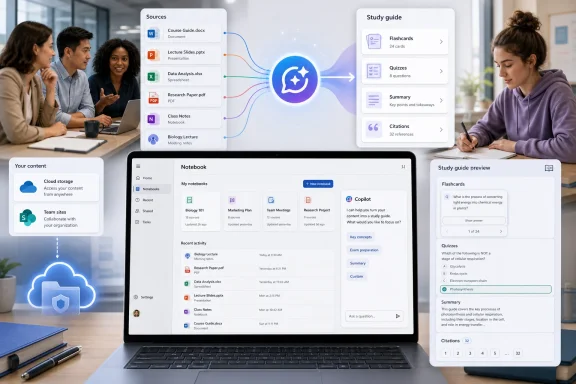
Microsoft describes Copilot Notebooks as curated collections of reference material. A user can add items such as Word documents, PowerPoint presentations, Excel files, PDFs, Copilot chats, meeting notes, links, and OneNote pages, then ask Copilot questions based on that selected material. The intended benefit is grounding: the model is meant to respond using the sources gathered in that notebook rather than treating an open-ended chat prompt as the entire assignment.
This makes Copilot Notebooks closer to a project room than to a passive note repository. An HR team might assemble policy documents, draft communications, and meeting notes for a benefits change. A project manager could combine a requirements deck, issue log, planning notes, and customer feedback. A student could collect class slides, PDFs, and personal notes before generating a structured review aid.
That collection step is also where the product’s value and its limitation meet. Copilot will only be as reliable as the material the user adds, its freshness, and the access controls around it. Adding a stale project plan alongside current meeting notes does not make the stale plan current; it may simply give Copilot two conflicting sources to summarize.
For organizations, this is an argument for treating Copilot Notebooks as a managed knowledge-work feature, not as an informal consumer AI tool. Users need guidance on what belongs in a notebook, who should have access, and when generated output must be checked against an authoritative record.
Study Guide is the clearest immediate use case
Microsoft’s education announcement provides the most concrete description of the new Study Guide experience. It can use the reference materials inside a Copilot Notebook to create a multi-page study resource with summaries, topic pages, flashcards, exercises, matching activities, fill-in-the-blank prompts, and quizzes.
The useful part is that the content is designed to remain tied to the materials that were supplied. Microsoft says summary and topic pages include pointers back to the original source materials, giving students and educators a way to inspect where generated explanations came from. That is a stronger model than asking a general-purpose chatbot to produce a quiz on a topic without supplying the actual course content.
Schools still have deployment work to do. Microsoft says Study Guide is available to education users aged 13 and older, and K–12 students aged 13 through 17 need Copilot Chat enabled by an IT administrator before they can use Copilot Notebooks and Study Guide. The user’s age-group data in Microsoft Entra ID is therefore part of the feature’s access path, not merely a profile detail.
The product is also explicitly positioned as practice material rather than an assessment platform. Microsoft says quiz results are private unless the learner chooses to share them. Administrators and educators should not assume Study Guide produces audit-ready assessment data, integrates with a gradebook, or replaces the controls of a learning management system.
OneNote access has arrived in stages
The submitted report suggests a single, simultaneous OneNote rollout. Microsoft’s own material shows a more complicated sequence.
Microsoft first made Copilot Notebooks accessible through the Microsoft 365 Copilot app, with OneNote becoming a fuller workspace for the same notebooks. Its June education announcement said Notebooks would reach education tenants first through the Microsoft 365 Copilot app, with availability in OneNote following in subsequent weeks. Microsoft’s support pages now describe access through both the Copilot app and OneNote, though they also warn that some entry points and features are still rolling out gradually.
That means help-desk advice should begin with the Copilot app rather than assuming the feature must already appear in every OneNote client. If the Notebooks item is absent from the app’s left navigation, Microsoft directs users to its app launcher. Admins should also account for client and platform differences instead of treating a web rollout as proof that every Windows, Mac, mobile, and desktop OneNote build has identical capabilities.
The article’s claim that users can access OneNote notebooks directly from the Copilot app is broadly directionally correct, but it needs this qualification: Copilot Notebooks can draw on OneNote pages as references and can open in OneNote; they do not erase the boundary between the traditional OneNote notebook format and the newer Copilot Notebook workspace.
Infographics and other output types should be treated as rollout-specific
The report also packages infographic generation, MathML rendering, file-opening preferences, and Copilot Notebooks as though they were one unified release. Microsoft’s roadmap and announcements point instead to a stream of separate OneNote and Copilot updates.
Microsoft’s June Notebooks update says Copilot Chat users can add Office files and Outlook email to a notebook, ask questions across the collected materials, and use tools such as mind maps and Study Guide. Microsoft’s roadmap has also listed richer source types, mobile multimodal capture, and output formats including Excel workbooks and infographics for Copilot Notebooks. Roadmap entries describe direction and expected availability; they are not a guarantee that every tenant has each function today.
For IT teams, this is more than wording. If a user has access to Notebooks but cannot find an infographic generator or a particular output type, the absence may be a rollout, licensing, client, regional, or preview-status issue rather than a broken deployment. Microsoft has repeatedly used staged rollout language for the Notebooks entry point and related capabilities.
MathML rendering and Office-file opening defaults are valuable OneNote improvements for technical and productivity workflows, but they should be evaluated as their own client features. They do not determine Copilot Notebooks eligibility.
What admins should verify before announcing access
Organizations that want to make the feature available should verify the essentials before telling staff that “Copilot is free now.”
- Confirm that affected users have an eligible Microsoft 365 subscription and can sign in to Microsoft 365 Copilot Chat with a Microsoft Entra work or school account.
- Confirm that OneDrive or SharePoint service plans are enabled, because Microsoft requires storage service availability to create Copilot Notebooks.
- Check that users can find Notebooks in the Microsoft 365 Copilot app before troubleshooting OneNote client behavior.
- Review age-group data and Copilot Chat enablement for education tenants, especially for K–12 students between ages 13 and 17.
- Publish guidance on reference selection, sharing, and verification of AI-generated output, particularly where notebooks may contain internal project, policy, or customer material.
The bottom line is better than the headline suggests, even if the headline is too broad. Copilot Notebooks has become available without the Microsoft 365 Copilot add-on for a large population of eligible commercial and education users, bringing grounded document-and-note analysis into a tool they may already be licensed to use. The immediate operational task is to verify who qualifies, where the feature has appeared, and which user workflows can safely benefit from it.
