
But the more consequential part of this launch is not the new connector. It is the correction to a long-standing assumption in higher education IT: Microsoft 365 is a collaboration service with storage attached, not an unlimited institutional archive. Microsoft’s education storage rules have been in force since renewals beginning in August 2024, yet the cost and operational effects are only now reaching organisations whose contracts, historic quotas and data estates were built around the old model.
CFOtech Australia reported the launch on August 26, while Arcitecta announced it through Business Wire a day earlier. Blocks & Files separately reported that the product is designed to help universities avoid the cost of Microsoft’s additional pooled storage. The reporting confirms the product launch, but the economic case rests on Microsoft’s published licence and storage rules—not on Arcitecta’s marketing language.
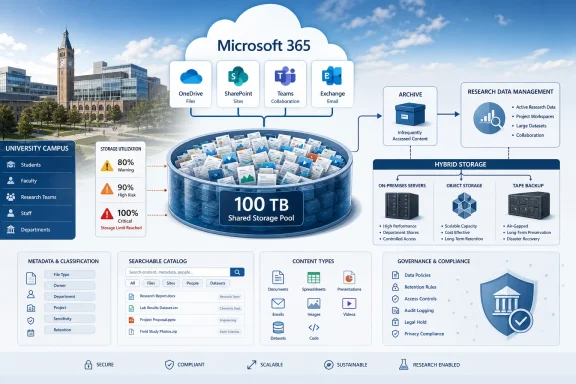 Microsoft 365 Education storage is pooled, not per-user capacity
Microsoft’s current Education documentation gives eligible tenants a 100 TB base pool shared across OneDrive, SharePoint Online and Exchange Online. Paid Office 365 or Microsoft 365 A3 licences add 50 GB each to the pool, while paid A5 licences add 100 GB each. Additional storage is available in 10 TB increments at an estimated retail price of $300 per month.
That produces the $360,000-per-petabyte annual figure cited by Arcitecta: 100 lots of 10 TB at $300 monthly reaches $30,000 a month, or $360,000 over a year. It is a reasonable arithmetic illustration, but it should not be read as a universal invoice. Actual institutional pricing can vary by agreement, region, education discount and the mix of licences already contributing to the tenant pool.
There is a more important distinction missing from the shorthand description of “50 GB to 100 GB per licensed user.” Those additions apply to qualifying paid licences; they do not mean every student account independently adds that amount to available storage. Microsoft’s service description specifically notes that Student Use Benefit licences do not contribute to the central storage pool. A university with tens of thousands of student identities but a comparatively small paid faculty and staff licence base can therefore have far less pooled capacity than a simple headcount calculation suggests.
For administrators, this makes storage planning a tenant-wide exercise. A large research group’s SharePoint library, a collection of former staff OneDrives, and Exchange shared mailboxes all draw from the same allowance. Teams can obscure the problem further: channel files are generally stored in the associated SharePoint site, while files shared in private and group chats reside in the uploader’s OneDrive. A product claiming to manage data “in Teams” must consequently understand the SharePoint and OneDrive locations underneath the Teams interface.
The deadline is operational, not theoretical
Microsoft does not immediately shut down a tenant when pooled usage reaches its limit. Its published guidance says technical contacts receive notifications at 80% use, with admin-center warnings at 90%. At 100%, the tenant has 30 days to act before OneDrive and SharePoint become read-only.
That last condition is why universities should avoid treating the issue as a procurement discussion to be resolved after the quota is exhausted. A read-only state means staff and students cannot add or modify files in OneDrive or SharePoint, although they can still view, download and delete content. Exchange mail continues to function, but the institutional collaboration layer does not.
The immediate work is less glamorous than a migration: establish the true baseline. Microsoft directs education administrators to the Microsoft 365 admin center’s storage reports to see the tenant’s capacity and use. That review needs to identify inactive OneDrives, oversized SharePoint sites, recycled content still consuming capacity, duplicated collaboration material and data tied to departing users, research projects or expired retention obligations.
Arcitecta’s principal claim is that Mediaflux Connect 365 can turn that inventory task into active data management: analyse files, enrich them with metadata, decide which materials remain in Microsoft 365 and move others to managed storage. That is a sensible category of tool for research-intensive institutions, where filenames and folder structures rarely provide enough context to decide what can be removed. However, the company has not publicly provided product pricing, tested migration rates, supported storage-target details, or named university customers using Connect 365 in production.
Those omissions matter. A university cannot evaluate a lifecycle-management product only on its ability to discover files. It needs to know whether it preserves access controls, audit trails, retention classifications, immutable-record requirements, version history and the links that users encounter in SharePoint and Teams. Moving a dataset cheaply is easy compared with moving it without breaking governance or daily work.
Microsoft already has a lower-cost archive route
Arcitecta’s announcement frames the choices as paying for more Microsoft 365 storage, deleting data, or moving it to external on-premises, cloud or hybrid infrastructure. Microsoft’s own portfolio adds a fourth option: Microsoft 365 Archive for Education.
For eligible education tenants, Microsoft says archived SharePoint content can be charged at $0.02 per GB per month when archive storage exceeds the tenant’s standard allocation. That is lower than the approximately $0.03 per GB monthly rate implied by the $300-per-10-TB standard storage packs. Microsoft 365 Archive therefore deserves consideration before an institution assumes that data must leave Microsoft’s platform to reduce costs.
Archive is not equivalent to live SharePoint storage. It is designed for inactive sites, and users cannot interact with the archived content until it is reactivated. Microsoft’s Purview retention policies and labels can continue to apply, and archived material remains subject to the relevant governance configuration, but an archive tier is not a seamless substitute for content researchers need to edit and share every day.
That split should shape procurement. Microsoft 365 Archive may work for completed projects, old department sites and records that must be retained but are rarely accessed. A third-party product such as Mediaflux Connect 365 could be more compelling where the institution needs to place large research collections on tape, object storage or an on-premises system while still applying a metadata model across the archive. The key is to compare the full operational cost, including recall, migration, support and compliance administration—not merely the monthly storage rate.
Metadata is the product’s real differentiator, if it holds up
Arcitecta is selling more than bulk file movement. Its argument is that higher education needs richer metadata describing where data originated, how it was generated and how it should be managed. That is a meaningful distinction for scientific datasets, imaging collections, audiovisual archives and records that must be retained for grant, ethics or institutional purposes.
Storage quotas alone cannot determine whether data can be deleted. The data owner, legal status, research-retention obligation, sensitivity classification and likely reuse value all matter. A stale project folder could contain disposable duplicates; it could also hold irreplaceable source data. The more credible use of a tool like Connect 365 is therefore as a review and classification layer before migration or deletion, not as an automated cleanup engine.
Administrators should also separate ordinary file storage from the wider Microsoft 365 compliance record. Teams messages, for example, have their own data locations and eDiscovery treatment distinct from channel files. Removing a SharePoint document library to free pooled storage does not automatically resolve every retention, legal-hold or discovery obligation associated with the Team that used it.
What universities should verify before moving data
Any institution considering Mediaflux Connect 365 should treat the product as one option within a documented storage-control programme. The practical questions are straightforward, but the answers must be contractually and technically specific.
- The university should calculate its actual pooled-storage entitlement using the paid licence mix, rather than estimating capacity from total user accounts.
- The IT team should map Teams content to its underlying SharePoint and OneDrive locations before setting deletion or migration rules.
- Records, research governance and security teams should determine which content is eligible for archival, which must remain immediately available, and which can be defensibly deleted.
- Procurement should request evidence of permission preservation, retention-label handling, audit logging, version treatment, encryption, migration rollback and eDiscovery implications.
- Finance should compare standard Microsoft 365 storage, Microsoft 365 Archive, existing institutional storage and third-party targets on a multi-year basis.
Mediaflux Connect 365 is available now, according to Arcitecta. Its launch does not change Microsoft’s Education storage policy, but it highlights the practical decision facing universities that have delayed acting on it: once a tenant reaches 100% pooled capacity, the conversation stops being about long-term data architecture and becomes a 30-day race to keep OneDrive and SharePoint writable.