
The important practical divide is whether the same account can sign in at office.com. If browser sign-in works while desktop apps fail, the account has already cleared the cloud-side authentication path; the fault is likely on the Windows device, in its local token cache, device registration, or cryptographic key material. If the browser also refuses the account, clearing the TPM is a distraction. Start with account status, multifactor authentication, Conditional Access, licensing, and any administrator block.
Microsoft’s documentation also makes clear that the “TPM malfunctioned” wording is broader than the hardware. The company lists broken Office credentials, a blocked Microsoft Entra BrokerPlugin process, stale token files, disabled Entra devices, hybrid-join failures, outdated BIOS firmware, and profile corruption alongside an actual TPM reset. Treating every 80090016 prompt as a failed TPM chip can turn a recoverable Office activation fault into a Windows Hello and BitLocker recovery event.
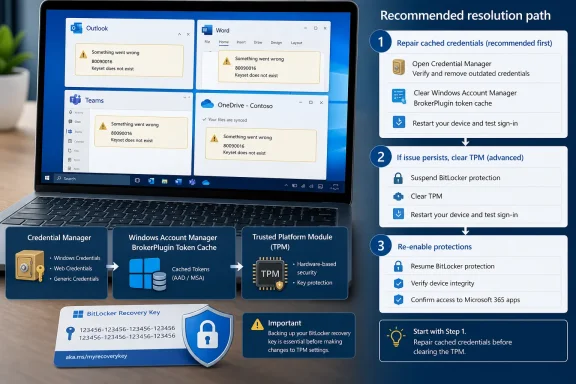 The first repair is an identity-cache repair
Appuals recommends deleting MicrosoftOffice16 credentials from Credential Manager and clearing the TokenBroker account data in the Microsoft.AAD.BrokerPlugin package, with an additional cleanup in the Windows Cloud Experience Host package where present. That is not an improvised registry trick: Microsoft publishes the same directories in its current Microsoft 365 Apps activation procedure.
The cache-first order is sound because desktop Microsoft 365 does not merely submit a password to the service. Windows brokers the account through Web Account Manager and its package-based identity components, then supplies tokens and device-bound cryptographic material to Office. A password that works in a browser can therefore coexist with a local key reference that no longer exists, an expired broker token, or an old credential entry from a previous workplace identity.
For an affected user, the low-risk first pass is narrowly scoped:
- Close every Office app, Outlook, Teams, and OneDrive before changing credentials or token files.
- Remove only Credential Manager entries clearly associated with
MicrosoftOffice16, rather than wiping unrelated saved passwords. - Delete the files in the BrokerPlugin and CloudExperienceHost
AC\TokenBroker\Accountsfolders Microsoft identifies, then restart before signing in again. - Confirm that antivirus, a proxy, firewall policy, or VPN is not blocking the
Microsoft.AAD.BrokerPlugin_cw5n1h2txyewyprocess.
That last check is absent from Appuals’ practical first method but appears in Microsoft’s official sequence. It matters in managed environments: a security product that blocks the broker can recreate the symptom after an apparently successful cache reset. Repeatedly clearing the cache without finding that block only guarantees repeated user disruption.
Microsoft also places “reset Microsoft 365 activation state” before credential removal in its full procedure. That option is especially relevant where Office activation itself is damaged, rather than merely the Windows sign-in token used to reach it. Appuals does not include it, which makes its five-step list useful for a common client-side repair but incomplete for administrators dealing with persistent enterprise activation failures.
Clearing the TPM is a last-resort operation, not a sign-out button
The most consequential warning in Appuals’ guide is also its most important: save the BitLocker recovery key before a TPM clear. Microsoft’s Windows security documentation goes further, warning that clearing the TPM removes keys associated with it and may affect data protected only by those keys, including virtual smart cards and Windows sign-in PINs. Windows will normally reinitialize the TPM after restart, but that does not preserve the old TPM-backed keys.
This is why the instruction to “clear TPM” needs a sharper operational boundary than many troubleshooting pages give it. A TPM clear should be considered only after the Office credential and broker-cache repair has failed, after the user’s BitLocker recovery material has been verified, and only with IT approval on a work or school device. Microsoft explicitly warns users not to clear a TPM on a device they do not own unless their IT administrator directs them to do so.
Appuals directs users to tpm.msc, while Microsoft’s current consumer-facing walkthrough uses Windows Security’s Device security area to reach Security processor troubleshooting and Clear TPM. Both are Windows-supported routes; Microsoft specifically advises using operating-system tools rather than clearing the module directly in UEFI. The path differs by Windows release and policy configuration, but the risk does not.
A second omission is what to do if the TPM clear itself fails. Microsoft documents error 0x80290300 as a physical-presence or firmware-management problem, often caused by BIOS settings that disallow TPM reset requests from the operating system. In that situation, retrying Office repairs will not solve the firmware policy. IT should check the device manufacturer’s BIOS settings and firmware updates instead of asking the user to make repeated destructive changes.
Work or school connections require an ownership check
Appuals advises disconnecting and reconnecting the account in Settings > Accounts > Access work or school when its local device relationship appears stale. Microsoft similarly includes disconnecting and rejoining Microsoft Entra ID in its repair tree. But the operation is not a universal self-service fix.
A Windows device can be merely workplace-registered, Microsoft Entra joined, hybrid joined to on-premises Active Directory and Entra ID, or managed through Intune. Those states look superficially similar in Settings but have different recovery paths. Microsoft specifically calls for dsregcmd /status and User Device Registration event logs when an Entra hybrid join is implicated, and it tells administrators to inspect whether the device object is disabled or deleted in Microsoft Entra ID.
That is the practical flaw in a generic “disconnect, restart, reconnect” instruction: on a managed machine, it can remove a working join state or collide with organizational enrollment and compliance policy. Appuals does advise contacting the help desk when a device is joined or managed, but its description understates Microsoft’s own recommendation that Entra device status is an administrative check, not a user-level guess.
The repair sequence for managed endpoints should therefore be controlled:
- Verify whether the user can sign in to Microsoft 365 in a browser and whether another Windows profile reproduces the desktop failure.
- Repair the Office credentials and BrokerPlugin store first, while preserving device enrollment.
- Collect the exact error code, timestamp, device name, Windows build, Office build,
dsregcmd /statusoutput, and relevant registration events if it persists. - Have the administrator check the device record, compliance state, Conditional Access results, and whether the device is disabled, deleted, or failing hybrid registration.
- Clear TPM or re-register the device only after recovery keys, device-management consequences, and the cause of the mismatch are understood.
This is also where Microsoft’s recommendation to update device BIOS deserves more attention than it receives in the Appuals guide. Motherboard replacement, firmware changes, and TPM configuration changes are recurring conditions in reports of 80090016. When the hardware identity has legitimately changed, stale Windows identity data may be only part of the problem.
Memory integrity belongs to a compliance investigation
Appuals includes enabling Memory integrity under Windows Core isolation as a possible remedy. Microsoft does list that step in its activation article, so it is not unsupported advice. But it should not be read as a general cure for “Keyset does not exist.”
Memory integrity is a Windows virtualization-based security feature. Enabling it can satisfy a security baseline or device-compliance requirement, but it does not reconstruct a missing Office credential, recreate an Entra device object, or restore TPM keys erased by hardware changes. If a managed organization requires it, the relevant question is whether Intune or Conditional Access considers the device noncompliant—not whether the Office dialog itself mentions TPM.
If Windows reports an incompatible driver when Memory integrity is enabled, fix or replace the driver through the vendor-supported route. Appuals is right to discourage registry workarounds here. A compliance setting bypassed locally is unlikely to satisfy a management service that evaluates the device after it checks in.
A fresh Windows profile is a diagnostic result, not simply a workaround
Testing the same Microsoft 365 account in a new Windows user profile is one of the cleanest ways to separate a per-user corruption issue from a device or tenant problem. Microsoft’s own activation guide ends with a new administrator profile after a clean boot, and Microsoft community cases involving 80090016 repeatedly identify profile recreation as the eventual fix when credential cleanup alone did not hold.
If Office activates in the new profile, the evidence points at the old profile’s identity store, cached credentials, or user-bound key material. Rebuilding the profile may be less disruptive than repeatedly clearing the TPM, and it avoids treating the entire PC as defective. If the error follows the same account into the new profile, however, IT should stop treating it as a single-profile issue and examine device registration, firmware, Microsoft Entra status, and tenant policy.
The real takeaway from Appuals’ guide is not that TPM clearing should be avoided at all costs. It is that the visible error text is an unreliable diagnosis. Start with the least destructive repair that matches the evidence: browser access versus desktop failure, one profile versus every profile, and one device versus every device. On a BitLocker-protected business laptop, that distinction can be the difference between a five-minute token reset and a recovery-key incident.
