
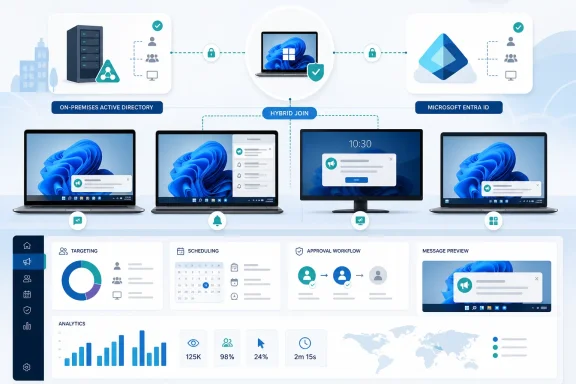
The practical result is that administrators no longer need an Entra ID–joined-only fleet to use the Windows delivery surfaces in Organizational Messages. Hybrid-joined PCs can receive centrally managed communications through supported Windows experiences, while administrators continue creating, targeting, approving, scheduling, and measuring those campaigns from the Microsoft 365 admin center.
This is a communications feature, not a change to hybrid identity itself. A PC must already be successfully hybrid joined before it can qualify for Organizational Messages; the rollout does not enroll devices, repair broken Entra registrations, or turn an ordinary on-premises domain-joined machine into a managed cloud identity.
 The rollout reaches the Windows estates Microsoft has not fully left behind
Microsoft’s terse roadmap description says only that Organizational Messages “now supports Hybrid-joined Devices.” The detail that matters is in the current Microsoft Learn requirements: Windows support is limited to devices that are either Microsoft Entra ID joined or Microsoft Entra hybrid joined.
That definition excludes a common edge case: a conventional Active Directory domain-joined PC that has not completed its hybrid registration. A machine can be managed through traditional Group Policy and still be invisible to this service if it lacks the Entra device identity. For organizations midway through an Intune, Entra Connect, Windows 11, or cloud-management transition, that distinction determines whether a campaign reaches a small pilot group or the majority of staff.
Microsoft Entra hybrid join keeps a device joined to on-premises Active Directory while registering it in Microsoft Entra ID. Microsoft’s Entra deployment documentation makes clear that hybrid join depends on the underlying identity and connectivity plumbing: device synchronization or federation configuration, a correctly configured service connection point where applicable, and access to Microsoft’s registration and sign-in services. The Organizational Messages change rides on that existing device state rather than replacing it.
For sysadmins, the immediate implication is straightforward: Organizational Messages can now be considered for fleets that use co-management or retain Active Directory domain join for legacy applications, file services, certificate workflows, or staged migration reasons. It is no longer a feature reserved for cloud-native Windows endpoints.
“Launched” does not mean every Windows PC can display a message
The Roadmap entry identifies the control surface as the Microsoft 365 admin center’s web experience, but message delivery remains constrained by Windows version, edition, patch level, policy, and device identity. Microsoft’s own requirements are much more specific than the roadmap card.
For Windows delivery channels such as Windows Spotlight and the taskbar, recipients must be running Windows 11 version 24H2 or 25H2 Enterprise. Microsoft also says that the taskbar experience requires KB5094126, the June 9, 2026 cumulative update for Windows 11 24H2 and 25H2. That package corresponds to OS builds 26100.8655 and 26200.8655.
The important catch is the edition requirement. Microsoft’s KB5094126 applies to all editions of Windows 11 24H2 and 25H2, but the Organizational Messages documentation describes Windows-channel recipients as using the Enterprise editions. Installing the named cumulative update on a Home or Pro system does not, by itself, establish eligibility for the admin-managed message surfaces.
Organizations should also avoid treating the phrase “Hybrid-joined Devices” as a blanket compatibility promise for every Organizational Messages location. The service supports several destinations, including Windows Spotlight, the taskbar, Notification Center, Microsoft Teams, and limited email templates. The Windows-specific device requirements govern Windows delivery; a Teams or email message has its own delivery path and audience conditions.
Microsoft’s documentation also says that Intune policies can block Organizational Messages. In other words, an eligible hybrid-joined device can still fail to show a message because its configuration policies intentionally disable the relevant Windows experience. That is useful from a governance perspective, but it means a successful campaign test needs more than a correctly selected Entra group.
The operational check is device state, not the group assignment
An Entra group assignment alone cannot validate this rollout. Before treating an absent message as a targeting failure, administrators should confirm that affected devices have completed hybrid join.
Microsoft’s troubleshooting guidance identifies the expected states in dsregcmd /status: DomainJoined should report YES, AzureAdJoined should report YES, and WorkplaceJoined should generally report NO for a properly hybrid-joined domain computer. A device that is merely workplace registered after a user added a work account is not equivalent to a hybrid-joined endpoint for this purpose.
That check matters because hybrid registration failures can look deceptively like a communications-platform issue. Microsoft lists several familiar causes: no network line of sight to a domain controller, an unreadable or misconfigured service connection point, proxy problems in the system context, failed access to the device-registration endpoint, or a device object that has not yet synchronized from Active Directory to Entra ID.
The service itself has network dependencies too. Microsoft lists fd.api.orgmsg.microsoft.com and ris.prod.api.personalization.ideas.microsoft.com as Windows firewall endpoints that must be reachable for Organizational Messages. A security team that allows Entra registration but blocks the Organizational Messages endpoints may have healthy hybrid join and still see no delivery.
A sensible validation sequence is therefore:
- Confirm the target computer reports the expected hybrid-join state with
dsregcmd /status. - Verify that the device runs Windows 11 Enterprise 24H2 or 25H2, and that taskbar delivery devices have KB5094126 or a later cumulative update.
- Check whether Intune, Group Policy, or other endpoint configuration has disabled the intended Windows surface.
- Confirm outbound access to Microsoft’s Organizational Messages endpoints.
- Use a small Entra group containing known-good hybrid-joined test devices before scheduling a broad campaign.
Microsoft warns that tenant-based targeting can take 24 to 48 hours to initialize when a tenant has not scheduled a message in the preceding 30 days. That means administrators should not use an immediate non-delivery result as proof that hybrid device support is malfunctioning.
The feature is also a governance decision
Organizational Messages is designed for communications that would otherwise arrive as email, intranet posts, or help-desk reminders: Microsoft 365 service availability, internal updates, onboarding information, feature education, and adoption campaigns. The Microsoft 365 admin center provides campaign controls such as schedules, frequency, approval workflows, recipient selection, and performance reporting.
Those controls make the feature more manageable than an ad hoc script or a broad notification policy, but they also create a new channel that security, communications, and endpoint teams need to jointly govern. Windows notifications and taskbar messages are high-visibility real estate. A poorly targeted campaign can be more disruptive than an unread email, especially when it reaches users through several surfaces in the same week.
Microsoft supports targeting Entra groups, while certain advanced targeting features can use aggregates such as department, location, company, and usage behavior. Those advanced capabilities require an eligible licensing position, which Microsoft lists as Microsoft 365 E3/E5, Office 365 E3/E5, or Windows Enterprise E3/E5. The basic hybrid-device rollout should not be confused with a newly announced entitlement to every advanced targeting option.
The service also records aggregate indicators including messages seen, clicks, and click-through rate, and allows data export to CSV. The notable limitation is that Microsoft is removing email open tracking for Organizational Messages worldwide; historical open-count data remains available, but new email open metrics will no longer be collected. Admins planning adoption reporting should use clicks, delivery behavior, support-volume changes, and product-usage measures rather than assume email-style open rates will remain available.
Microsoft’s public records show the rollout was completed after a long roadmap cycle
Roadmap ID 503564 was created on October 6, 2025, with preview availability listed for December 2025 and general availability for June 2026. An independently maintained Microsoft 365 Message Center archive still shows an April 10, 2026 snapshot of the same item marked In development. The current roadmap metadata supplied with the update marks it as launched and was last updated on August 24, 2026.
That discrepancy is not evidence of a reversal; it is a reminder that archived roadmap snapshots preserve a point in time, not the live status. Microsoft Learn’s current device-requirements page is the stronger operational record because it explicitly names hybrid joined devices as supported now.
For IT teams, the action is to update the eligibility assumptions in existing Organizational Messages pilots. Hybrid-joined Windows 11 Enterprise devices that meet the supported build, update, policy, and network requirements can now be included in the same communication plan as Entra ID–joined PCs. Devices that fail the hybrid-join check, remain on unsupported Windows releases or editions, or have blocked delivery policies will still sit outside that reach.