
Microsoft’s own general-availability announcement, corroborated by reporting from IT Pro and TechRadar, puts Cowork in the Microsoft 365 Copilot app as a separate mode from ordinary Copilot Chat. A user can ask it to gather information from Microsoft 365, build an artifact, arrange meetings, prepare a briefing, draft communications, manage files, or use approved skills and plugins across a multistep task. The meaningful distinction is that Cowork has access to tools that can change a user’s working environment rather than simply returning prose in a chat window.
For Windows administrators, that moves the risk discussion away from whether employees can write a good prompt. The important questions are which users may delegate actions, what data those actions can reach, what external plugins can do with the resulting work, and how much each completed task costs.
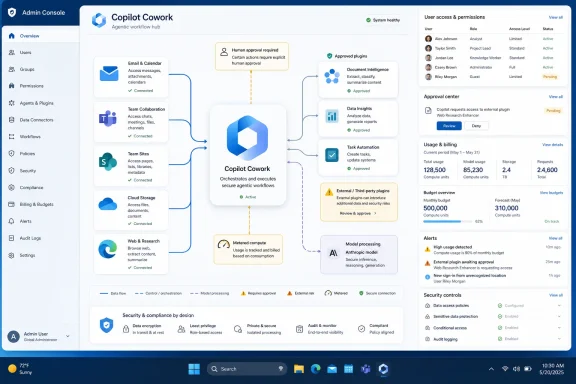 General Availability Changed the Admin Control Plane
During Frontier preview, Copilot Cowork was treated as an agent with preview-era access controls. Microsoft’s current administration documentation says that model has changed: Cowork is now classified as an agentic system, and administrators manage it through the Microsoft 365 admin center’s Agents area rather than through the prior All Agents > Cowork path.
That sounds cosmetic, but it reflects a material deployment change. General availability does not mean Cowork automatically appears for every Microsoft 365 Copilot user. Microsoft says Cowork is off by default, and its use depends on enabling usage-based billing. An administrator can make it visible to users without switching on billing, but then users request access and IT must review those requests against policy, cost, and compliance requirements.
In other words, Cowork is not a feature that can be safely evaluated through a broad “turn it on and see” rollout. The prerequisite is a Microsoft 365 Copilot license, followed by billing configuration, user or group access decisions, and an approved model-provider configuration. Microsoft’s support guidance says Cowork requires Anthropic to be enabled in the tenant because the service uses Anthropic models as a subprocessor.
That last requirement deserves more attention than Microsoft’s product language gives it. Organizations that approved Microsoft 365 Copilot on the assumption that they were standardizing entirely on Microsoft-operated models must revisit their provider policy before enabling Cowork. Microsoft says prompts, responses, and Microsoft Graph data used by Cowork are not used to train foundation models, and that existing Microsoft 365 security and governance policies apply. But the service is still designed around Anthropic model availability for much of its reasoning and tool use. That is a vendor and compliance decision, not merely a checkbox.
Cowork Executes Work, but It Is Not an Unsupervised Employee
The central claim in the Cowork launch is that Microsoft 365 Copilot can now act rather than merely answer. That is accurate in a narrow, important sense: Cowork can sequence work across Outlook, Calendar, Teams, OneDrive, SharePoint, Word, Excel, PowerPoint, and PDF creation. Microsoft documents examples such as researching a topic, preparing a document, and emailing it to stakeholders in one conversation.
But “independently execute” needs qualification. Cowork does not operate as a free-running autonomous worker with standing authority over a user’s Microsoft 365 account. Microsoft’s own support and responsible-AI documentation says it shows its work step by step and requires explicit approval before sensitive actions such as sending an email, posting in Teams, or scheduling a meeting. Users can also pause, resume, or cancel work.
There is a convenience tradeoff built into that safeguard. A user can choose “Always allow” for similar actions during the current conversation, reducing the number of approval prompts. That can make a long task move faster, but it also means the employee approving a task is deciding when to relax a control that otherwise catches recipient errors, inaccurate drafts, and unintended calendar changes.
Cowork remains constrained by the permissions of the signed-in user. It cannot reach SharePoint sites, files, mailboxes, or Teams content that the user could not already reach. That is a sensible baseline, but it is not a complete governance answer. Microsoft 365 environments frequently contain broad legacy permissions, overshared SharePoint libraries, and distribution lists with poorly understood membership. Cowork makes those existing access decisions operationally easier to exploit at scale.
The sensible first use cases are therefore bounded, reviewable workflows: a weekly project-status draft assembled from named Teams channels and files; meeting preparation that produces a briefing but does not send it; or a structured comparison of approved document sets. The poor first use cases are actions that combine ambiguous data, high consequences, and an irreversible external step—legal communications, HR decisions, customer commitments, financial approvals, or anything involving a mailbox or site the user should not have broad access to in the first place.
Microsoft itself cautions that Cowork is not intended for uses requiring guaranteed accuracy without human review. It specifically flags legal filings, medical decisions, and financial transactions that bypass approval processes. Those warnings should be treated as deployment boundaries, not generic responsible-AI boilerplate.
Usage Billing Makes Every Workflow a FinOps Workload
Cowork’s biggest operational change is not its chat-to-action toggle. It is the billing model.
Microsoft charges Cowork consumption in Copilot Credits. At the published pay-as-you-go rate, a credit costs $0.01, while the prepaid P3 option offers discounts for organizations that commit to volume. The difficult part is that a task does not have a single fixed price. Microsoft counts model responses, tool and skill calls, image generation, and browser tasks toward consumption. The actual cost varies with the model, context size, number of steps, connected tools, and runtime.
Microsoft has provided an estimator, per-task user cost visibility, tenant-, group-, and user-level reporting, budgets, alerts, and hard caps. Those are useful controls, but they also reveal the underlying reality: a Microsoft 365 Copilot license is now an entry point to an additional consumption service. An organization that budgets only per-seat Copilot licensing will not have a complete Cowork cost forecast.
Microsoft’s June announcement said billing began immediately for general-availability customers, with a grace period only for tenants that had Cowork users in Frontier between March 30 and June 16. That grace period ended July 1, 2026. Any organization that tested Cowork under Frontier assumptions and deferred billing configuration has already crossed the line into paid production usage.
The first financial control should be scope, not a large tenantwide cap. Assign a limited group of users with similar work patterns, require a known set of approved workflows, and set small group-level budgets that can expose real task costs. A sales operations team preparing account summaries and a communications team creating weekly updates will consume Cowork differently even if they issue roughly the same number of requests.
The second control is to measure completed business output, not prompt volume. A $3 task that produces an accurate, approved client briefing may be cheap; a 30-cent task that creates a misleading draft requiring 20 minutes of correction is not. Microsoft’s public pricing materials emphasize light, medium, and heavy tasks, but internal chargeback or showback needs to use a business unit’s actual review time, error rate, and avoided manual work.
Browser Use and Plugins Expand the Security Review
Cowork’s initial Microsoft 365 scope was already substantial, but general availability adds another layer: partner plugins and local Edge browser use in Frontier. Microsoft lists available or announced integrations from providers including Miro, monday.com, Moody’s, Morningstar, LSEG, S&P Global Energy, Enosix, Harvey, TeamsMaestro, and additional vendors planned for later availability.
Plugins change Cowork from a Microsoft 365 workflow assistant into a potential bridge to external business systems. IT should not treat an approved plugin as automatically suitable for all users. The review needs to establish what data is sent to the plugin, whether the plugin can perform write actions, what authentication it uses, whether access is group-scoped, and how activity will be logged.
Microsoft says admins control plugin availability, deployment, and user access. That makes the correct deployment posture straightforward: start with no third-party plugins, then approve individual integrations for specific business groups after assessing their permissions and data flows. The product’s ability to chain tools is its value; it is also why connector sprawl becomes more consequential than it was for a conventional chat assistant.
Browser use adds a separate concern for Windows environments. Microsoft says Cowork can work through a local Microsoft Edge browser session, following enterprise policies already applied to that user. Credentials and cookies remain on the device, and Cowork works through sites where the user is already signed in. If it reaches an authentication point it cannot complete, it returns the browser to the user.
That design avoids handing browser cookies to a cloud agent, but it does not eliminate risk. A Cowork session running in Edge inherits the consequences of the user’s active web access. Windows administrators should validate Edge policies, Conditional Access behavior, browser extension rules, session controls, and approved-site boundaries before treating browser automation as ready for broad use. The browser is no longer just where a user reads Cowork’s results; it can become part of the task execution path.
A Deployment Plan Needs Permission Hygiene Before Prompt Training
Cowork’s usefulness will expose weak Microsoft 365 governance faster than a normal Copilot Chat rollout. It can search broadly, assemble outputs, and propose actions across the services where employees already work. The effective security boundary is therefore the identity and data-permission model already present in the tenant.
Before broad enablement, administrators should audit the workspaces Cowork will be asked to use: overshared SharePoint sites, stale Teams memberships, public link settings, external sharing, sensitive labels, and mail-enabled groups. Microsoft says Cowork inherits Microsoft 365 security, privacy, compliance, audit, eDiscovery, retention, Insider Risk Management, and sensitivity-label controls. Those controls are valuable only if the tenant’s underlying data classification and access assignments are credible.
A practical pilot should also establish a human-review rule. Generated files are saved to OneDrive and SharePoint; communications, appointments, and Teams posts can affect other people. Treat Cowork-created material as a draft until a designated employee verifies sources, recipients, attached files, and requested action. Microsoft explicitly warns that incomplete or outdated organizational data can produce inaccurate content, and that complex workflows with multiple dependencies can fail to complete as expected.
Copilot Cowork gives Microsoft 365 customers a more capable way to delegate repetitive cross-application work, particularly on Windows desktops where the Copilot app and Edge can sit beside the applications employees already use. Its arrival does not remove the need for people, permissions, or process ownership. It makes each of those controls visible in the output—and, beginning with every billable task, visible in the budget.
