

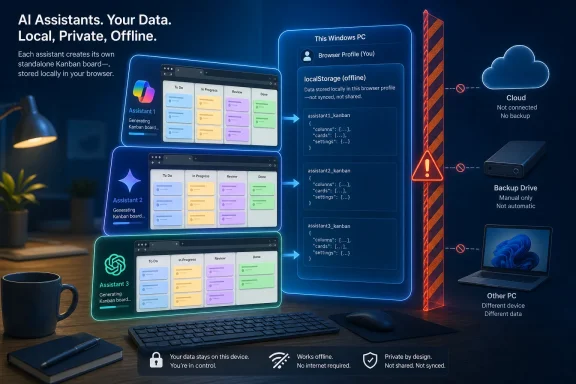
The test asked Gemini, ChatGPT, and Copilot for the same small application: a four-column board for To Do, In Progress, Review, and Done; task titles, notes, priorities, and due dates; editing, deletion, and drag-and-drop; local saving; and offline use. According to How-To Geek, all three returned working standalone HTML applications when their code was pasted into Notepad, saved to the desktop, and opened in a browser.
Copilot won because it supplied more of the surrounding product experience without being asked. Its board included usage instructions, a visible “Changes saved locally” notice, an initial-column selector when creating a task, task counts, a confirmation-protected Clear Board control, and click-to-edit cards. Gemini’s version was more visually restrained, while ChatGPT’s was described as closer to a polished traditional application, with stronger visual hierarchy and always-visible task controls.
That is a credible win on first-use usability. It is not, however, evidence that Copilot is the better coding assistant in a general sense—and How-To Geek’s own test design does not establish that broader claim.
The winner was judged on product instincts, not code quality
The striking part of the result is not that Copilot can generate a Kanban board. All three assistants can emit the HTML, CSS, and JavaScript needed for a small browser application in one response. The meaningful difference was that Copilot anticipated mundane needs that often make the difference between a demo and a tool someone keeps open all day.
A permanent saved-state message, an explicit starting column, and confirmation before erasing the board are not technically ambitious features. They are the kinds of decisions a developer or product owner adds after watching somebody use a prototype and hesitate. In this case, Copilot appears to have supplied those decisions in its initial output, while Gemini and ChatGPT followed the requested feature set more literally.
That makes the article’s conclusion more narrowly useful than the headline suggests. Copilot did not necessarily write more robust JavaScript, better drag-and-drop handling, more accessible controls, or safer data persistence. It made a more opinionated interpretation of an underspecified brief. For a personal tool, that may be exactly what the author wanted.
Gemini’s minimalism also deserves more credit than the final ranking gives it. A colored priority strip, controls that appear only on hover, and a board-level scrollbar point to a design that keeps attention on work rather than chrome. ChatGPT’s persistent Edit and Delete controls may look busier, but they can be easier to discover for people who do not know that a card is interactive. These are interface tradeoffs, not universal victories.
How-To Geek’s test was a single reviewer’s practical comparison, and it should be read that way. The report does not establish how many generations each assistant received, whether the first output was used unchanged, which exact model variants were selected, what browser was used, or whether the result was retested after a restart. Those omissions matter more than visual preference when the stated requirement is dependable offline storage.
“Saved locally” is a browser-storage promise, not a backup plan
The Copilot board’s “Changes saved locally” message answers a question visually, but it cannot itself prove that the application will retain data as the user expects. In a standalone browser app, the likely mechanism is the Web Storage API’s localStorage, which saves key-value data in the browser profile rather than inside the .html file.
MDN documents that localStorage normally persists when the browser closes and reopens. But it is tied to an origin—the combination of scheme, host, and port—not to a user’s concept of “this project board.” It will not follow the HTML file to a second PC, a different Windows account, another browser, or a clean browser profile. Clearing site data can remove it, and private-browsing sessions do not offer the same persistence.
The weak point is especially relevant to the exact workflow described in How-To Geek: double-clicking an HTML file from the desktop opens it using a file: URL. MDN explicitly says localStorage requirements for documents loaded from file: URLs are undefined and may vary among browsers. In practical terms, a board can appear to work perfectly in the reviewer’s chosen browser yet behave differently after being moved, renamed, opened in another browser, or affected by a privacy policy.
That does not make these apps useless. It means users should not confuse “offline” with “self-contained,” or “locally saved” with “backed up.” A single-file application and the data it displays are usually two separate things.
For individual planning, that arrangement is often acceptable. For work tasks, deadlines, project notes, or anything that must survive a device replacement, browser reset, or support incident, it is inadequate without an export function. The submitted comparison does not indicate that any of the three generated apps included JSON, CSV, or HTML-data export and import. That is the feature a real-world version needs before it replaces even a basic spreadsheet.
The benchmark leaves out the checks that make generated code deployable
How-To Geek tested what a typical non-developer would first notice: whether the board opens, looks good, accepts tasks, and feels useful. That is an appropriate test for a personal experiment. It is not a deployment review.
A Windows user can run a generated .html file by double-clicking it, but should treat it as code, not as a document. The browser may restrict some local-file behaviors; corporate endpoint controls may intervene; and JavaScript bugs are still JavaScript bugs regardless of whether an AI or a developer wrote them. The smallest generated app can also become hard to repair once a user starts layering follow-up prompts onto an unversioned file saved on the Desktop.
GitHub’s current Copilot documentation makes a related point from the developer side. Its local and cloud sandboxing features exist because agents that run commands and manipulate files need controlled access to systems and data. Those safeguards apply to coding workflows and are not a blanket guarantee for whatever code gets copied out of a chat into Notepad. A generated standalone web page deserves the same basic scrutiny as any downloaded script.
Before relying on one of these boards, users should verify several things that were outside the How-To Geek ranking:
- Open the file, create tasks, close the browser completely, reopen the same file, and verify that every task is still present.
- Repeat the test in the browser that will actually be used, because
file:URL storage is not standardized across browsers. - Test deletion, Clear Board, and drag-and-drop after creating enough cards to force scrolling.
- Confirm that task text is rendered safely rather than inserted into the page as executable markup.
- Make a copy of the original HTML file before requesting later modifications, because a regenerated “improvement” can erase working behavior.
Accessibility belongs on that list too. Hover-only controls can be elegant but are less discoverable on touch devices and can be inaccessible if keyboard focus does not reveal them. Click-to-edit can be fast, but it needs a clear affordance and keyboard path. Permanent controls consume space but can make the interface more obvious. None of those choices can be settled by screenshots alone.
The word “Copilot” hides an important product distinction
The comparison also treats “Copilot” as a single competitor beside Gemini and ChatGPT, though Microsoft uses the Copilot name across several products. Consumer Microsoft Copilot, Microsoft 365 Copilot, Copilot Studio, GitHub Copilot, the GitHub Copilot CLI, and Copilot inside Windows or Edge have different capabilities, account requirements, data boundaries, and coding workflows.
That distinction matters for readers trying to reproduce the result. GitHub Copilot is explicitly positioned as a developer coding product, while consumer Copilot is a general assistant. A result from one should not be assumed to apply to the other, even if both can generate HTML. Likewise, OpenAI’s ChatGPT Canvas can render and revise HTML and React in a sandboxed workspace, but the file a user eventually saves and runs locally is a different artifact from the preview inside ChatGPT.
The missing model identifiers are the largest reproducibility gap in the experiment. “Gemini,” “ChatGPT,” and “Copilot” are product names, not fixed models. Their output can differ with the selected model, plan, model updates, safety settings, the presence of Canvas or another code workspace, and even seemingly irrelevant prior conversation context. No vendor should be awarded a durable coding crown from an unversioned one-prompt result.
What How-To Geek has shown is still valuable: a modest, offline-first browser utility is now within reach of a non-programmer, and Copilot’s output reportedly had the best default user experience in this specific run. The more useful lesson for Windows enthusiasts is to ask for the second layer of requirements that the original prompt omitted: visible persistence status, export and import, keyboard operation, data validation, and a recoverable backup.
A Kanban board that lives in one HTML file is appealing precisely because it avoids accounts and subscriptions. But unless it can move its data with the user, it has traded vendor lock-in for browser-profile lock-in—and the first Windows reset, browser cleanup, or PC migration will reveal the difference.