
Microsoft’s Roadmap entry 557558 was updated on August 4, 2026 and remains marked “Rolling out,” despite listing general availability as June 2026. A Microsoft 365 Message Center notice published June 11 said the worldwide rollout was expected to finish by late July, with government clouds following from mid-July and also finishing by late July. The Roadmap’s continuing rollout status is the more useful operational signal: administrators should treat availability as tenant-dependent rather than assume every tenant received the update on schedule.
For organizations that rely on employees to report phishing and spam, the practical gain is straightforward. A user who reports a suspicious email can now receive the eventual result—such as phishing, spam, or no threats found—in the language they have chosen for Outlook, rather than in a single tenant-wide default language.
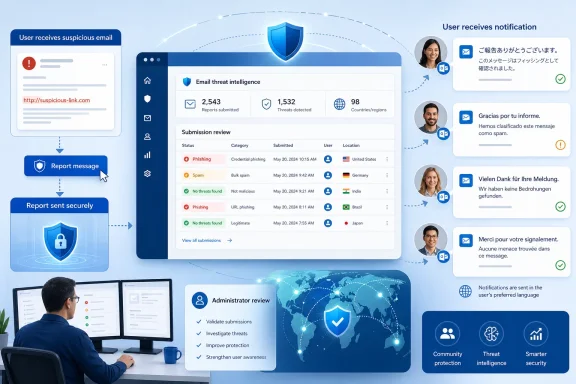 The setting applies to the review-result email, not the reporting experience as a whole
The feature concerns a narrow but consequential step in Defender’s submission workflow. Users report suspicious mail through Outlook’s built-in Report button or a supported third-party reporting tool; administrators see those reports under Actions & submissions > Submissions > User reported in the Microsoft Defender portal. They can submit the item to Microsoft for analysis, assign a verdict, and use Mark as and notify to send the reporter a result.
Microsoft Learn confirms that, when automatic notifications use the default template, the recipient now receives that notification in the preferred language defined in Outlook. Microsoft also says the change does not alter message verdicts, filtering decisions, or automated investigation behavior. A German-language result email, for example, does not mean Defender’s analysis was performed differently from the result sent to an English-language user; only the default notification presentation has changed.
That limitation matters in environments where the result email doubles as a lightweight security-awareness message. The localized email may make users more likely to understand why a message was judged harmful or benign, but it does not make a weak verdict more reliable, recover a deleted message, change a quarantine action, or automatically teach a user what to do next. The notification is feedback after an existing workflow, not a new protective control.
Microsoft’s documentation further confines Mark as and notify to messages that users reported as false positives or false negatives. It is therefore tied to the user-submission pipeline rather than a universal email-notification language setting across Defender for Office 365.
Custom result emails are deliberately excluded
The most important implementation detail is what Microsoft did not localize. Roadmap 557558 and the associated Message Center notice say that custom notification templates configured by administrators are unaffected. Microsoft Learn now states this directly: Outlook-language localization occurs when automatic notifications use the default notification template; custom notification templates remain outside the feature.
That preserves existing wording and branding, but it leaves multilingual organizations with a split outcome. Tenants using Microsoft’s out-of-box result email gain per-user localization automatically. Tenants that replaced the stock copy with a custom phishing, junk, or “no threats found” message keep receiving precisely the custom content they configured—regardless of each user’s Outlook language.
The Defender portal supports custom result text separately for Phishing, Junk, and No threats found, plus a shared footer. The present configuration experience documents those fields, but Microsoft has not announced per-language variants for these admin-review result emails. In other words, administrators cannot assume this rollout translates their customized templates or supplies a new multilingual-template editor.
This is a sensible boundary from a change-management perspective. Automatically translating organization-authored text could create legal, HR, regulatory, or security-communication problems, especially where the customized message tells users to contact a local help desk or follow a country-specific incident process. But it also means the organizations most likely to have invested in tailored communications will see no localization benefit unless they return to the default template.
Admins should therefore review the Email notifications section under Defender’s User reported settings before announcing the feature internally. If “Customize results email” is in use, a test report from a mailbox with a non-English Outlook language setting will establish the actual outcome quickly. The expected result, based on Microsoft’s current documentation, is unchanged custom content.
Outlook language, rather than tenant geography, decides the language
Microsoft’s description is specific about the selector: the result email follows the user’s Outlook language setting. It is not described as following the Microsoft 365 tenant’s default language, the user’s physical location, the email client’s operating-system locale, or the language preferred by the administrator conducting the review.
That decision has useful consequences for multinational tenants. A single Microsoft 365 tenant can provide different default notification languages to different users without administrators building regional workflows, maintaining separate reporting mailboxes, or changing the reviewer’s portal language. The same is true for government-cloud tenants as the rollout reaches GCC, GCC High, and DoD.
It also creates a support consideration. Users who expect a result email in one language but have a different Outlook display language configured may receive a notification they did not anticipate. Help desks should check Outlook language preference before treating that as a Defender delivery or template defect.
Microsoft has not published a list of supported languages for this specific default email template in the Roadmap entry or the Message Center announcement. Nor has it said how the service handles an Outlook language that lacks a corresponding template. That missing detail is material for organizations with less common locales, because a fallback language is operationally different from full localization. Administrators should validate the languages represented in their workforce rather than infer broad coverage from the phrase “preferred language.”
Automatic notifications remain a licensing and workflow question
The localization rollout does not turn on user-result emails in a tenant that has never enabled them. The Message Center notice says the feature is enabled by default when automatic notification is already turned on, while Microsoft’s configuration documentation says automated investigation results emails are available in Defender for Office 365 Plan 2 organizations using Automatic Investigation and Response.
That distinction separates the two notification paths. An administrator can manually review a user-reported email and choose Mark as and notify from the Submissions page. Separately, qualifying Plan 2 environments can automatically email users after automated investigation reaches a result. The new language behavior follows the default template in either relevant path; it does not replace the decision to send notifications at all.
This is also why an organization’s report destination matters. Microsoft Learn says that when reported messages go only to a designated reporting mailbox, they show as “Not Submitted to Microsoft” until an administrator submits them for analysis. A localized result email cannot be generated from an analysis flow that the organization never initiates. Teams that route reports only to a security mailbox should make sure their analysts’ review and notification process is consistent before measuring the feature’s employee-engagement impact.
For users, the notification is only as timely and useful as the review process behind it. A localized “no threats found” email after several days of silence may be easier to read, but it does not solve the backlog that delayed the verdict.
What administrators should do during the remaining rollout
No tenant-wide configuration change is required for the default template. The immediate work is verification and communication:
- Confirm whether the organization uses Microsoft’s default results email or a custom template under User reported settings.
- Test a reported-message review with accounts whose Outlook languages differ from the tenant’s dominant language.
- Confirm that automated user notifications are enabled where the organization expects them, and that the tenant’s Defender licensing supports the desired automated path.
- Update security-awareness and help-desk material so users recognize that Defender’s outcome email may arrive in their individual Outlook language.
The update is a quality-of-life improvement, but a useful one in a reporting workflow that depends on users believing their reports are seen and acted upon. The unresolved operational point is rollout completion: Microsoft projected completion by late July 2026, yet Roadmap 557558 still showed “Rolling out” on August 4. Until that status changes, administrators should test their own tenant rather than rely on the published target date.
