
The practical update is that do not stop at Security Intelligence version 1.457.236.0 simply because early reports identified it as a fix. Later user testing on August 19 found that 1.457.236.0 restored scans for some systems, while others still failed until version 1.457.238.0 or a newer package arrived. The right remediation target is therefore the newest Defender intelligence update currently offered to the device or management channel, followed by a successful test scan.
For administrators, this is a genuine endpoint-health incident. A failed manual scan does not prove real-time protection has stopped, but it removes an important validation control precisely when a user may be responding to a suspicious download or an active security alert.
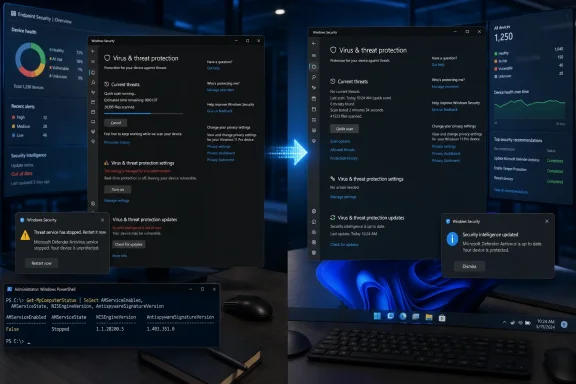 The crash pattern points at Defender’s update path
The reports have a remarkably repeatable sequence. A Quick or Full scan begins, Windows Security then reports that the threat service stopped, and restarting Defender does not reliably prevent the next scan from failing. Some users say Microsoft Defender Offline scans freeze at roughly 90 to 93 percent rather than returning normally to Windows.
In r/sysadmin, Defender for Endpoint administrators reported MsMpEng.exe crashes across multiple endpoints, including machines that had been freshly installed. One report recorded the WinDefend service timing out after a scan request, while other users saw Event Viewer entries with the 0xC0000005 access-violation exception associated with Defender’s scanning components.
Those details matter because they distinguish this incident from the usual one-device troubleshooting case. A corrupt Windows installation, a broken local security policy, or malware disabling Defender can all cause protection problems. The same reproducible failure on clean installations and separate managed endpoints shortly after intelligence updates instead makes the update path the most credible common factor.
Community reports have associated the failures with Microsoft Malware Protection Engine version 1.1.26070.7 and security-intelligence builds including 1.457.222.0, 1.457.225.0, 1.457.226.0, 1.457.227.0, 1.457.230.0, and later 1.457.235.0. CyberInsider also identified engine version 1.1.26080.2 in reports, but that particular engine-version association has not been independently established in the administrator thread reviewed for this article.
Microsoft had not published a public incident explanation at the time of writing. It is therefore fair to call this a strongly evidenced bad Defender update incident, but not to claim Microsoft has confirmed the root cause, a particular DLL defect, or the full affected-build range.
Version 1.457.236.0 was an early recovery point, not a universal finish line
CyberInsider reported that users moving to Security Intelligence version 1.457.236.0 saw scan crashes disappear, based in part on testing noted by security researcher Aryeh Goretsky. That was useful advice early on, but it has already aged poorly as a precise completion criterion.
In the larger r/antivirus discussion, some users reported normal Quick and Full scans on 1.457.236.0. Others said the same version still did not repair their scan failures. Subsequent comments identified 1.457.238.0 as working, and at least one later report cited 1.457.241.0. These are community observations rather than a Microsoft release bulletin, but they establish the operational point: a device is not “fixed” merely because it reached 1.457.236.0.
For IT teams, test the behavior rather than relying only on a version threshold copied from an early report. A current intelligence package, an enabled antimalware service, and a completed Quick Scan provide a much better recovery signal than any one build number.
The same-day succession of intelligence versions is also a reason not to manually roll systems backward unless updating is impossible. Microsoft Defender intelligence packages can arrive several times daily, and a rollback may exchange a scan crash for older detection coverage. Updating to the latest available package should come first.
What to check on affected PCs and endpoints
On an affected PC, use Windows Security’s Protection updates page to check for updates, then run a Quick Scan after the update completes. If that scan finishes, follow with a Full Scan when the endpoint can tolerate the additional I/O and CPU load.
Administrators can inspect core Defender state from an elevated PowerShell session:
Get-MpComputerStatus |
Select-Object AMProductVersion, AMEngineVersion,
AntivirusSignatureVersion, AntispywareSignatureVersion,
AMRunningMode, AMServiceEnabled, AntivirusEnabled,
RealTimeProtectionEnabled
The important distinction is between an engine or scan-workflow failure and a broader protection outage. AMRunningMode should normally be Normal; AMServiceEnabled, AntivirusEnabled, and RealTimeProtectionEnabled should be True on endpoints where Defender is the active antivirus product. Record the output before changing anything so that central teams can identify whether the trouble clusters around a particular intelligence build, platform version, or update ring.
If a device remains stuck on an affected package or refuses the normal update path, Microsoft’s Defender documentation supports removing only dynamic security intelligence and then requesting a new signature update. Run the following from an elevated Command Prompt or PowerShell window:
"%ProgramFiles%\Windows Defender\MpCmdRun.exe" -RemoveDefinitions -DynamicSignatures
"%ProgramFiles%\Windows Defender\MpCmdRun.exe" -SignatureUpdate
The -DynamicSignatures qualifier is important. Microsoft documents it as removing dynamically downloaded intelligence updates; it is not the same as the broader -All rollback option, which can revert installed security intelligence to a prior backup or inbox set. Do not casually run the broader rollback command across a fleet while a newer corrective update is available.
For managed Defender for Endpoint estates, identify endpoints whose latest Quick Scan failed or whose antimalware service restarted unexpectedly, force the approved intelligence update through the normal management path, and retest on a representative sample before declaring the issue closed. Check that the device has both updated intelligence and a completed scan result, since an updated version alone did not appear to be sufficient in every user report.
Do not mistake the failure for a malware diagnosis
This outage created exactly the kind of ambiguity attackers benefit from: a user downloads something questionable, launches a scan, and Defender crashes. Several affected users said they initially assumed they had been infected and spent time resetting Windows or searching for invasive repair steps.
A Windows reinstall is not an evidence-based response to this particular pattern. Fresh installations were among the machines reported to fail after Defender updated, and reinstalling Windows can simply place a machine back on the same problematic intelligence package. Registry “fixes,” disabling services, and installing unvetted repair tools are worse responses; they can damage protection status or introduce a real compromise where none existed.
That does not mean a failed Defender scan guarantees a machine is clean. If the failed scan was prompted by a suspicious file, an alert, or observed malicious activity, preserve the file and relevant logs, disconnect the endpoint if warranted by your incident process, and use an approved second-opinion scanner or EDR investigation workflow. The update issue explains a broad scan-failure pattern; it does not clear a specific device of suspicion.
Reports that real-time protection remained active while manual scans crashed are encouraging but remain anecdotal. Organizations should verify their own endpoint state through Get-MpComputerStatus, Defender for Endpoint telemetry, and recent detection events instead of assuming that real-time monitoring survived unchanged.
ShieldBreak speculation has no demonstrated link to the scan crashes
Some users have connected this incident to ShieldBreak, the recently reported Microsoft Defender privilege-escalation issue. BleepingComputer reported on August 12 that ShieldBreak could be used to obtain SYSTEM privileges under certain conditions, and the timing naturally prompted speculation that a Defender change related to that problem caused the scan failures.
There is currently no published evidence tying the August 18 scan crash to a ShieldBreak mitigation, an engine patch, or any other specific security fix. Microsoft has not publicly attributed the incident, and the observed failures involve security-intelligence packages that can change independently of Windows cumulative updates and Defender platform binaries.
Treating the two as linked would turn timing into causation. The useful operational response is simpler: update Defender intelligence, verify that scans complete, and investigate the endpoint separately if there are indicators of compromise.
Microsoft’s immediate gap is not the absence of a complicated workaround; it is the absence of a public explanation and a clearly identified bad-version range. Until that arrives, Windows users and Defender for Endpoint administrators should regard a successful scan after the newest available intelligence update—not an early version number—as the concrete signal that this incident has passed on their machines.
