
Microsoft’s Beta release notes list build 151.0.4129.59 as a July 31 update whose direct change log is limited to fixes. The more important story is the feature set accumulated across the 151.0.4129 branch during July, which is now approaching the Stable-channel window Microsoft scheduled for the week of July 30. Neowin’s release coverage surfaced the same branch-level changes, but administrators should note that 151.0.4129.59 is a Beta build, not a Stable deployment target.
For ordinary Windows users, this is mostly a preview of what the next major Edge release will bring. For IT teams, it is a prompt to review browser policy, supported macOS inventory, legacy Edge deployments, and workflows that still rely on Microsoft’s Drop feature.
 The July 30 Translator Deadline Has Already Passed
The most immediately disruptive change in the Edge 151 release notes is not new functionality at all. Microsoft says the built-in Microsoft Translator service stopped working after July 30, 2026, for Edge versions earlier than version 136.
That means the date is no longer a future warning. On August 1, organizations still running Edge 135 or earlier should assume browser translation is unavailable until they move to a supported Edge release. The practical impact is most visible on locked-down endpoints, long-lived virtual desktop images, kiosks, and devices where browser updating has been deferred because the underlying Windows installation is older.
This should not be confused with a Windows support cutoff. Microsoft’s current lifecycle documentation says Edge and the WebView2 Runtime will continue receiving updates on Windows 10 22H2 through at least October 2028, alongside the end of that operating system’s Extended Security Updates program. The problem is simply that an organization which has frozen Edge far behind current releases is now losing connected browser features as well as accumulating security and compatibility risk.
The remediation is straightforward: update Edge through its normal enterprise deployment mechanism or, for individual machines, open Settings and more > Help and feedback > About Microsoft Edge, then install the offered update and relaunch. Administrators should treat this as an inventory exercise, not a help-desk issue. A device that remains below version 136 is old enough that it may have other unaddressed browser policy, extension, web compatibility, and security problems.
Edge Starts Reading the Clipboard in the Address Bar
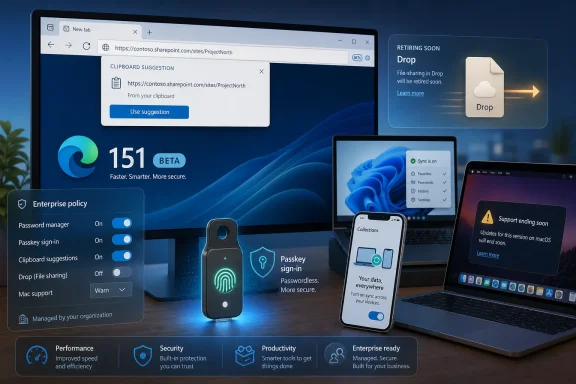
The most visible new behavior in version 151 is clipboard suggestions in the address-bar dropdown. When a user copies text or a link, Edge can suggest that content when the user activates the address bar, reducing the number of steps between copying a value and searching for or opening it.
Microsoft has provided the AddressBarClipboardSuggestEnabled policy for this feature. If the policy is enabled or left unconfigured, Edge may show clipboard-derived suggestions; if it is disabled, it will not show them. The policy applies to Windows and macOS, can be configured as mandatory or recommended policy, and requires an Edge restart rather than dynamic policy refresh.
That distinction matters in enterprise environments. A copied URL, ticket number, customer identifier, or code fragment can be convenient context for the user, but it is also potentially sensitive context appearing in a browser interface. The feature does not imply that Edge is publishing clipboard contents to a website; nevertheless, organizations with strict data-handling rules will want to decide whether a clipboard-aware browser suggestion fits their desktop policy.
The release is a useful example of why browser settings now require the same scrutiny as collaboration and productivity settings. Modern browsers increasingly turn nearby signals—history, open tabs, signed-in identity, clipboard contents, and cloud services—into suggestions. That may be helpful for an individual user, but managed environments need a deliberate answer about whether convenience should be enabled by default.
Enterprise Passkeys Move From a Device Feature to a Workflow
Edge 151 also introduces passkey synchronization for enterprise users. Microsoft says passkeys created in Edge can sync across devices, enabling passwordless sign-in without requiring employees to recreate credentials on each machine.
Passkeys use public-key cryptography rather than a reusable password shared with a service. In a properly implemented workflow, the service receives a public key while the private key remains protected in the user’s credential store. That model can reduce exposure to phishing and credential reuse, but it only improves the real-world sign-in experience if the credentials follow a user between their managed devices.
Microsoft ties the capability to the existing PasswordManagerPasskeysEnabled policy. That policy becomes the first control point for administrators: it determines whether users can save passkeys in Edge’s password manager. Organizations already piloting Microsoft Entra ID, Windows Hello for Business, or FIDO2 security keys should evaluate Edge passkey sync as part of the same identity program rather than as a standalone browser toggle.
There are still operational questions to work through. Teams should validate how credential recovery works when an employee replaces a device, leaves the organization, or uses a mixed fleet of Windows PCs and Macs. They should also test which relying parties support passkeys in their actual business workflow, because passkey readiness remains uneven across third-party SaaS services.
The direction is clear, though: Edge is making the browser a more important container for enterprise authentication credentials. That raises the value of robust profile governance, device compliance, conditional access, and clear account separation between personal and work browsing.
Drop Is Going Away, and the Sidebar Is Losing Its App Tower
Microsoft is retiring Edge Drop, the feature used to move files and notes between devices through an Edge profile. According to Microsoft’s Beta notes, files shared through Drop are saved in OneDrive, while text notes must be downloaded separately before the retirement takes effect.
The wording leaves an important practical gap: Microsoft has announced that Drop will be retired “in the near future,” but has not published a final shutdown date in the release notes. Users who have treated Drop as an informal scratchpad should export text notes now rather than wait for a more specific deadline. Files are less concerning because the service stores them in OneDrive, but users should still verify that content appears where expected and is covered by their normal OneDrive retention and backup practices.
For enterprise users, Edge 151 also retires the sidebar app list. New apps can no longer be added to the sidebar, apps previously pinned in the app tower are removed, and sidebar app policies are no longer supported or applied.
This is a meaningful cleanup for administrators who had deployed or documented sidebar apps, even if it will be invisible to many users. Microsoft’s own positioning is simplification: the company is trimming browser surfaces that duplicated access patterns available through bookmarks, installed web apps, tabs, Teams, or Microsoft 365. Copilot is not included in the sidebar app-list retirement, and Microsoft continues to position it separately in Edge.
The direct action for IT is to locate any configuration that references sidebar app policies and remove it from baselines, configuration profiles, Group Policy Objects, and deployment documentation. Leaving obsolete policy entries in place will not necessarily break Edge, but it creates misleading configuration debt and makes future troubleshooting harder.
macOS 12 Falls Off the Edge 151 Support List
While this is a Windows-focused release for many readers, mixed-platform organizations need to account for a second hard boundary: Edge 151 requires macOS 13 Ventura or later. macOS 12 Monterey is no longer supported by this Edge generation.
Microsoft had previously described Edge 150 as the final release supporting Monterey, so the version 151 requirement is not a surprise. Still, it creates a concrete browser-support split for organizations that have retained older Macs for specialized workflows, lab equipment, or lightly used executive devices.
A Mac that cannot move beyond macOS 12 will not be able to follow Edge into the 151 branch. That matters for more than feature parity: current browser versions are the route through which Chromium-derived security and compatibility updates arrive. Administrators should identify affected Macs before Edge 151 reaches broad deployment and determine whether to upgrade macOS, replace the device, or formally accept the risks of an aging browser.
A Small Beta Build With a Larger Administrative Payload
Build 151.0.4129.59 itself is a maintenance update, and Microsoft does not attach a named security advisory or a list of specific fixed defects to this build. That is normal for a late Beta servicing release. But the branch it services is far from routine: it changes what Edge reads from the clipboard, how enterprise passkeys can move across devices, which older browsers retain translation, which Macs remain supported, and which browser collaboration surfaces survive.
Administrators should use the Beta window to test AddressBarClipboardSuggestEnabled and PasswordManagerPasskeysEnabled, export any Edge Drop notes, remove legacy sidebar app policies, and identify Macs still on Monterey. With Edge 151 scheduled for Stable-channel availability around the end of July, the time to make those decisions is before the release becomes the default browser experience across the fleet.
