
The Microsoft Support article frames the collection as optional telemetry used to diagnose problems, improve Edge and make search results more relevant. Microsoft Learn’s Edge policy documentation independently confirms that optional diagnostics can include visited URLs and per-page usage, plus identifiers and usage information for browser components such as extensions. This is not the same as a vague count of pages opened: a URL can itself expose a search query, document name, account path, medical condition, financial product, internal ticket number, or other context that users may reasonably treat as sensitive.
No independent outlet appears to have reported a new change in collection behavior tied specifically to the July 30 support-page publication. The significance is the disclosure and the control path: Microsoft has spelled out a broader set of browsing-related fields than the label “optional diagnostic data” suggests, while its consumer-facing instructions do not fully describe how the setting works for every Windows installation.
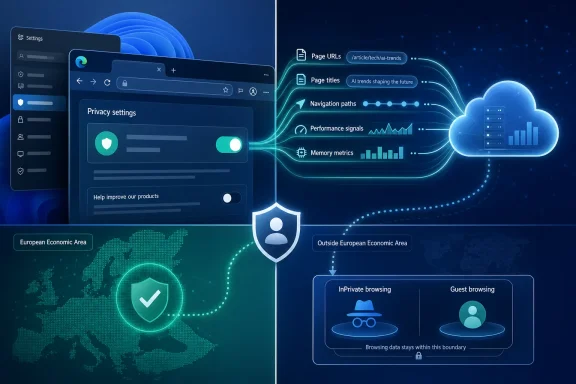 Optional telemetry can include more than browser performance
Microsoft separates Edge data into required and optional categories. Required diagnostic data is described as the baseline needed to keep Edge secure, updated, and functioning properly, including device connectivity, configuration, software setup, and inventory information. Optional data adds browser usage, crash reporting, and browsing information.
The support article says the optional package includes site-load times, memory usage, and websites visited. It then defines the website-related collection more specifically: the URL of the page, page title, how the page was reached, page navigation information, website metrics, and information about page content. Microsoft says those signals help it understand performance and improve products, services, testing of new experiences, and search relevance.
That scope deserves plain language. A page title and full URL are often meaningful on their own. A generic domain name reveals relatively little; a deep link to an internal Microsoft 365 site, a hospital portal, a legal filing, a bank application, or a search-results page can reveal far more. Microsoft calls the data optional, but users deciding whether to opt in should evaluate the actual fields named in the documentation rather than treating the setting as a conventional anonymous crash-report switch.
Microsoft’s Windows privacy documentation also describes browsing-history data as a category that can contain URLs, potentially including search terms, page titles, typed address-bar or search-box text, service response time, autocomplete information, navigation suggestions, and browser identifiers. It says diagnostic browsing-history data is pseudonymized. Pseudonymization reduces direct identifiability; it does not make the content of a visited URL innocuous.
The Windows setting is not universal in the European Economic Area
The support article directs Windows 10 and Windows 11 users to Settings > Privacy & security > Diagnostics & feedback to change their optional diagnostic-data preference. That is generally the right path in the United States and many other markets, but Microsoft’s more detailed Edge privacy documentation records a material exception.
Since March 6, 2024, Edge diagnostic data has been collected separately from Windows diagnostic data on Windows 10 version 22H2 or later and Windows 11 version 23H2 or later devices in the European Economic Area. On those systems, the Edge control lives in Edge itself under Settings > Privacy, search, and services > Privacy, using the “Send optional diagnostic data to improve Microsoft products” toggle.
The omission matters because an EEA user can follow the Windows-level directions in the new support page and assume that the operating-system choice governs Edge, when the browser’s setting is the relevant one on the specified Windows releases. Microsoft’s documentation does not say the July 30 article applies only outside the EEA, nor does it link readers to the regional exception.
For administrators, the split also affects compliance inventories. A script, baseline, or help-desk procedure that only audits Windows diagnostic settings may not accurately reflect Edge optional-diagnostics consent for EEA endpoints. Microsoft’s own Edge privacy page says the Edge setting is used across all profiles associated with that browser installation and is not synchronized between devices, which makes per-device verification more important than relying on a Microsoft account preference.
Edge has a more granular enterprise control for URL reporting
Microsoft’s browser-policy documentation reveals a control that the consumer support article does not mention: UrlDiagnosticDataEnabled. When Edge optional diagnostic data is allowed, this policy controls whether visited URLs and per-page usage are included in the optional diagnostic stream.
The policy is supported on Windows and macOS beginning with Edge 122. If an administrator disables
UrlDiagnosticDataEnabled, Edge does not report URLs in optional diagnostic data. If it is enabled or left unconfigured, Microsoft says URLs are provided when the broader diagnostic-data policy permits optional collection. The policy is machine-wide rather than profile-specific and requires an Edge restart to take effect.
That produces a useful middle ground for organizations that want browser reliability and usage telemetry without transmitting URL-level browsing records through that channel. It also corrects an easy but inaccurate assumption: turning on optional Edge diagnostics is not necessarily an all-or-nothing choice for managed Windows and macOS deployments.
Microsoft provides the policy in the Edge administrative template at Administrative Templates > Microsoft Edge > URL reporting in Edge diagnostic data enabled. The corresponding registry value is
UrlDiagnosticDataEnabledunder
HKLM\SOFTWARE\Policies\Microsoft\Edge; a value of
0disables URL reporting. Administrators must also account for the companion
DiagnosticDatapolicy, because the URL policy only applies when optional Edge diagnostics are enabled.
The broader
DiagnosticDatapolicy has three meaningful states: off, required data only, and optional data. Microsoft says required data is collected to maintain the browser, while optional data includes browser usage, websites visited, and crash reports. An organization that sets required-only data avoids optional browsing telemetry entirely; an organization that needs optional diagnostics but wants to minimize browsing exposure should additionally disable URL reporting.
InPrivate and Guest browsing have a stated URL-collection boundary
Microsoft’s Edge privacy documentation provides a clearer protection than the July 30 support article: website information is never sent for optional diagnostic purposes during InPrivate or Guest browsing. The optional-diagnostic toggle still applies to those modes in the sense that it governs diagnostic collection generally, but Microsoft says visited-site information is excluded there.
Users should not confuse that statement with a promise of total network anonymity. InPrivate clears local session data when its windows are closed and restricts several browser behaviors, but it does not conceal activity from a workplace, school, network operator, internet service provider, website, or any security tools deployed on the device or network. It is a boundary for Edge product-improvement telemetry, not a substitute for organizational controls or network privacy.
There is a separate WebView2 implication as well. Microsoft’s article says other Microsoft and third-party applications can host the Edge web platform, such as a streaming app embedding web content, and that the platform can send optional diagnostics about its use and websites visited. Microsoft’s WebView2 developer documentation confirms that WebView2 follows Windows diagnostic-data practices on Windows 10 and Windows 11.
That means Edge privacy review cannot stop at the blue-and-green browser icon. Applications built with WebView2 can create browser-like telemetry paths inside desktop software, and the Windows diagnostic setting can be relevant even where users never intentionally opened Edge.
The Windows 7 and Windows 8.1 note is historical, not a supported deployment path
The July 30 support page also says Edge collects required diagnostic data on Windows 7 and Windows 8.1. While technically contextualizing older behavior, it is poor operational guidance in 2026. Microsoft’s lifecycle documentation says Edge 109 was the final Edge release supported on Windows 7 and Windows 8.1, and support ended when Edge 110 arrived in February 2023.
Windows 10 or later is required for a supported Microsoft Edge version. An administrator maintaining Edge 109 on Windows 7 or Windows 8.1 should not read the diagnostic-data note as evidence of a supported, secure browser configuration. Telemetry preference is secondary to the absence of current browser security fixes.
The immediate action for individual users is to open Edge’s Privacy page and inspect the optional-diagnostics toggle, then check Windows’ Diagnostics & feedback page if they are outside the EEA or using a Windows configuration where Windows remains the controlling setting. For organizations, the more defensible standard is explicit policy: choose required-only diagnostics where appropriate, or disable
UrlDiagnosticDataEnabledwhen optional diagnostics are needed but URL reporting is not.