
PiunikaWeb first reported the behavior on August 1 after finding user complaints in a Reddit thread and reproducing it independently. The reported failure is unusually easy to spot: switch the control off in Edge’s Privacy settings, leave the page, then return. The toggle is on again. Restarting Edge and disabling extensions did not reportedly change the result.
That matters because this is not a cosmetic preference. Microsoft’s own Edge privacy documentation describes the setting as the consent gate for collection and use of browsing history, favorites, usage data, viewed web content, and certain device-related data for personalization across Microsoft services. If the browser presents an off state momentarily but does not retain it, users cannot reasonably know which preference is actually being enforced.
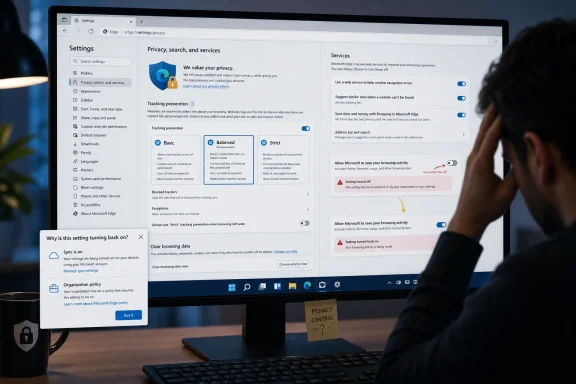 The toggle sits at the center of Edge’s personalization model
The affected control lives in Edge under Settings > Privacy, search, and services > Privacy, within the Personalization & advertising area. Its wording is deliberately broad: it authorizes Microsoft to save browsing activity including history, usage, favorites, web content, and other browsing data to personalize Edge and Microsoft services.
Microsoft says this information can influence advertising, Bing search results, shopping recommendations, and Microsoft News content. The company’s documentation also notes that InPrivate and Guest browsing are excluded from this particular personalization collection, while child and work or school accounts do not use the feature in the same way.
The key distinction is that this toggle is not simply Edge’s local history switch. Turning it off should not erase the browsing history stored on a PC, nor does it automatically delete data that may have been collected previously. Instead, Microsoft says it stops future collection and use of Edge browsing activity for the listed personalized experiences.
That makes persistence the entire point. A privacy setting that visibly accepts an opt-out and silently restores its opt-in state is more than an annoying settings-page glitch. It directly affects consent.
There is still no confirmed explanation from Microsoft
Microsoft has not publicly acknowledged the reported behavior as of August 1, and PiunikaWeb’s testing did not identify a trigger beyond navigating away from the page. The report says the issue persisted after Edge was restarted and after all installed extensions were disabled, narrowing—but not eliminating—the likelihood of an extension conflict.
There is also no independent reporting yet that establishes the scale of the problem, affected Edge channel, specific browser build, Windows version, account type, or geographic scope. That absence is important. A reproduced issue and multiple user reports are enough to justify attention, but not enough to conclude that every Edge installation is affected.
Several plausible explanations remain:
- Edge may be failing to commit the preference locally, causing the settings page to reload the previous value.
- An account-side preference may be overwriting the local change after Edge checks in with Microsoft services.
- A managed policy, security product, or profile configuration could be setting the preference again.
- A recent Edge update may have introduced a regression in the settings interface rather than in the underlying consent state.
The last possibility is particularly uncomfortable. If the interface is wrong while Microsoft’s backend respects the opt-out, users are still being shown misleading information. If the interface accurately reflects a preference that is being restored without consent, the issue is substantially more serious.
At present, there is no evidence publicly establishing which of those cases applies.
Enterprise administrators have a more durable control
For managed Windows environments, Edge includes a policy called PersonalizationReportingEnabled. Microsoft’s policy documentation says it controls whether Edge can send browsing history, favorites and collections, usage information, and other browsing data to Microsoft for personalizing advertising, search, news, Edge, and related services.
When that policy is disabled, Microsoft says users cannot override it through the browser interface. That is the appropriate enforcement route for organizations with a compliance requirement or a defined privacy baseline. Administrators can inspect applied Edge policies through the browser’s internal policy page and should confirm that the value is being delivered through Group Policy, Microsoft Intune, or another endpoint-management platform rather than relying on a user-facing toggle.
This policy is distinct from Edge Tracking Prevention. Setting Tracking Prevention to Strict can reduce third-party tracking and limit some website functionality, but it does not itself answer whether Microsoft can use Edge activity for Microsoft-side personalization. Likewise, the old Do Not Track preference asks websites to honor a request; it is not a substitute for controlling Microsoft’s data collection setting.
For IT departments, the practical takeaway is straightforward: do not treat a consumer-style UI switch as an auditable privacy control where a formal organizational requirement exists. Apply and verify policy instead.
A second Microsoft account control does not replace it
Edge’s setting is also easy to confuse with the “See ads that interest you” option in the Microsoft privacy dashboard. Microsoft explicitly distinguishes the two.
Turning off personalized ads in the privacy dashboard should stop Microsoft from using data for personalized advertising tied to the account. But Microsoft says that dashboard setting does not stop the collection and use of Edge browsing activity for other personalized experiences such as search results and news feeds. For that, users are meant to turn off the Edge control now reported to be reverting.
In other words, users concerned only with advertisements may choose to disable both controls. Users seeking to prevent this category of Edge activity from being collected for personalization need the browser setting to remain off. Clearing local history, cookies, and cached files may reduce traces held on the device, but it is not a replacement for withdrawing consent to future collection.
The same applies to disabling Edge Sync. Sync controls movement of browser data between signed-in devices; it is not a blanket switch for the personalization pipeline described by the affected control.
What affected users can verify now
Until Microsoft identifies the fault, affected users should document rather than assume the state of the preference. Open Edge, navigate to the privacy page, disable the personalization toggle, move to another settings category, then return. Restart the browser and check once more. If the switch has returned to enabled, capture the Edge version from Settings > About Microsoft Edge and note whether the profile is signed in with a personal Microsoft account.
Users can also check whether Edge reports that the browser is managed by an organization. On a personal PC, an unexpected management notice or applied policy may point to a workplace account, a security tool, a previous configuration script, or unwanted policy entries. In corporate environments, admins should inspect the applied policy list before treating the behavior as a browser defect.
It is worth avoiding aggressive “fixes” such as deleting the whole Edge profile, clearing every browser data category, or editing the registry without knowing what configuration is involved. Those steps can destroy useful troubleshooting evidence, remove saved credentials and sessions, and still fail if the preference is being restored from account or policy state.
The more useful evidence for Microsoft Support or Edge’s feedback channel is a short reproducible sequence: Edge version, Windows version, account type, whether Edge sync is enabled, whether the browser is managed, and exactly when the setting flips back on.
The real test is whether the opt-out survives navigation
Microsoft’s documentation is unambiguous about the intended experience: users can turn this browsing-activity personalization feature off, and Microsoft will no longer collect and use that activity for the specified personalization purposes from that point forward. The reports described by PiunikaWeb conflict with the first part of that promise because the opt-out does not appear to survive even a trip away from its settings page.
Microsoft now needs to clarify whether this is a known Edge regression, a profile synchronization issue, or an expected interaction with another setting or policy. If another configuration can supersede the switch, Edge should say so plainly and identify the controlling source rather than briefly accepting a choice it will not retain.
Until then, users who deliberately opted out should recheck the setting after updating Edge or changing account and sync options. For administrators, the safer next step is to enforce the relevant Edge policy and verify it on managed endpoints—because a privacy preference is only meaningful if it stays where the user or organization set it.
