
For Windows administrators, the immediate takeaway is not “retire domain controllers.” It is to stop expanding Active Directory dependencies by default. New Windows clients, new applications, new groups, and new access policies are the practical decision points Microsoft wants organizations to move toward Entra ID, Intune, Conditional Access, and modern authentication protocols.
Microsoft has not announced an Active Directory retirement date, and its guidance explicitly leaves room for AD to remain in place for exceptions and legacy services. The change is strategic: organizations that keep placing every new workload behind Kerberos, NTLM, LDAP, Group Policy, or domain joins will make their eventual cloud transition more expensive and more disruptive.
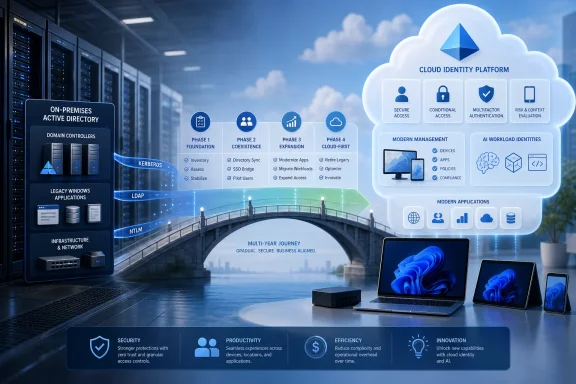 Microsoft’s recommendation is to minimize AD, not pretend it has disappeared
Neowin reports that Microsoft is asking IT teams to assess whether operational effort is being consumed by maintaining on-premises identity infrastructure rather than improving security and governance. That is a reasonable trigger for a review, but it should not be mistaken for evidence that Active Directory has suddenly become unsuitable for enterprise use.
Microsoft’s published road to the cloud guidance has long described a progression from cloud-attached and hybrid environments through cloud-first deployments and, for some organizations, an “AD minimized” state. In that state, Entra ID performs most identity and access functions while on-premises AD continues to support edge cases and applications that have not been replaced, rewritten, or reconfigured.
That distinction is more than wording. Active Directory Domain Services and Entra ID are separate products designed around different operating models. AD provides domains, forests, trust relationships, LDAP, Kerberos, and close integration with traditional Windows Server workloads. Microsoft’s own documentation notes that Entra ID does not offer a like-for-like replacement for AD domains and forest trusts.
An organization with a handful of Microsoft 365 apps and Windows 11 laptops may be able to become largely cloud-native. A manufacturer with plant-floor software, Windows Server file shares, line-of-business applications tied to LDAP, and older services using Integrated Windows Authentication faces a very different project. Calling both scenarios an “Entra migration” hides the work that determines whether users keep getting access on Monday morning.
Microsoft’s actual recommendation is therefore more disciplined than a simple AD-versus-Entra choice: establish the Entra environment, make new work cloud-first where possible, and reduce the on-premises footprint through application-by-application decisions.
The five signs point to identity architecture, not a licensing switch
The conditions described by Neowin are familiar to many administrators: infrastructure maintenance crowding out improvement work; identity boundaries that depend too heavily on a user’s network location; an application estate built largely around cloud services; a growing population of contractors and non-human identities; and preparation for AI-enabled workloads.
Taken together, these are signs that identity has become the control plane for work rather than merely the system that lets employees sign in to a domain-joined PC. Entra ID has tools aimed at that model, including Conditional Access, multifactor authentication, phishing-resistant passwordless methods, identity governance, lifecycle workflows, access reviews, entitlement management, and controls for external collaboration.
Those features can provide value even while AD remains the source of many accounts. In a hybrid organization, administrators can use Entra ID to protect access to Microsoft 365 and SaaS applications, require stronger authentication for privileged roles, enforce device-compliance requirements through Intune, and govern guest access without immediately changing how a legacy application authenticates against a domain controller.
The AI language in Microsoft’s positioning needs the same practical reading. AI agents, workload identities, service principals, automation accounts, contractors, and partners are all identities that need defined ownership, scoped permissions, lifecycle controls, and periodic review. Entra ID’s governance tooling can help administrators create those controls, but moving a human user account to the cloud does not automatically govern an AI agent or an overprivileged application registration.
The useful question is not whether an organization is “AI-ready.” It is whether it can answer who owns each non-human identity, what resources it can access, whether that access expires, and how administrators will detect a risky privilege change. If the organization cannot answer those questions today, the problem is governance first and directory location second.
Start with the applications that make AD hard to remove
Microsoft’s most important operational advice is also the least glamorous: inventory every application that depends on Active Directory before moving identity authority or retiring any on-premises component. That includes applications authenticated through Kerberos, NTLM, LDAP, AD FS, custom federation tooling, hardcoded service accounts, file shares, print services, SQL Server integrations, and software that relies on AD groups for authorization.
The inventory must go beyond a list of installed applications. IT needs to identify how each application authenticates users, which groups it reads, whether it needs a domain-joined server, whether it supports SAML or OpenID Connect, and who owns the application when testing or remediation is required. Domain controller logs and application discovery tools can reveal dependencies that a configuration management database misses, particularly when business units have deployed their own services.
Microsoft’s suggested sequence makes sense:
- Modernize applications already capable of using SAML, OpenID Connect, or another supported modern federation method before tackling applications tied only to older protocols.
- Join new Windows devices directly to Microsoft Entra ID and manage them through Intune where operational requirements permit, rather than automatically adding more hybrid-joined or domain-joined endpoints.
- Create new cloud-focused security groups in Entra ID when they do not need to be mastered in on-premises AD.
- Treat Kerberos-, NTLM-, and LDAP-dependent applications as explicit exceptions with an owner, a documented dependency, and a modernization or replacement plan.
The hardest cases are usually not the accounts themselves. They are applications that expect a password to exist in AD, require legacy protocols, use machine identities in ways Entra ID cannot duplicate, or depend on domain and forest trust designs. Microsoft’s current cloud-first guidance makes a particularly important limitation clear: for applications that require passwords in certain legacy scenarios, there may be no path to move the affected users fully to cloud authority without changing the application’s authentication design.
That is why an Entra tenant, Entra Connect synchronization, or Cloud Sync deployment should never be presented as an AD replacement project. Synchronization enables coexistence; it does not erase application dependencies.
