
That figure does not mean that Microsoft software has suddenly become unsafe or that every Windows 11, Outlook, or Microsoft 365 user has been compromised. It means something more practical and persistent: Microsoft’s enormous footprint makes its branding exceptionally valuable to scammers. A fake “Microsoft security alert,” an Outlook password-expiry notice, or an Office update warning has a good chance of looking routine at first glance—which is precisely what attackers need.
The current warning deserves attention because phishing no longer depends on crude emails full of spelling mistakes and obvious fake logos. Criminals are increasingly blending believable branding, account alerts, login pages, support pop-ups, and fake software downloads into attacks that can fool users who are otherwise security-conscious. For Windows users, the danger is less about a single vulnerability than a familiar brand being turned into a delivery mechanism for credential theft, malware, fraudulent payments, or remote-access scams.
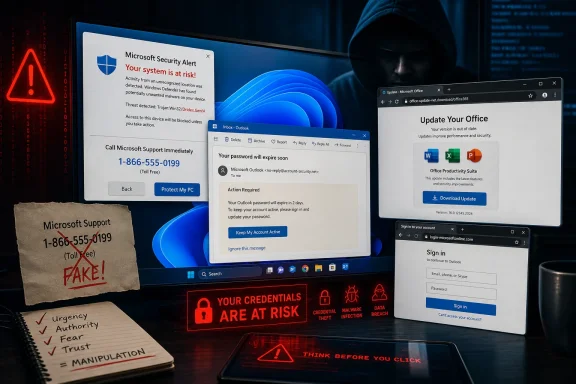 Microsoft Remains the Most Imitated Brand in Phishing
Check Point’s latest quarterly report identifies Microsoft as the single most impersonated brand in Q2 2026, accounting for 23% of the brand-phishing attempts it tracked. The company’s data also shows that Microsoft, LinkedIn, Google, Apple, and Amazon collectively made up more than half of the observed impersonation activity during the quarter. Check Point Research
The supplied figures that place Microsoft at roughly 22% should be treated as a rounded or earlier-period framing rather than a contradiction of the latest quarterly research. Check Point’s report, published on July 23, 2026, specifies 23% for Q2 2026. That distinction matters because the main conclusion is unchanged: Microsoft is not merely among the most abused brands; it is the dominant lure in this particular dataset. Check Point Research
The rest of the list reinforces why this is a broad identity-and-productivity problem rather than a Windows-only issue. LinkedIn, which is owned by Microsoft, ranked second; Google, Apple, Amazon, Adobe, Facebook, WhatsApp, PayPal, and ChatGPT also appeared among the most impersonated brands. Independent reporting on the dataset calculated that Microsoft and LinkedIn together represented 34.2% of tracked impersonations. TechRadar
For criminals, Microsoft offers an unusually flexible disguise. It can plausibly be used in a message about:
- A Microsoft account sign-in attempt
- An expired or blocked Outlook mailbox
- A shared OneDrive or SharePoint document
- A Microsoft 365 subscription renewal or invoice
- A Teams voicemail, meeting invitation, or missed call
- A Windows 11 security update
- An Office activation issue
- A supposed malware warning from Microsoft support
- A password-reset or multifactor-authentication prompt
That breadth is the real danger. A phishing campaign does not need to persuade every recipient. It only needs to make enough people think, “This looks like something Microsoft might genuinely send me.”
Why Microsoft Branding Works So Well for Attackers
Brand phishing is a form of social engineering: attackers imitate a company a victim already trusts, then use that familiarity to encourage the victim to hand over credentials, payment details, personal data, or access to a device. Check Point describes the underlying tactic as an attempt to transfer trust from a known brand to a fraudulent email or site. Check Point Research
Microsoft’s product portfolio gives scammers multiple credible entry points into a person’s everyday life. A consumer may use a Microsoft account for Windows sign-in, Xbox, OneDrive, or Outlook.com. A worker may receive real Microsoft 365 notices, Teams messages, SharePoint links, and calendar invitations every day. A small business may rely on Outlook and Office but have limited dedicated security staff.
That makes the visual language of Microsoft communications especially valuable. Blue account pages, familiar Office logos, Windows-style dialogs, a “Verify your account” prompt, and an urgent update message can each lower skepticism if they arrive at a busy moment. The attacker is not trying to defeat Windows Defender or crack an encrypted connection directly; they are trying to get the user to make a bad decision before security controls have a chance to help.
Microsoft itself cautions that phishing messages may arrive through email, text messages, Teams, direct messages, and other channels—not solely through a traditional inbox. The common objective is to persuade someone to click a link, open an attachment, enter information, or act immediately. Microsoft Support
The Fake Office Update Threat Is Particularly Concerning
One of the more relevant examples in Check Point’s Q2 reporting involved a fake Microsoft support page that urged visitors to install an urgent Office security update. Instead of a legitimate Microsoft patch, the download delivered a disguised executable file that could begin a malware infection. Check Point Research
This is a highly effective scam format because it turns a sound habit—keeping software patched—into a trap. Most security advice correctly tells people to install updates promptly. Attackers exploit that instinct by inserting themselves between the user and the official update process.
The safe rule is straightforward: do not install a Windows, Office, Edge, Defender, or Microsoft 365 update from a link in an unexpected email, browser pop-up, text message, or support page. For Windows updates, use the operating system’s own update interface. For apps, use their built-in updater, the Microsoft Store where appropriate, or the vendor’s official site reached independently.
Microsoft’s own guidance warns users to download software only from official Microsoft partner sources or the Microsoft Store, and to be wary of third-party download locations that may distribute altered software or bundled malware. Microsoft Support
A Real Windows Warning Does Not Demand a Phone Call
Fake support warnings often add another layer of pressure: a browser window made to resemble a Windows blue screen, an activation warning, a “virus detected” message, or a full-screen alert with a toll-free number. Microsoft warns that scam sites may make browser content appear to be a system error, sometimes use repeated pop-ups, play audio, or try to prevent a user from easily closing the page. Microsoft Support
The key fact to remember is simple: real Microsoft error and warning messages do not include a phone number telling users to call technical support. Microsoft also says it does not make unsolicited calls or send unsolicited messages asking for personal or financial information in order to fix a computer. Microsoft Support
A phone number on screen is not proof of support. It is often the scam’s central call to action. Calling can lead to a demand for gift cards, cryptocurrency, card details, or installation of remote-access software that gives a criminal control over the PC.
What a Microsoft Phishing Attempt Can Look Like
The most successful phishing campaigns are rarely identical. A campaign can use a fake login page one day, a password reset the next, and an Office update lure the day after. Check Point’s Q2 examples ranged from fraudulent payment-failure notices and replica storefronts to fake login pages and malware presented as a software update. Check Point Research
For Microsoft users, several patterns deserve immediate suspicion.
Urgent Account Alerts
A message may claim that an Outlook mailbox will be disabled, a Microsoft account is locked, a password has expired, or an unfamiliar sign-in needs immediate verification. The email will often include a large “Review activity,” “Keep account,” or “Sign in now” button.
Urgency is not incidental; it is the mechanism. Microsoft identifies calls to act immediately, threats of penalties, and pressure to click or open an attachment as common phishing indicators. Microsoft Support
Fake Shared Files and Microsoft 365 Documents
Another familiar lure is a supposedly shared document or invoice. The victim is told that a OneDrive, SharePoint, or Microsoft 365 file requires a sign-in to open. In reality, the page may only be harvesting the email address and password entered into a convincing imitation of a Microsoft login page.
Microsoft’s Outlook guidance specifically highlights phishing emails that use documents, storage-provider links, and protected invoices to trick recipients into entering their credentials. Microsoft Support
Lookalike Domains and Sender Addresses
A message might display a sender name such as “Microsoft Security,” “Outlook Team,” or “Office 365 Admin,” while the actual sender address has nothing to do with Microsoft. Some attackers rely on obvious throwaway domains; others use lookalikes designed to be overlooked in a crowded inbox.
Microsoft advises users to check for mismatched domains and subtle substitutions such as a zero replacing the letter “o” in a name, or combinations of letters that resemble another character at a glance. Microsoft Support
Unexpected Attachments and Executables
An attachment claiming to be an invoice, security report, password-protected file, or update should be treated cautiously—particularly if it asks the user to enable macros, change security settings, install an app, or run a file. Microsoft notes that normal email messages should not require users to weaken security settings or install applications to view ordinary content. Microsoft Learn
A legitimate security update does not arrive as a random .exe, .msi, script, archive, or “critical patch” attachment. The fake Office update example tracked by Check Point demonstrates why this distinction remains so important. Check Point Research
ChatGPT’s Arrival in the Top Ten Shows the Threat Is Expanding
Microsoft is still the most imitated brand, but the Q2 report includes a notable sign of where phishing is moving next: ChatGPT entered Check Point’s top 10 most impersonated brands for the first time. The report cited a fake ChatGPT Plus payment-failure email that led victims to a page intended to collect full payment-card details. Check Point Research
This matters for Windows users because many workflows now overlap. The same person may use Windows 11, Edge, Outlook, Microsoft 365, Teams, Copilot, and AI services in the same workday. An attacker does not need to keep a campaign confined to one brand. A fake ChatGPT bill can target payment details; a fake Microsoft 365 notification can target work credentials; a fake Windows update can target the endpoint itself.
The risk is therefore cumulative. Each trusted service adds another legitimate-looking email template, billing notice, login page, support article, and update prompt that criminals can imitate. The answer is not to distrust every service permanently, but to stop treating the logo and layout of a message as proof of authenticity.
How Windows 11, Outlook, and Microsoft 365 Users Should Respond
The practical defense against brand phishing is not a single antivirus setting. It is a repeatable routine that removes the attacker’s most important advantage: urgency.
1. Navigate Independently Rather Than Following the Link
If an email claims there is an account problem, do not use the button or link inside it. Open a new browser tab and visit the relevant Microsoft site through a saved bookmark, a known address, or a search result you independently verify.
Microsoft recommends going directly to an organization’s site or using a known phone number or contact method when a message may be genuine but looks suspicious. Microsoft Support
2. Inspect Before Clicking
On a PC, hover over a link without clicking it to inspect the destination. On a phone, use the platform’s long-press option to reveal the target. A button labeled “Microsoft account” may lead somewhere unrelated to Microsoft, and a familiar logo tells users nothing about where the link actually goes. Microsoft Support
Watch for:
- Domains with extra words, added hyphens, strange country suffixes, or misspellings
- Senders whose actual email address does not match the display name
- Generic greetings, unexpected requests, or awkward language
- Links that point to a third-party site rather than the expected Microsoft domain
- Unsolicited attachments, especially those requesting that macros or security controls be changed
3. Use Built-In Reporting Rather Than Just Deleting
For Outlook.com and Microsoft 365 Outlook, Microsoft says users can select a message and use Report > Report phishing. Reporting helps remove the message and feeds information back into filtering systems. Microsoft Support
Outlook can also show an unverified-sender indicator when authentication checks cannot confirm the sender’s identity. That is not automatic proof that a message is malicious, but it is a useful reason to pause—especially if the email is unexpected or asks for sensitive action. Microsoft Support
For a suspicious website in Microsoft Edge, use Settings and more (...) > Help and feedback > Report unsafe site. Microsoft documents this reporting route for unsafe webpages encountered in Edge. Microsoft Support
4. Turn On Multifactor Authentication
Multifactor authentication cannot stop every phishing attempt, particularly sophisticated attacks designed to capture active sessions, but it remains an essential barrier against the common scenario in which a criminal steals only a password. Both Microsoft and the U.S. Federal Trade Commission recommend using multifactor or two-factor authentication to make account takeover harder even after password exposure. Microsoft Support Federal Trade Commission
Use unique passwords as well. Reusing a password means one convincing fake Microsoft login page can create problems across email, shopping, banking, social media, and work accounts.
5. Keep Security Controls On, but Do Not Outsource Judgment to Them
Outlook and Exchange Online include anti-phishing measures such as spoof intelligence and unauthenticated-sender indicators. Microsoft 365 also uses email authentication checks including SPF, DKIM, and DMARC, plus reputation and behavioral signals, to identify forged senders. Microsoft Learn
Those controls are meaningful strengths. They can filter a large volume of malicious email before users see it, and organizations with Microsoft Defender for Office 365 can add impersonation protections, campaign analysis, and phishing-simulation training. Microsoft Learn
But filtering is not a guarantee. Some malicious messages will reach inboxes, some legitimate messages will fail authentication, and attackers continuously change domains and wording. Security technology should reduce risk, not become a reason to click without checking.
What to Do If You Already Clicked or Entered Information
A quick response can limit damage. If a password was entered into a suspected fake Microsoft page, change it immediately through the genuine account portal, then change any other account that used the same password. Microsoft also advises confirming that multifactor authentication is enabled and notifying workplace or school IT support if a work account may be involved. Microsoft Support
If bank details or card information were provided, contact the financial institution through the number on the card, account statement, or official website—not through any number included in the suspicious message. The FTC similarly recommends reporting phishing attempts and removing the message after it has been checked and reported. Federal Trade Commission
For a fake support incident in which remote-access software was installed, disconnecting the PC from the network is a sensible immediate containment step before seeking legitimate technical help. Do not continue communicating with the caller, do not provide additional verification codes, and do not accept a refund offer that requires another remote session.
The Bottom Line: Familiarity Is Now the Attack Surface
The latest phishing figures are worrying because Microsoft’s popularity is being used against the people who rely on its ecosystem most. Microsoft’s 23% share of Check Point’s Q2 2026 brand-impersonation tracking is not evidence of a failure by one Windows feature or one Outlook service; it is evidence that attackers see Microsoft’s name as one of the most persuasive social-engineering tools available. Check Point Research
The strongest protection is a calm, repeatable habit: pause, verify independently, never install updates from unsolicited links, report suspicious messages, and use multifactor authentication. A real Microsoft notice can withstand that scrutiny. A phishing campaign depends on preventing it.
