
The short roadmap description is easy to read as another targeting refinement. It is more consequential than that for Purview administrators using dynamic policy scopes to drive retention, records management, data loss prevention, and communication compliance. Adaptive Scopes determine who and what a policy reaches; a change in how recipient or owner status is evaluated can change the set of objects covered by an already-valid query without anyone editing the underlying department, geography, custom attribute, or site-property filter.
Microsoft has not yet published the supporting configuration documentation, the available lifecycle states, licensing requirements, supported Purview workloads, or the default behavior for existing scopes. Those omissions make this a feature to plan for, rather than enable blindly during preview.
 A new input to policy targeting
Adaptive Scopes are Purview’s reusable, query-based targeting layer. Rather than keeping static lists of mailboxes, Microsoft 365 Groups, OneDrive accounts, and SharePoint sites current by hand, administrators define a user, group, or site query and Purview reevaluates membership regularly. Microsoft’s current Learn documentation says those dynamic queries run daily, and it warns that full population and query changes can take as long as five days to appear.
Today’s documented scope model is built around identity and site metadata. User scopes can use Entra and Exchange-backed properties such as department, job title, country, alias, email addresses, and custom attributes. Microsoft 365 Group scopes use comparable group attributes. SharePoint site scopes use site URL, site name, template, and indexed custom properties such as RefinableString00 through RefinableString99.
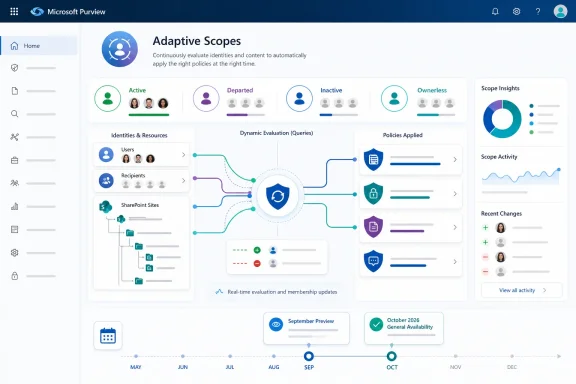
Roadmap ID 568785 introduces a distinct idea: whether Purview should evaluate the lifecycle state of a recipient or a site owner while determining scope membership. Microsoft’s wording does not say that lifecycle state will become another field administrators can add to an OPATH or KeyQL query. It says administrators will receive “explicit control” over lifecycle-state evaluation. That is an important distinction.
A queryable property would allow an administrator to construct rules such as “include only active recipients” or “exclude sites with owners in a specified state.” A control, by contrast, may govern whether a preexisting lifecycle condition is considered at all during evaluation. Microsoft has not disclosed which design it is implementing. The roadmap item also does not identify the portal setting, API, PowerShell parameter, audit event, or policy surfaces where the control will appear.
For now, the prudent reading is narrow: Purview will add an administrative decision point affecting how recipient and site-owner lifecycle state contributes to Adaptive Scope evaluation. It has not announced a new lifecycle-state query syntax or an automatic cleanup action.
Why owner status belongs in a compliance discussion
The “site owner” portion is closely related to SharePoint governance, but it should not be mistaken for a SharePoint site-lifecycle policy. Microsoft’s SharePoint Advanced Management documentation describes separate site ownership, inactivity, and attestation policies. Those policies can flag sites with inadequate ownership, identify inactive sites, request a periodic business-need review, send notices, and—after configured escalation—make sites read-only or archive them through Microsoft 365 Archive.
Adaptive Scopes do something different: they decide whether a Purview policy applies to the data in a site or account. A lifecycle policy can identify a site as ownerless or inactive; an adaptive scope can place that site inside or outside a retention or compliance policy’s reach. Roadmap ID 568785 appears to connect those previously separate considerations at the evaluation layer.
That connection has real operational consequences. A departed employee may still be listed in Microsoft 365 as a site owner, a group owner, a mailbox delegate, or an otherwise relevant recipient. A site can likewise remain online with content that is still subject to retention, eDiscovery, information barriers, DLP, or records obligations even after its owners stop responding to lifecycle notices.
If Purview treats lifecycle state too aggressively, a scope intended for active collaboration sites could lose a stale or ownerless site before governance staff have established whether a separate preservation requirement still applies. If it ignores lifecycle state entirely, a policy designed to target an active business unit may continue to reach retired identities or abandoned workspaces. Microsoft’s planned control appears designed to let the tenant decide which result better reflects its governance model.
The risk is especially acute where a single Adaptive Scope is reused. Microsoft documents Adaptive Scopes as reusable configuration elements that can be attached to one or many policies. That reduces administration, but it also means a scope-membership change can have a wider blast radius than the person adjusting the lifecycle option may expect.
An organization might use one “Finance-Europe” user scope for retention and another policy category that has a different treatment for inactive recipients. Or it might use a SharePoint scope based on site classification to support a records policy while the SharePoint team wants lifecycle rules to de-emphasize ownerless sites. A single global lifecycle-evaluation setting at the scope level could be too blunt for those differing requirements. Microsoft has not said whether the coming control will be per scope, per policy, per workload, or tenant-wide.
The current documentation exposes a gap
Microsoft’s existing Adaptive Scopes documentation already includes one lifecycle-adjacent exception: inactive mailboxes. Administrators who want to exclude inactive mailboxes, or target only inactive mailboxes, must use the advanced query builder and the IsInactiveMailbox OPATH property. That is a documented mailbox state with an explicit query mechanism.
There is no equivalent documented field for recipient lifecycle status generally, or for a SharePoint site owner’s lifecycle status. The current supported user attributes list does not include a generic lifecycle state. The current SharePoint scope properties list does not include owner condition, owner count, inactivity result, attestation result, or a lifecycle-policy outcome.
This makes the roadmap feature notable precisely because Microsoft is adding control in a part of Adaptive Scopes that is presently opaque to administrators. At the moment, admins can validate user and group queries against Exchange Online PowerShell and validate site queries through SharePoint search. They can inspect the resulting member list in Purview, where entries are marked Added or Removed. But validation does not guarantee a one-for-one match: Microsoft says the member list can take up to five days to reflect updates, and its own documentation notes differences between PowerShell output and the Scope Details view.
Lifecycle evaluation will add another condition that has to be tested separately from the query syntax itself. The familiar workflow—run the filter, compare its results, attach it to a policy—will no longer be sufficient if the eventual control changes scope membership after an owner or recipient moves into a relevant lifecycle state.
That is the part the roadmap entry leaves unstated: whether an administrator will be able to see why an otherwise matching recipient or site was included or excluded. A simple Added/Removed state is useful for observing a change, but it does not prove whether the cause was an Entra attribute update, an indexed site-property update, a query edit, an administrative-unit boundary, licensing eligibility, or the new lifecycle-state setting.
Microsoft should expose that reason in Scope Details, exports, PowerShell, and audit records before calling the control manageable at enterprise scale. Otherwise, administrators will be left comparing several asynchronous systems—Entra, Exchange, SharePoint lifecycle reports, and Purview membership results—to explain a policy targeting change after the fact.
Prepare the evidence before September
There is no action to take in production today. The roadmap item remains marked In development, and Microsoft can alter the timing, scope, or behavior before preview. No independent outlet had published additional technical detail about Roadmap ID 568785 when the entry appeared on August 4, 2026; Microsoft’s roadmap is presently the sole primary record for the announced schedule and feature description.
Administrators should nevertheless use the gap before preview to establish a baseline. Export the membership of Adaptive Scopes that protect regulated SharePoint content, active and inactive users, OneDrive accounts, and Microsoft 365 Groups. Record the policy attachments for each reusable scope, and identify which scope queries rely on data owned by HR, Entra, Exchange, or SharePoint teams.
It is also worth separating two questions that often get collapsed into one: whether a site or user should be governed as “active,” and whether its content must still be retained or protected. An ownerless project site can be operationally abandoned while its records remain under legal, tax, contractual, or regulatory retention. A departed recipient can be outside an active-user communications policy while their mailbox remains subject to preservation. Lifecycle status should inform targeting only where the policy’s purpose supports that outcome.
When September’s preview arrives, test with a non-production scope that has deliberately varied conditions: active and departed recipients, sites with two owners, one owner, no responsive owner, and sites in different lifecycle-policy states. Compare expected query matches with Purview’s actual membership before linking the scope to a production retention or DLP policy. Because Adaptive Scope changes can take days to settle, a same-day test will not establish whether the new control is working correctly.
Microsoft’s October 2026 general-availability target puts the responsibility squarely on compliance and SharePoint teams to agree on their definitions before the switch appears. The feature could reduce stale targeting and make lifecycle-aware governance more deliberate. Without clear visibility into membership decisions, however, it could also create the kind of silent scope drift that turns a policy review into an incident.
