
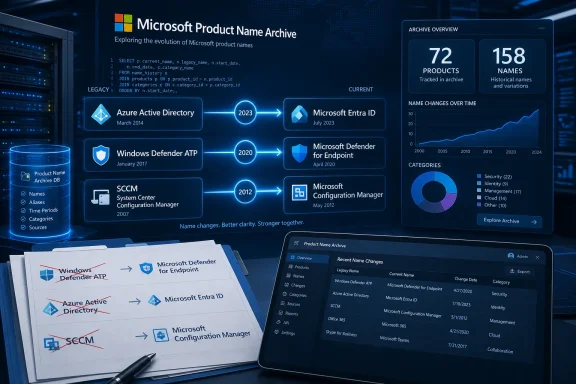
As reported by The Register and highlighted this week by Neowin, the registry currently lists 72 surviving products and 158 documented product names. Its dataset says a Microsoft product name lasts an average of two years and 11 months, although that figure should be read as a description of this curated collection rather than a company-wide measurement of every product Microsoft has ever launched, merged, or killed.
For Windows administrators, developers, and security teams, that limitation is important. A renamed product does not necessarily represent a new service, a changed entitlement, or a migration requirement. But when Microsoft changes a name without changing every technical identifier beneath it, the gap between branding and implementation becomes a real source of operational mistakes.
 A registry for names Microsoft has left behind
The Rebrand Registry is explicitly an unofficial project, and Strant says it was built both as a reference and to make readers “chuckle.” It follows earlier community projects from Strant, including Let Me Correct That For You, which catalogs inconsistent capitalization, spelling, logos, and terminology across Microsoft’s product universe.
The new registry concentrates on surviving products and traces their earlier identities. That focus produces a cleaner history for a product that still exists, but it also makes the database a deliberately incomplete record. Microsoft’s retired brands—Windows Live, Groove Music, Skype for Business, Microsoft Stream Classic, and many others—are outside its main scope unless their lineage continues into a current product.
That is not a trivial methodological detail. A dataset made only of survivors will naturally make renaming look like a normal stage in a product’s life. It cannot show how often a name was attached to something Microsoft later discontinued, folded into another service, or replaced with a technically different platform.
Strant acknowledges that survivorship bias on the site’s analysis page. The registry also flags that its “Rebrand Risk Index” is recreational: it ranks products according to the age of the current name, previous identities, and rename activity in the same family. It is not a Microsoft roadmap, a leak, or evidence that a specific product is scheduled for a new name.
That warning should be taken at face value. A product appearing as “elevated” in the site’s forecast is an invitation to notice its history, not a reason for an IT department to revise procurement plans or documentation before Microsoft announces a change.
The names change; the technical seams often do not
Microsoft’s own documentation shows why a rename tracker can be useful even when no technical migration is required. The July 2023 change from Azure Active Directory to Microsoft Entra ID is the clearest example.
Microsoft said the rebrand was intended to distinguish its cloud identity platform from the on-premises Active Directory role in Windows Server and to align the service with the broader Entra product family. The customer-facing name started changing across Microsoft experiences on August 15, 2023, and SKU and service-plan display names changed on October 1, 2023.
Yet Microsoft also said that existing deployments, configurations, integrations, sign-in URLs, APIs, PowerShell cmdlets, and Microsoft Authentication Libraries would continue working without interruption. In other words, a tenant could show “Microsoft Entra ID” in the portal while an administrator’s scripts still used Azure AD terminology and legacy identifiers.
That distinction has practical consequences. A support ticket mentioning “Azure AD Conditional Access” can still describe the same policy area that current documentation calls “Microsoft Entra Conditional Access.” An old automation project might include AzureAD cmdlets, while the supported administrative direction is Microsoft Graph PowerShell. Search results, error messages, community answers, and vendor guides can mix the old and new labels for years.
The name may change quickly. The underlying objects, endpoints, and historical vocabulary do not.
Microsoft Configuration Manager provides a second example closer to Windows fleet management. Microsoft’s Lifecycle documentation says that beginning with version 2303, Microsoft Endpoint Configuration Manager was rebranded as Microsoft Configuration Manager. Organizations that have lived through SMS, System Center Configuration Manager, SCCM, ConfigMgr, MEMCM, and MECM have learned the practical outcome: technicians may use several names for the same product in a single meeting, and old documentation may be technically accurate while commercially outdated.
The registry’s purpose is therefore strongest as a translation tool. It can help an administrator determine whether an unfamiliar old name describes an extinct product, a successor, or simply the same service under a previous banner.
Three documented rename chains show the operational problem
The registry identifies eight current products with three earlier naming changes, according to The Register. Several are familiar precisely because their old names remain common in enterprise conversations.
- Azure AI Search has moved from Azure Search to Azure Cognitive Search and then Azure AI Search. Microsoft’s current documentation still records that history, noting the 2019 rename and the November 2023 change. Developers maintaining older code and documentation will continue to encounter Azure Cognitive Search, even though the present service name is Azure AI Search.
- Microsoft Defender for Endpoint was previously Windows Defender Advanced Threat Protection. Microsoft’s Lifecycle page still states that relationship directly. That historical name remains relevant in older security architecture documents, integration notes, and product comparisons, especially where “ATP” was used as shorthand.
- Microsoft Configuration Manager retains a long chain of predecessor names that complicates searches for deployment guidance. A query for “SCCM” may surface useful material, but it also risks returning procedures written for older versions, old servicing models, or deprecated companion products.
These are not merely awkward branding stories. They are evidence that a product name is a poor primary key for a technical environment. Tenant IDs, service plan IDs, API versions, Windows build numbers, policy GUIDs, supported client versions, and documented feature behavior carry more operational meaning than whatever Microsoft’s current marketing page calls the service.
Documentation needs aliases, dates, and product boundaries
The registry’s most useful lesson for IT teams is not to memorize every former Microsoft name. It is to write documentation that anticipates the next rename.
Internal runbooks should use the current official name first, followed by the former name where it will help someone find legacy material. A line such as “Microsoft Entra ID (formerly Azure Active Directory/Azure AD)” makes a procedure searchable for both current staff and people working from older incident notes. The same approach works for “Microsoft Configuration Manager (formerly Microsoft Endpoint Configuration Manager)” or “Microsoft Defender for Endpoint (formerly Windows Defender ATP).”
Dates also matter. “Update the Entra policy” is weaker than “Update the Microsoft Entra Conditional Access policy formerly documented as Azure AD Conditional Access; validate the change in the Entra admin center.” The latter gives an engineer enough context to reconcile an old procedure with a current portal and to recognize that the task concerns a renamed control rather than an entirely new platform.
Teams should also resist broad replacements in scripts and configuration repositories. Renaming comments, documentation, display labels, and ticket templates is usually low risk. Renaming API paths, command names, application registrations, endpoint references, or variables just because the product label changed can introduce outages where none were necessary. Microsoft explicitly kept many Azure AD technical identifiers in place during the Entra ID transition.
A rename review belongs in normal change management when Microsoft announces a large umbrella-brand shift. The review should establish four things:
- Whether the service’s functionality, licensing, support terms, or product boundaries actually changed.
- Which admin portals, command-line tools, APIs, SDKs, and log labels retain the earlier name.
- Whether internal knowledge-base articles and monitoring alerts need alternate terms added for searchability.
- Whether third-party integrations or audit evidence refer to an obsolete name that could confuse responders.
That procedure is more valuable than treating every rebrand as either meaningless marketing or a mandatory migration. Some renames truly are cosmetic. Others accompany a merger of products, a SKU shift, a portal move, or a retirement of a predecessor service. The product name alone cannot settle which kind occurred.
The database is a useful index, not a source of truth
The Rebrand Registry’s forecast is intentionally playful, but its core catalog fills a gap Microsoft has not consistently addressed in one place: an accessible, chronological index of what a current service used to be called. Microsoft documents many individual name changes, but the record is scattered across Lifecycle pages, product announcements, Learn articles, retired documentation, and terminology glossaries.
That fragmentation is exactly why old names linger. Search engines reward years of accumulated references, enterprise environments retain old runbooks, and products can keep technical identifiers from a prior era for compatibility. A name change can be complete in a sales deck while remaining incomplete in the administrative reality of a tenant.
The registry should not be treated as authoritative proof of a product’s support status, entitlement, or technical lineage. For those decisions, Microsoft’s current Lifecycle pages, service documentation, Message Center notices, and release notes remain the primary records. But it is a credible starting index for finding the terminology needed to reach those records.
Microsoft’s naming history has become substantial enough that the community is now building the translation layer itself. For anyone who has to interpret a decade-old SCCM guide, an Azure AD error, or a Windows Defender ATP integration, that is more than a branding punchline—it is a practical maintenance tool.