
The feature matters because “easy to type” is not a cosmetic preference in every Teams deployment. Shared conference-room devices, phone-based workflows, frontline environments, accessibility needs, and users entering a code from a printed invite can all turn a mixed-character passcode into a genuine source of friction. Microsoft’s new policy acknowledges that reality without changing the secure default for everybody.
At the same time, this is not a broad redesign of Teams meeting security. It is a per-organizer meeting-policy control. It affects meetings created by users who receive the policy, it leaves current meetings alone, and it requires an administrator to confront a warning before accepting the reduction in passcode complexity. Microsoft’s own documentation says that the default remains an eight-character alphanumeric passcode, while the new NumericOnly value produces an eight-digit code for future meetings scheduled by applicable organizers. Microsoft Learn’s PowerShell reference also confirms that the setting is disabled by default.
For Windows and Microsoft 365 administrators, the important takeaway is simple: this is an accessibility and operations feature that must be deployed as a controlled exception, not a tenant-wide convenience switch.
 What Microsoft Teams has added
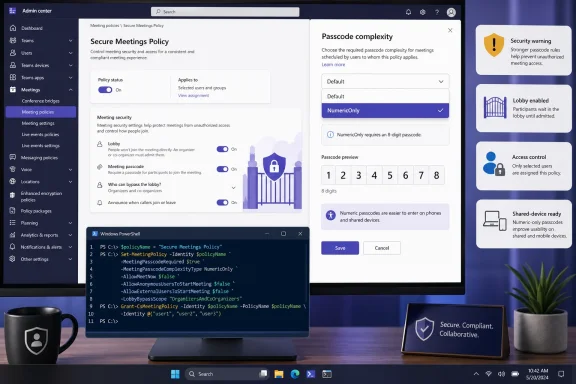
The newly launched Teams setting is named Passcode complexity in the policy layer and is exposed in the Microsoft Teams PowerShell cmdlets as PasscodeComplexity. It supports two documented values:
Default— the normal system behavior: eight-character alphanumeric meeting passcodes.NumericOnly— an eight-digit meeting passcode made solely from numbers.
Microsoft describes the feature as support for scenarios in which entering an alphanumeric passcode is difficult. Its Teams administration release notes state that the option can generate numeric-only passcodes for meetings organized by selected users or groups, rather than automatically converting every meeting in an organization. The same release note says that enabling the setting presents a warning and requires explicit administrator confirmation because Microsoft considers the lower-complexity option to create a greater risk of unauthorized access. Microsoft’s Teams release notes describe both the intended use case and that security warning.
That design is significant. It demonstrates that Microsoft is treating numerical passcodes as an exception based on a business or accessibility need—not as a new recommended default. The implementation gives organizations enough flexibility to support specific populations while preserving stronger defaults for executives, finance, legal, HR, research, customer information, and other high-impact meeting types.
The roadmap item lists the feature as Launched, with general availability beginning in April 2026. It is listed for both General Availability and Targeted Release, and Microsoft identifies support across its worldwide multitenant environment as well as GCC, GCC High, and DoD cloud instances. The official roadmap entry is therefore more than an early preview notice: the policy is part of the supported Teams administration surface.
The policy applies to organizers—not individual meetings
One of the most important operational details is that Passcode complexity is a meeting policy setting. Teams meeting policies define what users can create and how meeting behavior is configured, with the organizer’s policy often determining the meeting experience inherited by participants. Microsoft’s policy documentation explains that administrators can edit the global policy or create custom policies and assign them to chosen users; each user can hold one meeting policy at a time. Microsoft’s meeting-policy guidance outlines that model.
This matters for governance. An administrator does not need to give every employee a numeric-only passcode. Instead, the safer pattern is to create a dedicated policy, give it a purpose-driven name, and assign it to organizers whose meetings genuinely require simplified code entry.
Examples could include:
- Frontline supervisors who schedule meetings involving shared or constrained devices.
- Reception, facilities, or logistics teams that distribute meeting details to visitors or temporary workers.
- Accessibility-supported users for whom letter-and-number entry is a documented barrier.
- Training coordinators running tightly controlled sessions where participants must enter a passcode manually.
- Teams Room or hybrid-room operators in environments where numeric keypad entry is materially easier.
The policy should not become a catch-all response to isolated complaints about meeting invites. Because the setting attaches to the organizer, granting it to a frequently used organizer can affect a substantial volume of future meetings. That makes scoped assignment, change documentation, and regular review essential.
Existing meetings are not retroactively changed
Microsoft’s PowerShell documentation makes another limitation clear: a PasscodeComplexity change applies only to meetings scheduled after the setting is enabled. Existing meetings are not affected. The PasscodeComplexity parameter documentation explicitly calls out this forward-only behavior.
That constraint is good news for change control. An administrator can introduce the policy without unintentionally invalidating or transforming invitations already distributed to customers, staff, or external partners. It also means that a pilot cannot be assessed merely by inspecting old recurring meetings. Testing must involve scheduling new meetings after policy assignment.
For recurring meetings, administrators should be careful not to assume a policy assignment will automatically normalize every occurrence already on calendars. Since Microsoft specifies that existing meetings are unaffected, the prudent approach is to create a fresh test series and confirm the behavior of newly scheduled instances before communicating a rollout.
Why eight digits are easier—and less resilient
An eight-digit numeric passcode is easier to read aloud, enter on a telephone keypad, type on a touch panel, and transcribe from a printed meeting brief. It eliminates the common sources of error that arise when users confuse characters such as O and 0, I and 1, or lowercase l and uppercase I.
That usability improvement is real. In a time-sensitive front-desk, field-service, healthcare, education, or shop-floor environment, a code made exclusively of digits can reduce failed attempts and unnecessary support calls. It can also be friendlier to users who interact with Teams primarily through a dial pad or equipment interface rather than a full Windows desktop client.
But the reduction in complexity is equally real. A code made only of digits has a smaller possible set of combinations than one that can use letters and numbers. Microsoft therefore labels NumericOnly as a lower-complexity choice, warns that it increases the risk of unauthorized access compared with the default, and says it does not align with the company’s recommended meeting-security practices. Microsoft’s Teams PowerShell documentation leaves little ambiguity about that assessment.
The risk should not be misunderstood as a claim that every numeric-only meeting will be compromised. Rather, the policy reduces the difficulty of guessing or attempting passcode combinations relative to the standard default. Whether that becomes material in practice depends on other controls: who receives the meeting link or ID, whether anonymous join is permitted, lobby configuration, organizer attentiveness, the sensitivity of meeting content, and the organization’s ability to detect and respond to suspicious participation.
A passcode is only one control in the meeting-access chain
Teams meeting security is layered. A passcode can help protect access, but it does not replace sound controls over anonymous joining, the lobby, invitations, and participant admission. The practical security result is determined by their interaction.
Microsoft’s documentation notes that anonymous participants include people who are not signed in with a verifiable work or school account, including users from nontrusted organizations. Administrators can disable anonymous meeting join at the organization level or restrict it for particular organizers with a meeting policy. Microsoft’s lobby management guidance also explains that organizations can require anonymous attendees to wait in the lobby instead of being admitted directly.
For a tenant considering numeric-only passcodes, that context leads to a straightforward conclusion: the simpler the passcode, the more important the surrounding meeting controls become.
The right use cases for numeric-only meeting passcodes
The strongest case for the feature is not “people prefer numbers.” It is an environment where typing an alphanumeric string causes meaningful access difficulty and where the organization can offset the reduced passcode complexity through appropriate meeting controls.
Accessibility and assisted-entry scenarios
Numeric-only entry can be a practical accommodation where a participant uses a device with limited input capabilities, a specialized keyboard, an assistive workflow, or a screen-and-keypad arrangement that makes character switching disruptive. Eight digits are also more straightforward for a support worker or meeting facilitator to communicate and verify.
The setting’s value is especially clear when the participant must manually enter the code—rather than simply click a Teams join link from an authenticated Outlook invitation on a managed Windows PC. In that context, reducing input ambiguity can improve successful meeting entry without necessarily changing the broader meeting workflow.
Shared and purpose-built devices
Organizations increasingly use Teams in spaces where the primary device is not a personal laptop. Shared workstations, dispatch kiosks, reception desks, training rooms, and some hybrid-room scenarios can all present awkward text-entry conditions.
A numeric passcode fits those workflows more naturally, particularly where an attendee must type a code while standing, using a touchscreen, or interacting through a compact hardware keypad. The feature can reduce friction for legitimate users, provided that the meeting organizer’s policy assignment remains constrained to people who actually need it.
Phone-oriented and external-participant workflows
The benefit can also extend to meetings where a coordinator must relay access information verbally or where external participants rely on information copied from printed or SMS-based instructions. Numbers are usually easier to communicate accurately over a call than a case-sensitive-looking string containing letters and digits.
However, those same workflows often involve participants outside the tenant, which is exactly where supporting controls become more important. A numeric-only passcode should not be treated as permission to loosen every other barrier. If external attendance is necessary, organizers and administrators should consider whether the lobby defaults, invitation handling, and anonymous-join rules are appropriate for the meeting’s content.
Where the setting should not be used
The policy’s most compelling limitation is not technical—it is contextual. The simplified passcode should be avoided for meetings where an unauthorized attendee could create a major confidentiality, operational, legal, or reputational problem.
Examples include:
- Board, executive, or leadership meetings.
- Financial results, M&A, investment, payroll, and compensation discussions.
- HR investigations, disciplinary matters, interviews, and personnel planning.
- Legal strategy, privileged discussions, litigation-related conversations, or contract negotiations.
- Product roadmaps, unreleased engineering work, security incident response, and vulnerability reviews.
- Health, education, or public-sector meetings containing regulated or sensitive personal information.
- Customer meetings that involve confidential data, credentials, system architecture, or internal commercial plans.
In these circumstances, the first response should be to preserve the default alphanumeric passcode and tighten the broader meeting-access model. Microsoft provides several relevant controls, including lobby settings that determine who can bypass the lobby, who can admit participants, and whether only invited people should be admitted directly. Microsoft’s sensitive-meeting lobby guidance specifically recommends options such as People who were invited for sensitive meetings and Only organizers and co-organizers where organizers need to vet every attendee.
For highly sensitive conversations, an organization may need more than a lobby configuration. Microsoft supports end-to-end encrypted Teams meetings in eligible scenarios, although it comes with trade-offs including the loss of some collaboration and service-dependent capabilities such as recording. Microsoft also notes that end-to-end encryption requires Teams Premium and has client, platform, and attendee-limit constraints. Microsoft’s enhanced encryption documentation should be consulted before treating E2EE as a universal replacement for standard Teams meetings.
A safer deployment model for Teams administrators
A measured implementation should treat numeric-only passcodes like any other controlled reduction in authentication or access friction: narrowly justified, technically contained, logged, and periodically re-evaluated.
1. Keep the Global policy at its default
The Global (Org-wide default) meeting policy should generally remain on the documented Default passcode-complexity value. This preserves standard eight-character alphanumeric passcodes for the majority of organizers and makes numeric-only behavior an intentional exception rather than an invisible tenant-wide baseline. Microsoft’s policy parameter reference confirms that Default is the system default and NumericOnly is the lower-complexity alternative.
Changing the Global policy would increase the number of organizers creating lower-complexity future meetings and would make it harder to understand which business scenarios genuinely justified the exception. A dedicated policy is easier to audit, withdraw, and explain.
2. Create a dedicated policy with a clear name
Use a naming pattern that records the intent and warns future administrators of the compromise. Examples include:
Meeting-NumericPasscode-AccessibilityMeeting-NumericPasscode-FrontlineMeeting-NumericPasscode-SharedDevice
Avoid ambiguous names such as MeetingPolicy2 or SimpleMeetings. A policy name should communicate that the passcode format is intentionally reduced and should not be copied casually into unrelated business units.
Microsoft’s administration guidance states that custom meeting policies can be created in the Teams admin center and then assigned to users. The Teams meeting policy documentation also notes that a policy name cannot be changed after creation, making careful initial naming worthwhile.
3. Scope it to a justified organizer population
Use a small, documented user or group population. The appropriate unit of assignment is the meeting organizer, not every person expected to attend those meetings.
A useful approval record should include:
- The business or accessibility reason for numeric-only codes.
- The specific organizers or group covered.
- The data sensitivity of meetings those organizers typically create.
- The lobby and anonymous-join posture that will apply.
- An owner and review date.
- A rollback plan.
This prevents an accessibility accommodation from quietly becoming a broad convenience setting that outlives the original operational need.
4. Test only with newly created meetings
Because policy changes affect only meetings scheduled after the setting is enabled, validation should include new test meetings created by a policy-assigned organizer. Microsoft’s documentation makes clear that existing meetings are not altered.
A practical test should verify:
- The newly generated passcode contains eight digits only.
- A meeting created before the policy change remains unchanged.
- Internal and external join behavior aligns with the organization’s expectations.
- Lobby routing behaves correctly for anonymous, guest, and trusted participants.
- The meeting organizer knows how to recognize and admit expected attendees.
- The invitation and access workflow is usable on the devices that justified the exception.
Testing should involve the actual Teams clients and endpoints used in production, not only a browser session on an administrator’s Windows PC.
5. Harden the controls around the exception
Numeric-only passcodes are most defensible when meeting access is otherwise constrained. At a minimum, administrators should review:
- Anonymous users can join a meeting — disable it for the relevant organizers if anonymous attendance is unnecessary.
- Who can bypass the lobby — avoid
Everyonefor organizers using simplified passcodes. - Who can admit from lobby — limit admission authority for sensitive or externally attended meetings.
- People dialing in can bypass the lobby — retain a conservative default unless there is a defined business requirement.
- Invitation distribution and forwarding — use restricted, named-invite workflows where appropriate.
Microsoft notes that anonymous participants and callers ordinarily wait in the lobby until a verified participant starts the meeting when the policy allowing anonymous users and dial-in callers to start meetings is off. Microsoft’s lobby documentation recommends leaving that setting off because enabling it permits unverified users to start meetings through a meeting link.
Administrators can also consider Microsoft’s CAPTCHA-based verification control for anonymous users and people from untrusted organizations. Microsoft says that the per-organizer policy can require those participants to complete a verification check before joining, helping reduce unwanted web-based bot activity. Microsoft’s join-verification guidance describes the available configuration through the Teams admin center or PowerShell.
6. Do not automate away the warning
The explicit warning is not paperwork; it is the product communicating a security decision. Microsoft’s Set-CsTeamsMeetingPolicy documentation notes that the -Force switch can suppress warnings and confirmation prompts in scripting. Microsoft’s PowerShell reference documents that behavior.
For this particular setting, a deployment runbook should retain human review rather than treating warning suppression as standard automation hygiene. If PowerShell is used to manage a dedicated policy, the configuration can be represented clearly as:
Set-CsTeamsMeetingPolicy `
 -Identity "Meeting-NumericPasscode-Accessibility" `
 -PasscodeComplexity NumericOnly
The Set-CsTeamsMeetingPolicy cmdlet supports the -PasscodeComplexity parameter, and Microsoft’s documentation identifies NumericOnly as the value that creates eight-digit numeric passcodes for future meetings scheduled by organizers with that policy. Microsoft’s cmdlet reference
The command itself is not the governance decision. The policy’s scope, the meeting-access controls around it, and the organization’s review process are what determine whether the change is responsible.
The broader lesson: usability and security need explicit boundaries
Microsoft’s implementation is notable because it does not pretend that usability and security always point in the same direction. Numeric-only passcodes offer an understandable improvement in manual entry. They also make a code easier to attempt than an alphanumeric alternative. Rather than hiding that trade-off, Teams surfaces it through a warning, explicit confirmation, a disabled-by-default posture, and an administrator-controlled policy scope.
That is the right model for Windows and Microsoft 365 environments with diverse user needs. Accessibility and operational friction deserve serious consideration, but not at the expense of silently weakening security for the entire organization. A strong Teams deployment can support users who need a simpler code while reserving stronger defaults—and stronger meeting controls—for everyone else.
The best outcome is not a tenant where all meeting passcodes are numeric. It is a tenant where numeric-only Teams meeting passcodes are a documented, limited accommodation, paired with lobby protections, disciplined organizer assignment, and regular review.
