
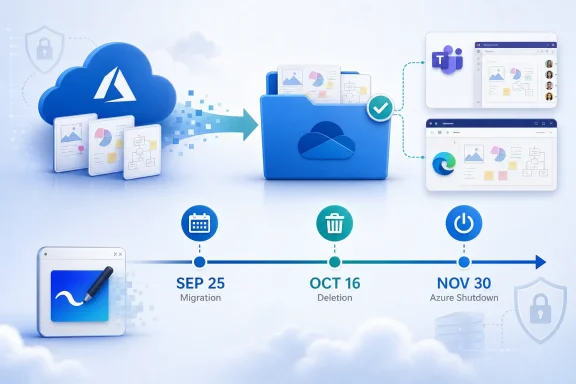
Windows Central reported on August 26 that Microsoft moved the migration deadline from August 22 to September 25, moved permanent deletion of legacy boards from September 5 to October 16, and pushed standalone-app deprecation to November 30. The first two changes are confirmed by Microsoft Support. The third is where the published timeline collapses distinct parts of Whiteboard’s retirement into one date.
For administrators and users with old boards, the practical message is simple: treat September 25, 2026 as the last day to complete migration, and October 16, 2026 as the irreversible deletion deadline. Do not wait for November 30 to move boards or redesign Windows deployments around Teams and the web experience.
 The extension applies to Azure-backed boards
Microsoft’s updated Azure-to-OneDrive migration guidance says commercial customers must finish migrating remaining Azure-based Whiteboards by September 25. After that date, boards left in Azure become read-only; users can still view or export them until October 16, when Microsoft will permanently delete them.
This is a meaningful extension from the earlier schedule captured in Microsoft 365 Message Center advisory MC1441775. That version had ended migration tooling on August 22 and set deletion for September 5. Neowin independently reported the revised dates on August 25, before Windows Central’s follow-up coverage.
The change matters primarily to organizations with boards created before Microsoft switched new commercial Whiteboard storage to OneDrive in 2022. Newer Microsoft 365 Whiteboards are generally OneDrive-backed already. The at-risk group includes older Azure-stored boards, including some content started on Surface Hub and Microsoft Teams Rooms devices.
Microsoft’s stated rationale for the OneDrive move is operational rather than cosmetic. Azure-stored Whiteboards lack the full set of Microsoft 365 controls available to OneDrive files, including retention policies, legal holds, Data Loss Prevention, auditing, and basic eDiscovery. OneDrive-backed .whiteboard files also inherit familiar file-management and lifecycle behavior, which matters when an employee leaves or a tenant must respond to a compliance request.
November 30 is the Azure service shutdown, not clearly the app deadline
Microsoft’s migration document says the Azure Whiteboard service shuts down on November 30. It does not say that the standalone Windows app stays supported until that date. In fact, the same page says standalone Windows, iOS, and Android Whiteboard apps retire on September 14 and directs users to Teams or Whiteboard on the web afterward.
That creates an obvious conflict with Windows Central’s account, which describes November 30 as the app’s deprecation date. Microsoft’s own dedicated support page about retirement of the standalone apps creates a second inconsistency: its current Spanish-language version says the standalone Windows, iOS, and Android apps retire on October 16, not September 14.
The practical distinction is not academic:
- September 25 is the end of migration capability for remaining Azure boards.
- October 16 is the deletion deadline for Azure boards that remain unmigrated.
- November 30 is the documented Azure service shutdown date.
- Microsoft’s public support pages currently disagree on whether the standalone app retires on September 14 or October 16.
Microsoft has not published a clear, unified public schedule that reconciles those app dates with the November 30 backend shutdown. That leaves Windows administrators with an avoidable deployment problem: a device image or software portal may continue advertising an app that Microsoft’s own migration guide tells users to stop relying on weeks earlier.
Organizations should therefore plan against the more conservative date. Remove the standalone app from standard deployment plans now, redirect users to Whiteboard in Teams and the web client, and do not interpret the November 30 Azure shutdown as an assurance that the Windows app will still open usable boards through that day.
Migration is user-triggered, not a tenant-wide batch job
The most consequential detail in Microsoft’s documentation is how the migration works. Microsoft provides PowerShell cmdlets for inventory, ownership transfers, progress review, recovery, and export, but it does not offer a tenant-wide Microsoft-operated migration that simply moves every remaining board in the background.
Migration is triggered when an eligible user opens Whiteboard through the web, Teams desktop, Teams on the web, or—according to the migration article—the Windows app through September 22. Mobile apps do not trigger Azure-to-OneDrive migration. That makes dormant accounts, departed employees, and unlicensed users a direct data-loss risk.
Microsoft says administrators can use the WhiteboardAdmin PowerShell module to identify Azure boards and their owners. Useful commands include Get-WhiteboardsForTenant for inventory, Get-WhiteboardOwners to identify ownership, Set-WhiteboardOwner and Invoke-TransferAllWhiteboards for ownership changes, and Export-WhiteboardHtml for content that cannot be migrated.
There is a timing catch: Microsoft says Whiteboard inventory data is precalculated and may take roughly two weeks to reflect recent changes. An administrator who runs a single inventory report shortly before September 25 could be working with stale information. That is a strong reason to begin the audit immediately, rerun it before the cutoff, and document ownership transfers rather than assuming a clean report means there is no remaining Azure content.
Microsoft also warns that migration can fail because the owner does not have OneDrive provisioned, has exhausted OneDrive storage, or cannot be matched to a valid OneDrive location. A board that fails to migrate should be copied or exported before October 16; waiting for a backend fix after the migration cutoff turns a recoverable provisioning error into a permanent loss.
Personal-account users have less clarity, not a new guarantee
The original Message Center advisory said personal Microsoft account users would lose the ability to create or edit Whiteboards on August 22, while retaining a short view-and-export window. Windows Central says that consumer cutoff has moved to September 25 along with the enterprise migration date.
Microsoft’s current public support documentation is much clearer about commercial Azure-board migration than it is about the personal-account service cutoff. Its standalone-app retirement page says personal-account users are affected by the app retirement, but it does not plainly provide the same revised create-and-edit timeline reported by Windows Central.
That gap matters because moving from a personal Microsoft account to a Microsoft 365 business or work account is not a transparent in-place conversion of a board library. Microsoft distinguishes personal Whiteboards from work or school content backed by OneDrive for Business. Users should export anything that exists only in a personal account and verify that the export is usable in the tool they intend to use next.
For personal users, “view and export” is also not the same as preserving an editable collaborative workspace. An image or HTML export can retain the visual record of a board, but it does not necessarily retain the day-to-day workflow, live sharing, object behavior, and organization of the original Whiteboard. The safe move is to export early, open the exported result, and recreate active working boards in the replacement service before access ends.
What Windows and Microsoft 365 admins should do now
The retirement is not the end of Microsoft Whiteboard for work and school tenants. Microsoft says OneDrive-backed boards will remain accessible through Whiteboard on the web and Microsoft Teams, including Teams meetings, chats, and the Whiteboard app inside Teams. But the standalone client is being retired, and the old Azure storage path is being removed.
Administrators should inventory Azure-based boards now, identify inactive owners, provision or validate OneDrive for affected users, and make sure each owner opens a supported client before September 25. Any board that has not migrated cleanly should be exported before October 16, with the exported file tested rather than merely downloaded.
For Windows endpoint management, the change should also trigger a cleanup of Intune assignments, Configuration Manager packages, golden images, software-center listings, onboarding guides, help-desk scripts, and internal links that point users to the standalone Microsoft Whiteboard app. Microsoft’s own documentation directs post-retirement users toward Teams and the web, so continuing to package the desktop client will create support tickets without preserving the old experience.
Microsoft has bought organizations several weeks for migration and roughly six additional weeks before legacy data is deleted. It has not bought them until November 30 to resolve Azure-board ownership, validate OneDrive provisioning, or keep the standalone Windows app as a supported workflow.
