
That distinction changes the purchasing advice. The PRO Z890-S WIFI makes sense for someone who has already found the conventional-layout board from a reputable Indian retailer at or below ₹20,000 and specifically needs its rear Thunderbolt 4 port. It is not evidence that every buyer should pay a Z890 premium, and it is certainly not a verified ₹20K recommendation when live stock, seller, warranty terms, and final price are left unreported.
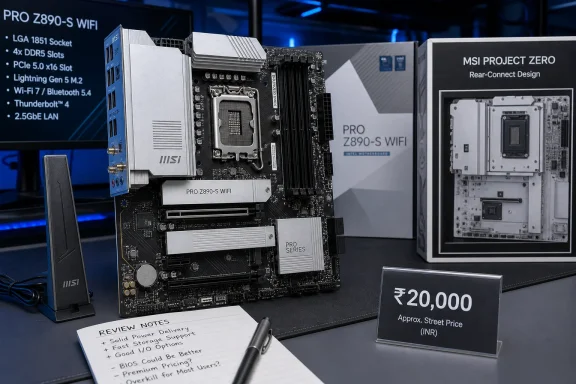 The Club386 testing was for the PZ board, not the ordinary PRO Z890-S WIFI
TechnoSports cites Club386 as a hands-on validation of “this exact board” with a Core Ultra 7 265K. Club386’s article is explicitly a review of the MSI PRO Z890-S WIFI PZ, the Project Zero edition. That suffix is not cosmetic: the PZ relocates the power, fan, storage, and front-panel headers to the rear of the PCB.
Club386 says the PZ’s primary feature is its back-connect layout and lists limited compatible case selection as a drawback. A PZ board requires a chassis designed around rear-facing connectors; it cannot be treated as a drop-in substitute for the normal PRO Z890-S WIFI in a standard ATX case. MSI itself markets the two as separate products.
There is useful overlap. Club386 reports that the PZ was adapted from the conventional PRO Z890-S WIFI without feature cuts, and both boards use a 12+1+1+1 Duet Rail power design, four DDR5 slots, three M.2 slots, Wi‑Fi 7, 2.5GbE and one onboard Thunderbolt 4 port. Its observations about the general platform and its warning that the VRM is relatively lean are therefore relevant context.
But the benchmark result is not a motherboard performance result in isolation. Club386 tested an AWD-IT prebuilt carrying a Core Ultra 7 265K, GeForce RTX 5070 Ti, DDR5 memory, cooling, firmware settings, case airflow, and a PCIe 4.0 Kingston NV3 SSD. Its gaming numbers describe that whole machine. They do not prove that the ordinary PRO Z890-S WIFI is the best value Z890 board at any particular Indian price.
That does not make the standard board a bad choice. It means prospective buyers should not read a PZ prebuilt review as direct, like-for-like validation of the conventional board, particularly when the purchase decision is supposed to hinge on a tight ₹20,000 ceiling.
MSI’s official specification confirms the useful features — and the practical limits
The core specification quoted by TechnoSports is broadly correct. MSI’s India specification page lists Z890, LGA 1851 support for Intel Core Ultra Series 2 desktop processors, four DDR5 UDIMMs up to 256GB, Realtek 2.5GbE, Intel Wi‑Fi 7 with Bluetooth 5.4, four SATA ports, three M.2 slots, and a rear Thunderbolt 4 Type-C port.
The board’s strongest feature at the right price is the I/O mix. Thunderbolt 4 is implemented as a true 40Gbps port, supports DisplayPort output and can daisy-chain Thunderbolt devices. Alongside it sit a 20Gbps USB-C port and six 5Gbps Type-A ports. For a workstation with external fast storage, a dock, capture hardware, or a high-resolution display routed through the integrated GPU, that is more useful than decorative heatsinks or RGB headers.
The connectivity still needs to be read carefully. The Thunderbolt port provides up to 15W charging, not the sort of high-wattage USB-C power delivery that can replace a laptop charger. Its display output also depends on using a processor with integrated graphics — which the Core Ultra 7 265K has, unlike the 265KF.
Likewise, this is a three-M.2 motherboard, not a sprawling storage platform. M2_1 is PCIe 5.0 x4 from the CPU, while M2_2 is PCIe 4.0 x4 from the chipset and M2_3 supports PCIe 4.0 x4 or SATA mode. A conventional gaming machine with one fast boot drive and one or two additional SSDs is well served. A workstation intended for several Gen5 NVMe drives is not.
MSI’s current India specification lists memory overclocking support up to DDR5-8800+ in a one-DIMM-per-channel, single-rank configuration. TechnoSports lists 8600+ MT/s instead. Either figure is an overclocking ceiling rather than a promise that any four-DIMM kit will operate there. MSI’s own table lowers the potential ceiling as more modules and ranks are installed, while Intel specifies DDR5-6400 as the Core Ultra 7 265K’s maximum supported memory speed. Builders planning 64GB or 128GB should buy a kit listed on MSI’s memory compatibility list instead of treating “8800+” as a realistic target.
Four full-length slots do not mean four high-bandwidth expansion slots
One passage in the TechnoSports review repeats favorable owner feedback praising “four PCIe x16 slots.” Physically, that is true: the board has four full-length slots. Electrically, it is misleading if it is read as four x16-capable slots.
MSI’s manual identifies the lanes as follows:
- The top PCI_E1 slot is PCIe 5.0 x16 from the CPU and is the slot intended for the main graphics card.
- PCI_E2 is a PCIe 3.0 x1 connection from the chipset despite its full-length physical slot.
- PCI_E3 is PCIe 4.0 x4 from the chipset.
- PCI_E4 is PCIe 4.0 x4 from the CPU.
This is a sensible allocation for capture cards, storage adapters, lower-bandwidth expansion cards, or possibly a second device that benefits from four PCIe 4.0 lanes. It does not make the board an appropriate foundation for multi-GPU compute, multiple high-end add-in cards, or an expectation that every long slot offers graphics-card-class bandwidth.
The same issue applies to the word future-proof. PCIe 5.0 on the primary graphics slot and primary M.2 slot offers flexibility, but buyers are locking into Intel’s LGA 1851 platform. A motherboard cannot make a socket durable beyond the processor support Intel chooses to provide. Calling the board future-proof based solely on Wi‑Fi 7, Thunderbolt 4 and Gen5 storage is marketing shorthand, not an upgrade guarantee.
The VRM is adequate for a 265K, but the review offers no thermal evidence
MSI specifies a 12+1+1+1 Duet Rail power system, dual 8-pin CPU inputs, a six-layer PCB, extended VRM heatsinks, and thermal pads. The Core Ultra 7 265K is a 20-core processor with a 250W maximum turbo power rating, so power delivery and cooling are relevant rather than academic details.
For stock operation, gaming, content work and memory tuning, there is no reason in the published specifications to assume the PRO Z890-S WIFI cannot run a 265K properly. Club386’s PZ review also did not identify a failure to operate its 265K test system. Its more measured finding was that the 12-phase design was lean relative to better-equipped Z890 competitors, and it advised against expecting enthusiast-grade overclocking from it.
TechnoSports reaches a similar conclusion, but it does not publish VRM temperatures, CPU package power, BIOS version, load duration, cooler, room temperature, or stability results. Those omissions are important because “comfortable” operation under a short gaming session is a different claim from sustained 250W rendering or manual all-core overclocking.
The practical answer is straightforward: pair the board with a good tower air cooler or liquid cooler, retain sensible Intel power limits unless testing warrants otherwise, and do not pay extra for a K-series CPU and Z890 chipset solely for aggressive overclocking. If manual tuning is the purpose of the build, a board with stronger documented power stages and published thermal testing is the safer comparison point.
The ₹20,000 verdict is unproven without a real Indian retail price
TechnoSports places the board at roughly $213 globally and translates that to about ₹18,500–₹21,000 after duties and retailer margins. That is not a price check. It is a conversion-based estimate, and it cannot establish what an Indian buyer will actually pay for a board with local GST, distributor warranty, shipping, and changing stock.
MSI’s India product page confirms the product exists in the region but does not publish a retail price. Searches also turn up multiple variants — the standard silver PRO Z890-S WIFI, the white version, and the back-connect PRO Z890-S WIFI PZ — whose prices should not be casually interchanged. One Indian retailer’s indexed listing for the white model showed ₹23,440 and out-of-stock status, illustrating exactly why a headline based on a broad ₹20K number can mislead.
The review’s comment that buyers may need to budget for cables and documentation is also at odds with MSI’s manual. MSI lists a quick-installation guide, two SATA cables, an EZ Conn cable, a Wi‑Fi antenna, three EZ M.2 Clip II retainers, and an EZ M.2 Clip II remover in the standard package. A purchaser who receives less should treat it as a missing-box-content issue to raise with the retailer, not as an expected cost of ownership.
The MSI PRO Z890-S WIFI is a well-equipped conventional ATX board with a credible Core Ultra 7 265K use case. Its one genuinely distinctive budget feature is onboard Thunderbolt 4 alongside Wi‑Fi 7 and 2.5GbE. But the published review has not shown that the ordinary board is available under ₹20,000, and its strongest external validation is actually for the case-restricted PZ variant. Buy it when a local seller makes the delivered, warranty-backed price compelling — not because a currency conversion turned it into “the best” board on paper.
