
That distinction matters. Plenty of compact Windows PCs have become capable office machines, media centers, and even modest gaming systems. MSI’s new desktop instead aims at developers, researchers, creative professionals, and privacy-conscious organizations that want to keep model inference and sensitive source data physically under their own control. The result is an intriguing collision of workstation ambitions, laptop-derived silicon, and a form factor small enough to disappear beside a monitor.
The headline is not merely that MSI has squeezed a fast processor into a compact shell. It is that the company is using AMD’s unified-memory architecture to attack one of the most stubborn limits in local AI: the high cost and limited capacity of dedicated GPU memory.
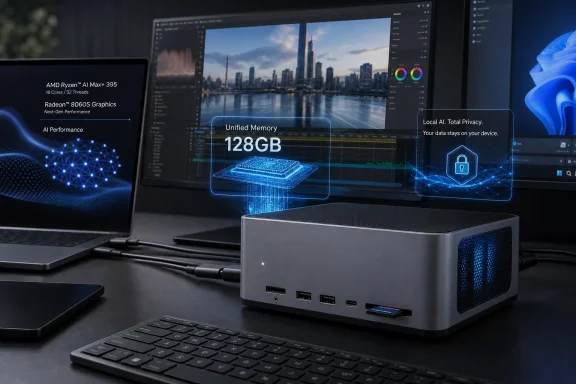 A 4-Liter Windows AI Workstation, Not a Conventional Mini PC
The PRO MAX EDGE AI+ 11M measures just 4 liters in volume, placing it in a very different physical category from a standard tower workstation. MSI’s published specifications describe an aluminum chassis, a built-in 300W power supply, and support for up to four displays, all while avoiding the large external power brick that often accompanies high-performance mini PCs. MSI lists the integrated PSU and 4-liter aluminum design as core features.
This is a commercial refinement of the compact “AI Edge” machine MSI previewed earlier in the year. The finalized branding is more direct: PRO MAX EDGE AI+ positions the desktop as part of a professional computing stack intended for local deployment, rather than as an enthusiast project or a gaming-first device. TechnoSports reported that the finalized launch follows MSI’s earlier AI Edge demonstrations.
Under the hood sits the AMD Ryzen AI Max+ 395, formerly known by its “Strix Halo” codename. AMD specifies the processor with:
- 16 Zen 5 CPU cores
- 32 threads
- Up to 5.1GHz boost frequency
- 64MB of L3 cache
- An integrated Radeon 8060S GPU with 40 Compute Units
- An XDNA 2 NPU rated for up to 50 TOPS
- A configurable power range spanning 45W to 120W depending on the system design and performance profile. AMD’s official Ryzen AI Max+ 395 specifications confirm the CPU, graphics, memory, connectivity, and power characteristics.
MSI rates its implementation at up to 126 TOPS of total AI performance, a composite figure that combines CPU, GPU, and NPU capabilities. That number is useful as a broad platform indicator, but it should not be treated as a direct prediction of how quickly a particular LLM, image model, or AI coding tool will run. Model architecture, quantization, context size, inference engine, driver maturity, and whether the workload is directed to the GPU or NPU all matter more than a catch-all TOPS value. MSI identifies the 126 TOPS rating as a platform-level figure.
That caveat does not diminish the machine’s technical importance. It clarifies where the real breakthrough lies.
Unified Memory Is the Actual Differentiator
The defining feature of MSI’s compact AI desktop is its 128GB unified memory pool. Instead of combining standard system RAM with a separate graphics card carrying a fixed amount of VRAM, the Ryzen AI Max+ design gives the CPU and Radeon 8060S integrated GPU access to the same high-bandwidth LPDDR5X memory. AMD lists a 256-bit LPDDR5X-8000 memory interface with support for up to 128GB, while MSI says up to 96GB can be allocated as variable graphics memory. AMD’s platform specification and MSI’s product documentation align on the memory ceiling and high-speed LPDDR5X configuration.
For traditional PC buyers, non-upgradeable LPDDR memory can sound like an unfortunate compromise. In this specific class of machine, it is a strategic feature. Local AI workloads increasingly run into VRAM capacity before they run out of raw compute throughput. A workstation with a powerful discrete GPU but 16GB of VRAM may be exceptionally quick with a model that fits inside that memory budget, yet incapable of loading a substantially larger model without partial CPU offloading, aggressive quantization, or cloud assistance.
MSI’s approach changes the calculation. Allocating as much as 96GB to the integrated GPU gives a local inference stack far more headroom than mainstream desktop graphics cards typically provide at anything approaching mini-PC size. The company says this arrangement can accommodate LLMs with up to 120 billion parameters on-device, with the explicit goal of retaining sensitive data locally. MSI makes the 120B-model and 96GB variable-graphics-memory claims.
Capacity Is Not the Same as Performance
There is an important distinction between loading a 120B model and obtaining an ideal interactive experience from it. Large models are often quantized—stored using fewer bits per parameter—to fit within available memory. Their speed also varies sharply according to prompt length, context window, model family, inference backend, and the quality of GPU acceleration.
MSI’s own messaging illustrates why buyers should read vendor numbers carefully. An earlier MSI announcement cited about 15 tokens per second with a model up to 120B parameters, while the current product page states 15 tokens per second for a 109B model and publishes a separate result of 33.29 tokens per second for GPT-OSS 120B. The earlier MSI announcement and the current product page’s benchmark table do not provide enough methodological detail to make those figures directly comparable.
That does not mean the results are invalid. It means they should be understood as vendor demonstrations of possible configurations, not as guaranteed throughput for every model users may install through Ollama, LM Studio, llama.cpp, or an enterprise inference framework. For an organization considering this device as a local AI workstation, repeatable testing with the exact intended models is essential.
The larger point remains compelling: memory capacity has become a primary AI workstation specification. MSI has made that capacity available in a desktop small enough to fit comfortably on a desk, shelf, or mobile production cart.
What Local AI Changes for Windows Professionals
The appeal of local LLM inference is not limited to avoiding subscription costs. It is about workflow control.
A legal team reviewing confidential contracts, a healthcare organization processing protected materials, an engineering group searching internal documentation, or a studio generating summaries from unreleased scripts may have legitimate reasons to minimize data exposure. A machine that keeps prompts, embeddings, retrieval databases, and inference output on a local network can simplify certain privacy and governance requirements.
MSI’s language leans heavily into this proposition, describing the system as a way to run private retrieval-augmented generation workflows and contract analysis without transmitting data to a cloud AI service. MSI explicitly markets on-device execution for private RAG and sensitive analysis workloads.
Still, “local” should not be confused with automatically secure. The PC itself remains a Windows endpoint that needs a disciplined security baseline:
- Use Windows 11 Pro security features where appropriate, including BitLocker device encryption and policy management.
- Protect model files and vector databases with access controls, especially on shared systems.
- Keep AMD graphics, chipset, and Windows updates current, because local inference still depends on a complex software stack.
- Segment the device on the network if it serves internal AI tools to multiple users.
- Audit third-party models and extensions before importing them into a business workflow.
MSI offers configurations with Windows 11 Home and Windows 11 Pro, while AMD officially lists Windows 11, Ubuntu, and RHEL support at the processor level. MSI’s operating-system options and AMD’s supported-OS listing indicate that the hardware can fit into both mainstream Windows environments and more specialized Linux-oriented AI setups.
For Windows enthusiasts, that flexibility is significant. The PRO MAX EDGE AI+ is not trying to replace a data-center GPU server. It is trying to move meaningful local AI capability into offices and home labs that previously had to choose between expensive cloud APIs, oversized tower workstations, or machines whose GPU memory capacity set an early ceiling.
Connectivity Is Built for Creators and Small Studios
A compact desktop aimed at edge AI cannot be useful if it becomes an I/O bottleneck. MSI has given the PRO MAX EDGE AI+ a well-considered connectivity layout that reflects its intended professional audience.
The front panel includes:
- A physical performance switch
- A UHS-II SD card reader
- One 40Gbps USB Type-C port with DisplayPort Alt Mode
- Two 10Gbps USB Type-A ports
- A 3.5mm combo audio jack. MSI’s front I/O specification details the port selection.
At the rear are a second 40Gbps USB Type-C port, one additional 10Gbps Type-A port, two USB 2.0 ports, HDMI 2.1, DisplayPort 1.4a, 2.5GbE Ethernet, and another audio jack. The port arrangement supports up to four displays when the USB-C display outputs are used alongside HDMI and DisplayPort. MSI’s rear I/O and display-support information confirms the connectivity claim.
The dual 40Gbps USB-C ports are especially valuable. They allow high-speed external storage for model libraries, datasets, and project media, while also opening practical routes to external docks and displays. The integrated UHS-II SD reader is an unusually welcome inclusion in a machine that could plausibly be used by photographers, video editors, and field-production teams working with large files.
Storage is also more flexible than some compact AI PCs. MSI includes two PCIe Gen 4 M.2 slots, enabling separate drives for Windows, applications, models, datasets, scratch storage, or backup images. MSI lists dual PCIe Gen 4 M.2 support, while Gagadget’s reporting independently identifies the two M.2 Gen4 x4 slots, Wi-Fi 7, 2.5GbE, and UHS-II reader.
Thermal Engineering Will Decide the Real-World Experience
The central engineering question is obvious: can a 4-liter machine maintain performance during long inference sessions, rendering jobs, or sustained gaming workloads?
MSI’s answer is Frozr AI Pro, a cooling system using three fans, a copper spreader, and three heat pipes. The company also references its Glacier Armor approach to cooling internal components such as SSDs. MSI’s thermal design description and launch material present the design as one built for sustained local AI workloads.
The company has also added a physical three-stage performance switch. Rather than requiring a utility or control-panel visit, users can select profiles intended to prioritize performance, balanced behavior, or acoustics. MSI describes the hardware-level switch as a way to alter performance, thermal, and noise behavior.
That is a sensible feature for this category. A local LLM box may spend hours generating embeddings, indexing documents, transcribing audio, compiling code, or running an AI agent loop. During those jobs, a user may reasonably prefer stable lower noise over an extra increment of tokens per second. Conversely, an overnight batch workload can make better use of the system’s performance profile.
The potential risk is straightforward: small enclosures have less thermal mass and less room for error. Sustained performance, fan noise, component temperatures, and power consumption need independent reviews before the PRO MAX EDGE AI+ can be judged as a fully proven replacement for a larger workstation. MSI’s cooling claims are technically plausible, but vendor materials alone cannot establish how quiet or consistent the machine will be during a multi-hour workload.
Radeon 8060S Makes This More Than an AI Appliance
The Radeon 8060S integrated GPU changes the role of the PRO MAX EDGE AI+. This is not a stripped-down enterprise endpoint with an NPU attached. It is a powerful integrated graphics platform sharing a large, fast memory pool with the CPU.
AMD specifies the Radeon 8060S at 40 Compute Units and a graphics frequency of up to 2.9GHz. AMD’s graphics specification page confirms those details. MSI argues that the graphics performance can accelerate rendering and high-resolution video editing while also supporting modern games, publishing results such as roughly 80–90 FPS in selected 1440p titles using high visual features including FSR and frame generation. MSI’s gaming figures and test settings should be interpreted as vendor benchmarks, not universal game-performance promises.
Independent testing of a separate Ryzen AI Max+ 395 mini PC has also shown the Radeon 8060S delivering smooth 1080p results in a range of modern games, albeit with settings adjusted title by title. Tom’s Hardware’s coverage of external Radeon 8060S gaming tests supports the broader conclusion that this iGPU is much more capable than conventional integrated graphics.
That versatility matters because it improves utilization. A small business may buy the machine primarily for a private AI assistant, then use it for CAD visualization, media work, software development, and occasional gaming without having a second PC at the desk. A home-lab owner may host local models by day and use the same Windows system for editing, streaming, or entertainment at night.
The limitation is equally clear: it is still an integrated GPU. It shares memory bandwidth and system resources with the CPU, and it cannot match every specialized workflow enabled by a high-end discrete GPU with dedicated VRAM, CUDA-only software support, or more mature acceleration libraries. Buyers whose work depends on NVIDIA-specific tools should verify application compatibility before assuming that high memory capacity alone makes this an interchangeable replacement.
Clustering Raises the Ceiling—and the Complexity
MSI is not limiting its pitch to a single desktop. The company says multiple PRO MAX EDGE AI+ systems can be combined into a distributed local cluster, extending capacity to models of up to 670 billion parameters. MSI’s launch announcement makes that 670B clustering claim, while the product page lists example multi-node configurations for large open models.
The idea is compelling: rather than buying one enormous server, a small team could scale local AI capability by adding compact nodes. This modularity could suit studios, research groups, and departments that need to expand gradually.
But clustering is not a consumer-style plug-and-play feature. Splitting a model across machines introduces networking, software orchestration, synchronization, model-sharding, management, and reliability considerations. A four-node cluster may offer extraordinary total memory for its desk footprint, but it also creates four systems to configure, update, secure, and support.
This is where MSI’s marketing should be read as a roadmap for advanced deployments rather than a promise of effortless scale. The single-node system is the more immediately understandable product. The cluster proposition is a potentially valuable extension for technically capable organizations that are prepared to own the operational work.
Pricing Will Determine Whether MSI Has Created a New Category
MSI had not published pricing or detailed regional availability in the launch coverage reviewed for the PRO MAX EDGE AI+ 11M. TechnoSports noted the absence of confirmed pricing and regional release information. That missing figure is not a minor detail; it will determine whether this becomes a practical local-AI workstation or a showcase product for a narrow market.
The Ryzen AI Max+ 395, 128GB of high-speed unified memory, premium cooling, integrated 300W PSU, Wi-Fi 7, dual USB4-class 40Gbps ports, and compact aluminum enclosure all point to a premium bill of materials. It would be unrealistic to expect standard mini-PC pricing.
Yet value in this category cannot be measured only against other mini PCs. The more relevant comparison includes:
- A desktop tower with a high-memory discrete GPU
- A workstation laptop with similar Ryzen AI Max+ hardware
- Ongoing cloud AI subscription and API costs
- The operational and privacy implications of moving sensitive workloads off-premises
- The desk space, noise, and power overhead of a conventional tower
For the right professional, 128GB of unified memory in a 4-liter Windows desktop could justify a substantial premium. For casual users interested mainly in Windows Copilot features or occasional image generation, the same specification may be excessive.
The PRO MAX EDGE AI+ therefore succeeds first as a statement of direction. It demonstrates that local AI is starting to reshape desktop design around memory capacity, privacy, and sustained inference rather than raw GPU branding alone. MSI has not eliminated the need for larger workstations, discrete graphics, or cloud compute. It has, however, built a compact Windows AI PC that makes those choices feel less inevitable.
