
The headline configuration is unusually capable for this class. Buyers can specify an Intel Core Ultra 7 365, 32GB of LPDDR5X memory, and a 512GB encrypted PCIe NVMe SSD, while the display reaches 500 nits of brightness. The resulting package looks compelling on paper, especially for professionals who need a compact Windows tablet that can work outdoors, travel easily, dock into a desk setup, and handle modern AI-assisted workloads without immediately falling back on cloud processing.
There is an important caveat, however. The LAVIE BT53C has been announced for Japan with a planned availability window in late September 2026, and there is no indication of a broad North American retail launch. Its expected starting price in Japan is also steep, at ¥611,600 including tax for the listed business model range. That positions it as a premium enterprise purchase rather than an impulse alternative to a consumer Surface Pro.
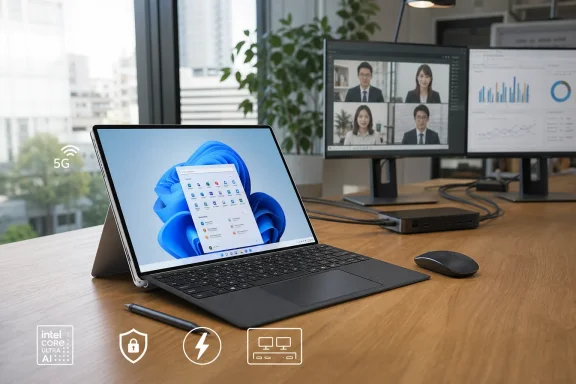 Overview: A Windows Tablet Built for Work Rather Than Casual Consumption
The LAVIE BT53C is a detachable Windows tablet with a built-in rear kickstand, optional cover keyboard, and optional rechargeable digitizer pen. Its physical formula will feel familiar to anyone who has used a Surface Pro: tablet-first portability, a fold-out stand for desk use, and a slim keyboard cover that converts the device into a more conventional laptop-style workstation.
What distinguishes the BT53C is the degree to which NEC has optimized the concept for managed business environments. It ships with Windows 11 Pro, supports Intel vPro Enterprise, includes Microsoft Pluton and TPM 2.0 security hardware, and is positioned as a Secured-core PC. Those specifications matter in organizations that need centralized administration, hardware-rooted security, Windows Hello sign-in, and a long product support lifecycle.
The core specifications paint a clear picture of the intended audience:
- 13-inch, 3:2 IPS touchscreen
- 2,880 × 1,920 resolution
- Up to 500 nits brightness
- Intel Core Ultra 7 365, Core Ultra 5 335, or Core Ultra 5 332
- 16GB or 32GB LPDDR5X memory
- 256GB or 512GB encrypted NVMe SSD
- Wi-Fi 7 and Bluetooth 5.4
- Optional 5G wireless WAN with Nano SIM and eSIM support
- Two Thunderbolt 4 / USB4 ports
- 5MP Windows Hello IR front camera and 8MP rear camera
- Optional backlit keyboard and rechargeable pen
- Windows 11 Pro
- Integrated kickstand
The LAVIE BT53C measures approximately 290 × 210 × 9.3 mm, putting it close to A4-paper dimensions. NEC rates the lightest configuration at roughly 866 g or less, which is highly portable for a 13-inch Windows system with a kickstand and enterprise-oriented internals.
That figure applies to the tablet itself, not necessarily to the complete laptop-style setup. Adding the optional cover keyboard increases the practical carry weight considerably; NEC lists the keyboard at around 371 g. A fully equipped BT53C with keyboard and pen will therefore be closer to a small ultraportable laptop in a bag, even though the tablet alone remains notably light.
The Real Surface Rival Angle
Calling every detachable Windows tablet a Surface rival has become a predictable headline device, but the comparison is valid here. NEC has clearly adopted the same broad category: a premium, pen-capable Windows tablet that becomes a laptop with a detachable keyboard.
Yet the BT53C competes differently.
Microsoft’s Surface Pro line is often designed as a polished general-purpose premium PC for consumers, creatives, students, professionals, and business users alike. The LAVIE BT53C is more narrowly engineered around corporate deployments. It emphasizes optional cellular connectivity, vPro management, support services, Windows 11 Pro, security features, a brighter panel for outdoor work, and accessories that serve document annotation and field-service scenarios.
A More Enterprise-Centric Proposition
The BT53C appears designed for employees who move between desks, vehicles, meeting rooms, warehouses, construction sites, hospitals, customer locations, and public-sector offices. A 500-nit panel may sound like a minor upgrade in a specifications list, but it is meaningful for work conducted near windows, under strong overhead lighting, or outdoors.
The device also embraces a practical set of field-friendly features:
- An integrated adjustable kickstand
- Optional 5G wireless WAN
- A rear camera with autofocus for photos and document capture
- A front IR camera for facial recognition
- A detachable keyboard that doubles as display protection
- An optional pen with 4,096 pressure levels
- GPS availability on 5G-equipped versions
These are not specifications that automatically make the BT53C better than every Surface device. Instead, they demonstrate that NEC is targeting a different purchasing decision. IT departments may value integrated mobile data, endpoint management, local support, and predictable configurations more than thin bezels or consumer-oriented styling.
The Limits of the Comparison
The Surface comparison also has limits. The LAVIE BT53C is, at least initially, a Japan-focused commercial PC. Its keyboard uses a Japanese JIS layout, and the 5G band support is tailored to the Japanese market. For Windows enthusiasts in the United States, that distinction is substantial.
A product can have excellent hardware and still be difficult to recommend outside its native market if distribution, warranty coverage, keyboard localization, cellular certification, and accessories are not available locally. At this stage, the BT53C should be seen as an interesting high-end Surface-class device, not as a confirmed global Surface challenger.
Intel Panther Lake Arrives in a Detachable Form Factor
The most interesting part of the LAVIE BT53C is not its shape but its processor platform. NEC is using Intel’s Core Ultra Series 3 family, also known by the code name Panther Lake.
The top option, the Core Ultra 7 365, brings an eight-core design made up of four performance cores and four low-power efficient cores. NEC lists up to 4.8 GHz single-core turbo frequency for its performance cores and up to 3.6 GHz for its low-power cores.
This is not a high-wattage workstation CPU with a large discrete GPU attached. Rather, it is a mobile processor intended to balance responsiveness, AI acceleration, graphics capability, and power efficiency. In a thin 13-inch tablet, that balance matters far more than an impressive peak benchmark number.
NPU Performance and Copilot+ PC Readiness
The Core Ultra 7 365 includes an NPU rated at up to 49 TOPS. That crosses Microsoft’s 40-TOPS threshold for the Copilot+ PC class, enabling the BT53C to meet the hardware requirements for Windows features and applications that can use dedicated on-device AI acceleration.
The lower processor choices also include capable NPUs:
| Processor | CPU Core Configuration | Maximum NPU Performance |
|---|---|---|
| Core Ultra 7 365 | 8 cores | 49 TOPS |
| Core Ultra 5 335 | 6 cores | 47 TOPS |
| Core Ultra 5 332 | 6 cores | 46 TOPS |
The practical point is not that every Windows application will suddenly become an AI showcase. Most daily office work still depends on CPU speed, memory capacity, browser efficiency, application quality, network access, and storage responsiveness. However, the NPU can allow supported workloads—such as video-call effects, transcription-related features, image processing, local inference, and AI-enhanced Windows functions—to run with lower power use than they would on the main CPU or GPU.
For organizations considering AI PCs, the BT53C is a more credible choice than older Intel-based detachables with much weaker neural processing hardware. It meets the relevant performance threshold without requiring a move to an ARM-based Windows machine.
32GB of Memory Is a Significant Advantage
The premium Core Ultra 7 model can be configured with 32GB of soldered LPDDR5X memory, while the Core Ultra 5 versions are paired with 16GB. That is an important split because detachable systems are rarely upgradeable after purchase.
For basic Office work, browser sessions, Teams calls, and cloud applications, 16GB remains usable. But a premium business tablet expected to remain in service for years benefits from 32GB. Large Excel workbooks, browser-heavy research, local virtual machines, multitasking across multiple displays, creative software, and AI-enhanced applications all consume memory rapidly.
The downside is clear: the memory is fixed onboard. Buyers must choose carefully at the point of purchase because neither RAM capacity nor storage should be treated as an easy future upgrade path.
Integrated Graphics: Useful, Not a Gaming Promise
Intel’s integrated graphics in the Core Ultra 7 365 include four Xe3 cores and hardware support for contemporary display, media, and graphics standards. This should make the BT53C more than adequate for high-resolution desktop work, web media, presentations, 4K external monitors, video conferencing, and light visual creation.
It should not be mistaken for a dedicated-GPU workstation or gaming tablet.
The 2.8K internal display is especially demanding if users attempt to run modern games at native resolution. Even capable integrated graphics generally benefit from lower resolutions and conservative settings in graphically intensive titles. The LAVIE BT53C is fundamentally a productivity tablet, not a handheld gaming PC in a larger shell.
Display: The 500-Nit Panel May Be the Most Practical Upgrade
The BT53C uses a 13-inch IPS touchscreen with a resolution of 2,880 × 1,920 pixels and a 3:2 aspect ratio. This is a well-chosen format for Windows productivity because it provides more vertical working space than a conventional 16:9 display.
A 3:2 display helps with:
- Editing Word documents and PDFs
- Reviewing long webpages
- Working in spreadsheets
- Reading technical documentation
- Viewing portrait-oriented photos and diagrams
- Taking handwritten notes
- Managing split-screen layouts
The 2.8K resolution also gives the display a sharp pixel density for a 13-inch panel. Text, interface elements, and pen annotations should look clean at typical working distances, provided Windows scaling is properly configured.
Brightness Matters More Than Resolution Alone
The 500-nit brightness rating is arguably more valuable than the jump from a standard high-resolution panel to a slightly sharper one. Many premium laptops and tablets look good indoors but become difficult to use near sunlit windows or in mobile settings. A 500-nit panel gives the BT53C a better chance of remaining readable in those conditions.
That does not mean it becomes a flawless outdoor device. The panel is described as glossy, and glossy touchscreens can reflect light aggressively. Strong brightness helps offset reflections, but it cannot eliminate them. In direct sunlight, the actual experience will depend on panel coating, viewing angle, ambient light, and how much screen content uses dark versus bright backgrounds.
The combination of 500 nits, 3:2 proportions, 2.8K resolution, and touch support still makes this one of the BT53C’s strongest attributes. It is a display designed for real work, not merely for producing an attractive spec-sheet number.
Connectivity: Thunderbolt 4, Wi-Fi 7, and Optional 5G
The LAVIE BT53C has a surprisingly strong connectivity foundation for a thin Windows tablet. It includes two Thunderbolt 4 / USB4 ports, one on each side, and both support USB Power Delivery and DisplayPort output.
This matters because detachable PCs can feel restrictive when they rely on a single multifunction port. Two Thunderbolt 4 ports give users more flexibility: one can be used for charging while the other connects an SSD, display adapter, dock, or other accessory.
A Tablet That Can Become a Desk PC
Through Thunderbolt 4, the BT53C can support a more conventional workstation environment. NEC specifies support for up to three active displays including the internal screen when using the tablet’s two Thunderbolt ports, while an optional dock expands that setup further.
The optional dock provides:
- HDMI output
- Two DisplayPort outputs
- Gigabit Ethernet
- Three USB 10Gbps Type-A ports
- One USB 10Gbps Type-C data port
- Two USB 2.0 ports
- A 3.5 mm headset jack
For office workers, this capability is crucial. The BT53C is not intended to replace a desktop through sheer local power; it replaces a desktop by becoming the same computer in different locations. Users can carry a tablet to a meeting, type on it in transit, use 5G away from Wi-Fi, then connect one cable at a desk and return to a multi-monitor Windows workspace.
5G Is a Genuine Business Feature—With Regional Constraints
The optional 5G module supports both Nano SIM and eSIM, making the BT53C more flexible than Wi-Fi-only devices. Integrated 5G can be valuable for sales professionals, field engineers, public-sector workers, and anyone who handles sensitive data outside trusted office networks.
Still, 5G should not be viewed as an automatic security solution. Cellular connections can reduce reliance on public Wi-Fi, but organizations still need VPN policies, endpoint protection, multifactor authentication, patch management, and data-loss prevention. The connection itself is only one piece of the security model.
There is also a practical regional limitation. The listed 5G and LTE bands are oriented toward Japanese carrier compatibility. A U.S. import buyer would need to verify exact band support, carrier approval, eSIM behavior, warranty coverage, and regulatory considerations before treating the cellular model as usable abroad.
Cameras, Pen Input, and the Tablet Experience
NEC has equipped the BT53C with a 5MP front camera that includes an IR sensor for Windows Hello face authentication and a physical privacy shutter. The addition of a privacy shutter is welcome in an enterprise device, where users may spend much of the day in video meetings but still want a visible, hardware-level way to block the camera.
The 8MP rear camera includes autofocus. Rear cameras on Windows tablets are sometimes dismissed as unnecessary, but they can be useful in field operations. Employees can photograph equipment labels, document site conditions, capture a whiteboard, scan paperwork, or include images in service reports without reaching for a separate phone.
The Pen Is Useful, But It Is Not Bundled by Default
The optional rechargeable digitizer pen supports 4,096 levels of pressure sensitivity. That should make it suitable for handwritten notes, markups, digital signatures, diagram review, and basic sketching.
NEC’s design includes a practical detail: the pen is stored and charged through a dedicated location on the optional cover keyboard. The company states that the pen can charge in roughly two minutes and deliver about 2.2 hours of use after a full charge under its stated testing method.
The limitation is obvious. Users must purchase the keyboard to gain the pen’s intended storage and charging arrangement. This increases the actual cost of a complete tablet-and-pen workflow, while also making the pen experience dependent on an accessory that may not be included in the base configuration.
Keyboard Quality Will Matter More Than the Tablet Alone
NEC claims a 1.5 mm key travel, an 18.5 mm key pitch, a large precision touchpad, backlighting, and two typing-angle options for the cover keyboard. Those figures suggest NEC is taking the keyboard seriously rather than treating it as a thin protective flap.
That is vital. Detachable Windows PCs live or die by keyboard usability. A fast processor and bright screen cannot compensate for a cramped keyboard that flexes under pressure or a kickstand arrangement that is uncomfortable on a lap.
The BT53C’s keyboard must still be tested in real-world conditions. Kickstand-based detachables generally work best on desks, trays, and tables rather than on soft or narrow surfaces. NEC’s hardware can reduce that compromise, but it cannot fully escape the physics of a tablet-plus-kickstand design.
Battery Life: Respectable, Not Class-Leading
NEC quotes up to 10.1 hours of video playback and 15.9 hours of idle time under the JEITA 3.0 measurement methodology, with the 5G module excluded. These numbers suggest respectable endurance, but they do not establish all-day battery life for every professional workload.
Real usage can vary sharply based on display brightness, cellular activity, video conferencing, browser load, connected accessories, background synchronization, screen resolution, and the selected power mode. A 500-nit display is excellent for visibility, but running it near maximum brightness will naturally consume more power.
The 10.1-hour video figure is therefore best understood as an indicator that the device is designed for mobile use—not as a guarantee that it will survive a full day of Teams calls, 5G use, high screen brightness, and sustained processor load.
This is one area where the BT53C’s premium positioning creates high expectations. A £4,000-equivalent class enterprise device, depending on currency conditions and final configuration, should offer more than adequate mobility. Independent testing will be needed to establish whether its real-world battery behavior matches the promise of its efficient processor platform.
Security, Manageability, and Support Are Central to the Design
The LAVIE BT53C’s enterprise features are not cosmetic additions. The selected Core Ultra processors support Intel vPro Enterprise, while the device integrates Microsoft Pluton and TPM 2.0. NEC also positions the tablet as a Secured-core PC.
Together, these capabilities can strengthen a managed Windows environment through protections related to firmware, identity, encryption, policy enforcement, remote management, and hardware-backed security features. That does not remove the need for disciplined IT practices, but it gives administrators a more suitable foundation than a consumer laptop configured after the fact.
AI Plus Biz: A Narrower AI Pitch Than Copilot Marketing
NEC also includes its own AI Plus Biz support concept, described as a chat-based troubleshooting tool that can assess device conditions and guide users through likely fixes. This is a more pragmatic use of AI than many broad productivity claims.
For corporate buyers, the value proposition is not “AI will do your work.” It is that employees might resolve simple device issues faster, reduce downtime, and avoid unnecessary help-desk escalations. That could be useful, especially in distributed workforces.
However, organizations should assess how the service handles telemetry, internet connectivity, data processing, localization, and support boundaries before deploying it widely. NEC notes that AI Plus Biz requires an internet connection, meaning it is not a fully offline diagnostic system.
Strengths, Risks, and Buying Considerations
The LAVIE BT53C is one of the more fully specified Windows business tablets announced in this category. It addresses many common detachable-PC complaints with a bright display, modern Intel platform, strong I/O, optional cellular access, enterprise management, high memory capacity, and a more capable accessory ecosystem than many budget 2-in-1s.
Notable Strengths
- Up to 32GB RAM in a compact detachable format
- Core Ultra Series 3 processors with Copilot+ PC-class NPU performance
- 500-nit 2.8K, 3:2 touchscreen
- Wi-Fi 7 and optional 5G
- Two Thunderbolt 4 ports
- Windows Hello IR camera and physical privacy shutter
- vPro Enterprise, Pluton, TPM 2.0, and Secured-core PC positioning
- Optional pen and keyboard designed for business workflows
- Built-in kickstand and compact tablet-first dimensions
- Full Windows 11 Pro rather than a consumer-oriented configuration
Potential Risks and Weaknesses
- The device is currently announced for Japan, not the global market.
- The listed starting price is extremely high for a detachable Windows PC.
- Keyboard and pen functionality depend on separately selected accessories.
- The keyboard uses a Japanese JIS layout, complicating import appeal.
- Memory is soldered and cannot be upgraded later.
- Storage peaks at 512GB, which may be restrictive for some professional workloads.
- Battery ratings are measured without 5G and may not reflect demanding real-world use.
- The glossy display may still create reflections outdoors despite the 500-nit brightness.
- The kickstand form factor remains less comfortable on a lap than a traditional clamshell laptop.
- Core Ultra 7 365 graphics are capable integrated graphics, not a discrete-GPU replacement.
The storage ceiling deserves particular attention. A 512GB SSD is adequate for cloud-centric office work, but it is modest for device fleets that handle large offline media libraries, engineering files, virtual machines, large datasets, or locally stored archives. The use of encrypted NVMe storage is a security positive, but capacity planning will be essential.
A Premium Windows Tablet With a Clear Purpose
The NEC LAVIE BT53C is not attempting to be the cheapest Surface alternative, nor is it trying to be a gaming machine or a mass-market consumer tablet. It is a high-end business Windows tablet designed around managed deployments, mobile productivity, digital ink, outdoor readability, secure connectivity, and modern AI hardware.
Its most compelling attributes are the combination of Core Ultra Series 3 performance, a 49-TOPS NPU in the top model, 32GB of RAM, 500-nit 3:2 display, optional 5G, and Thunderbolt 4 connectivity. That package makes it far more than a lightweight note-taking slate. Properly configured, it can operate as a mobile field device, an executive travel PC, a meeting-room tablet, and a docked desktop replacement.
The central question is not whether the BT53C can rival Microsoft Surface hardware in principle. It can. The more important questions are whether NEC expands availability beyond Japan, whether the final business configurations justify their substantial pricing, and whether real-world battery life and sustained performance hold up under the thermal limits of a 9.3 mm tablet chassis.
For enterprise buyers in its intended market, the LAVIE BT53C looks like a technically ambitious and unusually complete detachable Windows PC. For everyone else, it is a reminder that the Surface-style Windows tablet category still has room for innovation when manufacturers treat it as a serious business platform rather than a niche accessory.
