
Microsoft has expanded conditional formatting in the new Outlook for Windows and Outlook on the web, adding message-list rules based on email size, read state, attachments, flag status, categories, and importance. The feature, tracked as Microsoft 365 Roadmap ID 503551, is now marked Launched for worldwide commercial tenants.
As detailed in the Microsoft 365 Roadmap, the change gives users a more practical way to make actionable mail visible without moving it, filtering it, or relying entirely on inbox sorting. A team can, for example, give high-importance messages a distinct color, surface flagged follow-ups, or make messages with attachments stand out in a crowded project folder.
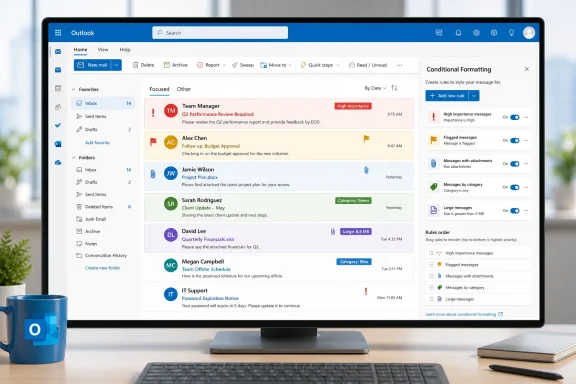
Conditional formatting changes how a message appears in the message list; it does not alter delivery, retention, category assignment, or other message data. That matters because it makes the feature complementary to Outlook rules: rules can move or categorize incoming mail, while formatting can make selected items visually prominent wherever they remain.
Microsoft’s support documentation says rules are managed from Settings > Mail > Conditional Formatting in new Outlook. A rule applies to both read and unread messages across folders except Drafts, and if multiple rules conflict, the one higher in the list takes precedence.
The newly expanded conditions cover several everyday triage signals:
The addition also depends on the account type. Microsoft documents conditional formatting for work or school accounts with a qualifying Microsoft 365 subscription, so administrators should not assume identical behavior for personal Outlook.com or unsupported mailbox configurations.
For end users, the immediate payoff is simple: a category such as “Executive Review” or “Customer Escalation” can now be both an organizational tag and a visual signal. For admins, there is no new tenant-side setting described in the roadmap; the practical task is communicating where users can create rules and setting expectations that these are personal display preferences, not centrally enforced mailbox policies.
The rollout is listed for desktop and web under General Availability, meaning users of the new Outlook for Windows and Outlook on the web should now look for the added conditions in the Conditional Formatting rule editor.
Formatting becomes a triage tool
Conditional formatting changes how a message appears in the message list; it does not alter delivery, retention, category assignment, or other message data. That matters because it makes the feature complementary to Outlook rules: rules can move or categorize incoming mail, while formatting can make selected items visually prominent wherever they remain.Microsoft’s support documentation says rules are managed from Settings > Mail > Conditional Formatting in new Outlook. A rule applies to both read and unread messages across folders except Drafts, and if multiple rules conflict, the one higher in the list takes precedence.
The newly expanded conditions cover several everyday triage signals:
- Messages can be visually identified by size, useful for spotting large documents or unusually heavy mail.
- Users can distinguish read and unread items, or highlight messages with attachments.
- Flags, categories, and high- or low-importance indicators can now drive presentation rules.
Useful, but not a replacement for classic Outlook views
For organizations migrating from classic Outlook for Windows, this closes part of a long-standing feature gap. The new client has already supported conditional formatting around criteria such as sender, subject text, and Cc recipients, but Microsoft continues to note that not every classic Outlook formatting option is available in the new experience.The addition also depends on the account type. Microsoft documents conditional formatting for work or school accounts with a qualifying Microsoft 365 subscription, so administrators should not assume identical behavior for personal Outlook.com or unsupported mailbox configurations.
For end users, the immediate payoff is simple: a category such as “Executive Review” or “Customer Escalation” can now be both an organizational tag and a visual signal. For admins, there is no new tenant-side setting described in the roadmap; the practical task is communicating where users can create rules and setting expectations that these are personal display preferences, not centrally enforced mailbox policies.
The rollout is listed for desktop and web under General Availability, meaning users of the new Outlook for Windows and Outlook on the web should now look for the added conditions in the Conditional Formatting rule editor.
References
- Primary source: Microsoft 365 Roadmap
Published: 2026-07-30T23:01:43.5748334Z
Microsoft 365 Roadmap | Microsoft 365
The Microsoft 365 Roadmap lists updates that are currently planned for applicable subscribers. Check here for more information on the status of new features and updates.www.microsoft.com
- Related coverage: m365admin.handsontek.net
Outlook: Expanded Conditions for Conditional Formatting in the New Outlook for Web and Windows - M365 Admin
The new Outlook for web and Windows now offers expanded Conditional Formatting options, allowing you to highlight emails based on size, read/unread status, presence of attachments, flag settings, categories, or importance. These enhanced rules make it easier to identify critical messages at a...m365admin.handsontek.net - Related coverage: ryantechinc.com
Outlook: Expanded Conditions for Conditional Formatting in the New Outlook for Web and Windows
ryantechinc.com
- Related coverage: support.microsoft.com
Use Conditional formatting rules to change incoming messages in Outlook | Microsoft Support
Conditional formatting is a way to make messages that meet defined conditions stand out in the message list through the use of color, fonts, and styles.support.microsoft.com