
The road map entry, updated August 26, lists the feature for general availability on Outlook desktop in Microsoft’s worldwide multi-tenant cloud. Microsoft’s associated Message Center notice, MC906502, had said the deployment would begin in late May 2026 and finish by mid-August. The status change arrives after that target date, but Microsoft has not published client build numbers, a tenant-level availability checker, or a confirmation that every eligible organization has received it.
For IT departments encouraging users to leave classic Outlook, this is a useful compatibility repair rather than a broad redesign of shared-calendar permissions. It affects calendars connected through Exchange automapping — the mechanism that causes a mailbox to appear automatically after an administrator grants a user direct Full Access rights.
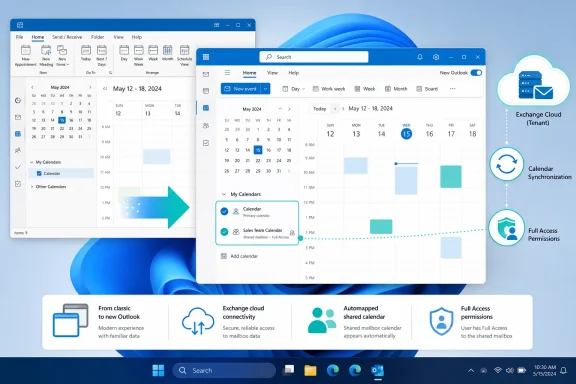 What changes when users switch Outlook clients
Before this rollout, Microsoft said a user could lose the visible calendar of an auto-mapped mailbox when toggling from classic Outlook for Windows to new Outlook. The mailbox relationship did not necessarily disappear at the Exchange level; the new client simply did not surface the corresponding calendar in the same automatic way.
With Roadmap ID 415168 launched, those calendars should appear under Calendar > My Calendars in new Outlook for Windows. There is no switch for the user to enable and no Microsoft 365 admin-center policy identified for the feature. Microsoft describes it as on by default.
That distinction is worth making because “auto-mapped calendar” can sound like any calendar another person has shared. It is not. A manager who has merely shared a calendar with a colleague, a room calendar added manually, an internet calendar subscription, and a calendar from a consumer Outlook.com account are separate scenarios. This rollout is specifically about the mailbox-and-permission relationship Exchange identifies as automapped.
Microsoft’s documentation says Autodiscover creates that relationship when an administrator grants a user Full Access permission to a shared mailbox or to another user’s mailbox. In a typical helpdesk, departmental inbox, executive-assistant, or facilities-mailbox setup, classic Outlook may already have added the mailbox automatically. The missing calendar in new Outlook became conspicuous only when people tried the toggle or were moved to the newer application.
Direct permissions determine who receives the calendar
The practical limitation is in Exchange configuration, not in the Outlook calendar interface. Microsoft says automapping works when Full Access is assigned explicitly to an individual user. It does not expand membership in a security group to create an automapped mailbox relationship.
An organization that grants a security group Full Access to a shared mailbox may therefore have working access but no automapping for the individual group members. Those users should not expect this Outlook change to make the mailbox calendar suddenly appear. They may still need the mailbox or calendar added manually, or administrators may need to reconsider whether direct permission assignments are appropriate.
This also means that the rollout will not correct mailboxes deliberately configured with automapping disabled. Exchange administrators can disable automapping by removing a user’s Full Access permission and adding it again with the AutoMapping setting turned off. That configuration remains meaningful for organizations where opening a large number of delegated mailboxes would clutter the Outlook profile or slow client startup.
Microsoft’s Exchange guidance explicitly warns that people with Full Access to many mailboxes can cause Outlook to attempt to load all of them. The new Outlook calendar change makes an existing relationship more visible during client migration; it does not remove the administrative trade-off behind automapping.
New Outlook still treats shared mailboxes differently
Microsoft’s developer documentation describes auto-mapped shared mailboxes in new Outlook for Windows as shared folders by default. In that state, users can work with mail but do not manage the mailbox’s settings as though it were a fully separate account. A user can promote the shared mailbox to a full account when they need that broader control.
The newly visible calendar should not be read as evidence that every classic Outlook shared-mailbox behavior has reached feature parity. It addresses the calendar-display problem Microsoft identified, while other behavior — mailbox settings, account configuration, add-ins, reminders, and folder-specific workflows — can still vary according to how the mailbox was added and which Outlook client is in use.
For example, Microsoft’s support documentation says that event reminders for an automapped or additional mailbox are not supported in the same way as a mailbox added as a separate account. Teams that depend on reminders from a shared scheduling mailbox should verify that workflow after the calendar appears. A calendar being listed in My Calendars does not by itself establish that alerts, delegation, or mailbox-management behavior changed.
The same caution applies to shared calendars granted independently of the rest of a mailbox. Microsoft’s current guidance separates explicit calendar delegation from shared-mailbox automapping. Administrators should diagnose access failures based on the permission model in use rather than assuming this rollout covers every calendar a user should see.
A small migration fix with a visible support payoff
The feature is most valuable to organizations that have deferred or complicated a new Outlook rollout because users work from department, reception, scheduling, or executive calendars. Those users may have accepted the mailbox appearing in the folder pane but regarded the absent calendar as a reason to return to classic Outlook.
Now, the expected support path is straightforward: after the user opens new Outlook, they should go to Calendar and check My Calendars for the auto-mapped calendar. If it is not there, the first questions should be whether the user has Full Access, whether it was assigned directly rather than through a group, and whether automapping was disabled by design.
A missing calendar after those checks does not necessarily mean the new Outlook rollout failed. The mailbox could have been manually attached, the user could have only calendar-level permissions, or the administrator may have chosen a configuration that does not trigger Exchange automapping. Microsoft has not published a diagnostic command or an Outlook build threshold specifically for Roadmap ID 415168, so administrators will need to validate the Exchange permissions and the client experience together.
Microsoft’s Message Center notice advised organizations to update user documentation, and that is sensible. Internal guides that tell users to add a shared calendar manually after switching clients may now be outdated for directly auto-mapped mailboxes. Removing those unnecessary steps can prevent duplicate calendar entries and reduce confusion over which copy is authoritative.
What administrators should verify now
Administrators do not need to deploy a package or change a tenant setting for this feature, according to Microsoft. They should, however, treat it as a targeted validation item in any classic-to-new Outlook migration plan.
- Confirm that pilot users who have directly assigned Full Access to shared mailboxes can see the corresponding calendars in new Outlook for Windows.
- Check that support staff distinguish auto-mapped mailbox calendars from calendars individually shared by colleagues or added manually.
- Review shared mailboxes managed through security groups, because those memberships do not produce automapping under Microsoft’s documented Exchange behavior.
- Test reminder-dependent scheduling workflows separately, especially where the shared mailbox has not been added as a full account.
- Update migration documentation to direct users first to Calendar and My Calendars instead of automatically instructing them to recreate access.
Roadmap ID 415168 closes one of the sharper calendar discontinuities between classic Outlook and new Outlook for Windows. It does not make every shared-calendar scenario equivalent, but for the Exchange setups that use direct Full Access with automapping, the calendar should now follow the mailbox when the user makes the switch.