

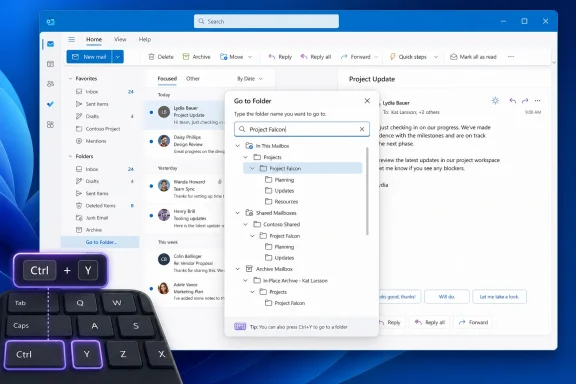
Ctrl+Y, enter a few characters from a mailbox folder’s name, and open it without manually expanding and scrolling through a folder tree. Microsoft also says the command is available from an account’s context menu.For people managing large Exchange Online mailboxes, shared mailboxes, project archives, or years of nested retention folders, this is a small change with a practical payoff: folder navigation no longer depends entirely on keeping the left pane expanded and carefully organized. The command is especially useful when a folder is known by name but buried several levels deep.
Microsoft’s roadmap lists the item as generally available for Desktop and Web in its Worldwide Standard Multi-Tenant environment, with general availability dated May 2026. The entry was updated on August 12, 2026, when its status changed to Launched.
A restored workflow for new Outlook users
The useful part of this announcement is not simply that Outlook can search. Outlook has long offered message search, and classic Outlook has supported Ctrl+Y as a way to go to a different folder. The gap was in new Outlook for Windows, which has spent several years rebuilding desktop Outlook workflows on its web-based foundation.
A Microsoft Q&A thread from June 2023 records that gap plainly. A user asked how to invoke the old folder-jump dialog in new Outlook, and a Microsoft responder said the shortcut was not then available in the preview client. The response advised users who depended on it to consider returning to classic Outlook.
That makes Roadmap 559801 more significant than its short description suggests. Microsoft is restoring a familiar high-frequency navigation action rather than introducing an entirely new mail-management concept. For users migrating from classic Outlook, it removes one more reason to memorize a folder hierarchy or rely on Favorites as a workaround.
The distinction is important for IT teams supporting mixed Outlook deployments. A help-desk instruction such as “press Ctrl+Y and type the folder name” has historically made sense in classic Outlook, but it was not a dependable instruction for the new client. Microsoft now says it should be.
Ctrl+Y has a documentation problem
There is one immediate complication: Microsoft’s own current keyboard-shortcuts documentation for new Outlook for Windows still describes Ctrl+Y as “Go to the Folder pane,” followed by “Quick jump to the folder name” through an alphanumeric key. Elsewhere in the same Microsoft Support page, the shortcut table for classic Outlook says Ctrl+Y will go to a different folder.
The Roadmap entry is more specific about the new behavior: it calls Ctrl+Y the trigger for Go to Folder and says users can type a few letters to locate a folder. But Microsoft has not yet published a dedicated support article explaining the command’s interface, search rules, or keyboard behavior. It is therefore unclear whether the feature replaces the documented Folder pane behavior, extends it into a search surface, or varies by client build.
That discrepancy matters because Ctrl+Y is also commonly associated with Redo in Windows applications. Microsoft’s new Outlook keyboard-shortcuts page currently lists Ctrl+Y as “Repeat the most recent action” when editing text, while assigning it a mail-navigation role outside the editor. In practice, users should invoke Go to Folder from the main Outlook window rather than while a compose field has focus.
Until Microsoft updates its support documentation, organizations should avoid overcomplicating deployment guidance. Tell users to try Ctrl+Y while they are in the mailbox view; if it does not open the folder search experience, they should use the account context-menu route Microsoft describes. This is an example of the feature announcement moving ahead of the documentation needed to make it reliably supportable.
What Go to Folder does — and does not — replace
Go to Folder searches the mailbox’s folder structure. It does not search email content, subjects, senders, attachments, or retention labels. It also does not create Outlook Search Folders, which are saved, query-based views such as unread mail or messages from a particular sender.
That separation should keep expectations realistic. A user who wants a message from a vendor should use Outlook search. A user who knows that a message is filed under Finance > FY2026 > Approved Invoices can use Go to Folder to reach that location directly. The new command shortens the travel to a folder; it does not replace the filing or retrieval tools inside it.
The capability also does not solve the larger organizational problem of inconsistent folder naming. Searching for “budget” may be straightforward in a mailbox with one Budget folder, but less so where a user has Budget, Budget 2025, Budget - Archive, and several project-specific subfolders with similar names. Teams that use shared mailboxes should still establish names that identify function, project, and year consistently.
A well-structured folder tree remains beneficial, particularly for delegated administration and audit-oriented mailbox handling. Go to Folder changes the cost of navigating that structure, not the need to maintain it.
The scope Microsoft has and has not stated
Microsoft’s wording specifically tags the feature as #newoutlookforwindows, even though the roadmap metadata lists both Desktop and Web platforms. The item does not name supported Outlook versions, browser requirements, Exchange account types, consumer Outlook.com availability, mobile support, or government cloud availability.
The “Worldwide (Standard Multi-Tenant)” designation is equally narrow. It confirms availability for the standard commercial Microsoft 365 cloud, but it does not establish availability in GCC, GCC High, DoD, or sovereign Microsoft 365 environments. Administrators in those tenants should not assume the feature has arrived merely because it is marked launched in the public roadmap.
Microsoft also has not said whether Go to Folder searches only a user’s primary mailbox folders or includes mounted shared mailboxes, archives, delegated stores, and other account roots. The account context-menu entry suggests the selected account has some role in scoping the search, but Microsoft has not documented that behavior. For organizations with multiple mailboxes attached to one Outlook profile, that detail will determine whether the command becomes a daily shortcut or remains limited to simple mailbox navigation.
The lack of published build numbers creates a second support issue. Microsoft 365 Roadmap statuses describe release progress, not necessarily a uniform installation state across every device at the same moment. If a user cannot find the command, support teams should first confirm that the person is using new Outlook for Windows, then check whether the account is in the standard commercial cloud and whether the account menu exposes the Go to Folder option.
A modest feature with a migration benefit
This is not a security update, a policy control, or a reason to change an Outlook deployment plan by itself. It is a quality-of-life feature. But it addresses a particularly visible friction point for people who work in mailboxes that have accumulated hundreds of folders over years of project, customer, or compliance-driven filing.
Classic Outlook users have often built habits around the old Ctrl+Y path. New Outlook users have instead been pushed toward scrolling, expanding folders, using Favorites, or searching for messages and then inferring their location. Microsoft’s announced command brings direct folder discovery back into the workflow.
For administrators, the practical action is limited: update internal Outlook quick-reference material to include Go to Folder, but qualify it as a new Outlook for Windows feature and test it in the tenant before making it a standard support instruction. Do not remove guidance for classic Outlook solely because the command name is familiar; the two clients still differ in interface behavior and documentation.
Microsoft has now labeled the feature launched, yet its public shortcut documentation has not caught up with the more specific roadmap description. The most concrete measure of this release will be whether Ctrl+Y produces the promised searchable folder picker consistently across new Outlook installations — especially for the shared and archive mailbox setups where fast folder navigation is worth the most.