
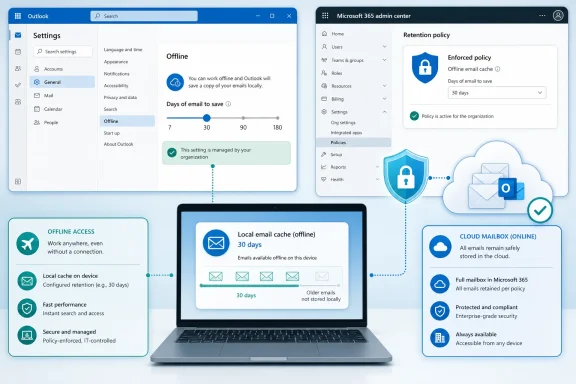
The change concerns the control at Settings > General > Offline > Days of email to save, where new Outlook determines how much mailbox content it keeps on a Windows device for use without a connection. Microsoft’s support documentation currently lists 7, 30, 90, and 180 days as the available choices, with 30 days as the default. The roadmap entry does not identify the policy’s eventual name, its administrative surface, or the exact values an admin will be able to enforce.
For IT teams deploying the new Outlook, the useful news is not a new offline feature. It is the arrival of a missing governance control over a feature that already creates a local working set of corporate mail.
 A sync-window control, not a retention policy
“Days of email to save” governs the portion of a mailbox Outlook retains locally for offline access. It does not delete older mail from Exchange Online, change mailbox retention, replace Microsoft Purview retention policies, or alter eDiscovery content held in the service.
That distinction should keep this roadmap item from being treated as a compliance tool. A 30-day or 90-day window limits what a user can open without a network connection; the complete mailbox remains server-side, subject to the organization’s normal retention, litigation hold, archive, and access policies.
Microsoft’s offline guidance says new Outlook saves mail, calendar events, and People data on the device when offline access is enabled. It also warns that the chosen window is not a guarantee that every item will be available locally: if device storage is insufficient, Outlook may save fewer items or disable offline access altogether.
The practical value of the policy is therefore consistency. An administrator will be able to establish how much recent mail should ordinarily be carried onto managed Windows endpoints, rather than relying on a different choice made in every employee’s settings pane.
The policy closes a gap in new Outlook management
Microsoft already offers a more sweeping control for new Outlook offline use. Its new Outlook policy-management documentation says the OfflineEnabledWin setting in Exchange Online’s Outlook on the web mailbox policy can allow or block offline capability for new Outlook for Windows. Turning that off is an all-or-nothing decision: users lose the ability to keep the offline copy of mailbox content on the device.
Roadmap 570069 describes a more targeted control. Instead of disabling offline access entirely, administrators will be able to choose a default number of days and decide whether that choice remains editable. That is a materially different operating model for organizations that need offline access for mobile workers, field staff, unreliable home connections, or virtual desktop users but do not want every user setting their own local cache horizon.
Microsoft has not yet said whether the forthcoming setting will appear in the Exchange admin center, Exchange PowerShell, Microsoft 365 Cloud Policy, Intune, or some combination of those tools. That omission matters. The current documentation separates policy types: many mailbox-specific controls are handled through Exchange Online, while app-wide and cross-Microsoft 365 controls can be managed through Cloud Policy.
Until Microsoft publishes the policy identifier and management instructions, administrators should not assume it will arrive as a Group Policy or Intune Administrative Template setting. The roadmap promises the result, not the implementation details.
Why the 30-day default may not fit every deployment
Microsoft increased the new Outlook default from seven days to 30 days in 2025. The support page now presents 30 days as the default and offers 180 days as the longest documented choice. For a typical information worker with a stable broadband connection, that is likely a sensible balance between offline access and local storage use.
It is less universal in enterprise deployments. Outlook’s own documentation acknowledges that available storage can constrain offline data, and mailboxes are not uniform. A 180-day cache of mostly text email is very different from 180 days of large presentations, photographs, scanned PDFs, and lengthy threads with inline attachments.
The decision will be especially consequential on devices with small system drives, shared workstations, and non-persistent virtual desktop infrastructure. Microsoft’s classic Outlook guidance has long advised virtual desktop users to synchronize only one month of mail, illustrating the trade-off: a smaller window can reduce profile growth, login delays, storage pressure, and redownload activity, but leaves less mail usable during an outage.
New Outlook does not expose its offline data as the familiar classic Outlook .ost file that administrators have spent years sizing and troubleshooting. That does not remove the capacity question. It changes the troubleshooting model while leaving the underlying issue intact: more local mail means more data must be stored, maintained, and refreshed on endpoints.
User lockout needs a deployment decision, not a reflex
The ability to make the setting unchangeable will appeal to organizations that want predictable endpoint behavior. But an enforced value should be selected deliberately, particularly for groups whose connectivity and mailbox patterns differ sharply.
A single corporate default can create avoidable friction. A call-center employee using a fixed, well-connected desktop may have little need for 180 days of offline mail. A travelling executive, sales representative, technician, or emergency-response team may need considerably more history available when connectivity fails.
A sensible rollout plan would treat the policy as a segmentation tool rather than a tenant-wide checkbox:
- Organizations should measure mailbox size, free disk capacity, and common attachment patterns before enforcing a long offline window across all Windows devices.
- IT teams should use a shorter enforced window for constrained virtual desktops and storage-limited hardware where offline access remains necessary.
- Groups that regularly work without reliable connectivity should be tested with the intended window before users lose the ability to extend it themselves.
- Help desks should be told that an email missing from offline search may still exist in Exchange Online and become visible after the client reconnects.
The final point is easily missed. New Outlook’s offline capabilities cover only content cached on the device, and Microsoft still documents limitations on several offline functions. The setting is about local availability, not a promise that Outlook can replicate every online experience without a network.
The current roadmap leaves important questions unanswered
Microsoft’s roadmap says the policy will cover the default value and whether end users can change it. It does not say whether the policy will be assignable per group, whether it will have a tenant default with mailbox-level overrides, how quickly a changed value will take effect, or whether reducing the enforced window purges already cached older messages immediately.
It also does not state whether the control applies exclusively to work and school accounts, how it behaves when a user has multiple accounts in new Outlook, or whether the same policy affects Outlook on the web. Microsoft’s existing policy documentation warns that many Outlook mailbox policies apply to both Outlook on the web and new Outlook for Windows, but Roadmap 570069 is tagged specifically for new Outlook for Windows. Administrators should wait for the published implementation guidance rather than infer the scope from older policies.
There is a second unresolved point around available sync windows. Earlier Microsoft 365 roadmap material described planned one-year and two-year options for the same offline setting, but Microsoft’s current support instructions still document a maximum of 180 days. The November target for Roadmap 570069 does not clarify whether the future administrative policy will manage only today’s documented values or a larger list by the time it ships.
For now, the dependable planning assumption is simple: Microsoft is preparing to let admins standardize and lock the new Outlook offline mail window, but has not yet published the knobs, assignment model, or final value range. Teams that currently depend on user choice should inventory those choices before November 2026, because once the policy reaches general availability, an enforced default can turn a previously local preference into an organization-wide endpoint configuration.
