
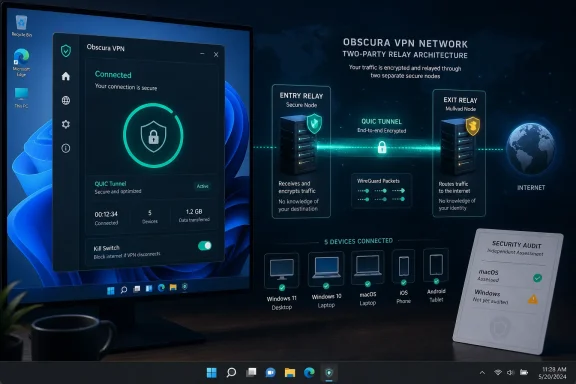
For Windows users, the important change is not simply another VPN icon in the notification area. Obscura’s native app is the first Windows route into the provider’s full QUIC-based transport and its two-party relay design. The manual WireGuard option still works across a broad range of platforms, but Obscura says it does not provide the service’s traffic-obfuscation layer when used outside the company’s own app.
That makes this a meaningful desktop release for people who use VPNs on restrictive networks, travel frequently, or want a different privacy model from the conventional “trust one VPN company not to log you” arrangement. It is also a consumer VPN launch with limits that prospective users should understand before treating its privacy claims as settled fact.
 The Windows app closes a real feature gap
When Obscura added Android support in May, TechRadar reported that Windows and Linux users could connect only through manually generated WireGuard configurations while native apps were being developed. The company now lists Windows alongside iOS, macOS and Android as supported platforms, while Linux remains a waitlist item.
The distinction is practical. A WireGuard configuration can establish a tunnel from Windows using the standard WireGuard client, but Obscura’s own documentation says that compatibility mode uses ordinary WireGuard rather than its QUIC tunnel. Users keep the two-party relay arrangement, but lose the added attempt to make VPN traffic resemble more ordinary QUIC or HTTP/3 traffic.
Obscura’s Windows client therefore matters most where simple WireGuard traffic may be fingerprinted, throttled or blocked. Its published source repository also shows that the Windows app is a substantive native implementation rather than a web wrapper: the project contains a Windows service, WinUI development requirements, MSI packaging instructions, Wintun integration, and separate x64 and ARM64 build paths.
That public code is useful transparency, but it should not be mistaken for a reproducible release-verification system. Obscura says it plans to offer reproducible builds, which would let users confirm that a distributed installer matches published source. Plans to provide reproducible builds are not the same as providing them today, particularly for a product that installs a network service and handles all device traffic.
Two relays reduce one kind of trust
Obscura’s central pitch is a two-party relay architecture. Its first relay sees the customer’s connecting IP address but is designed not to decrypt the traffic or learn its destination. The second, exit relay connects to the public internet, sees the destination, but receives the connection from Obscura’s relay rather than directly from the customer.
The split is not merely conceptual. Obscura has said that it operates the entry hop while Mullvad operates the exit hop, with traffic encrypted end-to-end to the Mullvad exit server. In the intended model, neither company acting alone has the complete mapping between a subscriber’s real IP address and the sites or services reached through the VPN.
That is an improvement over a typical single-provider VPN design, where one company can technically observe both sides of that relationship even if its policy promises not to retain records. It does not make Obscura anonymous in every threat model. An account operator, the entry relay, the exit provider, a payment processor, the user’s endpoint, and a sufficiently capable network observer each possess different pieces of information. Privacy depends on which of those parties can cooperate, be compromised, or be compelled to disclose data.
Obscura also uses WireGuard packets carried through QUIC. QUIC is the transport protocol associated with HTTP/3, and Obscura argues that this makes the connection harder for network filters to distinguish from normal modern web traffic without blocking or degrading QUIC more broadly. The company’s published technical material describes the goal as harder to detect or block, not impossible to block. That is the appropriate reading: network censors and administrators can use methods beyond basic protocol fingerprinting, and a VPN client should not be deployed as a guarantee of access in hostile environments.
The audit did not cover the Windows client
Obscura’s marketing around the launch leans on its first independent assessment by Cure53, and the audit is a genuine point in its favor: the full report is published rather than summarized only in a press release. But the scope is the crucial detail for Windows users.
Cure53 assessed Obscura’s macOS application, its network extension, and the protocol design in work conducted during 2025. The review identified six findings, including a medium-severity issue involving potentially unbounded parallel QUIC handshakes triggered through malicious relay-server responses. The report also flagged plaintext storage of long-term cryptographic keys in JSON configuration files and several other improvements for the vendor to address.
The report’s scope does not include the newly released Windows client, Linux, Android, the relay fleet, or the API backend. That does not establish that the Windows app is unsafe. It means the audit cannot be accurately presented as a security assessment of the Windows build now being installed by PC users.
This is the material gap in the launch coverage. A common Rust core and a public repository can reduce the chance that platforms diverge wildly, but Windows adds platform-specific code: a service, driver integration, DNS handling, installer logic, permissions, local configuration paths, and x64/ARM64 packaging. Those are precisely the sorts of components that deserve Windows-specific testing.
For administrators evaluating Obscura rather than an individual home user, that gap should shape the decision. Treat the release as an emerging privacy client with a public codebase and a prior architecture audit, not as an independently audited Windows endpoint. Pilot it on noncritical devices before considering any broad deployment.
Five connections means five active slots, not five registered PCs
Obscura’s increase from three to five simultaneous devices is straightforward only if customers use the native apps. The service says users can sign in to unlimited devices with its app, while only actively connected devices consume one of the five slots.
Manual WireGuard profiles work differently. Each generated configuration reserves a connection slot until it is removed from the account, whether the device is connected or not. A user who has created five WireGuard profiles can exhaust the allowance without an active connection; a user with one remaining profile has four app-based slots available at a given time.
That is an unusual but sensible implementation detail to know before migrating an existing account. Windows users adopting the native client should remove old, unused WireGuard configurations if they want the five-slot allowance to behave as expected. It also makes the native app operationally preferable for people who rotate among laptops, desktops, tablets and phones.
Obscura is advertising a 25% launch discount using the code WINDOWS26. That is a promotion rather than a product capability, and readers should compare the resulting price against the service’s normal $8 monthly rate and the payment model they intend to use. The provider accepts card payments through Stripe as well as Lightning Network and Monero top-ups; payments made by card necessarily introduce a different identity trail than an account funded with a privacy-oriented method.
Windows 10 support arrives late in its lifecycle
Obscura’s decision to support Windows 10 is welcome for compatibility, but its rationale needs a date attached. Windows 10 reached end of support on October 14, 2025 for mainstream Home, Pro, Enterprise and Education editions. The native app’s availability does not make an ordinary, unpatched Windows 10 installation suitable for security-sensitive work.
Microsoft’s Extended Security Updates program and certain LTSC editions are exceptions, so a managed Windows 10 estate may still receive security updates. But the broader consumer message should be clear: installing a privacy-focused VPN on an unsupported operating system solves neither operating-system vulnerabilities nor endpoint compromise. A VPN can protect traffic between a device and its exit point; it cannot repair a machine whose browser, kernel, drivers or credential store are exposed.
Obscura has delivered the Windows capability users had been requesting, and its two-party design gives it a technically distinct position among consumer VPNs. The more careful conclusion is narrower: the native app enables the service’s complete protocol on Windows, while the independent audit record currently validates the macOS client and protocol work—not the Windows software now reaching PCs.
