
OneDrive desktop users will soon receive a more useful response when a file path exceeds the sync client’s 520-character ceiling. Microsoft 365 Roadmap item 557563, added to the roadmap on July 30, says the OneDrive client will show exactly how far over the limit an affected path is and provide a guided way to rename or move the item so sync can resume.
Microsoft has marked the feature In development for worldwide general availability in September 2026. It applies to the OneDrive desktop client, rather than the web experience.
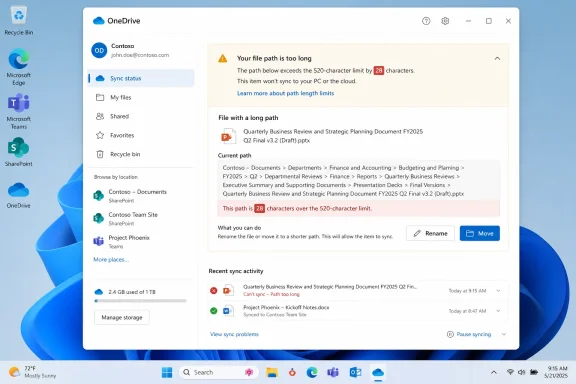
The 520-character threshold is not simply a filename restriction. For OneDrive sync, it reflects the combined local OneDrive root path and the item’s relative path. Long organization names, deeply nested SharePoint libraries, Teams-connected folders, and migrations from other repositories can push an otherwise reasonable file structure beyond the client’s limit.
Microsoft’s support documentation says paths over 520 characters produce a sync error, and the sync client may stop until the offending item is resolved. The new workflow should reduce the trial-and-error involved in finding enough characters to cut from an old project hierarchy.
For users, the expected benefit is straightforward: rather than being told only that a path is too long, they will be able to see the size of the problem and act from the error experience itself.
That makes this an operational improvement, not a compatibility cure. IT teams moving legacy departmental shares into SharePoint or deploying OneDrive shortcuts should still identify deeply nested structures before they become desktop sync failures.
Microsoft’s OneDrive Sync release notes already describe separate work to improve maximum-path checks for OneDrive folder shortcuts, reducing cases where files are incorrectly flagged. Roadmap 557563 addresses the next part of the problem: making genuine over-limit failures easier for users to correct when they occur.
A Sync Blocker Gets a More Practical Repair Path
The 520-character threshold is not simply a filename restriction. For OneDrive sync, it reflects the combined local OneDrive root path and the item’s relative path. Long organization names, deeply nested SharePoint libraries, Teams-connected folders, and migrations from other repositories can push an otherwise reasonable file structure beyond the client’s limit.Microsoft’s support documentation says paths over 520 characters produce a sync error, and the sync client may stop until the offending item is resolved. The new workflow should reduce the trial-and-error involved in finding enough characters to cut from an old project hierarchy.
For users, the expected benefit is straightforward: rather than being told only that a path is too long, they will be able to see the size of the problem and act from the error experience itself.
The Limit Still Matters Elsewhere
The redesign does not increase OneDrive’s path-length limit. Microsoft continues to document a 400-character limit for OneDrive and SharePoint cloud paths, while the desktop sync calculation can reach 520 characters because of the local OneDrive folder path. Windows File Explorer and Office desktop applications can encounter tighter practical limits, commonly around 260 characters.That makes this an operational improvement, not a compatibility cure. IT teams moving legacy departmental shares into SharePoint or deploying OneDrive shortcuts should still identify deeply nested structures before they become desktop sync failures.
Microsoft’s OneDrive Sync release notes already describe separate work to improve maximum-path checks for OneDrive folder shortcuts, reducing cases where files are incorrectly flagged. Roadmap 557563 addresses the next part of the problem: making genuine over-limit failures easier for users to correct when they occur.
References
- Primary source: Microsoft 365 Roadmap
Published: 2026-07-30T23:01:43.5748334Z
Microsoft 365 Roadmap | Microsoft 365
The Microsoft 365 Roadmap lists updates that are currently planned for applicable subscribers. Check here for more information on the status of new features and updates.www.microsoft.com
- Related coverage: support.microsoft.com
What are the file path length limits? | Microsoft Support
File path length limits across Windows, macOS, OneDrive, SharePoint, and Office.support.microsoft.com - Related coverage: learn.microsoft.com
OneDrive sync - file path too long error - Microsoft Q&A
Though we recommend that users avoid the flawed OD sync client. some that do experience this error. Msft's documentation is as usual poorly organized and contradictory, so I need to know if there's been any improvement in the woefully pathetic 260…learn.microsoft.com