
Windows 11 Enterprise devices are receiving a new Start menu entry called OneDrive Photos through the OneDrive sync client, even where administrators have not deployed a separate app. The immediate operational issue is not that the component is especially dangerous; it is that a consumer-oriented photo viewer has arrived on managed endpoints outside the normal app-approval path, while it does not accept the Microsoft Entra work or school accounts those endpoints are built around.
Windows Report surfaced the enterprise reports on August 5, following earlier testing by Windows Latest and posts from Intune administrators. Multiple administrators report the entry appearing across fleets of Windows 11 Enterprise PCs, including one administrator who described it as appearing on all machines in that environment. The available evidence supports a real rollout through OneDrive; it does not yet establish that every Enterprise tenant, Windows servicing channel, or OneDrive update ring is affected.
The more useful finding is that this is not a conventional Windows app deployment. OneDrive Photos is launched by
Windows Latest first documented OneDrive Photos on July 29 after finding a new Start menu application on a Windows 11 PC. Its testing found the shortcut pointing to
That distinction matters operationally. A machine inventory based on installed MSIX packages may not see OneDrive Photos as a separately manageable package because, on the evidence available, it is not one. The Start menu item is simply an entry point into an executable delivered as part of the OneDrive client footprint.
Microsoft’s own OneDrive Sync release-notes page gives the rollout an important, uncomfortable context. As of August 5, the public Windows production notes list version 26.119.0622.0003 as the gradually rolling build and version 26.113.0614.0004 as the released build. The reports from administrators associate the appearance of OneDrive Photos with version 26.129.0706.0003, a newer build absent from those public notes.
Microsoft warns in those same notes that devices can run newer builds before the page reflects them. That makes the version discrepancy plausible, but it also means the public changelog supplies no published explanation for OneDrive Photos, its audience, its rollout ring, or an administrative off switch. The release notes describe the new builds as reliability and performance updates, with no mention of a local-photo viewer or a new Start menu application.
That is the missing record here. A feature arriving through a continuously serviced client is not inherently improper; OneDrive has long updated independently of Windows feature releases. But when a client update creates a visible application surface on managed PCs, administrators need to know what was added, whether it is optional, which rings receive it, and how to control it. None of that is documented publicly for OneDrive Photos.
That means the initial enterprise deployment does not extend a company’s OneDrive or SharePoint photo experience. It puts a personal OneDrive feature on a work PC. Organizations that already prohibit personal Microsoft accounts through policy may find the application functionally constrained, but it remains installed and user-visible.
The separation has governance implications even if the app is blocked from signing in. A user who is permitted to authenticate with a personal Microsoft account could reasonably interpret “OneDrive Photos” on an employer-issued laptop as an approved place to browse or organize personal media. That introduces predictable support, privacy, retention, and data-boundary questions which do not arise when the app is absent.
Windows Latest also reports that OneDrive Photos can display local images before an account is connected and includes a People feature that groups similar faces after the user enables it. The outlet says the app asks for consent before the face-grouping function is activated. That suggests the component is not merely a web shortcut to cloud files; it has a local photo-library role that overlaps substantially with the built-in Microsoft Photos app.
No published Microsoft enterprise documentation found during this rollout explains how OneDrive Photos’ local discovery behavior interacts with corporate privacy policies, Windows folder access controls, or personal-account restrictions. Administrators should avoid assuming that blocking personal account sign-in alone answers every compliance question. It prevents a personal cloud session; it does not remove the executable or its local UI.
Intune administrators have demonstrated two distinct mitigation approaches. One community script removes
That is a field workaround, not Microsoft-supported lifecycle management. It may work today because
A more conservative approach, published by enterprise IT blogger Chris Proctor after testing the rollout on Windows 11 Enterprise machines, leaves
The drawback is obvious: this hides OneDrive Photos rather than disabling it. An executable still present in the OneDrive folder can be launched directly, a shortcut can be restored by an update, and the organization still has no vendor-provided control to declare the feature unwanted.
For most managed environments, shortcut removal is the lower-risk temporary choice. It maintains a supported OneDrive binary set while preventing casual discovery through Start. Deleting
Microsoft documents that policy as an Experience CSP setting used to control consumer features in Windows. It is not a OneDrive client feature-management policy. The apparent bypass is therefore less a policy failure than a boundary problem: a policy aimed at Windows consumer experiences does not necessarily govern functions delivered by a separately serviced Microsoft 365 client.
That is a practical distinction for Intune design. Inventory and control plans should treat OneDrive as an application platform with its own update cadence, binaries, release rings, and feature changes—not as a static Windows inbox component. A Windows configuration profile may prevent certain operating-system suggestions while doing nothing about an addition delivered through
Administrators should now check representative devices across their OneDrive production, deferred, and any targeted deployment populations. Look for
Microsoft can resolve this cleanly with three things: a documented OneDrive Photos feature flag or Intune policy, a supported removal method that does not remove OneDrive sync, and release notes that identify when the component is introduced and which update rings receive it. A Message Center notice would be appropriate for tenants that use OneDrive at scale, but documentation and controls matter more than an after-the-fact notice.
Until those arrive, the defensible response is to remove the shortcut through scheduled Intune remediation, retain the OneDrive client binaries, and monitor whether subsequent OneDrive updates restore the entry. The next OneDrive client update is now the real test: it will show whether this was a one-off packaging surprise or a permanent new component enterprises are expected to manage without a management control.
The more useful finding is that this is not a conventional Windows app deployment. OneDrive Photos is launched by
OneDrive.App.exe, a separate executable placed alongside OneDrive.exe in the OneDrive client directory. That lets Microsoft add the experience when OneDrive updates, but leaves Intune teams without the ordinary Microsoft Store, MSIX, or Win32 application controls they would expect to use for a separately installed app.
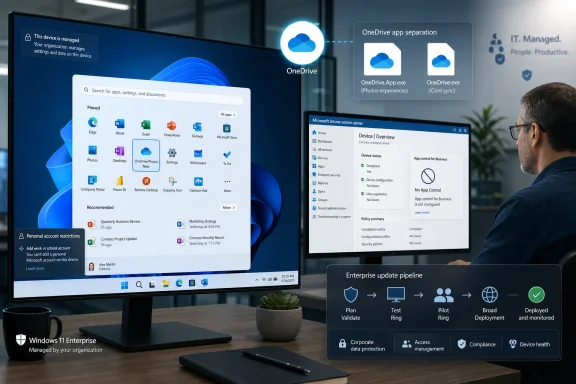 OneDrive is the delivery vehicle, not Windows Update
Windows Latest first documented OneDrive Photos on July 29 after finding a new Start menu application on a Windows 11 PC. Its testing found the shortcut pointing to C:\Program Files\Microsoft OneDrive\OneDrive.App.exe; the established synchronization client remains OneDrive.exe in the same directory.That distinction matters operationally. A machine inventory based on installed MSIX packages may not see OneDrive Photos as a separately manageable package because, on the evidence available, it is not one. The Start menu item is simply an entry point into an executable delivered as part of the OneDrive client footprint.
Microsoft’s own OneDrive Sync release-notes page gives the rollout an important, uncomfortable context. As of August 5, the public Windows production notes list version 26.119.0622.0003 as the gradually rolling build and version 26.113.0614.0004 as the released build. The reports from administrators associate the appearance of OneDrive Photos with version 26.129.0706.0003, a newer build absent from those public notes.
Microsoft warns in those same notes that devices can run newer builds before the page reflects them. That makes the version discrepancy plausible, but it also means the public changelog supplies no published explanation for OneDrive Photos, its audience, its rollout ring, or an administrative off switch. The release notes describe the new builds as reliability and performance updates, with no mention of a local-photo viewer or a new Start menu application.
That is the missing record here. A feature arriving through a continuously serviced client is not inherently improper; OneDrive has long updated independently of Windows feature releases. But when a client update creates a visible application surface on managed PCs, administrators need to know what was added, whether it is optional, which rings receive it, and how to control it. None of that is documented publicly for OneDrive Photos.
Enterprise users cannot sign in with the accounts they have
The app’s account model is where this becomes more than a Start menu cleanup complaint. A Microsoft moderator on the company’s Learn Q&A site stated in June that OneDrive Photos supports Microsoft personal accounts only, and that work or school accounts cannot sign in. The same response said the Photos view is not available in OneDrive for Business.That means the initial enterprise deployment does not extend a company’s OneDrive or SharePoint photo experience. It puts a personal OneDrive feature on a work PC. Organizations that already prohibit personal Microsoft accounts through policy may find the application functionally constrained, but it remains installed and user-visible.
The separation has governance implications even if the app is blocked from signing in. A user who is permitted to authenticate with a personal Microsoft account could reasonably interpret “OneDrive Photos” on an employer-issued laptop as an approved place to browse or organize personal media. That introduces predictable support, privacy, retention, and data-boundary questions which do not arise when the app is absent.
Windows Latest also reports that OneDrive Photos can display local images before an account is connected and includes a People feature that groups similar faces after the user enables it. The outlet says the app asks for consent before the face-grouping function is activated. That suggests the component is not merely a web shortcut to cloud files; it has a local photo-library role that overlaps substantially with the built-in Microsoft Photos app.
No published Microsoft enterprise documentation found during this rollout explains how OneDrive Photos’ local discovery behavior interacts with corporate privacy policies, Windows folder access controls, or personal-account restrictions. Administrators should avoid assuming that blocking personal account sign-in alone answers every compliance question. It prevents a personal cloud session; it does not remove the executable or its local UI.
“Cannot be removed” overstates the evidence
Windows Report correctly identifies the core problem: there is no visible standalone uninstaller, Store listing, AppX package, or documented policy setting for OneDrive Photos. But the claim that removing it necessarily means removing the whole OneDrive sync client goes further than the record supports.Intune administrators have demonstrated two distinct mitigation approaches. One community script removes
OneDrive.App.exe from the OneDrive installation locations and deletes the corresponding Start menu shortcut. Users reporting tests in the Intune subreddit say the executable can be moved or deleted while OneDrive sync continues to work, and the script author recommends running it as an Intune remediation so it can remove the file again after reappearance.That is a field workaround, not Microsoft-supported lifecycle management. It may work today because
OneDrive.exe and OneDrive.App.exe are distinct binaries, but Microsoft can create dependencies between them in a future OneDrive build without warning. Deploying a deletion script across production devices therefore trades one unsupported state for another: the unwanted feature is gone, but the OneDrive installation has been modified outside its documented servicing model.A more conservative approach, published by enterprise IT blogger Chris Proctor after testing the rollout on Windows 11 Enterprise machines, leaves
OneDrive.App.exe in place and removes only the Start menu shortcuts using Intune Remediations. Proctor reports that OneDrive synchronization, SharePoint library sync, Files On-Demand, and existing personal-account restrictions continued to operate after shortcut removal.The drawback is obvious: this hides OneDrive Photos rather than disabling it. An executable still present in the OneDrive folder can be launched directly, a shortcut can be restored by an update, and the organization still has no vendor-provided control to declare the feature unwanted.
For most managed environments, shortcut removal is the lower-risk temporary choice. It maintains a supported OneDrive binary set while preventing casual discovery through Start. Deleting
OneDrive.App.exe should be confined to a carefully tested exception group until Microsoft documents whether the file is independently serviceable and whether it will acquire dependencies.
The consumer-features policy did not stop this rollout
One detail from the field reports should make Windows administrators cautious about relying on broad consumer-feature policies. Chris Proctor says devices in his environment received OneDrive Photos even though theAllowWindowsConsumerFeatures policy was disabled.Microsoft documents that policy as an Experience CSP setting used to control consumer features in Windows. It is not a OneDrive client feature-management policy. The apparent bypass is therefore less a policy failure than a boundary problem: a policy aimed at Windows consumer experiences does not necessarily govern functions delivered by a separately serviced Microsoft 365 client.
That is a practical distinction for Intune design. Inventory and control plans should treat OneDrive as an application platform with its own update cadence, binaries, release rings, and feature changes—not as a static Windows inbox component. A Windows configuration profile may prevent certain operating-system suggestions while doing nothing about an addition delivered through
oneclient.sfx.ms as part of a sync-client update.Administrators should now check representative devices across their OneDrive production, deferred, and any targeted deployment populations. Look for
OneDrive Photos.lnk under the shared Start menu path and for OneDrive.App.exe within the relevant OneDrive installation directories. Do not use the reported version 26.129.0706.0003 as a hard detection rule: Microsoft’s official notes already show that the public version list can lag devices in the field.Microsoft needs to turn an undocumented component into a manageable feature
The evidence does not support calling this a Windows security incident, nor does it prove an accidental deployment. It does show a real enterprise-management gap: Microsoft has placed an unannounced, personal-account-only photo experience on at least some managed Windows 11 Enterprise devices through a client that administrators must keep updated for core OneDrive and SharePoint synchronization.Microsoft can resolve this cleanly with three things: a documented OneDrive Photos feature flag or Intune policy, a supported removal method that does not remove OneDrive sync, and release notes that identify when the component is introduced and which update rings receive it. A Message Center notice would be appropriate for tenants that use OneDrive at scale, but documentation and controls matter more than an after-the-fact notice.
Until those arrive, the defensible response is to remove the shortcut through scheduled Intune remediation, retain the OneDrive client binaries, and monitor whether subsequent OneDrive updates restore the entry. The next OneDrive client update is now the real test: it will show whether this was a one-off packaging surprise or a permanent new component enterprises are expected to manage without a management control.
References
- Primary source: Windows Report
Published: 2026-08-05T07:12:08+00:00
Loading…
windowsreport.com - Related coverage: learn.microsoft.com
Loading…
learn.microsoft.com - Related coverage: learn.microsoft.com
Loading…
learn.microsoft.com - Related coverage: techcommunity.microsoft.com
Loading…
techcommunity.microsoft.com