

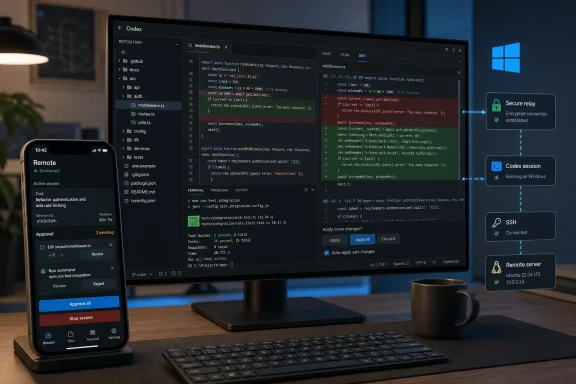
There is also a date problem worth clearing up before Windows users act on the announcement. The submitted post is marked August 10, 2026, but OpenAI’s primary product post and its May 14 release notes date the mobile-Codex preview to May 14, 2026. At that point, OpenAI explicitly said phone connections to the Codex app on Windows were “coming soon,” and its setup documentation described the initial host as a Mac. Later May release notes say Windows remote control arrived, with important plan, regional, and administrative constraints.
The practical result is useful but narrower than the headline can suggest. ChatGPT mobile is not a standalone phone-based coding environment with direct access to a Windows machine’s source tree. It is a remote window into an active Codex environment, with the Windows computer retaining the repository, terminal, application server, files, permissions, and credentials.
The phone is a remote control surface, not a replacement workstation
OpenAI describes the feature as Codex inside the ChatGPT mobile app, but its current help documentation draws a clearer line: Codex is not a normal selectable mobile ChatGPT mode. Instead, users open a Remote area in the mobile app to reach supported desktop Codex chats.
That distinction changes the security and operational model. A developer can review terminal output, screenshots, test results, diffs, approval requests, and messages from Codex while away from the desk. They can redirect a task, answer a question, approve a next step, change the model, or start additional work. But the execution happens on the connected host machine or on a remote environment it has reached through SSH.
OpenAI says the connected machine’s files, credentials, local configuration, and permissions remain on that machine. That is a better model than copying an entire development environment to a phone, particularly for corporate Windows laptops with private repositories, internal package registries, VPN-only systems, or locally held signing credentials. It does not, however, mean the mobile feature creates a separate security boundary around whatever Codex can already do on the host. A phone approval can still authorize an action performed by the already-privileged Windows environment.
The company says it uses a secure relay layer so hosts do not need to be directly exposed to the public internet. That avoids the obvious bad pattern of opening inbound remote-control ports on a developer laptop. Yet OpenAI’s public announcement does not specify the relay’s protocol, session lifetime, encryption design, device-verification flow, or how lost-device revocation works beyond the normal account and workspace controls. Enterprises should not treat the phrase “secure relay” as a substitute for reviewing their own identity, endpoint-management, conditional-access, and audit requirements.
Windows support arrived after the original announcement
OpenAI had already released the Codex desktop app for Windows on March 4, 2026, describing it as a Windows surface for running multiple Codex agents with isolated worktrees and reviewable diffs. The mobile-connection story lagged behind it.
Then, in May 29 release notes for ChatGPT Business and Enterprise/Edu, OpenAI said that remote control could continue Windows workflows from ChatGPT on iOS or Android while the Windows machine remained the host for local files, shell access, app servers, and context. Those notes paired remote control with Windows Computer Use, the capability that lets Codex see, click, and type in Windows applications.
The availability language is not uniform across OpenAI’s own materials. The Business release notes describe Windows remote use as available for Business users with Codex access. The Enterprise/Edu notes say Windows Computer Use and remote control are disabled by default for Enterprise users and require contacting an OpenAI account representative for early-access enrollment. OpenAI also said Windows Computer Use was initially unavailable in the European Economic Area, United Kingdom, and Switzerland.
For WindowsForum readers, the safe interpretation is straightforward: do not assume that installing the Windows Codex app automatically enables mobile remote control. The current app, workspace plan, region, device-level settings, and an administrator’s Remote Control permissions can all determine whether the feature appears.
OpenAI’s broader Codex plan documentation adds another operational gate: workspace administrators or owners may need to enable Remote Control through role-based access control, and the host device itself must allow discovery and control in the Codex app settings. That is appropriate for managed Windows fleets, but it means help-desk teams will have a new category of tickets involving host discoverability, account mismatches, missing permissions, and devices that have been put to sleep.
The host must stay available, and sleep policy now matters
OpenAI’s initial mobile setup guidance says the host must remain awake, online, and running Codex for remote access to continue. The connection begins in the host Codex app and is completed in ChatGPT mobile by scanning a QR code.
That makes Windows power policy a material part of the feature, rather than an afterthought. A laptop that sleeps when the lid closes, disconnects from Wi-Fi, or loses a required VPN tunnel will stop being a useful remote Codex host. Developers expecting a task to keep moving through a commute should test the actual behavior of their Windows sleep settings, endpoint security client, VPN, network profile, and corporate idle-lock policies before relying on it for a release-critical job.
The distinction between locked and asleep matters as well. OpenAI announced support for keeping Codex working after a Mac locks in May, but the original mobile documentation’s requirement that the host remain awake is still the relevant operational rule. Windows administrators should avoid extrapolating Mac-specific locked-computer claims into a guarantee that any locked or sleeping Windows device will continue a remote session.
The feature is therefore strongest on a deliberately prepared host: a desktop workstation, an always-on development tower, or a managed Windows devbox with stable networking and narrowly scoped access. It is less dependable as an always-available bridge to an ordinary corporate laptop that is routinely closed, moved between networks, or forced to sleep by policy.
Remote SSH expands the useful target beyond the Windows PC
The announcement also made Remote SSH generally available. Codex can detect hosts from a user’s SSH configuration, create projects on remote systems, and run threads there as it would locally. For Windows developers, that can be more consequential than mobile control alone.
A Windows workstation can become the control point for a Linux build server, a cloud development VM, a lab machine, or an internal devbox, while ChatGPT mobile remains the remote status and approval surface. In that arrangement, the phone does not need direct access to the remote server, and the Windows host does not need to hold a cloned copy of every repository merely to let a developer review a long-running task.
But Remote SSH also concentrates trust. Codex inherits the meaningful authority of the SSH configuration and remote account it is allowed to use. A team that has carefully limited key forwarding, sudo rights, production access, and repository secrets should validate that its Codex host configuration preserves those limits. The ability to approve an action from a phone is convenient; it should not quietly turn a workstation account with broad SSH reach into an unattended automation identity.
OpenAI’s new programmatic access tokens make that question more urgent for Business and Enterprise customers. The company says these scoped tokens can be issued from ChatGPT workspace settings for CI pipelines, release flows, and internal automations. They are separate from the mobile feature, but they reflect the same shift: Codex is moving from an interactive assistant toward a component that can run tasks across developer machines and managed infrastructure. Token issuance, expiration, revocation, and audit ownership need named operational controls before teams put them into release systems.
Hooks and HIPAA support add controls, not blanket clearance
OpenAI also declared Codex Hooks generally available on all plans. Hooks can scan prompts for secrets, run validators, log conversations, create memories, or alter behavior for particular repositories and directories. For a Windows development shop, secret scanning and repository-specific validation are the immediately practical uses: they can keep prompt-time checks close to the local coding workflow rather than depending solely on user judgment.
A hook can reduce risk, but it is code that itself needs review. A logging hook may collect sensitive prompt contents; a validator may block legitimate work; a memory-creation hook deserves especially careful scrutiny if a repository contains customer, operational, or regulated data. OpenAI’s later documentation says plugins and the underlying app permissions are administered at the workspace level, and controls can apply across surfaces rather than being isolated to mobile alone.
The announcement’s HIPAA language needs an equally careful reading. OpenAI says eligible ChatGPT Enterprise workspaces can use Codex in local environments — the CLI, IDE, and app — for HIPAA-compliant use. Its HIPAA eligibility documentation separately states that the customer remains responsible for the Codex Local Client installation, the operating environment, and third-party services accessed through it. The public materials do not establish that every remote-control path, plugin, or connected external service is automatically covered simply because Codex Local is eligible.
For Windows teams, the immediate consequence is concrete: mobile supervision of Codex is now part of the platform’s Windows story, but it is a managed remote-control feature, not a universal entitlement. Confirm the Windows Codex app version, enable the necessary workspace and device permissions, keep the intended host awake and reachable, and test the path with a non-sensitive repository before approving real work from a phone.