
Microsoft’s OpenClaw Companion for Windows is a useful demonstration of where Windows agent security could go, but it is not the consumer-ready “native” AI experience its Build 2026 presentation suggested. PCMag UK’s hands-on testing found that basic work—getting browser automation, file access, and webcam capabilities to function—could require manual troubleshooting, terminal commands, and an understanding of OpenClaw’s own tool model. The deeper problem is visible in the project’s documentation: the polished Windows app is only one piece of a system whose default local gateway still runs in WSL, whose permissions span several layers, and whose sandbox is narrower than the marketing language implies.
Microsoft announced OpenClaw on Windows at Build on June 2 as part of its pitch for Windows as an agent platform. The company said the OpenClaw node and gateway “run contained” through Microsoft Execution Containers, or MXC, and described the Companion app as an easy route to create or connect agents. PCMag UK’s test does not disprove that the installer works. It shows that installing the app and operating an agent reliably are two very different thresholds.
For Windows power users, the conclusion is straightforward: treat OpenClaw Companion as an alpha-grade agent host and MXC test bed, not as a trustworthy desktop automation appliance. Do not give it broad file, browser, camera, or clipboard access on a primary work PC simply because the Windows UI presents a “Recommended” sandbox setting.
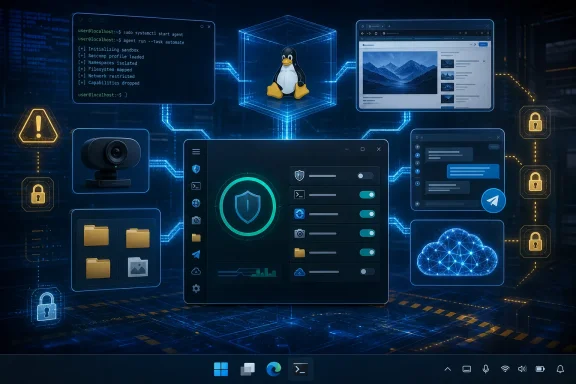
Microsoft’s Build materials use the phrase “OpenClaw runs natively on Windows,” but OpenClaw’s own Windows-node repository documents a more qualified architecture. The Companion itself is a native WinUI tray application, and the Windows node can expose native capabilities such as shell execution, browser control, camera capture, screen capture, location, and speech services. On first launch, however, the default “local gateway” path installs a dedicated OpenClaw gateway in the Windows Subsystem for Linux.
That is a legitimate engineering design, not an automatic defect. WSL is well suited to running a Node.js and Linux-oriented gateway on Windows, while the Companion bridges it to Windows-specific controls. But it means the experience is not comparable to installing a self-contained Windows application such as Microsoft PowerToys or Windows Terminal. It is a Windows control surface, a local Windows node, a gateway, a model provider, permissions, paired devices, and often a Linux environment working together.
PCMag UK’s account of the setup reflects that split. The reporter could install the graphical app, but had to select and configure a model provider, use an API key and token-billed service in the tested configuration, and open a terminal during Telegram setup. The project’s own documentation also describes separate gateway pairing, command allowlists, node permissions, reapproval, diagnostics, and gateway configuration. Those are sensible controls for an agent that can run commands or observe a screen. They are also an admission that this is an administrator’s workflow, not an ordinary consumer onboarding flow.
The practical result is that a failed browser session, a denied folder operation, or an unavailable camera does not necessarily identify one broken toggle. It may involve Windows capability consent, a Companion permission, a gateway command allowlist, an execution approval rule, the active sandbox policy, a pairing state, or the model’s selection of the wrong tool. An agent that is supposed to remove complexity cannot require its operator to debug its architecture each time it hits a boundary.
OpenClaw’s documentation makes the scope more concrete. Its MXC plug-in runs commands in a Windows ProcessContainer with configured policy files. The Companion’s sandbox controls are specifically attached to programs launched through the Windows node’s
Those choices explain PCMag UK’s observation that the agent initially failed to demonstrate benign command execution under restrictive controls, then required additional direction to work with the Downloads folder. That is not necessarily the sandbox malfunctioning. In fact, it is evidence that the sandbox can prevent an agent from casually expanding its reach. The usability failure is that the product leaves the human operator to infer which control blocked the task and how to authorize only the needed action.
There is a more important limitation buried in the Windows-node documentation. The MXC sandbox covers commands run through the Windows node; commands run directly on the gateway are governed separately. That distinction matters because OpenClaw’s gateway is the long-running component handling sessions, channels, model requests, configuration, and much of the agent’s operational logic. A user who sees a green “sandboxed” status should not assume every agent action has been isolated under one unified boundary.
OpenClaw’s documentation also says that if MXC is unavailable, and strict fallback blocking is disabled, the product can fall back to uncontained host execution for compatibility. Microsoft’s containment story is therefore conditional on the runtime being available and on the operator selecting the safer fallback behavior. For an experimental developer framework, that compatibility escape hatch is understandable. For an unattended agent that can be reached through messaging channels, it is exactly the kind of state users and administrators must be able to see instantly.
Microsoft has not presented MXC as a blanket guarantee that OpenClaw cannot harm a Windows installation. Its Build material is more careful, calling it a layer for constraining agent access. But the Companion interface needs to make that boundary much clearer before anyone can reasonably delegate destructive chores such as recurring deletions, bulk file movement, or PowerShell maintenance to an agent.
They do align, however, with the Windows project’s design. Browser control, camera access, screen capture, and shell execution are all opt-in capabilities. The repository explicitly warns that privacy-sensitive features should remain disabled unless the user intends to use them. It also requires deliberate opt-in and reapproval for commands including
The most revealing part of PCMag UK’s test was not that the agent made an error. All agent systems make tool-selection errors. It was that the agent apparently tried to repair its own environment through repeated commands and gateway restarts while the operator waited. The system has blurred two functions that should be sharply separated in a mainstream product: doing the requested task and administering the agent platform.
A user asking “open a browser and search the web” should receive a clear result, a clear permission request, or a clear message that the capability has not been configured. They should not have to inspect sandbox preferences to teach the agent which command family exists, or diagnose whether the gateway, browser bridge, policy, and model agree on the system’s capabilities. OpenClaw currently provides the raw ingredients for capable automation, but it still asks the user to act as the integration engineer.
That architecture is much closer to the control model an organization would need for agents that can access mail, files, calendars, Teams, SharePoint, and browsers. It also exposes the gap between Microsoft’s enterprise ambition and the consumer-facing Companion. In the open-source version, the user is often the one assembling the provider relationship, choosing whether to pay model API charges, deciding which channels to expose, setting permissions, reading diagnostics, and resolving a mismatch between what the agent says it can do and what the host permits.
Microsoft’s separate
The agentic Windows future may still arrive through a combination of local models, delegated app actions, explicit permission brokers, and managed cloud execution. OpenClaw helps Microsoft exercise the lowest-level pieces of that stack, particularly process containment and policy enforcement. It does not yet demonstrate that the company has solved the user-experience problem of safely granting a model ongoing authority over a desktop.
For now, the sensible deployment is narrow: run OpenClaw Companion on a disposable test machine or a segregated Windows profile, keep the sandbox at Locked Down or a carefully scoped Custom policy, disable camera and screen access unless a specific workflow demands them, and avoid recurring destructive tasks. Microsoft has built an interesting agent platform experiment. It has not built the Windows assistant that ordinary users can install, message from Telegram, and safely forget is running.
For Windows power users, the conclusion is straightforward: treat OpenClaw Companion as an alpha-grade agent host and MXC test bed, not as a trustworthy desktop automation appliance. Do not give it broad file, browser, camera, or clipboard access on a primary work PC simply because the Windows UI presents a “Recommended” sandbox setting.
“Native Windows” Means a Native Front End Around a Split Runtime
Microsoft’s Build materials use the phrase “OpenClaw runs natively on Windows,” but OpenClaw’s own Windows-node repository documents a more qualified architecture. The Companion itself is a native WinUI tray application, and the Windows node can expose native capabilities such as shell execution, browser control, camera capture, screen capture, location, and speech services. On first launch, however, the default “local gateway” path installs a dedicated OpenClaw gateway in the Windows Subsystem for Linux.That is a legitimate engineering design, not an automatic defect. WSL is well suited to running a Node.js and Linux-oriented gateway on Windows, while the Companion bridges it to Windows-specific controls. But it means the experience is not comparable to installing a self-contained Windows application such as Microsoft PowerToys or Windows Terminal. It is a Windows control surface, a local Windows node, a gateway, a model provider, permissions, paired devices, and often a Linux environment working together.
PCMag UK’s account of the setup reflects that split. The reporter could install the graphical app, but had to select and configure a model provider, use an API key and token-billed service in the tested configuration, and open a terminal during Telegram setup. The project’s own documentation also describes separate gateway pairing, command allowlists, node permissions, reapproval, diagnostics, and gateway configuration. Those are sensible controls for an agent that can run commands or observe a screen. They are also an admission that this is an administrator’s workflow, not an ordinary consumer onboarding flow.
The practical result is that a failed browser session, a denied folder operation, or an unavailable camera does not necessarily identify one broken toggle. It may involve Windows capability consent, a Companion permission, a gateway command allowlist, an execution approval rule, the active sandbox policy, a pairing state, or the model’s selection of the wrong tool. An agent that is supposed to remove complexity cannot require its operator to debug its architecture each time it hits a boundary.
MXC Is a Valuable Guardrail, but It Does Not Secure Everything OpenClaw Can Do
The strongest part of Microsoft’s OpenClaw pitch is MXC. Microsoft describes MXC as a policy-driven execution layer that lets developers declare what an agent may access—such as files or networks—and have Windows enforce those limits at runtime. The company says the technology is in early preview, and that alone should set expectations: this is a platform capability being proven in public, not a mature endpoint-security control.OpenClaw’s documentation makes the scope more concrete. Its MXC plug-in runs commands in a Windows ProcessContainer with configured policy files. The Companion’s sandbox controls are specifically attached to programs launched through the Windows node’s
system.run capability. In the default Locked Down profile, internet access, the clipboard, and normal user folders are blocked. The Recommended profile enables internet access, read-only access to common folders, and clipboard-read access; Unprotected permits broad folder and clipboard access.Those choices explain PCMag UK’s observation that the agent initially failed to demonstrate benign command execution under restrictive controls, then required additional direction to work with the Downloads folder. That is not necessarily the sandbox malfunctioning. In fact, it is evidence that the sandbox can prevent an agent from casually expanding its reach. The usability failure is that the product leaves the human operator to infer which control blocked the task and how to authorize only the needed action.
There is a more important limitation buried in the Windows-node documentation. The MXC sandbox covers commands run through the Windows node; commands run directly on the gateway are governed separately. That distinction matters because OpenClaw’s gateway is the long-running component handling sessions, channels, model requests, configuration, and much of the agent’s operational logic. A user who sees a green “sandboxed” status should not assume every agent action has been isolated under one unified boundary.
OpenClaw’s documentation also says that if MXC is unavailable, and strict fallback blocking is disabled, the product can fall back to uncontained host execution for compatibility. Microsoft’s containment story is therefore conditional on the runtime being available and on the operator selecting the safer fallback behavior. For an experimental developer framework, that compatibility escape hatch is understandable. For an unattended agent that can be reached through messaging channels, it is exactly the kind of state users and administrators must be able to see instantly.
Microsoft has not presented MXC as a blanket guarantee that OpenClaw cannot harm a Windows installation. Its Build material is more careful, calling it a layer for constraining agent access. But the Companion interface needs to make that boundary much clearer before anyone can reasonably delegate destructive chores such as recurring deletions, bulk file movement, or PowerShell maintenance to an agent.
PCMag’s Browser and Webcam Failures Point to the Product’s Real Readiness Problem
PCMag UK reported that its OpenClaw agent claimed it could use a web browser, spent minutes attempting to diagnose itself and restarting the gateway, and eventually opened a canvas-based web view rather than the expected browser experience. Later, the agent declined to inspect a webcam despite the Companion indicating that webcam access had been granted. Those are single-test observations, and no broader independent benchmark of those exact failures has been published. They should not be read as proof that browser or camera support fails on every Windows system.They do align, however, with the Windows project’s design. Browser control, camera access, screen capture, and shell execution are all opt-in capabilities. The repository explicitly warns that privacy-sensitive features should remain disabled unless the user intends to use them. It also requires deliberate opt-in and reapproval for commands including
system.run, camera capture, screen recording, and related controls. OpenClaw’s own diagnostics include specialized browser setup, capability diagnostics, allowlist repair guidance, and port diagnostics—useful tools, but a revealing inventory for software positioned as simple to install.The most revealing part of PCMag UK’s test was not that the agent made an error. All agent systems make tool-selection errors. It was that the agent apparently tried to repair its own environment through repeated commands and gateway restarts while the operator waited. The system has blurred two functions that should be sharply separated in a mainstream product: doing the requested task and administering the agent platform.
A user asking “open a browser and search the web” should receive a clear result, a clear permission request, or a clear message that the capability has not been configured. They should not have to inspect sandbox preferences to teach the agent which command family exists, or diagnose whether the gateway, browser bridge, policy, and model agree on the system’s capabilities. OpenClaw currently provides the raw ingredients for capable automation, but it still asks the user to act as the integration engineer.
Microsoft’s Own Enterprise Strategy Shows Where OpenClaw Fits
Microsoft’s parallel Scout announcement puts the OpenClaw Companion in context. As described by Microsoft, Scout is an always-on personal work agent using OpenClaw open-source technology, but surrounded by Microsoft’s enterprise identity, governance, managed package supply chain, Agent 365 controls, and zero-trust mediation. Microsoft says Scout’s tool calls, model requests, and network hops are mediated, while identity and policy sit outside the agent container.That architecture is much closer to the control model an organization would need for agents that can access mail, files, calendars, Teams, SharePoint, and browsers. It also exposes the gap between Microsoft’s enterprise ambition and the consumer-facing Companion. In the open-source version, the user is often the one assembling the provider relationship, choosing whether to pay model API charges, deciding which channels to expose, setting permissions, reading diagnostics, and resolving a mismatch between what the agent says it can do and what the host permits.
Microsoft’s separate
openclaw-dev project is even more candid about the risk. Its documentation recommends using isolated cloud containers rather than a work laptop because OpenClaw can execute arbitrary code and can be deceived by prompt injection. That warning is the correct security posture for a powerful autonomous framework. It sits uneasily beside any suggestion that routine Windows users should place a persistent, chat-reachable agent beside their personal files and active browser sessions.The agentic Windows future may still arrive through a combination of local models, delegated app actions, explicit permission brokers, and managed cloud execution. OpenClaw helps Microsoft exercise the lowest-level pieces of that stack, particularly process containment and policy enforcement. It does not yet demonstrate that the company has solved the user-experience problem of safely granting a model ongoing authority over a desktop.
For now, the sensible deployment is narrow: run OpenClaw Companion on a disposable test machine or a segregated Windows profile, keep the sandbox at Locked Down or a carefully scoped Custom policy, disable camera and screen access unless a specific workflow demands them, and avoid recurring destructive tasks. Microsoft has built an interesting agent platform experiment. It has not built the Windows assistant that ordinary users can install, message from Telegram, and safely forget is running.
References
- Primary source: PCMag UK
Published: 2026-08-06T12:00:00+00:00
Loading…
uk.pcmag.com - Related coverage: developer.microsoft.com
Microsoft Build 2026 recap: vision, launches, and top sessions - Microsoft for Developers
Catch up on Microsoft Build 2026 with the vision lead-off, top developer announcements, and must-watch sessions across the Microsoft developer ecosystem.developer.microsoft.com - Related coverage: blogs.windows.com
Build 2026: Furthering Windows as the trusted platform for development
Build is one of our favorite moments each year - a chance to connect with the global developer community and share what we’ve been building. Over the past year, we have connected with many developers pushing the boundaries of what’s possible onblogs.windows.com - Related coverage: docs.openclaw.ai
Loading…
docs.openclaw.ai - Related coverage: docs.openclaw.ai
Loading…
docs.openclaw.ai - Related coverage: github.com
Loading…
github.com - Related coverage: openclaw.ai
OpenClaw — Personal AI Assistant
OpenClaw — the open-source AI assistant that runs on your machine and works from the chat apps you already use.openclaw.ai
- Related coverage: github.com
Loading…
github.com - Related coverage: commandline.microsoft.com
Loading…
commandline.microsoft.com - Related coverage: news.microsoft.com
Microsoft Build Live
The home for real-time coverage of the news as it is announced from Microsoft Build, June 2-3, 2026.news.microsoft.com - Related coverage: elegantsoftwaresolutions.com
Loading…
www.elegantsoftwaresolutions.com - Related coverage: ithub.global.ssl.fastly.net
Loading…
ithub.global.ssl.fastly.net - Related coverage: techcrunch.com
Microsoft launches Scout, an OpenClaw-inspired personal assistant | TechCrunch
Launched at Build, Microsoft Scout is a new AI assistant meant to bring the power and flexibility of OpenClaw into the Microsoft 365 system.techcrunch.com - Related coverage: mo0ogly.github.io
Loading…
mo0ogly.github.io - Related coverage: openclaw-il.com
Loading…
www.openclaw-il.com - Related coverage: techradar.com
Microsoft Build 2026 — all the news and updates as it happened | TechRadar
Everything we saw at Microsoft Build 2026www.techradar.com - Related coverage: axios.com
Microsoft debuts Scout agent, homegrown reasoning model
Microsoft is seeking to show it is a serious player in AI.www.axios.com
- Related coverage: tomsguide.com
Biggest Microsoft Build 2026 announcements — agentic AI, RTX Spark Dev Box, GitHub Copilot app, new MAI models, and more | Tom's Guide
All the big news from Microsoft's AI-focused eventwww.tomsguide.com - Related coverage: windowscentral.com
Microsoft 365 will soon have helpers that take actions for you — here’s what that means | Windows Central
Microsoft’s new OpenClaw system introduces personal AI agents to Microsoft 365, designed to automate tasks, take actions, and help users get work done faster.www.windowscentral.com - Related coverage: tomsguide.com
A guide to agentic AI: How Windows is going to do more things for you | Tom's Guide
Microsoft Build 2026 laid out the future of agentic AI for Windows and how the software tools millions of people use every day are about to change.www.tomsguide.com - Related coverage: techradar.com
From Quantum to Containers - 4 big things you might have missed at Microsoft Build 2026 | TechRadar
We round up some of the other major news from Microsoft Build 2026www.techradar.com