
Hostinger’s updated “25 ways to automate work and life” guide is a useful catalog of what OpenClaw can be wired to do, but it blurs an important line for beginners: most of the 25 examples are not turnkey automations. They are workflows that require a working Gateway, an appropriate model provider, connected accounts or APIs, a tool policy, and—in several cases—custom skills, browser sessions, or external services before a natural-language prompt can produce the advertised result.
That distinction changes the practical recommendation. A daily briefing, a meeting-summary workflow, or a read-only inbox digest is a reasonable first OpenClaw project. Giving the same agent access to an authenticated browser, a production shell, client communications, or smart-home controls is a systems-integration and security project, not a weekend productivity experiment.
Hostinger refreshed its tutorial on August 6, 2026, a day before this report. Its core description is accurate: OpenClaw is an open-source agent framework designed to work through tools, messaging channels, scheduled jobs, browsers, files, and command execution. OpenClaw’s own documentation confirms built-in categories for web search, browser control, messaging, scheduling, media generation, Gateway management, and tool execution. But the documentation also makes clear that tools can be removed from an agent run by global configuration, per-agent restrictions, channel policy, sandbox rules, provider limits, or a missing plugin.
In other words, the guide is best read as an automation backlog, not a checklist of features enabled by installing OpenClaw.
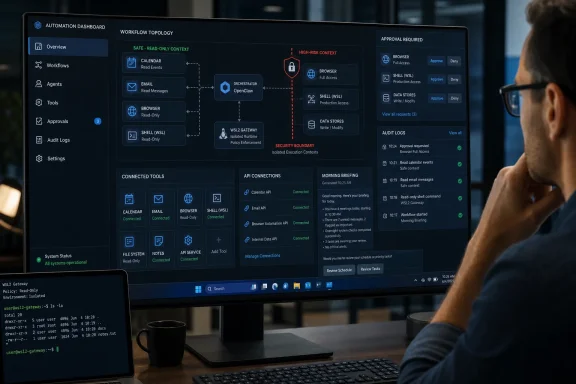
The strongest examples in Hostinger’s list are deliberately constrained: morning briefs, shared shopping lists, voice-note journals, meeting transcription, package tracking, unread-email summaries, receipt extraction, and scheduled KPI snapshots. They take a defined input, turn it into an output a person can inspect, and cause little or no damage when the agent makes a mistake.
For an individual Windows user, the sensible first deployment is not an agent with access to every account. It is a small workflow with one source and one destination. A morning briefing can read a calendar and an RSS feed, then send a message. A meeting workflow can take an uploaded recording and create a draft summary. A receipt workflow can extract fields into a spreadsheet that still requires human review before reimbursement or tax reporting.
The practical payoff is real, but so is the quality-control requirement. Language models can misidentify names, dates, owners, and amounts with enough confidence to make an error look polished. That is especially relevant to Hostinger’s meeting-action-item, expense-entry, client-onboarding, content-repurposing, product-comparison, and document-assistant examples. The agent may speed up the first pass, but it does not establish whether a deadline was actually agreed, whether a receipt category meets an accounting policy, or whether a comparison report has current pricing and complete terms.
Hostinger’s list also compresses separate technical problems into one headline. “Track packages” requires reliable extraction of tracking numbers and access to a carrier API or tracking service. “Monitor brand mentions on X” requires an X data-access path that complies with the platform’s current API and rate-limit rules. “Send KPI snapshots” may require browser automation, while a direct API integration would be more dependable and easier to audit. “Run a private document assistant with Ollama” requires document ingestion, storage design, local-model capacity, access boundaries, and an answer-quality process—not simply local inference.
The safe pattern is straightforward: start with an automation that produces information, then move to an automation that prepares a draft, and only later consider one that takes action.
Browser automation must deal with session expiration, multi-factor authentication, CAPTCHAs, changed page layouts, anti-bot controls, and terms-of-service restrictions. It can also expose an agent to instructions embedded in a page it is trying to read. A malicious webpage does not need to compromise the browser itself to be dangerous; it only needs to persuade the model to misuse an available tool, disclose information, or take an unintended action.
OpenClaw’s own browser documentation reflects that reality. It tells the agent to report login, two-factor-authentication, CAPTCHA, camera, and microphone blockers for manual action rather than guessing. Its browser-login guidance also distinguishes a dedicated OpenClaw browser profile from attaching to an existing user profile, which should only be done when the user is present to approve the connection. Those are important limitations absent from the breezier “log in, copy data, and submit forms” framing.
Shell automation needs the same discipline. Hostinger correctly recommends command allowlists, non-root execution, logging, and no stored root credentials. Yet “safe shell commands from chat” can be misleading if readers think a plain-language request becomes safe merely because it maps to a familiar command such as checking disk space or restarting a service.
The command is only one part of the risk. An agent needs a clearly bounded host, a constrained working directory, a restricted service account, precise command arguments, and an approval path that shows the actual command before it runs. OpenClaw’s project has published multiple security advisories involving command approval, command wrapping, allowlist enforcement, and authorization issues. On June 30 alone, the project’s advisory tracker listed several high-severity fixes, including one involving durable binding of execution approvals. That is evidence that the maintainers are publishing and fixing problems, but it also demonstrates why a permissive “approve once and forget it” setup is the wrong operating model.
A recent academic preprint examining OpenClaw similarly argues that the risk rises as more agents, tools, and action paths are combined. Its precise compromise-probability figures are model-based rather than a measure of every real-world installation, so they should not be treated as incident statistics. Its broader finding is harder to dismiss: agentic systems become more exposed when untrusted content, broad privileges, and autonomous execution share the same workflow.
Keep untrusted content and privileged actions apart. An agent that summarizes incoming email should not also possess authority to execute production commands. An agent that browses public sites should not inherit an authenticated personal browser profile. An agent that drafts client emails should require review before sending them.
The Windows Hub can provision an app-owned WSL Gateway, provide a tray icon, chat window, diagnostics, device pairing, and Windows node capabilities. That lowers the setup barrier substantially. It does not mean that a desktop PC automatically becomes a dependable 24/7 automation appliance.
Always-on tasks such as a 6:30 a.m. briefing, continuous server-health alerts, or CI/CD monitoring require the Gateway to remain available when nobody is signed in. OpenClaw’s Windows documentation calls for a user-service installation inside WSL and, for headless startup, a Windows Scheduled Task configured to start the distribution at boot. It also documents a current WSL behavior that can idle-terminate a distribution shortly after the last client exits, along with a
That is the operational tradeoff Hostinger’s managed and VPS recommendations are trying to address. A hosted instance can be better for scheduled automations because it remains online independently of a personal PC. But a hosted OpenClaw instance also changes the trust boundary: its credentials, browser sessions, messages, documents, and task logs now reside on infrastructure outside the user’s device. “Managed” reduces patching and uptime work; it does not reduce the need to review integrations, rotate secrets, limit permissions, and inspect logs.
For a Windows desktop, a local or WSL-based setup is a good fit for document summarization, coding assistance, reminders, local-note workflows, and carefully scoped device actions. It is a poor fit for unattended production administration unless the machine, network exposure, backups, patch level, and credential storage have been designed for that role.
Each connection has its own permissions, OAuth scopes, API quotas, webhook behavior, data-retention terms, error handling, and revocation process. Some tasks are safer through an API; others may require a plugin; some may be possible only through a browser, which is usually the least stable route. OpenClaw’s documentation explicitly says plugin-provided tools are separate from built-in capabilities and that an unavailable or disabled plugin can remove a tool from a run.
That makes integration inventory a prerequisite, not an afterthought. Before building an automation, define the source account, the destination, the data fields the agent may access, the actions it can take, the approval point, the expected failure behavior, and the log location. If those details are not known, the workflow is still an idea.
The article also has a small but telling editorial problem: it reaches 25 use cases, but the headings for image generation, pull-request summarization, and dependency scanning are missing their numbered labels in the supplied text. That does not invalidate the examples, but it reinforces the broader issue. The guide is expansive rather than implementation-specific, and readers should not mistake a well-described prompt for a completed automation design.
OpenClaw is most valuable when it removes repeated context switching from a controlled workflow. Begin with an agent that reads, summarizes, categorizes, or drafts; grant one integration at a time; require approval for anything external or destructive; and keep browser, shell, and production access as separate systems with separate credentials. The 25 ideas become useful once they are reduced to that level of operational specificity.
Hostinger refreshed its tutorial on August 6, 2026, a day before this report. Its core description is accurate: OpenClaw is an open-source agent framework designed to work through tools, messaging channels, scheduled jobs, browsers, files, and command execution. OpenClaw’s own documentation confirms built-in categories for web search, browser control, messaging, scheduling, media generation, Gateway management, and tool execution. But the documentation also makes clear that tools can be removed from an agent run by global configuration, per-agent restrictions, channel policy, sandbox rules, provider limits, or a missing plugin.
In other words, the guide is best read as an automation backlog, not a checklist of features enabled by installing OpenClaw.
The most useful use cases have narrow inputs and reviewable outputs
The strongest examples in Hostinger’s list are deliberately constrained: morning briefs, shared shopping lists, voice-note journals, meeting transcription, package tracking, unread-email summaries, receipt extraction, and scheduled KPI snapshots. They take a defined input, turn it into an output a person can inspect, and cause little or no damage when the agent makes a mistake.For an individual Windows user, the sensible first deployment is not an agent with access to every account. It is a small workflow with one source and one destination. A morning briefing can read a calendar and an RSS feed, then send a message. A meeting workflow can take an uploaded recording and create a draft summary. A receipt workflow can extract fields into a spreadsheet that still requires human review before reimbursement or tax reporting.
The practical payoff is real, but so is the quality-control requirement. Language models can misidentify names, dates, owners, and amounts with enough confidence to make an error look polished. That is especially relevant to Hostinger’s meeting-action-item, expense-entry, client-onboarding, content-repurposing, product-comparison, and document-assistant examples. The agent may speed up the first pass, but it does not establish whether a deadline was actually agreed, whether a receipt category meets an accounting policy, or whether a comparison report has current pricing and complete terms.
Hostinger’s list also compresses separate technical problems into one headline. “Track packages” requires reliable extraction of tracking numbers and access to a carrier API or tracking service. “Monitor brand mentions on X” requires an X data-access path that complies with the platform’s current API and rate-limit rules. “Send KPI snapshots” may require browser automation, while a direct API integration would be more dependable and easier to audit. “Run a private document assistant with Ollama” requires document ingestion, storage design, local-model capacity, access boundaries, and an answer-quality process—not simply local inference.
The safe pattern is straightforward: start with an automation that produces information, then move to an automation that prepares a draft, and only later consider one that takes action.
Browser control and shell access are a different class of capability
Hostinger does warn readers about browser prompt injection and recommends avoiding browser automation for payments, sensitive account changes, and public websites. That warning is justified, but the guide’s broad wording—OpenClaw can “usually” capture data from any web interface that allows automated access—understates how fragile and risky browser-driven workflows can be.Browser automation must deal with session expiration, multi-factor authentication, CAPTCHAs, changed page layouts, anti-bot controls, and terms-of-service restrictions. It can also expose an agent to instructions embedded in a page it is trying to read. A malicious webpage does not need to compromise the browser itself to be dangerous; it only needs to persuade the model to misuse an available tool, disclose information, or take an unintended action.
OpenClaw’s own browser documentation reflects that reality. It tells the agent to report login, two-factor-authentication, CAPTCHA, camera, and microphone blockers for manual action rather than guessing. Its browser-login guidance also distinguishes a dedicated OpenClaw browser profile from attaching to an existing user profile, which should only be done when the user is present to approve the connection. Those are important limitations absent from the breezier “log in, copy data, and submit forms” framing.
Shell automation needs the same discipline. Hostinger correctly recommends command allowlists, non-root execution, logging, and no stored root credentials. Yet “safe shell commands from chat” can be misleading if readers think a plain-language request becomes safe merely because it maps to a familiar command such as checking disk space or restarting a service.
The command is only one part of the risk. An agent needs a clearly bounded host, a constrained working directory, a restricted service account, precise command arguments, and an approval path that shows the actual command before it runs. OpenClaw’s project has published multiple security advisories involving command approval, command wrapping, allowlist enforcement, and authorization issues. On June 30 alone, the project’s advisory tracker listed several high-severity fixes, including one involving durable binding of execution approvals. That is evidence that the maintainers are publishing and fixing problems, but it also demonstrates why a permissive “approve once and forget it” setup is the wrong operating model.
A recent academic preprint examining OpenClaw similarly argues that the risk rises as more agents, tools, and action paths are combined. Its precise compromise-probability figures are model-based rather than a measure of every real-world installation, so they should not be treated as incident statistics. Its broader finding is harder to dismiss: agentic systems become more exposed when untrusted content, broad privileges, and autonomous execution share the same workflow.
Keep untrusted content and privileged actions apart. An agent that summarizes incoming email should not also possess authority to execute production commands. An agent that browses public sites should not inherit an authenticated personal browser profile. An agent that drafts client emails should require review before sending them.
Windows users should plan around the Gateway, not the chat window
For Windows enthusiasts, the Hostinger guide leaves out one important operational fact: OpenClaw’s useful unit is the Gateway runtime, not whichever chat surface receives the prompt. OpenClaw supports a native Windows Hub companion app and Windows CLI installation, but its documentation still describes WSL2 as the most Linux-compatible Gateway runtime.The Windows Hub can provision an app-owned WSL Gateway, provide a tray icon, chat window, diagnostics, device pairing, and Windows node capabilities. That lowers the setup barrier substantially. It does not mean that a desktop PC automatically becomes a dependable 24/7 automation appliance.
Always-on tasks such as a 6:30 a.m. briefing, continuous server-health alerts, or CI/CD monitoring require the Gateway to remain available when nobody is signed in. OpenClaw’s Windows documentation calls for a user-service installation inside WSL and, for headless startup, a Windows Scheduled Task configured to start the distribution at boot. It also documents a current WSL behavior that can idle-terminate a distribution shortly after the last client exits, along with a
dbus-launch workaround.That is the operational tradeoff Hostinger’s managed and VPS recommendations are trying to address. A hosted instance can be better for scheduled automations because it remains online independently of a personal PC. But a hosted OpenClaw instance also changes the trust boundary: its credentials, browser sessions, messages, documents, and task logs now reside on infrastructure outside the user’s device. “Managed” reduces patching and uptime work; it does not reduce the need to review integrations, rotate secrets, limit permissions, and inspect logs.
For a Windows desktop, a local or WSL-based setup is a good fit for document summarization, coding assistance, reminders, local-note workflows, and carefully scoped device actions. It is a poor fit for unattended production administration unless the machine, network exposure, backups, patch level, and credential storage have been designed for that role.
The missing middle is integration design
Several of Hostinger’s examples rely on integrations that the article names but does not specify. Calendar data, email, WhatsApp, Telegram, Slack, Discord, GitHub Actions, GitLab, Jenkins, Stripe, Google Analytics, Home Assistant, carrier tracking, X, and cloud storage do not become interchangeable simply because an agent can call tools.Each connection has its own permissions, OAuth scopes, API quotas, webhook behavior, data-retention terms, error handling, and revocation process. Some tasks are safer through an API; others may require a plugin; some may be possible only through a browser, which is usually the least stable route. OpenClaw’s documentation explicitly says plugin-provided tools are separate from built-in capabilities and that an unavailable or disabled plugin can remove a tool from a run.
That makes integration inventory a prerequisite, not an afterthought. Before building an automation, define the source account, the destination, the data fields the agent may access, the actions it can take, the approval point, the expected failure behavior, and the log location. If those details are not known, the workflow is still an idea.
The article also has a small but telling editorial problem: it reaches 25 use cases, but the headings for image generation, pull-request summarization, and dependency scanning are missing their numbered labels in the supplied text. That does not invalidate the examples, but it reinforces the broader issue. The guide is expansive rather than implementation-specific, and readers should not mistake a well-described prompt for a completed automation design.
OpenClaw is most valuable when it removes repeated context switching from a controlled workflow. Begin with an agent that reads, summarizes, categorizes, or drafts; grant one integration at a time; require approval for anything external or destructive; and keep browser, shell, and production access as separate systems with separate credentials. The 25 ideas become useful once they are reduced to that level of operational specificity.
References
- Primary source: Hostinger
Published: February 5, 2026 at 12:09 AM UTC
OpenClaw use cases: 25 ways to automate work and life
Explore 25 OpenClaw use cases for productivity, DevOps, web automation, and smart workflows. Learn how to run it on your private server.www.hostinger.com - Related coverage: techradar.com
Rethinking defense in the wake of OpenClaw attacks | TechRadar
AI-driven threats demand Zero Trust security nowwww.techradar.com - Related coverage: hostinger.com
One-click AI agents: OpenClaw just got easy for everyone
OpenClaw on Hostinger is now a true one-click experience. You can deploy an AI agent and start using it immediately, without external accounts or setup hurdles.www.hostinger.com - Related coverage: openclaw.ai
OpenClaw — Personal AI Assistant
OpenClaw — the open-source AI assistant that runs on your machine and works from the chat apps you already use.openclaw.ai
- Related coverage: github.com
GitHub - gmgai-lab/openclaw: Open-source AI Agent framework with cryptographic vrification — Claude Agent SDK + Skills + SHA-256/Merle/OpenTimestamps. Apache 2.0. · GitHub
Open-source AI Agent framework with cryptographic vrification — Claude Agent SDK + Skills + SHA-256/Merle/OpenTimestamps. Apache 2.0. - gmgai-lab/openclaw
github.com
- Related coverage: pypi.org
- Related coverage: docs.openclaw.ai
- Related coverage: operator.io
Operator.io | What Is OpenClaw? The Open Source AI Agent Explained (2026)
OpenClaw is an open source AI agent you self host: a model wired to your chat apps with tools, memory, and scheduled tasks. Here is how to run it.operator.io - Related coverage: docs.openclaw.ai
- Related coverage: builtin.com
OpenClaw Explained: How the Open-Source AI Agent Works | Built In
OpenClaw is an open-source AI agent that runs locally to automate tasks and workflows. Learn how it works, its core features and common use cases.
builtin.com
- Related coverage: techtarget.com
OpenClaw and Moltbook explained: The latest AI agent craze | TechTarget
Assess the risks of OpenClaw and agentic AI before deployment. Learn how autonomous, local AI agents impact security, governance and compliance for IT leaders.www.techtarget.com - Related coverage: labs.cloudsecurityalliance.org
Securing OpenClaw in the Enterprise: A Zero Trust Approach to Agentic AI Hardening
PDF documentlabs.cloudsecurityalliance.org
- Related coverage: m5stack.oss-cn-shenzhen.aliyuncs.com
- Related coverage: techradar.com
What is OpenClaw? Agentic AI that can automate any task | TechRadar
The open-source AI agent that acts, not just answerswww.techradar.com - Related coverage: androidcentral.com
Tecno taps OpenClaw to supercharge its Ella AI assistant with new automation features | Android Central
EllaClaw is the next stage of Ella, thanks to a big boost from OpenClaw.www.androidcentral.com - Related coverage: axios.com
Gas Town, OpenClaw and the rise of open source AI agents
The AI agent explosion is coming.www.axios.com
- Related coverage: github.com
Security Advisories · openclaw/openclaw · GitHub
GitHub is where people build software. More than 150 million people use GitHub to discover, fork, and contribute to over 420 million projects.
github.com