
That contradiction is the important detail for administrators and users. Microsoft has described the intended experience, supported platforms, and deployment ring, but it has not published a rollout-complete notice, a Message Center post with tenant-impact details, or end-user documentation showing the card. In practical terms, organizations should treat the feature as planned and potentially appearing in selected tenants—not as a completed Outlook release.
The item applies to Outlook on Android, iOS, Mac, and the web in Microsoft’s worldwide standard multi-tenant cloud. Windows is conspicuously absent from the platform list. That means a user who sees Copilot search summaries in Outlook on the web should not assume the same interface will arrive in new Outlook for Windows, classic Outlook for Windows, or both.
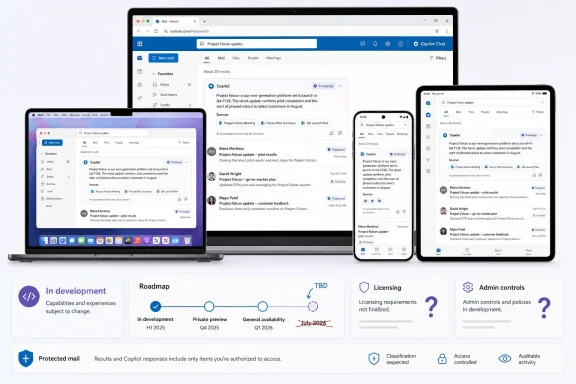 A search answer, rather than a summary of one email
Microsoft’s description is brief, but it draws a meaningful distinction from Outlook’s existing Summary by Copilot button. That current feature operates inside an individual email conversation: select a thread, invoke Summary by Copilot, and the service extracts its key points. Microsoft’s support documentation says those thread summaries can include links back to the relevant messages, and, in new Outlook, can also summarize certain attached Word, PowerPoint, and PDF files.
Roadmap ID 559989 moves the AI step forward in the workflow. Instead of opening a message and asking for a recap, the user first runs an Outlook search. Copilot is then supposed to synthesize the returned material into an answer positioned at the top of the results page, with a card that hands the query off to Copilot Chat for follow-up work.
That can be genuinely useful for searches where the question is broader than a single thread. A search for a customer name, project codename, contract milestone, or incident number may surface a long mix of messages. The proposed card is designed to answer the first-order question—what changed, what remains open, who said what—without requiring the user to triage every result manually.
It also means the feature deserves a higher standard of verification than an ordinary keyword search. Search results let users inspect source messages, dates, senders, and context. A short AI answer compresses all of that into a claim about the result set. Users will need to open the underlying emails before relying on a summary for deadlines, commitments, approvals, customer communications, or anything that may have been superseded by a newer message.
Microsoft’s Outlook FAQ already carries that warning for Copilot-generated work generally: users should review, edit, and verify AI output. The search-results feature makes the guidance more operational. A concise answer can save the first few minutes of mailbox archaeology; it should not become the only reading of a business record.
Microsoft has shipped a similar feature—but it is not this one
There is an easy source of confusion here. Microsoft previously announced an enhanced search experience for classic Outlook for Windows under Roadmap ID 510107. In an October 2025 Message Center notice, the company said that classic Outlook search would expose an entry point to a Copilot side pane, where licensed commercial Microsoft 365 Copilot users could view an LLM-generated summary of search results from documents, Teams messages, and related content, then ask follow-up questions.
Microsoft said that earlier classic-Outlook rollout would begin in mid-December 2025 and complete by mid-February 2026. It was enabled by default, although the archived notice said AI generation in the pane required the user to opt in. It also identified the license condition plainly: commercial accounts needed access to Microsoft 365 Copilot licenses.
Roadmap ID 559989 uses a different feature number, different platform scope, and a different surface: a compact summary card above Outlook search results rather than a classic Outlook side pane. The two experiences share the same core idea—turning returned material into a natural-language answer—but they should not be treated as proof that the new mobile, Mac, and web feature is live.
That distinction has a practical consequence for support teams. A help desk may receive reports that “Copilot search summaries are already in Outlook” from Windows users who are referring to the older classic Outlook side pane, while Mac, web, iOS, and Android users wait for the newer card. The UI, licensing rules, and rollout status may not match.
Microsoft’s documentation adds another compatibility boundary: on Mac, Microsoft 365 Copilot in Outlook is supported only in the latest Outlook for Mac, not legacy Outlook. Roadmap ID 559989 lists “Mac,” but it does not state whether the search-summary card follows that same modern-client restriction. It is a sensible expectation, not a published requirement, until Microsoft documents the feature itself.
The missing license and control details are not minor omissions
The August 4 roadmap entry labels the product area as both Outlook and Microsoft Copilot for Microsoft 365, but it does not say whether a Microsoft 365 Copilot add-on license will be required. It also does not specify whether the feature will be available to users of Copilot Chat without that add-on.
Microsoft’s current support guidance confirms that the distinction matters in Outlook. A work or school user without the Microsoft 365 Copilot add-on can use Copilot Chat for limited inbox, calendar, and meeting questions, including prompts such as summarizing recent project-related mail. Users with the add-on can additionally combine inbox and calendar content with chats and enterprise data such as documents. Those are materially different data scopes.
The older classic Outlook search feature was explicitly limited to commercial Microsoft 365 Copilot license holders. The new roadmap entry does not repeat that rule, does not offer an exception, and does not say whether the card will appear for unlicensed Copilot Chat users. Until Microsoft fills in that gap, admins should avoid promising broad availability merely because users can already open Copilot Chat in Outlook.
There is a related governance question. Microsoft’s Outlook FAQ says Copilot scenarios are limited to a user’s primary mailbox and are unavailable in archive, group, shared, and delegate mailboxes. The FAQ also says Outlook Copilot does not support S/MIME or Double Key Encryption-protected messages, while the broader feature set has exclusions for signed, encrypted, IRM-protected, and some sensitivity-labeled mail.
None of those boundaries are restated in Roadmap ID 559989. Microsoft has not said whether the summary card will simply omit unsupported results, generate an answer from the remaining accessible items, or display an explanation that protected content was excluded. That is exactly the sort of ambiguity that can change the meaning of a search answer for legal, executive-assistant, finance, and incident-response workflows.
The July target versus the August status changes the deployment advice
Microsoft’s roadmap dates are targets, not delivery certificates, and this entry demonstrates why. The record was created on April 17, 2026, assigned a July 2026 general-availability date, and updated on August 4. Yet its status remains In development. The public record therefore gives two incompatible signals: the scheduled release window is over, while the status indicates work has not completed.
There is no published explanation for the mismatch. Microsoft may be deploying progressively, holding the feature while it completes validation, or simply carrying a stale status in the roadmap. No independent outlet has reported a rollout timeline or produced screenshots of the exact Roadmap ID 559989 search-summary card as of August 4.
For tenant administrators, that makes this a monitoring item rather than a deployment event. Check Outlook on the web and the supported mobile and Mac clients with representative licensed accounts, but do not alter training materials, compliance procedures, or service-desk scripts until the feature appears and Microsoft clarifies its scope. A visible Copilot entry point in Outlook does not by itself identify which underlying Copilot capability a user has received.
Users should also distinguish the card from a traditional search result. If the new interface appears, use it as a shortcut to orient yourself, then open the messages that establish the answer. Copilot’s follow-up-chat link may make deeper investigation faster, but it also shifts the task from deterministic search toward generated interpretation.
What to watch next
The next meaningful update should be a Microsoft Message Center notice or dedicated support page that answers the questions Roadmap ID 559989 leaves open: the required license, exact client versions, Windows plans, administrator controls, treatment of protected and shared mail, and whether the rollout is complete.
Until then, Microsoft has announced an Outlook search-summary experience for Android, iOS, Mac, and the web, but the company’s own public record still says it is in development. The most concrete conclusion is also the least glamorous: the feature is not yet documented well enough to call generally available, despite its July 2026 target date.
