
Microsoft 365 Roadmap item 543425, updated July 30, lists the feature as generally available worldwide for the desktop and web clients. Microsoft originally targeted general availability for February 2026.
The change matters because Outlook rules can now manage the state of a message, not just its destination. A rule can flag an incoming email from a key sender for follow-up, remove a flag when messages meet an archival condition, or strip categories that no longer apply as mail moves into another workflow.
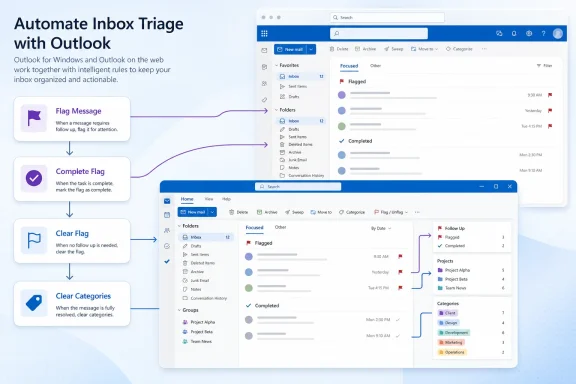 Rules Gain a Cleaner Handoff Between Workflows
The four actions cover the ordinary lifecycle of a flagged or categorized message:
- Clear Categories removes category labels from a matched email.
- Flag Message applies a follow-up flag automatically.
- Complete Flag marks an existing follow-up flag as finished.
- Clear Flag removes the flag entirely.
That enables rules such as flagging messages sent to a shared mailbox, then clearing that flag when a later routing rule moves the message into a completed-work folder. Teams that classify mail by project or escalation status can likewise remove categories as messages leave an active queue.
Microsoft’s Outlook support documentation describes rules in the new client as server-side automation for arriving mail, with support for multiple conditions, actions, and exceptions. The new actions expand the available outcomes, but they do not turn a rule into an event-driven workflow engine: administrators should not expect a message being manually marked complete to trigger a second rule.
A Useful Addition, With a Familiar Client Boundary
The actions apply to Outlook for the web and the new Windows client, rather than classic Outlook for Windows. Microsoft’s current support documentation also notes an important limitation for the new client: rules do not manage third-party accounts such as Gmail, Yahoo, and iCloud; those rules must be configured with the respective email provider.
For Microsoft 365 work and school mailboxes, however, the update closes a practical gap in new Outlook automation. The most valuable use is likely consistency: incoming mail can be categorized and flagged when attention is needed, while subsequent routing rules can remove that visual debt once the email is no longer active.
Users can create or edit the rules from Settings > Mail > Rules in Outlook on the web or new Outlook for Windows. Organizations that standardize on flags as a lightweight work queue should review existing rules now, particularly rule order and the “stop processing more rules” option, before layering in the new flag-clearing behavior.
