
The feature sounds modest, but it addresses an unusually visible bit of friction in the new Outlook experience. Microsoft’s current Outlook support guidance describes managing a rule one at a time: select a single rule to edit or delete it, or clear that rule’s check box to disable it. A mailbox with dozens of project, sender, notification, and filing rules therefore requires the same repetitive action for each cleanup or temporary pause.
Microsoft says the new selector will allow users to choose every rule or only a subset, then apply one of three actions: delete, enable, or disable. It has not said that bulk selection will include editing rule conditions, changing rule priority, duplicating rules, exporting them, or running selected rules against mail already in a folder.
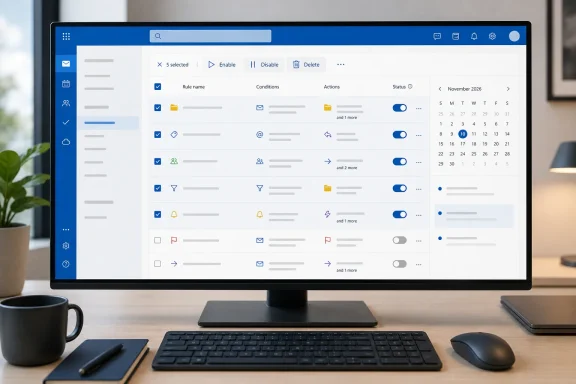 Roadmap entry says Web, even as Microsoft tags new Outlook for Windows
There is an important limitation in Microsoft’s own listing. Roadmap ID 569430 identifies the platform as Web, while the announcement text includes the #newoutlookforwindows tag. Those two details point in the same product direction—new Outlook for Windows is built around the Outlook on the web codebase—but they are not the same rollout commitment.
For administrators and users, the practical reading is that the planned capability is first an Outlook on the web feature. It may arrive in the new Outlook for Windows as part of that shared experience, but Microsoft has not explicitly listed Windows as a supported platform for this roadmap item. Classic Outlook for Windows is not named, either.
That distinction matters for mixed Outlook deployments. Organizations that still rely on the classic Win32 client’s Rules and Alerts window should not assume its rule-management interface will gain the same multi-select controls in November. Microsoft’s roadmap entry does not make that promise.
Bulk enable and disable is the useful part
Deleting several obsolete rules is a convenience. Bulk enablement and disablement are the more consequential additions for people who use rules as a temporary routing system rather than a permanent filing scheme.
A user may disable several rules before monitoring a busy project mailbox directly, then re-enable them once the period ends. Teams that receive large volumes of automated alerts may similarly suspend filing rules while diagnosing a notification problem. Today, doing that in Outlook’s web-style rules interface means changing each rule individually and remembering precisely which rules were altered.
The new control should reduce that manual overhead, but it will not remove the need to review rule order. Microsoft’s existing documentation says inbox rules are applied in the order shown in the rules list. A rule that is re-enabled can therefore resume moving or processing messages before a lower-priority rule gets a chance to act.
Users should also be cautious when deleting rules in bulk. An inbox rule can contain several conditions, exceptions, folder destinations, forwarding behavior, categories, and “stop processing more rules” logic. Microsoft has not described a confirmation screen, undo mechanism, backup option, or a way to export the selected rules before deletion. Until the feature ships and its interface is documented, the safe assumption is that bulk deletion deserves the same care as deleting any other mailbox automation.
This does not add a bulk rule editor
The wording of Microsoft’s announcement is narrow: selected rules can be deleted, enabled, or disabled. It does not say users will be able to modify multiple rules’ recipients, folders, conditions, exceptions, or priority in one pass.
That leaves several common administrative chores unresolved. If a department changes a folder convention, a user may still need to edit each rule that moves mail to an old folder. If several rules need their order adjusted, Microsoft’s current documented method—selecting a rule and moving it up or down—appears unchanged. And if the goal is to apply a collection of rules retroactively to existing messages, the new roadmap item does not mention that capability.
The distinction is worth making because “manage multiple rules” can easily be read as a broad rules overhaul. What Microsoft has announced is batch state management and deletion, not a redesigned Rules engine or a multi-rule editing workflow.
What IT teams should do before November
There is no deployment action yet: the entry is still in development, the release is listed for Microsoft’s worldwide standard multi-tenant cloud, and November 2026 is a target rather than a guaranteed release date. Microsoft has not provided a feature flag, build number, tenant setting, or staged-rollout schedule.
Still, teams with heavy Outlook rule use can prepare by treating the release as a reason to audit mailbox automation. The most useful checks are straightforward:
- Identify rules that are no longer connected to active projects, shared mailboxes, distribution lists, or folders.
- Review rule order, especially where a higher rule stops Outlook from processing later rules.
- Document temporary rules and their owners before giving users an easier way to disable or delete several at once.
- Test the feature in Outlook on the web first when it reaches the tenant, rather than assuming identical behavior in classic Outlook for Windows.
Microsoft is delivering a needed quality-of-life improvement, particularly for users maintaining long rule lists in new Outlook. But the company’s November 2026 roadmap item should be read for what it is: a batch enable, disable, and delete tool for inbox rules, with a web-platform commitment and no announced bulk editor, priority manager, or classic Outlook parity.
