
The practical change is straightforward: when a user creates or edits a calendar event in Outlook mobile, Purview DLP policies will be able to inspect sensitive content in the subject, description, and invitation content, then show policy tips, require remediation, or enforce the policy. For organizations whose staff put customer numbers, patient details, product roadmaps, incident data, or credentials into meeting invitations, the calendar is a real data-sharing channel rather than a scheduling afterthought.
Microsoft’s timing is still an estimate, not a committed ship date. Its roadmap explicitly says release dates can change, and the company has not published a supporting Message Center post, client-version requirement, or detailed calendar-specific configuration guidance. Administrators should therefore treat September as a planning window, not a deployment deadline.
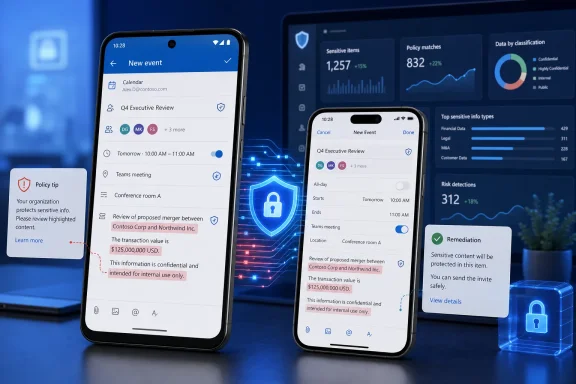 Calendar invites become a DLP enforcement point on phones
The extension matters because an Outlook calendar invite is routinely sent to people outside the organization, forwarded between attendees, copied into native calendar apps, and retained in mailboxes long after a meeting ends. Yet employees often regard the subject line and meeting body as lower-risk than email, even when those fields contain exactly the information an organization’s DLP policy is designed to detect.
Roadmap ID 569716 says Purview will cover meeting subjects, descriptions, and invite content on Android and iOS. Microsoft says users will receive policy tips and remediation options, with policy enforcement available when a rule requires it. In effect, the same compliance decision that presently applies when a user drafts a message will move into the mobile meeting-composition flow.
That is significant for heavily regulated tenants and public-sector environments because the rollout list includes GCC, GCC High, and DoD. Those customers frequently need to demonstrate that data-handling controls apply consistently regardless of whether an employee is on a managed Windows PC or a personal mobile device running an approved work app. A rule that only protects desktop Outlook is difficult to defend when an employee can create the same meeting from a phone.
Microsoft’s existing Purview documentation describes DLP as centrally managed policy that is synchronized to Exchange and then evaluated by Outlook clients. Its mobile DLP documentation already confirms that Outlook for iOS and Android supports policy tips, sensitive-information types, custom sensitive-information types, exact data match classifiers, sensitivity labels, retention labels, and trainable classifiers for email communications. The new roadmap item is notable precisely because it names calendar events separately: Microsoft’s published mobile guidance has not yet been updated to explain which of those capabilities will apply unchanged to calendar content.
The mobile DLP switch remains off by default
The most consequential implementation detail is easy to miss. Microsoft’s current documentation says the user interface for Purview DLP policy tips in Outlook for Android and iOS is disabled by default. The company says the default is intended to give administrators time to test policies and train users before policy warnings appear in the mobile app.
That means calendar-event protection may be present in a future Outlook build without becoming visible or enforceable for every organization on day one. Administrators will need to verify both parts of the setup: the Purview DLP policy must cover the relevant Exchange data, and the client-side policy-tip experience must be enabled for the targeted mobile users or groups.
The existing setting is named “Enable Purview Data Loss Prevention (DLP) policy tips in Outlook” and is managed through Microsoft’s Microsoft 365 Apps administration controls. Microsoft allows organizations to target the setting to users or groups, which gives IT teams a sensible rollout pattern: enable the experience for a compliance pilot group, validate real policy matches and overrides, then expand coverage.
The distinction between detection and the visible user experience matters. A policy can identify content after it reaches a service, but a policy tip or block during composition is what gives an employee the chance to remove the data, select an approved channel, or document a permitted business exception before the invitation is sent. Microsoft describes its mobile experience as supporting warning, override, and block pop-ups for email; the calendar roadmap promises comparable policy tips, remediation, and enforcement but does not yet say whether the same pop-up design, override reasons, and custom wording will be available for every calendar rule.
Existing mail rules need a calendar-specific test
Organizations should not assume that every existing Exchange DLP rule will immediately produce the expected result in a mobile calendar event. Microsoft’s public reference for Outlook mobile says all supported actions and information types apply to email communications, while the new roadmap entry offers only a high-level description of calendar-event support. It does not list supported conditions, exceptions, recipient checks, attachment behavior, or the way recurring meetings will be evaluated.
This is more than documentation trivia. A rule based on a credit-card number or national identifier in a meeting description is relatively easy to test. A rule based on external recipients, a sensitivity label, an attachment, or an exception for a designated business group may rely on different metadata and client behavior. Microsoft previously modified the rollout of mobile email DLP after implementation challenges around external-recipient validation, according to the Microsoft 365 message republished by Purview.expert. That earlier change did not concern calendar events, but it is a useful warning against presuming that recipient-based email controls map cleanly to mobile scheduling.
Microsoft has also not said whether the calendar feature will cover only new and edited events, whether it will rescan pre-existing events, or how it will handle updates sent from a Windows desktop client, Outlook on the web, Teams, or another Exchange-connected calendar client. Its general Purview guidance says Exchange evaluates new email messages, rather than scanning old mailbox content retroactively. Calendar items follow different Exchange object and update patterns, so administrators need Microsoft’s eventual documentation before setting assumptions for audit, retention, or incident-response workflows.
A prudent pre-release validation plan should include the following:
- Administrators should build test meetings containing the actual sensitive-information types, custom classifiers, and labels used by their production policies rather than relying on synthetic placeholder text.
- They should test internal-only, external, guest, and mixed-recipient invitations, including updates to existing events and recurring-series edits.
- They should verify what users see when a rule warns, requires a justification, permits an override, or blocks the event, and confirm that the intended business process remains usable on both iOS and Android.
- They should confirm that policy matches, overrides, and enforcement actions appear in Purview reporting and the Defender investigation workflow with enough event detail for compliance teams to distinguish calendar activity from email activity.
What Microsoft has and has not committed to
Microsoft has committed to a September 2026 general-availability target for Outlook mobile calendar DLP in commercial and U.S. government cloud instances. It has also committed, at the roadmap level, to policy tips, user remediation, and enforcement for sensitive content in calendar subjects, descriptions, and invite content.
It has not committed publicly to a minimum Outlook app version, a specific rollout date within September, support for attachments, the status of external-recipient conditions, required licensing, or parity with desktop Outlook and Outlook on the web. Nor has Microsoft said whether a new policy setting will be needed beyond the existing mobile DLP policy-tip control. No independent outlet appears to have reported additional calendar-specific technical details as of August 24.
The rollout should be read as an extension of a mobile DLP foundation Microsoft has already been building for Outlook email, rather than as a new Purview policy engine. That should reduce the administrative burden for tenants with mature Exchange DLP policies, but it also makes testing more important: a policy built around email composition can create unexpected friction when applied to the meeting titles and descriptions employees use dozens of times a week.
For IT teams, the immediate action is to inventory the DLP rules that would be problematic if triggered by a calendar invitation, confirm that mobile policy tips are deliberately configured rather than left at their default disabled state, and reserve a test window before the September rollout. Once the feature begins appearing in Outlook for iOS and Android, the first concrete deployment question will be whether Microsoft’s promised calendar coverage reaches the same policy conditions and audit trail that administrators already rely on for email.
