
The supplied Microsoft 365 Roadmap item, ID 491016, marks the feature as launched for worldwide multi-tenant tenants, with general availability listed as March 2026. Microsoft’s current Purview documentation confirms that Outlook for Android and iOS supports DLP policy tips, advanced classifiers, and overrides. It also confirms broader support in Outlook for macOS, although the mobile oversharing dialog—the pop-up used for warning, override, or block decisions—is specifically documented for Android and iOS.
This is a useful expansion for enterprises that have treated Outlook mobile as a blind spot in their DLP user experience. Exchange could still enforce a rule after a user hit Send, but a person composing an email from a phone had less opportunity to understand why a message was risky and correct it before delivery was attempted. The new prompts move that explanation into the mobile client, where the mistake begins.
There is a qualification worth making immediately: this is a product capability, not a blanket policy migration. Existing DLP rules, legacy Exchange configurations, license assignments, and the client-side enablement setting determine what users actually see.
 The feature is launched, but it is not automatically active
Microsoft Learn says the Policy Tip UI is off by default in Outlook for Android, iOS, and macOS. Microsoft’s stated reason is to give administrators room to test rules and train users before a new class of pop-ups appears during mobile email composition.
The switch is exposed through the Microsoft 365 Apps Admin Center, under Customization and Policy Management, as Enable Purview Data Loss Prevention (DLP) policy tips in Outlook. Administrators can target the setting at particular users or groups, which makes a phased rollout more practical than enabling it for every mobile user at once.
That default is more than a deployment nicety. DLP policies are often tuned against desktop Outlook and Outlook on the web, where users have more screen space, more time to read notices, and a more established support process. A policy that produces an understandable warning on a large display may become disruptive on a phone if it triggers too frequently, presents an unclear remediation path, or asks users to distinguish between similar confidential-data matches while they are working quickly.
Microsoft’s documentation says that mobile policy tips support all custom sensitive-information types, exact data match classifiers, sensitivity labels, retention labels, and trainable classifiers. It also says all email-related actions and information types are supported. In other words, this is not restricted to simple credit-card-number detection. Organizations using custom classifiers or data sets should assume their existing rules may now become visible to mobile senders—and test accordingly.
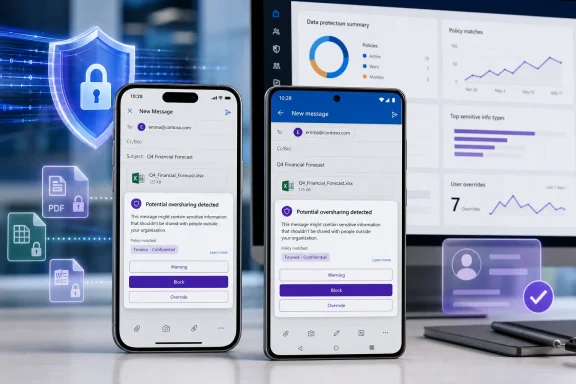
The policy tip can warn, block, or permit a justified override
The mobile implementation can present an oversharing dialog when a DLP rule is configured to warn, allow an override, or block the action. The dialog uses the policy tip’s standard or customized text, and Microsoft says administrators can customize its title, body, dynamic fields, and available justification choices.
The important operational distinction is between a notification and an enforceable action. A visible tip can tell a sender that the message conflicts with policy; a rule configured to block can stop delivery; and an override-capable rule can let the user continue if organizational policy permits it. Microsoft’s general Purview guidance notes that a justification entered during an override is recorded and can be reviewed in DLP reporting.
That means the rollout affects both security controls and audit workflows. Compliance teams should decide before enabling the feature whether a mobile override should be permitted for each policy category, what business-justification choices users should see, and who will examine override patterns. Allowing overrides without reviewing them turns a useful exception mechanism into a documentation exercise. Blocking without testing, meanwhile, can interrupt legitimate time-sensitive work.
Microsoft’s current configuration guidance also reinforces a longstanding Purview limitation: Outlook policy tips can draw from either DLP policies and mail flow rules managed in the Exchange admin center, or policies managed through the Microsoft Purview portal, but not both at the same time. Email notifications can still be sent from both locations, but the visible Outlook tip uses only one policy source.
For tenants that still maintain older Exchange Online DLP rules, this is the first issue to check. Microsoft’s troubleshooting guidance recommends migrating legacy Exchange Online DLP policies to the Purview compliance portal because unmigrated policies can produce unexpected policy-tip behavior. An organization can therefore have a valid block rule and still fail to get the mobile warning or override experience it expected.
Mobile does not inherit every desktop DLP behavior
The launch narrows the gap between desktop and mobile Outlook, but it does not erase it. Microsoft explicitly says Outlook for Android and iOS does not support DLP Wait-to-Send, the centrally managed Exchange Online mailbox setting that can delay sending while a policy evaluation completes.
Administrators should not mistake a mobile oversharing dialog for support of their existing Wait-to-Send configuration. The mobile client can show a pre-send warning, override, or block dialog when the DLP rule is configured for it, but Microsoft does not document the Android and iOS apps as supporting the Exchange Online Wait-to-Send mechanism. If that setting is part of an organization’s enforcement design on Windows Outlook, mobile must be validated as a separate client path.
There is another unresolved wrinkle around recipient conditions. A March update archived by Purview.expert said Microsoft had temporarily removed external-recipient rule validation from the initial mobile release because of implementation challenges. The same update said that attachment scanning, custom policy information, custom oversharing dialogs, and policy-tip performance improvements were added as the release evolved.
Microsoft’s later product documentation describes broad mobile support but does not specifically say that external-recipient validation has been restored. That omission does not prove the limitation remains; it does mean an administrator should not assume a rule designed around external recipients behaves identically on a phone. Test internal and external recipient cases separately, including replies, forwarded mail, distribution lists, and messages with attachments.
The roadmap record itself needs careful reading
The public records around this launch are less tidy than a single “launched” label suggests. The submitted Roadmap ID 491016 reports worldwide general availability in March 2026 and identifies the platform as Web, despite the feature being about Outlook Mobile. A Microsoft 365 Message Center update captured by Purview.expert associates the mobile DLP rollout with Roadmap ID 496146 and described an April 6 app-store submission target for iOS and Android. Microsoft’s currently indexed roadmap catalogue also shows a similarly named Outlook Mobile DLP Policy Tips & Override item under ID 559990, added April 7 and marked launched with a May 2026 rollout start.
The record supports the conclusion that the capability has launched; it does not support treating the supplied ID, platform field, and March date as a precise client-availability guarantee. App-store distribution, tenant configuration, targeted policy deployment, and subsequent feature revisions all sit between a roadmap entry and a user actually seeing a prompt.
That discrepancy matters for change management. A help desk investigating why one Android user has a DLP dialog while another does not should not begin by assuming a failed March rollout. It should verify the Outlook app version, the assigned policy group, the Apps Admin Center setting, the location and status of the governing DLP policy, and whether the rule is intended to permit an override.
A controlled pilot is the sensible deployment path
Microsoft’s own documentation effectively outlines the safer rollout: target the UI policy to a test group, run DLP rules in test mode where appropriate, and show policy tips in simulation before broad enforcement. The goal is to evaluate the complete chain, not merely whether a dialog appears.
A useful pilot should include these checks:
- Test messages containing the same sensitive-information types, labels, and attachments used in production policies.
- Verify warning-only, block, override-with-justification, and false-positive-reporting paths where the policy allows them.
- Confirm that the policy tip originates from the intended Purview policy source rather than a conflicting Exchange admin center configuration.
- Exercise both internal and external recipient scenarios before relying on recipient-based rules for mobile enforcement.
- Record the user-facing text and support path, because vague policy messages will generate avoidable escalations.
For Windows and Microsoft 365 administrators, the immediate task is to inventory mobile email DLP assumptions rather than simply toggle the new setting. Outlook mobile can now give users the same kind of moment-of-send intervention that compliance programs have long expected on desktop clients. But because the experience is opt-in, has client-specific limits, and sits on top of often-complicated policy estates, the first rollout should be measured as a policy validation project—not treated as a routine Outlook app update.
