
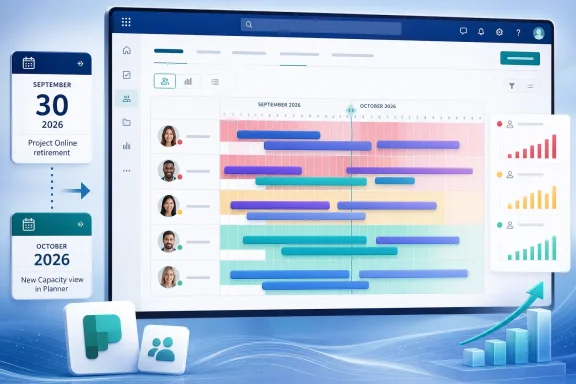
Roadmap entry RM569733 describes the feature in unusually plain terms: Capacity view will show a timeline of “who’s working on what,” allowing managers to see workload distribution and identify overload or unused capacity at a glance. Independent roadmap trackers that archive Microsoft’s public entries list it as in development for both desktop and web, with an October 2026 general-availability target.
For teams using Planner as a task board, that may sound incremental. For organizations using it as a replacement for Project Online or Project for the web, it addresses a limitation that has remained visible even after Microsoft folded its modern project-management offerings into the Planner brand.
 The promised view is about time, not task totals
Planner already offers ways to inspect work distribution. Basic plans have Charts, including a Members chart that displays the number of tasks assigned to each person. Premium plans go further with People and Assignments views, which can show task distribution and effort within a plan. But task counts are a blunt management metric: one task can be a 15-minute approval, another a 40-hour implementation effort, and a list of assignments does not automatically show whether two deadlines collide.
Microsoft’s existing Planner documentation makes that distinction explicit. The standard Members chart can reveal that one employee has more tasks than another, but it cannot determine whether someone has more work than they have time to complete it. In premium plans, Assignments can represent effort and timing more precisely, but Microsoft’s own support material still frames the feature as a per-plan tool.
That per-plan boundary is the practical problem Capacity view may solve. A Microsoft moderator responding to a Planner Plan 5 question last year said Planner did not yet offer native capacity planning or workload balancing across multiple projects. The new roadmap wording does not state whether Capacity view will cross plan boundaries, but it does at least move Planner from static assignment distribution toward an explicitly time-based view of team availability.
Microsoft has not published screenshots, technical documentation, supported plan types, licensing requirements, or a data model for the new view. Those omissions matter. A timeline that simply groups existing assignments by date would be useful; a capacity engine that accounts for working calendars, part-time schedules, holidays, task effort, and assignments across plans would be a much larger step.
For now, the roadmap confirms the former goal—visualizing workload over time—but does not substantiate the latter set of capabilities.
Project already handles the harder version of this job
Calling the upcoming Planner feature a rival to Microsoft Project needs a qualification. It could rival a narrow slice of Project’s resource-management experience, but it does not yet equal the mature scheduling system in Project desktop or the resource planning that Project Online offered.
Microsoft’s Project support documentation describes Resource Usage, Resource Graph, and capacity-planning views that can show allocations across a selected period, flag overallocated resources, and distinguish planned work from maximum availability. In Project Online, enterprise resources could be reviewed across projects, with views for work by resource, remaining availability, and resource utilization by project.
Those capabilities depend on scheduling information that many Planner teams do not consistently enter: effort estimates, start and finish dates, calendars, assignment units, and dependencies. A Capacity view cannot reliably identify a real overload if a plan consists mostly of undated cards with no effort estimate. It can only visualize the data it receives.
That is why the feature’s eventual design will matter more than the name. If Planner highlights people with too many tasks due in a week, it will improve visibility for ordinary collaborative teams. If it measures planned hours against each person’s working availability and aggregates work across several plans, it will become meaningful to PMOs and IT departments replacing Project Online workflows.
At present, Microsoft has disclosed neither the calculation method nor whether teams will be asked to maintain richer task fields before the view becomes accurate.
The timing exposes a gap in Microsoft’s migration story
Microsoft Project Online will retire on September 30, 2026. Capacity view is currently listed for October 2026—after the retirement date.
That sequencing is not necessarily a failure. Microsoft has been moving Project for the web into Planner for some time, and customers with the former Project Plan 3 or Plan 5 premium licenses were told their premium plans already appeared in Planner without a separate migration. Still, the calendar makes Microsoft’s message harder for Project Online customers: the resource-capacity feature being positioned as a key Planner improvement is scheduled to arrive only after the legacy service closes.
The gap is especially relevant for organizations whose migration plan relied on Project Online’s resource-center and capacity-planning functions. They should not assume the October Planner release will reproduce every Project Online view, calculation, or cross-project control. The current roadmap entry is too short to support that conclusion, and Microsoft has not published a feature-parity statement tying RM569733 to Project Online migration requirements.
The company also has not said whether Capacity view will be available in all Microsoft 365 cloud environments. The roadmap trackers list desktop and web availability along with General Availability and Targeted Release, but provide no detail on GCC, GCC High, Department of Defense, or other sovereign cloud support. Those distinctions routinely determine whether a feature is actionable for enterprise IT, not merely announced.
Basic and premium Planner plans remain an operational split
Administrators also need to separate the Planner product name from the plan type their users actually have. Planner’s unified branding obscures a meaningful divide between basic and premium plans.
Basic plans emphasize grid, board, schedule, and charts. Premium plans add Timeline for Gantt-style scheduling and dependencies, People for workload distribution, Goals, and Assignments for resource effort. Microsoft notes that some views require different premium licenses, which means an organization cannot safely plan around Capacity view until Microsoft publishes its entitlement requirements.
That uncertainty is more than a procurement footnote. A Capacity view limited to premium plans would be logical given Planner’s existing division between lightweight task collaboration and advanced project-management functions. But it would also mean a company that moved hundreds of teams to basic Planner plans may not gain the feature without a licensing decision, a premium-plan conversion strategy, or both.
The task data itself could also require cleanup. Teams that want a useful rollout should inventory whether premium plans contain all of the following before October:
- Tasks should have credible start dates, due dates, and effort estimates rather than only a status and an owner.
- Managers should identify whether a person’s work is spread across several plans, because a single-plan view cannot expose collisions elsewhere.
- Administrators should document which users hold premium Planner entitlements and which teams use basic plans.
- Migration owners should preserve Project Online capacity and availability reports before September 30 if those reports support active staffing or delivery decisions.
This is ordinary project-data hygiene, but it becomes urgent when a new visualization may expose estimates that were never maintained well enough to use for staffing decisions.
The useful news is the admission of what Planner still lacked
The strongest signal in RM569733 is not that Microsoft is adding another Planner tab. It is that the company has formally identified capacity visibility as a missing capability while it continues to consolidate work management under Planner.
Planner already had Kanban boards, task lists, Gantt-style timelines for premium plans, dependencies, charts, and limited assignment views. What it did not clearly provide was a native, time-oriented answer to the management question that Project users ask daily: can this person realistically take this work now?
Microsoft’s October target offers an answer in principle, but not yet in enough detail for a migration team to redesign staffing processes around it. Organizations retiring Project Online should treat Capacity view as a potentially valuable addition—not as a confirmed replacement for Project Online capacity planning—until Microsoft documents the scope, plan requirements, supported clouds, and cross-plan behavior.
The immediate deadline remains September 30, 2026. Capacity view is scheduled to follow in October, and until Microsoft shows how it calculates availability, Project Online customers should keep their current resource reports and migration evidence intact.