
That mismatch is the practical news for Microsoft 365 administrators and Copilot users. Microsoft’s wording says users “can now reference” cloud files while creating a presentation, yet the official roadmap metadata still classifies the feature as unfinished. Microsoft’s own current PowerPoint support documentation also says that file referencing in Agent Mode is “coming soon.” Organizations should therefore treat this as an announced Mac capability with an uncertain availability state, rather than assume it is present in every eligible tenant today.
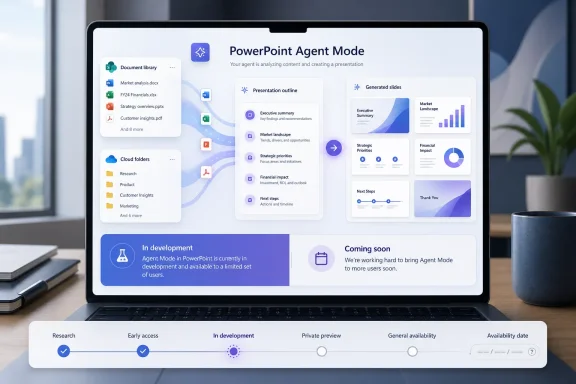 Roadmap ID 555897 expands the sources Agent Mode can use
The roadmap entry specifically covers creating a presentation through Agent Mode in PowerPoint, with reference files stored in SharePoint libraries and OneDrive folders. It is scoped to PowerPoint and Microsoft 365 Copilot on Mac, for Worldwide Standard Multi-Tenant environments, and is marked for the General Availability release ring.
The feature is narrower than a promise that PowerPoint will autonomously search an organization’s entire Microsoft 365 estate. The wording describes selecting or referencing files in two familiar Microsoft 365 repositories: personal or individually managed OneDrive folders, and SharePoint document libraries that normally hold team-controlled material such as approved templates, product briefs, policies, project documentation, and launch plans.
That distinction affects how useful the feature will be in a real tenant. A presentation grounded in a deliberately chosen project brief is a very different workflow from a Copilot system that discovers all related material from mail, chats, meetings, and files. Microsoft has separately described Work IQ-based PowerPoint creation on Windows as gathering relevant authorized files, meetings, and emails. Roadmap ID 555897 does not say that the Mac feature inherits that broader discovery behavior.
Microsoft also has not published the details administrators need to predict exactly how this reference-file feature will work. The roadmap entry does not identify supported file types, whether folders can be referenced as containers or only files within them, how many sources can be attached, whether SharePoint sites outside the current team are selectable, or whether the feature uses a new picker, inline mentions, or the existing Add Content interface.
Microsoft’s public documentation still describes the capability as forthcoming
The status conflict is more than a cosmetic roadmap error. Microsoft Support’s current instructions for creating a presentation in PowerPoint direct users to select Add Content, choose Agent Mode, enter a presentation prompt, and then submit it. The same page explicitly says support for referencing files is coming soon to Agent Mode.
Microsoft’s broader Agent Mode documentation similarly points PowerPoint users to an Agent Mode experience identified as Frontier, Microsoft’s early-access program for experimental AI features. Meanwhile, Microsoft’s public Microsoft 365 roadmap page still places Agent Mode in PowerPoint among features “currently in development,” even as Agent Mode in Word and Excel appear in the available section.
Taken together, the official record does not support telling Mac users that reference-file creation is broadly deployed. The most defensible reading is that Microsoft has updated the planned feature description and release target while the underlying Agent Mode and reference-file experience remains in a staged rollout, early-access state, or documentation transition.
That may change quickly. The Roadmap ID 555897 update landed on August 21, 2026, and Microsoft’s release notes have been documenting other recent PowerPoint Agent Mode source options, including the ability to reference a Teams meeting or chat on Windows, the web, and Mac. But neither the release notes nor the submitted roadmap entry establishes that SharePoint and OneDrive file references are available today across Mac tenants.
This closes a workflow gap, rather than creating file-based presentation generation from scratch
Microsoft has supported file-grounded presentation creation outside this new Agent Mode scenario for some time. In 2025, the Microsoft 365 Insider blog said PowerPoint Copilot could create presentations using Word documents and expanded that capability to TXT and PDF files stored in OneDrive or SharePoint.
The important change here is the proposed location inside the newer Agent Mode workflow. Agent Mode is designed to take a prompt, ask clarifying questions about audience or style, generate an outline, create slides, and then continue refining the deck conversationally. Bringing selected cloud files into that workflow should let a user iterate on a presentation without separating the source-selection step from the agent-led drafting and editing process.
For a communications team, that could mean grounding an executive-update deck in a SharePoint-hosted planning document and then asking Agent Mode to reshape the material for a board audience. For a project manager, it could mean using a OneDrive folder of approved notes and source documents to build an internal status presentation while retaining the ability to change scope, structure, or tone through chat.
The value depends heavily on source quality. Microsoft’s support guidance already cautions that Copilot-generated presentation output should be reviewed and edited by a person. Referencing a file can reduce the risk of a generic or incomplete deck, but it does not make generated slides authoritative. Users still need to verify numbers, dates, quotations, slide-level claims, speaker notes, and the absence of confidential material that should not have been included.
Permissions remain the boundary, not file location
Microsoft’s documentation for PowerPoint presentation creation says a user must have access to and permission to use a referenced file. That is a meaningful constraint for IT teams: moving a document into a SharePoint library does not turn it into universally available Copilot context, and sharing an output deck does not automatically grant recipients access to the source material.
The company’s SharePoint and OneDrive agent documentation makes the same point more directly. Copilot agents answer only from sources that the user is already authorized to access. If an agent or generated artifact is shared with another employee, that employee must also have permission to the underlying files to receive full responses based on them.
For administrators, the immediate preparation work is conventional information governance rather than a special Agent Mode setting. Review library membership, external-sharing policies, sensitivity labels, site permissions, and the location of approved templates and source packs. A feature that makes it easier to feed SharePoint content into a deck will expose years of weak repository hygiene faster than it exposes a new AI problem.
Teams should also establish a simple operating rule: use curated, current source folders for high-stakes decks. Do not point a presentation agent at a broad project library full of obsolete drafts, meeting notes, conflicting versions, or material with different distribution restrictions and expect it to infer the authoritative record.
What Mac users should test when the feature appears
When Roadmap ID 555897 becomes visible in a tenant, a controlled pilot should establish its actual limits before users depend on it for executive, customer, legal, or regulated-content presentations.
- Test a file stored in the user’s own OneDrive alongside one held in a SharePoint library with team-managed permissions.
- Confirm whether the experience supports only individual files or can incorporate a selected folder and its contents.
- Compare the generated deck against the source material for omissions, hallucinated claims, handling of tables and charts, and whether citations or attribution are retained where required.
- Verify that a user lacking access to a referenced SharePoint file cannot use that file to influence a deck.
- Record the PowerPoint for Mac build, Microsoft 365 update channel, Copilot license assignment, and tenant release configuration when testing, because the roadmap entry does not publish a minimum build number.
Microsoft’s June 2026 general-availability date should not be used as a deployment confirmation. Until the company changes the item from In development or updates its PowerPoint support documentation to remove the “coming soon” notice, the reliable conclusion is that file references for Mac-based Agent Mode are planned, but their tenant-by-tenant availability and operating boundaries remain unconfirmed.