
There is an important catch for IT teams planning around the change: Microsoft still marks the feature as “In development” even though the roadmap’s general-availability field says June 2026. The entry was updated on August 21, 2026, which makes it a planning signal rather than evidence that the capability has reached every tenant—or that it is currently usable in production.
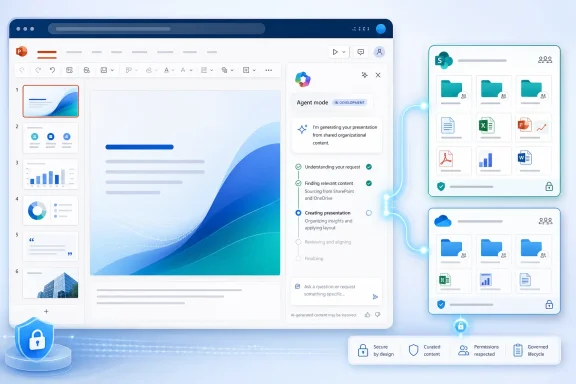 Roadmap ID 555894 broadens the source picker
The practical change is straightforward. Instead of grounding an Agent Mode presentation request only in files surfaced through its existing creation workflow, users are meant to be able to point PowerPoint at content kept in a SharePoint library or a OneDrive folder.
That matters most for organizations whose working material is not organized as a single polished Word document. A project team may keep reports, approved messaging, planning spreadsheets, product specifications, and prior decks in a shared SharePoint library. A presenter could use those stored materials as the reference set for a new draft deck, without first copying files to a personal location or manually opening each one.
Microsoft’s published PowerPoint documentation already describes a more limited file-reference workflow for creating a slide: users can select a file for Copilot to reference, or type / to choose one. The roadmap item appears to take the same basic grounding concept into the presentation-creation flow in Agent Mode and, specifically, into SharePoint library and OneDrive-folder storage locations.
The distinction is meaningful. Selecting a known individual file is a different task from using a folder or document-library location where an organization maintains a living set of project material. The latter creates a more realistic path for teams that prepare recurring status, sales, training, or executive-update presentations from shared content.
“In development” overrides the June target for deployment planning
Microsoft 365 roadmap dates are targets, not service-level commitments, and this entry shows why administrators should not treat a past target month as a completed rollout. As of its August 21 update, Microsoft has retained an “In development” status beside a June 2026 general-availability date.
For admins, the operational conclusion is simple: do not publish internal instructions that assume the feature is live merely because the planned GA date has passed. Test it in the web version of PowerPoint with a licensed pilot user and an ordinary shared library before changing a presentation-production process around it.
The roadmap also does not say whether the rollout is staged by tenant, whether it is controlled by an admin setting, whether the feature must be enabled through a separate Copilot policy, or whether it will appear only for certain Microsoft 365 Copilot license assignments. Those omissions are normal for an early roadmap entry, but they are the details that determine whether a feature is actually available to a user on Monday morning.
Microsoft’s separate support documentation for OneDrive and SharePoint agents makes clear that access to organizational content remains permission-scoped: users can only receive answers from files and sites they are allowed to access. That existing permission model strongly suggests that allowing a PowerPoint agent to reference a library does not create a shortcut around SharePoint access controls. Microsoft has not yet published implementation documentation for Roadmap ID 555894 that spells out the PowerPoint-specific behavior, so administrators should verify that assumption in their own tenant rather than treating it as a documented guarantee.
Shared content can improve deck creation—and expose content-management problems
The appeal of the feature is that it reduces the gap between where an organization stores knowledge and where it turns that knowledge into a presentation. Users would be able to start with current shared documents rather than downloading a collection of files, attaching them one at a time, or relying on memory to assemble a deck.
But wider access to source locations does not solve the quality of those sources. A SharePoint library with duplicate documents, obsolete pricing, conflicting product language, or loose permissions can produce a presentation that looks polished while carrying the wrong facts. Copilot can synthesize the material it is given; it cannot reliably decide which of several internally inconsistent documents is the organization’s authoritative record.
This is a content-governance issue, not a reason to reject the feature. Teams that already maintain clear library ownership, document versioning, retention labels, and a single approved location for key materials should find it easier to use safely. Teams that rely on sprawling “final-v2-revised” file collections are more likely to discover those underlying problems through bad presentation drafts.
A sensible pilot should use a narrow, well-curated library first. For example, a communications team could test a new quarterly business review presentation using a folder containing the approved narrative, current metrics, brand assets, and prior-quarter deck—then compare Copilot’s output against a manually prepared version. That creates a usable measure of whether the new reference flow saves time without silently changing figures or pulling in stale language.
PowerPoint web is the stated platform
Microsoft lists the web as the platform for this roadmap item. Organizations whose users create presentations mainly in the Windows desktop app should not assume matching behavior there, even if PowerPoint Copilot features overlap across clients.
That limitation is easy to miss because Microsoft’s broader PowerPoint support material covers Copilot across multiple platforms for some tasks. Roadmap ID 555894 is narrower: it identifies a specific Agent Mode scenario, a specific source-location expansion, and PowerPoint for the web. Until Microsoft updates product documentation or the roadmap itself, desktop-client parity remains unconfirmed.
The feature should also not be confused with SharePoint agents or OneDrive agents. Those are standalone, scoped agents that can answer questions about selected files, folders, sites, or libraries. Microsoft’s support documentation says such agents are saved as .agent files in relevant OneDrive or SharePoint locations in some creation paths. Roadmap ID 555894 concerns using stored files as references when creating a PowerPoint presentation through Agent Mode, not saving a new PowerPoint-specific agent into a library.
What administrators can do before rollout
The roadmap entry does not provide a configuration procedure, but it does point to a practical readiness check:
- Confirm that presentation authors who will pilot the feature have the required Microsoft 365 Copilot access available in your tenant.
- Use a test SharePoint library with deliberately curated, non-sensitive reference files and established permissions.
- Verify that users with read-only access can reference permitted material without gaining visibility into files outside their SharePoint or OneDrive permissions.
- Check whether the option appears in PowerPoint on the web, rather than assuming it will surface in the Windows desktop application.
- Require a human review of generated decks, particularly for financial figures, policy statements, customer commitments, and externally published material.
Microsoft has announced the direction of the feature, but the August 21 roadmap status means the next concrete milestone is a status change and product documentation that identifies the actual rollout conditions. Until then, Roadmap ID 555894 is best treated as an upcoming improvement to how PowerPoint can draw from shared organizational files—not as a completed June release.